20 comments found.

Does this still work in 2025 I am looking for a similar one for my delta actualizado script project ?
Hello,
Thank you for browsing the plugin. It has been tested and successfully working up to WordPress 6.8.1.
Regards
Does this help to make a bloated theme load less scripts? Or is it only for plugins?
Hello leon_r,
Thank you for browsing the plugin. Yes, it can help in loading less scripts by dequeuing selected scripts. This applies to all JS and CSS files available on your site which are registered using native WordPress functions.
Coming to the bloated theme scenario, loading time also depends upon image sizes, above the fold required scripts, database calls, etc. Disabling scripts is one of the measures of improving load time but not the entire measure. If you want to give it a try, please email me at xconsau[at]gmail[dot]com.
Regards
Thank you for this plugin. Would you please mention if this plugin is still supported ?
Hello AiONets,
Yes this plugin is still supported and works with latest WordPress versions.
Regards
Hi Saurabh,
I somehow have difficulties in using this plugin. When I select any file to deque the website does not work properly or some elements are missing. How do I use this plugin? Is it possible for you to take a look?
Thanks, Serkan
Hello Serkan,
The CSS and JS files are used by the theme and plugins for some features. If the files are dequeued, it is obvious that some features will not work. The main use of this plugin is to dequeue files which are not used in site but still loaded unnecessarily. For example, the fonts CSS files are loaded twice, or jQuery Masonry is loaded but never used. So you shall dequeue only those files which are not used anywhere on the site, or you do not want the features which are dependent on that file.
Regards
I’m interested in this plugin but I see that years ago no update or some kind of support is given.
http://prntscr.com/jden4ywell I already buy it I hope you help me here too, because I asked for help in another plugin that you have. 
Hello jucapuna,
Thank you for purchasing the plugin. It is compatible with latest WordPress and plugins. If you encounter any issue, you can post your query in comments section or email me directly at xconsau[at]gmail[dot]com.
Regards
watch this: http://prntscr.com/jdiw9d
hey friend, install it on my site but can not find anything….....
Hello jucapuna,
I am awaiting your response on email which you sent to me.
Regards
I know I’ve noticed: it would be great to have a choice of one to decide if I want to place the burden on the footer. and also it would be good to place an option to be able to make the options as much for mobile or as for desktop. in my case I have a home page for mobile and a home page for desktop and the loads or what you need are different, but I have pages that are for both teams but it is important to know which one is going to be optimized or not since I do not have the option for mobile or desktop.
look at the site: https://www.laguiadesincelejo.com/
Hello,
Your suggestion is good. I will try if these features can be implemented.
Regards
last updated 2016? does this work still ?
Hello Matthew,
Thank you for browsing the plugin. Yes, it still works and is fully compatible with latest WordPress version 4.9.5.
Regards
Hi there, I am interested to buy this theme, but have a question in advance. You offer the Scripts Dequeuer Frontend but also a Scripts Dequeuer Backend. Please clarify for me what the difference is and which one I would need to let websites load/open faster. Do I need both, or does they have both different optimizations? Thanks in advance.
Best regards!
Hello ddcom,
Thank you for browsing the plugin. If you want your website to load faster for visitors, you will need front end version. If you want it faster when you are logged in (i.e. in admin area) then you will need backend version. In backend of WordPress, there are not many unnecessary scripts, so you will only need the front end version.
Also check on your front end if the number of scripts to dequeue is large. For dequeuing just 1 or 2 files, the plugin will be an overkill. This plugin is feasible/useful when your site loads many JS files and you need to selectively dequeue at least 5-6 of them.
Regards
Thanks for this descriptive reply. When it comes to the “selectively dequeueing”, is it possible to get help in this case later? And my last question is: I can see that the last update was made in 2016. Are the scripts up to date or are they going to be continued/further developed from your site? Thanks Saurabh!
Regards
Hello,
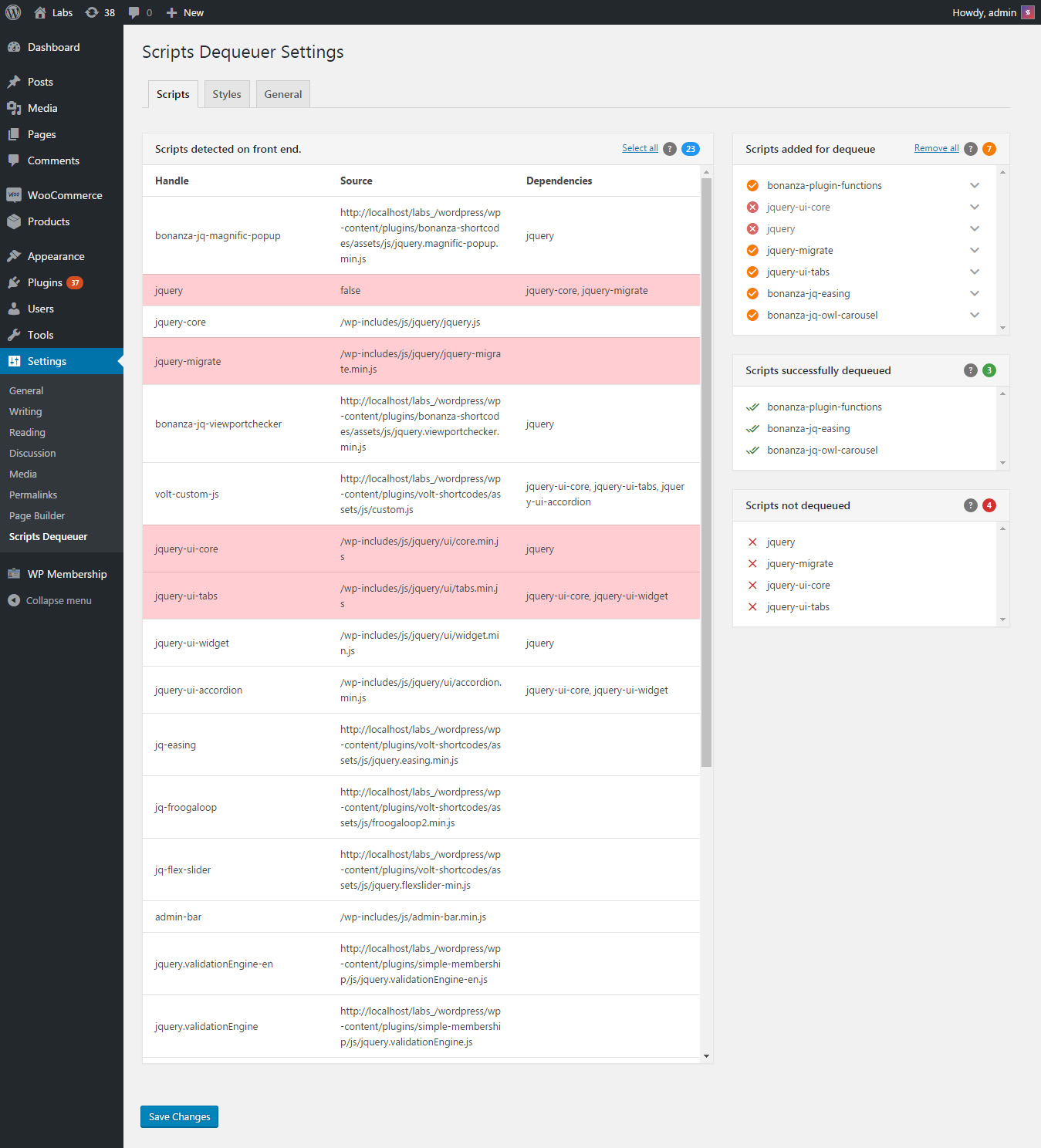
In selective dequeueing, the back-end will show a list of all available JS and CSS files. You need to click the file rows and save changes. Then those files get dequeued and listed separately in a side panel. See backend screenshot for reference.
The scripts and native functions are up to date as per latest WordPress version 4.9.5. If any compatibility issue arises, I will release and update for that.
Regards
Hello,
The scripts dequeuer plugin is breaking the opening of my menu bar when the plugin it is activated even before dequeing any scripts.
Hello knance,
Thank you for purchasing the plugin. Is it possible for you to send me the site URL and login at xconsau[at]gmail[dot]com. I will need to log in and check the issue. Please also include a screen shot of the menu bar in question.
Regards
I contacted you at xconsau[at]gmail[dot]com regarding an issue with the plugin
Hello silverz,
The issue has been resolved now.
Regards
I am really interested in this plugin.. but one major question.. there are aome plugins like sliders which are moatly needed in site homapage not other sections like posts and pages.
Would you please mention if this is possible to restrict some js/css files for different sections like posts and pages. And alao sometime there are aome plugins like contact us pages which load bunch of files which are only needed for contact us pagea so again it is possible to restrict those files only for specific pages which require these filea?
Sorry for a long question. 
Hello AiONets,
Thank you for browsing the plugin.
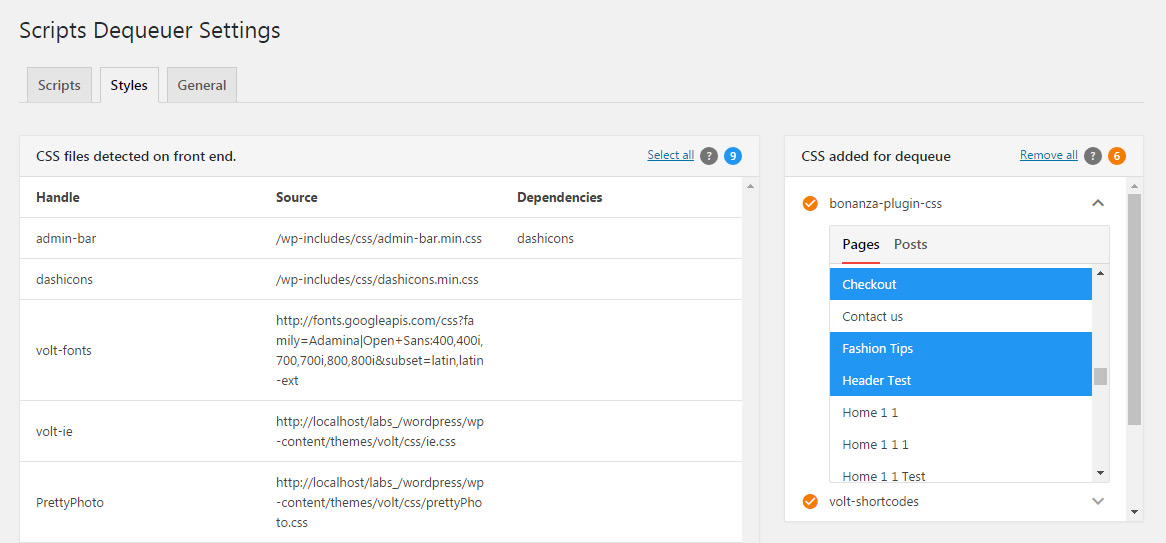
Yes it is possible to dequeue scripts on selected pages or posts. See this screen shot. You can select pages or posts on which dequeue operation shall be skipped. Those will load files in normal way.
Regards
Sorry maybe I do not get it but I want the exact oppposite of this. For example I want to dequeue example.js from all pages and posts but homepage or contact page.
Thankbyou for your support.
In that screen shot, the scripts will be dequeued on all pages except the selected ones. So if you wish to load example.js on “Contact” page only, you need to select Contact page. The example.js will be dequeued on all pages except the contact page.
Regards
Hello, the plugin was working however now it will not detect the scripts.
Backend message is;
No files to show
Either all files are dequeued, or there are no JavaScipt files on front-end, or there was some error detecting the files on front end.
Hello FlightDepartment,
Kindly send me your site URL and login details at xconsau[at]gmail[dot]com. I will check the issue.
Regards
this frontend also look good, does the plugin will let us know which script or css had a same name? do they had sorting for much easier to find it? someone who work with alot of themes and plugin might be difficult for them to find it which script or css that cause redundant, because they need select that manually right? this plugin had potential.. but not sure if I see something like this before in free section wordpress plugin.. maybe this one is different?
Hello diden,
The plugin will list script handle name, source and it’s dependencies. Right now there is no sorting option for the generated table. You will need to use browser’s Search feature (Ctrl + f) or scroll manually to check files. Sometimes, handle name may be different, and even the source file may be different. So you need to find out which one to disable. The plugin will only list them.
As a precautionary measure, the plugin highlights some files with red background. These are the files on which other files are dependent. You can force dequeue these files too using Plugin settings option.
I can not confirm if a free plugin with similar feature is available. But at the time of creating this plugin there was no such plugin in free or premium repos.
Regards
What makes this plugin different from Plugin Organizer on wp.org? (I can see your interface is much better.)
Hello ceopenup,
The main difference is that “Plugin Organizer” lets you disable entire plugin or change order in which plugins are loaded. The Scripts dequeuer plugin lets you dequeue JavaScript and CSS files (both from plugins and current active theme). Sometimes you would need a plugin but just want to disable some of it’s files. In that case this plugin is useful. Both these have completely different usage.
Regards
Plugin Organizer can selectively disable plugin on front end and back end. But the interface isn’t good compared to yours. I’m interested to see how your plugin will grow time to time. Perhaps I’ll buy one soon.
Thank you for consideration.
Regards
I’m using WP Rocket with cdn from keycdn. My css/js files are served from keycdn. Is there any compatibility concern I should consider?
In that case, once the CSS and JS files are dequeued, you will need to update the cache/resources so that previous instance is removed. It works with caching plugins and CDN without any issue.
Regards
Hi, just bought and installed Scripts Dequeuer but doesn’t detect ANY scripts! I suspect it has something to do with https Can you help please? The site’s at: https://thestatemanagementstory.org
Hello paulzz,
Can you let me know what URLs are being added for the detection process? OR you have kept it as default? If you can send me your site URL and login details at xconsau[at]gmail[dot]com, I will check and fix it.
Regards
I am interested in both of your plugins (for Frontend and Backend). I know this might be a hard question to answer but can you give me some examples of what type of performance increases you are seeing after applying your plugin?
Hello nopez4you,
Thank you for browsing the plugin. I have created a demo site for showing plugin performance. Check out the following links:
1. Page with redundant CSS files and multiple instances of jQuery: Link: http://labs.saurabh-sharma.net/project/ GTMetrix: https://gtmetrix.com/reports/labs.saurabh-sharma.net/A8fuYRDr
2. Page optimized using Scripts Dequeuer frontend.: Link: http://labs.saurabh-sharma.net/project/home-optimized/ GTMetrix: https://gtmetrix.com/reports/labs.saurabh-sharma.net/7sGMZIrX
Comparison of performance improvement: https://gtmetrix.com/compare/7sGMZIrX/idQiUYgC
The main difference will be seen in “Serve resources from a consistent URL”. You can see that it improved from F(32) to A(100).
Screenshot of redundant files: http://prntscr.com/cdy6xt
Screenshot of main improvement: http://prntscr.com/cdy72n
This is one example case. Files may be different on your site, depending upon number of plugins, and the files added by current theme. Improvements are significant only if redundant files are more in number.
Regards
Thank you.
Hello that benefits me this plugin, I use wp rocket on my website. Regards.
Hello mferro1984,
Thank you for browsing the plugin. WP Rocket is a caching plugin, which gives many features for site optimization. But it doesn’t have dequeue option for scripts and stylesheets. Scripts Dequeuer is another tool in the field of site optimization. It will work seamlessly with caching plugins too.
Regards
Hi,
Can this be used on the admin side of WP also ?
We have alot of plugins that use various versions of FontAwesome and Jquery that we would like to reduce to a single instance of each being called.
Hello pcheroes,
Thank you for browsing the plugin. I am working on a separate plugin for admin dequeue feature. It will be available in few days depending upon approval time. Hope to see you as buyer of that plugin.
Regards
Hello pcheroes,
The backend dequeue plugin is available now. Please check out at https://codecanyon.net/item/scripts-dequeuer-backend/17656921
Regards
Hey Saurabh – I am interested in trying this out but is there anyway I can pretest the benefits of dequeuing on the site speed of my website i.e. i dont want to pay for this and not see any benefit.
also, your ahref on “message box at http://codecanyon.net/user/saurabhsharma, or comment on the item comments ” has the comma included which is resulting in a 404
Hello SM-DEV,
Thanks for browsing the plugin. You can check site speed on any online checker like pagespeed tests or GTMetrix. Then subtract the file size and load time of files (which you wish to dequeue) from the total load time and total page size. That shall give you an approximate idea about how much your site will improve.
You can also check by manually dequeuing those files in theme’s functions.php using some code snippet. But above method will work fine too.
P.S. Thank you for reporting the broken link. I will correct it.
Regards
I am interested in using this plugin but was wondering if it has the following features which I am also looking for as part of the plugin.
1) Ability on a page/post to specify an override to re-enable a script for that page so in effect we could dequeue across the site but not dequeue on specific pages.
2) The ability to do the same thing for the admin area as many of the front end enqueued scripts are not required by the backend and cause the admin area to be very slow.
If these options are available or if you could add them quickly then I would look at buying this plugin and also for future client sites.
Hello nathanjwright,
Thank you for browsing the plugin and providing valuable feedback. I like this idea very much and have already started working on it. I can update the progress by next two days. The ability to ‘exclude’ pages or posts will be added for dequeued items.
The backend dequeue option can also be added, but that will be too risky if someone dequeues main core files accidentally. Even the JS file which is used by this plugin itself could be dequeued, thereby malfunctioning the plugin. It will be like cutting a branch on tree on which we are sitting. But I will give it a try with some restricted options. Thanks once again for valuable input.
Regards
Thanks for the quick reply and starting on the additions. Regarding the admin area, I fully agree with you that this could be really bad if used incorrectly but maybe you look at this as a separate plugin (would be happy to pay again) so that those who know what they are doing can use it as an addition to your current plugin. The way around the backend becoming unaccessible which is the risk is that you either have a separate URL that is displayed on the settings page for your plugin that the user goes to and it disables the backend dequeue or you have it that if you pass a parameter on any URL it looks for a secret key (random when the plugin is first created) that if correct causes the dequeue for the backend to turn off. For example www.aaa.com?dequeue-disable=234jhu2dh2AS
Nathan
Hello Nathan,
Thank you for purchasing the plugin. Your feedback has been very helpful in improving it’s functionality. I am able to add ‘exclude’ options per dequeue list item (including post and pages). If it goes fine, I will release an update very soon.
The idea of separate plugin for back-end seems good as it will be a direct approach without conflicting front end functionality. I will look into this too once the front-end features are done. Thanks once again.
Regards
Hello Nathan,
The backend scripts dequeuer is available for sale now. https://codecanyon.net/item/scripts-dequeuer-backend/17656921
Regards
Nice work GLWS
Thank you.