254 comments found.

No response from the developer. The documentation is poor. I sent a couple of emails to the developer, but received no reply. The image loading time is high, and there are several issues, but I still haven’t received any response from the developer.
Sorry, I was almost missing your first email. I’ve just replied:
The generator is responsive, it fits its container and is 100% wide, so if you want it smaller, just place it inside a smaller container.
You can use the block editor columns, or groups, or any other wp editor.
The size of the generated images can be adjusted under MeMeMe > Settings > Generated memes > MEDIA > Image width.
Also the quality of the original images used as templates should be high enough.
The image loading time depends on your server performances and on how big the final images you are trying to create are.
A very responsible programmer. I asked him several questions that go beyond using his plugin. He suggested solutions for my problems. I recommend the meme plugin and support.
this is for wordpress just upload in plujgin section right? is there any option where i can make meme videos
Yes, it is a WordPress plugin, but videos are not supported, just images.
Hello! Great Plugin, but is also JavaScript only Version available?
To be precise, I only need the Javascript from the meme generator but not the other options like the meme listing.
Hi, I’m sorry but is only available as WordPress plugin, it is required to save and store generated memes.
Does this script support Google ads? Can users comment on memes, as I don’t see any of this on the demo?
Google ads can be installed on your wordpress, regardless this plugin. Yes, the memes also support (optionally) comments, like any other wordpress post type.
How do I modify my theme so that it treats the memes generated by this plugin as its native posts and shows it on posts archives and home pages?
Thanks
The generated memes are custom post types, they should indeed appear like classic posts, unless the theme has a specific template single-mememe
For support requests please contact me using the support form.
If I renew support. Will you configure the theme in way that it treat meme posts as its native posts and appear on home and archive pages?
I don’t know the theme you are using, but you could just set a static page as homepage, and insert there the MeMeMe list block to list all the generate memes.
I couldn’t find List block and I updated the plugin too
Thanks I achieved the design with Chatgpt help.
Can I ask if there is any website where I can download large pack of blank templates without downloading them 1 by 1 ?
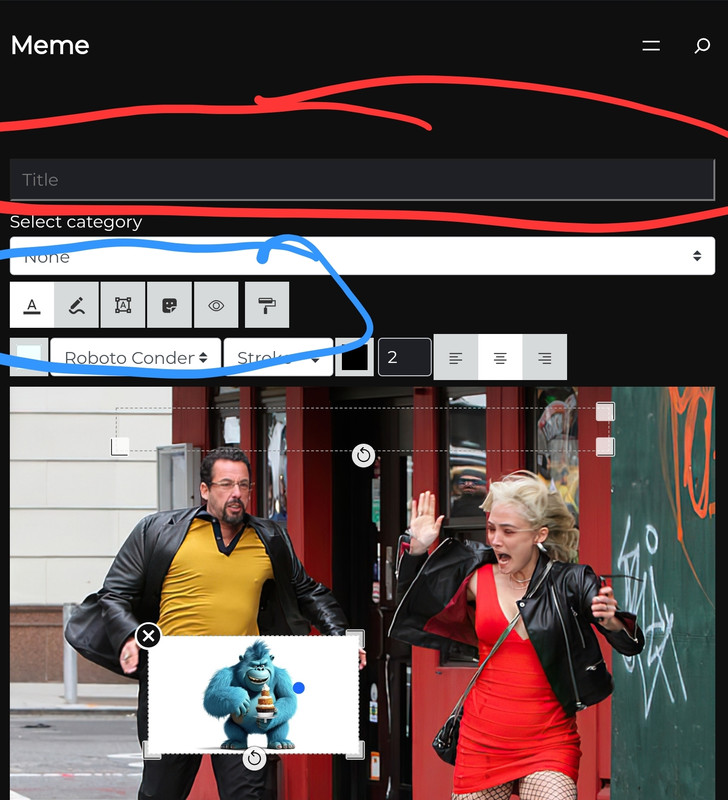
Also how do I remove this title thing from top ? Marked in red and how do I align items marked in blue in middle centre?
https://i.postimg.cc/8C6HFspg/Screenshot-20240919-170003-Chrome.jpgThank you
Hi, I’m sorry but I don’t know sources with templates packs. About the appearance you should use some CSS rules, for support requests please contact me using the support form.
Can you give me CSS rule please? Also how do I asign images to categories please ?
for support requests please contact me using the support form. You can assign tags to the images (Templates) and categories to generated Memes.
for multi languages we should use wpml or other plugins are also working with
You can also use other plugins.
would adsense accept this to show ads ?
Yes, if you create a website with some orginal contents
so, only memes are not counted as original content?
Since the memes are just custom posts with title and images, you should probably also insert some textual content inside the website (maybe).
commenting on memes are not supported yes?
Yes, comments are supported, like any other post type
Where is the file for the social sharing section? I would like to edit it to add Telegram
HI, for support requests please contact me using the support form
I have a template page but the images link directly to the actual image and not to the generator. Same is with the sidebar template widget.
Only on the generator page when clicking a template image under the generator the template is inserted into the generator.
Hi, be sure to select a page or post containing the generator, under MeMeMe > Settings > Generated Memes > Re-caption
Thank you. Sorry to bother you. I created a new page and didn’t update the page id.
Hi, I have this error after entering purchase code: Invalid Licence, automatic updates are disabled.
I did test this plugin on another domain but that is now deleted.
You should remove the license from the old domain, inside the plugins panel you should see a link to the license manager, if you can’t find it please contact me using the support form
Thanks
Hi, i had emailed you this questions.
It is possible to achieve this with your plugin.
1. Have a login for users to register and login before the can use the mememe to create meme or download.
2. Possible to have comments on the meme generated. Only logged in users can comment and rate the meme.
3. Users creating account to manage meme created and see their activity.
4. Also possible to have watermarks
Thanks
Any assistance will be grateful.
Hi, I’ve replied to your email.
Thank you.
Can there be an AI meme generator feature are you planning to add it? Example: https://imgflip.com/ai-meme
At the moment no, maybe in the future.
But can I create separate pages per meme like this: https://imgflip.com/memegenerator/256947333/The-full-armor-of-God
Something similar to Programmatic SEO?
Also, what if I don’t want users to post and just save or download on their end….
So if am getting it right I can add this plugin to multiple pages say Hide The Pain Harold and stuff that ranks on specific keywords and when user clicks they will be on that Hide The Pain Generator page. Correct?
https://veno.es/mememe/templates-default-layout/
Hi Nicola,
I have a buddypress built community website, possible to offer your product to my users as a paid service?
I will require your plugin to be buddypress compliant as add-on otherwise if only WP compatible then I have to use it separately within my UX but on a subdomain based installation.
Anyway, I am very much interested to offer a creative meme studio to my user.
Thank You, Jeet Sanyal
Actually, if your plugin is made buddypress compliant it will be great for my application, using as WP will be the last option.
Please let me know.
The plugin is compatible with BuddyPress, if a user creates a meme it will appeear inside his activity stream, just like new posts. By the way, BuddyPress is a wordpress plugin, so a website with BuddyPress is still a WP website. MeMeMe is a WordPrss plugin which can also work together with BuddyPress, not an extension for BuddyPress.
I am on Buddypress Youzify theme, where will the plugin appear inside the UI ? Also, the existing template imagery, can it be modified from backend by admin, because socio cultural context is very important, let me know.
The plugin uses blocks and shortcodes, you can place the generator and the galleries anywhere. It is provided without templates, so you can upload your pictures. Plus, it is compatible with buddyPress, which means the memes generated by registered users can be shown inside the activity stream.
hi, I have 2 questions 1. what theme did you use for the demo? 2. will this be compatible with a theme that already has frontend post submission. example themes: newsy, king, bimber.
Hi, the demo uses a custom theme made by me many years ago. The plugin is compatible with any theme and has its own generator, so a theme with frontend post submission would be more useless than incompatible.
Thanks for your reply.
1. Do it come with ability to create login for users before the create meme.
2. Can users download meme after creation, login needed.
3. Is it compatible with member plugins, so can create point collection for creation of memes.
Thanks.
1. The plugin uses the wp users system, default generated memes are custom post types with pending status, you can choose which role has the right to publish them. Buddypress stream activity supported.
2. Anyone can downloaad the generated image, aso guests, but only published memes will be visible and sharable with their permalink.
3. It is compatible with BuddyPress, and probably also other plugin which uses the WP roles.
hello, I have a couple of requests, can you add them to your feedback for consideration.
1) If you could separate memes into a standalone library (folder on server) instead of mixing them up in the media library, one reason being that WordPress generates all the thumb and image sizes for all images in the media library and that is awful .
2) To help with the tedious task of adding templates, can we please have a bulk import function, (it’s not complicated – themes and gallery plugins do it all the time) Adding templates one at a time is so slow. having a separate folder in the server would be so much neater and more efficient.
3) Finally, can you put together a zip file of the most common themes for us to download. Easy enough to do also.
these few things would 10x the time it takes to setup and make your plugin so much more attractive and user friendly to your customers.
thank you
Hi, and thanks for your feedback.
1) The memes images are already saved inside a standalone folder on the server, under /wp-content/uploads/mememe/. The thumb generation is anyway required to handle meme galleries and backend preview. If you delete a meme, the plugin automatically deletes also its image and all relative thumbnails.
2) I’m not sure if you are talking about this plugin or maybe I don’t understand the suggestion… of course you can already upload multiple templates, the same way you can upload multiple images inside the wp media gallery.
3) this is a wp plugin designed to work with any theme, why should I suggest some themes instead of some others?
Hi Thank you for the quick reply
1) I mean adding new blank memes (templates) into the mememe templates section in wordpress admin, it’s not exactly user friendly having to create a “new post” for each one. and as far as the wordpress media galley is concerned, my site is a community, and I would also like to avoid all users from having any access at all to those blank meme images. even other admins. That is my main concern.
as for the containing folder on the server idea, again I am talking about the blank meme templates, not the ones that users create.
This is all about the idea of making life easier for site admin regarding uploading/adding blank meme templates in bulk so I was suggesting if we could use a separate folder and keep them out of the main wordpress media gallery.
and to also have a one click option in the admin area to add them into the templates area rather than individual as posts. I have a folder of 800 memes collected over years, it has taken long time to find sort and clean them up (trim/remove existing text, optimze etc) that’s before going near wordpress site. Can you imaging how long it will to upload each of them one at a time through wordpress admin new post for a lot of blank memes (too long).
2) Yes, I am definitely referring to mememe plugin, Basically, it is the same issue as 1) that I am referring too manually creating a new post individually for each new image is the problem I am wanting to solve as it is putting me of adding any memes to the plugin. Perhaps if there was a load pre-installed I wouldn’t be so reluctant.
3) I only mentioned “wordpress themes” to point out that most themes, especially those on code canyon are able to provide “demo content” so why cant your plugin take the same approach?. themes that give demo content or pre-installed posts include pages and posts in the front end. Not just themes that do this, many plugins also do this. So it could also be a method for you to easily add value to your plugin by providing the same thing as well as an import option so user can bulk add blank templates even if it is a multi step process, perhaps upload a zip file, it lists the images and allows to bulk edit them, title, category etc and save then that process generates the custom posts rather than user doing it manually. (why not save out all the current template posts in your demo site and allow quick import of those as a getting started step, then keep adding more to your demo site and updating the file regularly)
Basically, I am referring to alleviating the long tedious process of an admin adding “meme templates” individually by providing a quick and easy way of importing them in bulk. maybe follow the manual theme/plugin installation method in your template admin area of providing a field to select a zip file and one click import the images into new posts for us. then all we have to do is go in and put them in categories. even better allow us to select existing category we want that upload to go into.
Additionally, I would like to be able to export those blank memes as I am currently changing hosts, and rebuilding my website from scratch. I tried to use the wordpress export but it doesn’t show the blank memes to export them (only existing users/edited memes) so I have to setup all the memes in the new site manually again and that is long process which led me to contact you with this request.
It is a great plugin, I’m not complaining, I’m just suggesting as feedback that you offer a better way of adding blank meme templates so we can get going quicker and also add them in bulk anytime we have collected up some more.
you could even offer meme packs as addons which user can purchase from within admin and then instantly install all optimised and sorted into categories.
Just some stuff to consider.
Sorry if my original comment was vague or unclear.
I hope I’ve explained better this time. 
Thanks for the exaustive clarification, I wasn’t taking it as a complain
1 & 2) Adding new templates from the plugin’s admin page is not exactly like creating “new posts”, if you bulk upload 100 pictures with the right file names, it doesn’t need further actions. And treating templates as wp media items gives a lot of SEO opportunity, to index them with title and description. Unfortunately can’t set templates inside a custom dir, because are handled directly by the wp media manager, unlike the frontend meme’s editor. Last but not least, they can be easily handled with IDs once are inside the wp system, and like the memes we need thumbnails and other meta info for the galleries.
3) Got it. A new opportunity could be to offer some block-based patterns, suitable with the new WP block themes for some premade layouts, but I don’t think I will add meme templates, due to possible copyright issues. Usually themes do offer unique contents, or stock images.
Feel free to contact me through the Envato support form if you need further informations.
“if you bulk upload 100 pictures with the right file names, it doesn’t need further actions. ” are you saying there is a way to bulk upload?
Administration > MeMeMe > Templates > Upload Templates > Drop files inside the window or select multipñle files to be uploaded
Hi, I purchased this plugin and I have 2 issues with it.
Issue 1: Why are users forced to add text to the meme, why can they not be saved without adding text? Sometimes people just want to upload a meme image and save it, maybe the text is already added to the image..
Issue 2: There doesn’t seem to be anyway to customize the single page for a meme. By default the meme shows without the title text and in full page width. In your demo it shows with the Title and 50% width, why is there no area to edit the meme post page layout?
I tried to contact direct through the support page but didn’t receive a response. @nicolafranchini please help.
Hi, check your email, maybe also the spam, I’ve already replied to your support request 2 days ago.
1. As explained inside my email: The Save button is disabled until the user types some text or draws a line or adds a sticker, to avoid blank memes who would be the copy of templates.
2. It is up to your theme, the single meme ihas the same layout of your single posts, unless you create a custom mememe-single.php file. If you don’t see the title is because your theme is not outputting the post tiles.
Hi there are there any Mememe pros her who can help me build out a new site? Please message me. Or @nicolafranchini if you offer this service please let me know. Thank you
HI, the plugin has been designed to work with almost any theme, for support requests please contact me through the support form
Thank you. Sorry for the misunderstanding. I need someone who can fill it up with memes and templates. Do you offer that service?
No, sorry.