148 comments found.

Hi, I have the plugin set up, and the preloader looks great on desktop and works just fine. However, on mobile (in both Chrome and Safari on iPhone), the preload happens, but it only shows a ? instead of the preload GIF.
Sometime mobile browsers causes issues. Can you please email us with details at pixiefytheme@gmail.com
It’s not working if user refresh/reload the page but working if click on the menu, same issue on both desktop an mobile. Watch this 1 min video to the end https://drive.google.com/file/d/1CtqmVWO1oVRzMzhpIkxwFIpzoOIoahPN/view?usp=sharing Here’s setting screenshot https://drive.google.com/file/d/1BEvkFr38ySxdgD-3PeLFztgWto_MRog6/view?usp=sharing Also all pages are enabled. Tried all options but still the same not showing preloader as soon as user refresh/reload the page
I think, plugin needs to be fixed to show preloader as soon as user refresh/reload the page which is not as of now as showed. Can you please fix ASAP and update me.
It can be different issue can you provide the url where you have the issue. I just checked on https://errorhandle.com it’s look fine to me
Yes, That’s the website but if you see on video it on one of page available for logged in users not home page so please send me an email to create an account for you to check. As a note the issue is on page when the page load time itself longer than normal meaning if you test your plugin on a page that takes for example above 5seconds to be loaded after refresh then you see your preloader after 5seconds appears.
HI, I just bought your Preloader unlimited which is really great ! I’d like to customize the background of the preloader with an image, instead of a simple color. Is it possible ?
Thanks for helping me !
which option you are using for preloader?
I’m using “Fill animation”
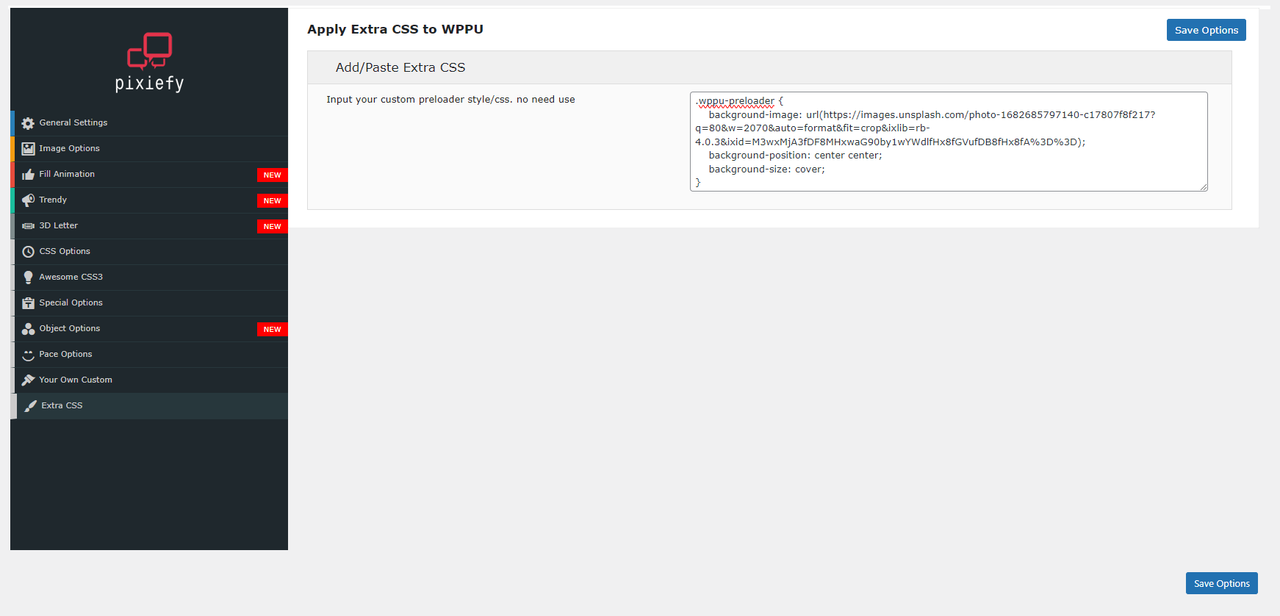
Please paste the following code into the “Extra CSS” field inside the WPPU plugin settings panel:
You can view the screenshot for reference: Extra CSS Panel https://i.postimg.cc/FHjB8B8w/extra-css.png
here’s the code https://gist.github.com/mlbd/e99a569b9bcb7a480fa933f67908c8d6
Note: that you may need to modify the image URL and other CSS properties according to your specific requirements. Please confirm the preloader option you are using as well, as this code might not be compatible with other preloader options.
Thanks 
Hi, is this plugin still supported? i see on codecanyon only tested up wordpress 5.5…
Yes, Feel Free to Use it,
As you know you will get free 6 month premium support. so if it’s not work we here to help you.
Hello! I’ve uploaded a custom GIF but it doesn’t show in Safara IOS. What’s the issue? https://wordpress-760719-4012054.cloudwaysapps.com/
It’s a known issue for Safari IOS, So, try to search solution on the internet. Here’s one you might try https://www.tuneskit.com/fix-ios/gifs-not-working-on-iphone.html
Hello
I have a presales question. My client saw this on a website:
https://www.armatus.ch/ Where we have a “preloader” for some secconds and a bounced in logo.Is it possible to do with Your plugin?
Regards,
Simon
can i get 7 days free trial before purchase? i use a lot plugins may cause or conflict with others may slow down the site. if it wont work well i wll not but it
Sorry we don’t have that options right now.
I looked at a few recommended loaders and Wordpress Preloader is certainly the best from my point of view. There are loads of options and I can’t imagine anyone needs any more from a loader. Wordpress Preloader may be missing out because there is no downloadable demo version to try which is a shame. I tried other demos before deciding on Wordpress Preloader after watching the very good your video demo, but if it hadn’t been on Code Canyon I might not have bought it. For anyone who is unsure this is a great loader and well worth the money.
Thanks a lot for your kind words <3
Hi, I have 2 problems. 1. Hebrew Language on Special Options Settings don’t work. 2. The on-off botton on Special Options Settings and Your Custom Preloader Settings dont work. Ravid
We don’t have Hebrew language version but if you want you can make it using any kind of translate plugin like https://wordpress.org/plugins/loco-translate/
We had .pot file to create any kind of language files
Thanks
Ignore my last request – I did not realise that you had to then click on the custom gif to make it active.
Hi – I have just installed the plugin WPPU plugin and am trying to use a custom gif.
When I add in the gif via the Image Options > Use your custom image the image just defaults to the plugin loader?
Can you confirm what the requirements are for an animated gif preloader please?
There’s none. All you need to click top right button to active preloader options.
Thanks for getting back
Hi, I want to set my preloader image to 500px but the maximum available is 200px. How do I fix this?
Hi
As you can see Image preloader > Background Size Selector has max 200px
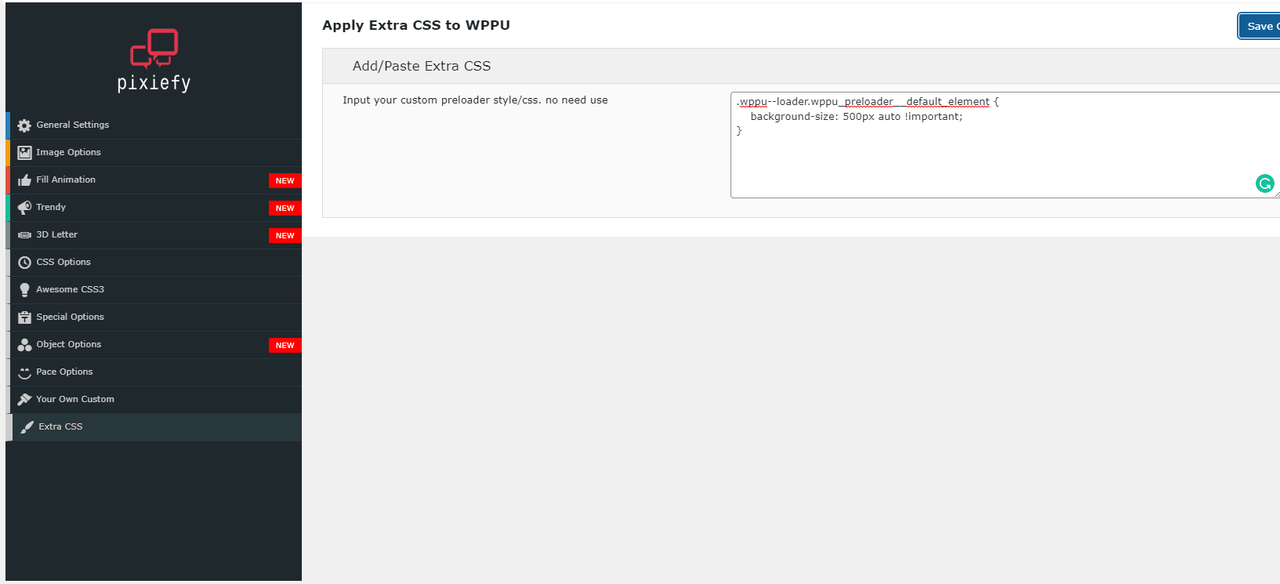
So, You have to do it with custom css to override background size selector value.
.wppu—loader.wppu_preloader__default_element { background-size: 500px auto !important; }
Just paste this css style into our plugin extra css options like this https://i.postimg.cc/HkmByJSr/screenshot-254.png
Hope it helps
Hey there! The WPPU plugin is awesome! but it seems to have broken my pop up plugin “popup maker” any ideas how to have both plugins working?
Hi there,
Can you share a little more info about it.
I mean share some screenshots or more info about it. Does your popup maker conflict on the frontend or backend?
Are you talking this plugin https://wordpress.org/plugins/popup-maker/
you can send your query at https://themeforest.net/user/pixiefy#contact
Thanks
Hello there, your plugin works well and there are a lot of settings. But one thing is problematic: If you deactivate the plugin and reactivate it again, all your setting are gone. So you have to set the preloader again. Thats the only issue, maybe you can check it.
As example i use a image for preloading the page and i selected only some pages for preloader. I deactivated the plugin, then activated it, then my website shows the default preloader and shows preloading on all pages etc.
it would be great to fix that.
That is true and We already had plan to change this system already.
So, we now clearing our plugin database after deactive but after new update it will be only delete if user delete the plugin. but deactive won’t do anything.
Thanks
Hi there! Quick question:
Your plugin works great on all my pages: https://point59.com
Except not on my listing pages: https://point59.com/homes-for-sale/71-ARJAY-CRES-TORONTO-ON-M2L-1C6/C5401147/273/?agreedToTerms=true
Any ideas why?
Thanks, Mike
Hi damiko,
that’s little weird. that loader has two part but in not working page has only one part but other page has both and working fine.
might possible to conflict with some markup or anything within that page. So, is it possible to give a temporary access to see what is going on there?
btw, mail us https://codecanyon.net/user/pixiefy#contact for further query.
Thanks
Hello, great plugin. Two questions though.
1. Are you able to provide an animation similar to “Clip” but instead of a going from top to bottom it’s left and right? We would really like a full page fill then the fill goes away to the left and right at the same time.
2. We are using an animated gif, the gif seems to be starting at random times instead of from the beginning at 0:01, is there any custom code or setting to have the gif start at the beginning every time?
Thank you!
1. Yeah, will try to add this on our next update or later. if we add we will let you know.
2. Sorry, .gif is a image so we can’t control when its should start animation or something. but if you are making that gif by yourself then you have that control while you are making it.
hope it helps Thanks
Hello,
can I set the time for this preloader ?
Do you mean by delay time for preloader? if it is then YES.
is it possible to use the loader only on a specific page rage .. ? i mean, im using eventon plugin and i want the loader to be active only at eventon pages ( under address : http://mydomain.com/events/ ... )
Yes its possible to control to display only certain pages or specific post types
Does this preloader have an ACCURATE percentage based progress that detects the loading progress of the actual page and then disappear after the actual page is done loading (And the percentage is at 100%)?
The live demo does not seem to be available.
Unfortunately NO
and for you information it’s not easy as you think to get exact page loading time before it’s load in CMS based site like WordPress.
So there is zero chance to that this feature will add to our plugin. But we do have predefine time loading system that’s almost look like real time.
Thanks.