1125 comments found.
Would it be possible within the constrains of the plugin to head each post created with a date above the title ?

Hi there
Thanks for using our plugin. Could you please tell me, do you want to show the WordPress posts in the timeline? If yes, then this feature supports in the cool timeline pro plugin. For more details, please check the docs, https://docs.coolplugins.net/docs/cool-timeline-pro/create-vertical-content-timeline/
Thanks & Regards
Hello I have a problem. I try to create the Timeline with category filters. My shortcode looks like bellow: [cool-timeline based=”default” layout=”default” designs=”default” skin=”default” date-format=”F j” pagination=”default” f” icons=”NO” animations=”none” show-posts=”10” story-content=”short” order=”DESC” filters=”yes” filter-categories=”pdo, alumiermd”]
It doesn’t work. I can’t filter the timeline by categories.
Hi there
Thanks for using our plugin. Please contact the technical support team related to this topic at contact@coolplugins.net
Thanks & Regards
Hi
Does Cool Timeline Pro support Custom Post Types or just Blog Posts ? Thanks
Hi there
Thanks for showing interest in our plugin. Yes, our plugin support the custom post types.
Thanks & Regards
HI Is there any demo we could see ? Maybe screenshots showing how to add them to a timeline. We are going to work on a music site and there will be some CPT: artist, records, songs Thanks
Hi there
Yes, you can give the name of your custom post type to attribute in the shortcode e,g post-type=”artist” , for more details, check the screenshot : https://prnt.sc/4oYiAX8-wJjo
You can read the docs to get an idea about content timeline post : https://docs.coolplugins.net/docs/cool-timeline-pro/create-vertical-content-timeline/
Thanks & Regards
Hi Now it’s clear as water. It looks very easy to config a Timeline shortcode Many thanks
Hi, I can’t see the full text of the stories. Options or parameters don’t change the display of the stories. I need the full text shown. Any comments? Or is this a PRO Feature?!
Hi there,
Please just re-generate shortcode using timeline block/shortcode generator with Content Description settings—> Full with HTML.
Story full content will be visible.
I hope this helps,
Hi, Isn’t there any way to get an editor to work on it? thanx
I try other post with instruction.thank you
Hi, Im testing your plugin but i cant customize, labels, sublabls… COuld you make a refund? Thanks so much
Hi There,
Thanks for using our plugin. Already we have settings to change label color/typography you can check given screenshot :- 1) Label color settings : https://prnt.sc/2HPY0tjCzdcD 2) Label typography settings: https://prnt.sc/xEGCEp-bVTeM Please contact us at contact@coolplugins.net if you have still any questions.
Thanks & Regards
I wrote you Feb 22 but no answer, i wrote you today again
No response
Please raise your refund request :- https://codecanyon.net/refund_requests/new
We will approve it.
Done. Thanks
Refund recieved. Thanks so much
How can I change the story details page https://music-lp-underground.com/timeline/aretha-franklin-lady-soul22-sijecnja-1968/ to look like other pages on my site, with a sidebar and all https://music-lp-underground.com/2023/01/22/jeff-beck-band-billy-gibbons-jimihendrix-foxy-lady/
Hi there
We provide the plugin related support. If you face the issue while using our plugin. We are happy to help you.
Thanks & Regards
Can I setup multiple timelines here? I downloaded the free version and it only appears to allow one timeline. I want to embed it with a shortcode but have more than one timeline for different types of content. The design can be the same, but different content.
Hi there,
Thanks for using our plugin. We have a category feature in the cool timeline pro. You can assign the category to the timeline stories and show the timeline with the different content. But We don’t have this feature in the cool timeline free version.
Thanks & Regards
Since installing plugin, my client site back end seems quite slow and sluggish
Hi there,
Please contact the technical plugin support team for any help related to this topic https://coolplugins.net/contact-plugin-support/
Thanks & Regards
Hi there,
Please contact the technical plugin support team for any help related to this topic https://coolplugins.net/contact-plugin-support/
Thanks & Regards
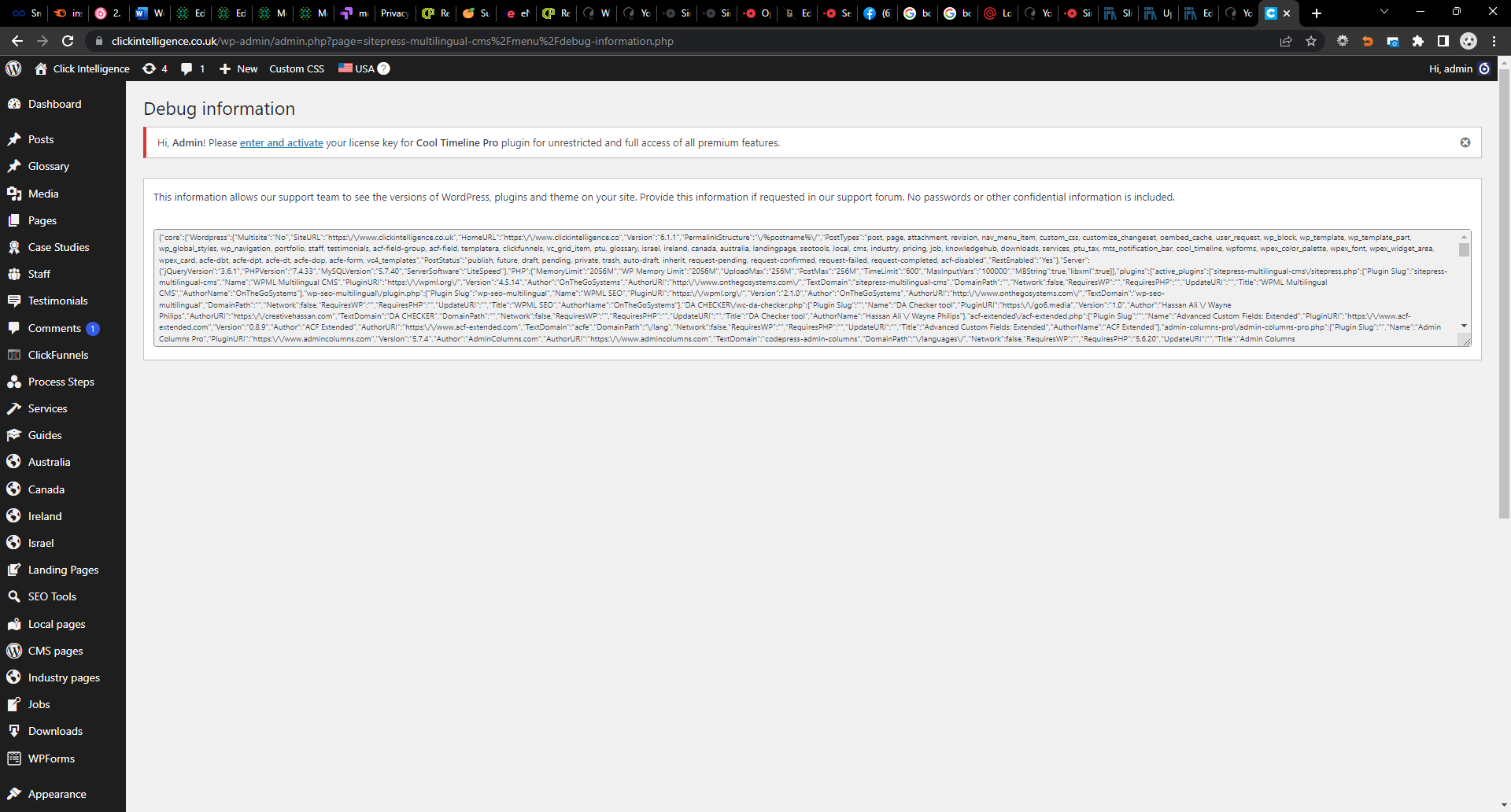
Yes I am entering this information and saving , it goes green but then an hour later it keeps saying the same message
“Hi, Admin! Please enter and activate your license key for Cool TimeLine Pro plugin for unrestricted and full access of all premium features.”
This keeps popping up – https://snipboard.io/GL29Au.jpg
but I am entering the information needed here https://snipboard.io/lHhQeX.jpg
then it keeps coming back to say Please enter and activate….
i think you thing is broken!
Hi there
Please share the credentials and contact the technical support team at contact@coolplugins.net
Thanks & Regards
it is still asking me to enter licence the next day even when i enter it and success screen every time!
Hi there
Please share the license details and contact the technical support team related to this topic at contact@coolplugins.net
Thanks & Regards
sent email – thanks
I purchased Cool Timeline Pro but can’t figure out where to enter the purchase code. I’ve gone into the plugin settings and clicked on settings, but I don’t see anywhere to enter the code.
Hi there,
You have to enter the Envato purchase code along with your email id, for more details, please check the screenshot: https://prnt.sc/AfYgnC3gvd1j
Thanks & Regards
Hi,
Can I change the order my Categories are displayed on the page?
Thanks
Wendy
Hi there,
Please contact the technical plugin support team for any help related to this topic https://coolplugins.net/contact-plugin-support/
Thanks & Regards
Thanks for your reply. It’s a shame their is no option to move around the displayed categories:( please let me know if this changes in the future?
Hi,
I’m having trouble changing the word count which shows on the timeline page. I have tried to change it in the Stories Settings, but the ‘Content Length – word Count’ doesn’t seem to make a difference at how many words are initially displayed on the actual Timeline.
Could you please assist?
Many Thanks
Wendy
Hi there,
Please contact the technical plugin support team for any help related to this topic https://coolplugins.net/contact-plugin-support/
Thanks & Regards
How can we stop the single pages from being created
eg
{domain}/timeline/{single-post}
We dont want them accessible from front end and we dont want google to index the single posts
Hi there,
Actually, Our plugin use WordPress default Post Type standards for timeline stories , So we cannot directly disable these single posts page. But with the help of small code customization you can disable these from indexing But these changes will revert back with plugin updates.
I hope you understand these concerns.
You can disable the single posts easy. When you register your custom post type you need to specify public false
‘public’ => false,
'show_ui' => true, // show the admin UI for the CPT even when public is falseThere is no need for the single posts to show on your post type please disable this or give us a hook to do it
Yes we know about it. But our plugins 98% users use story single page. So that’s why we cannot disable it in plugin code and our plugin current version does not support hooks for these type of changes.
Please do it at your end.
I changed my envato email addressm and had to re-setup my site, but it won’t reactivate when my license is good.
Hi there,
Please contact the technical plugin support team for any help related to this topic https://coolplugins.net/contact-plugin-support/
Thanks & Regards
Another concern is that the timeline isn’t in the center of my page, I checked and it seems to be the Plugin / Shortcode
Hi there,
Please contact the technical plugin support team for any help related to this topic https://coolplugins.net/contact-plugin-support/
Thanks & Regards
Hi, I bought Cool Timeline Pro and I have to say it’s packed with possibilities. However, I’m not sure how to use it correctly in combination with Oxygen builder (I’m quite new to web developing).
I paste the shortcode into a shortcode element/shortcode wrapper in Oxygen. This works, but as soon as I add animation (e.g. fade up) this interferes with my Pro Menu.
What am I doing wrong?
Kind regards
Hi there,
Please contact the technical plugin support team for any help related to this topic https://coolplugins.net/contact-plugin-support/
Thanks & Regards
Good day, I’ve recently purchased the Pro timeline plugin. On the horizontal timeline layout, I am not able to disable the date under the “stories settings” > Story date.
I’m aware that the year label says: “Only for Vertical and One sided layout”
The demo on your site has the same horizontal layout without the date above: https://cooltimeline.com/demo/cool-timeline-pro/cryptocurrency-ico-roadmap-timeline/
Please assist in hiding the date above the timeline on my site: https://devweb.co.za/parsec/company-overview/Hi there,
Thanks for using our plugin. I am not able to see the date in the given URL link of your website. check the screenshot : https://prnt.sc/T45awHOKaR8s Please explain your issue and contact the technical plugin support team for any help related to this topic https://coolplugins.net/contact-plugin-support/
Thanks & Regards
I have hidden the dates temporarily using css. Will contact support, thanks
Hi, I just bought this plugin and am having problems seeing any styling. I am using the Genesis Framework (the generic sample theme) and all of my plugins and wordpress is up-to-date.
I created a timeline using the block editor on my page. On the editing of the page, it appears to have a new styling, but when you go to the live page, here is 0 styling. Help! Thanks in advance.
Hi there,
Please contact the technical plugin support team for any help related to this topic https://coolplugins.net/contact-plugin-support/
Thanks & Regards
Hi there, I’ve baught the plugin cool timeline pro. I’d like to build a timeline like this:
https://cooltimeline.com/demo/elementor-timeline/multi-color-timeline/Is there a way to to that with the plugin? I mean the vertical animated red line which overlaps the black one.
Thanks in advance
Hi there,
Thanks for purchasing our plugin. Sorry, but currently our current version does not support the line-filling feature in the Cool timeline pro plugin.
Thanks & Regards
Hello,
I hope this message finds you well.
Any of my “read more links” don’t work
Also, in the Cool Timeline Stores” I test each of the stories I have written in the past and none of the links work.
You can view here:
https://www.iamhealthyandfit.com/about/All of the “read more” links work
I just upgraded to go pro. Maybe the reason why?
Could you please help.
Thank you.
Vanessa P.
Hi there,
Please contact the technical plugin support team for any help related to this topic https://coolplugins.net/contact-plugin-support/Thanks & Regards