32 comments found.

Hello, I haven’t found a way to contact you directly. I wanted to know if it’s possible to create a 100% compatible and fully tested version with French characters?
Best regards, Mickaël
Hello Michael.
Our plugin is tested with English characters. Specific localization is outside of its current scope, but you can contact us through our profile’s contact form in order to receive a quote.
Hello – Presale question:
How does the plugin work exactly? Does it scan the article after viewing the content and find relevant links to add? Or it uses some sort of cron and save the values for articles before the contents are viewed?
For uncached websites, (lets say 3000 articles) after flushing cache, it would be a nightmare on the host (even for 100 articles) if the website has decent traffic.
How does the link add function work? Can you describe in technical terms as much as possible?
Our plugin works upon saving an article, using the respective hook, and it modifies your content according to your preferred settings.
It doesnt retroedit your existing content, neither it updates articles upon view.
Hello, I wanted to inquire about purchasing your plugin, but I have two preliminary questions. 1. My website has 5500 entries. Can it handle this volume? 2. When I input a keyword and a URL to link, does it take that keyword from all posts or pages, or can I specify to only include it from a category of my choosing? 3. Does it work well with the Spanish language and accents? Thanks in advance.
Hello.
That depends on your hosting provider – its not our plugin which handles such a database load, but your server.
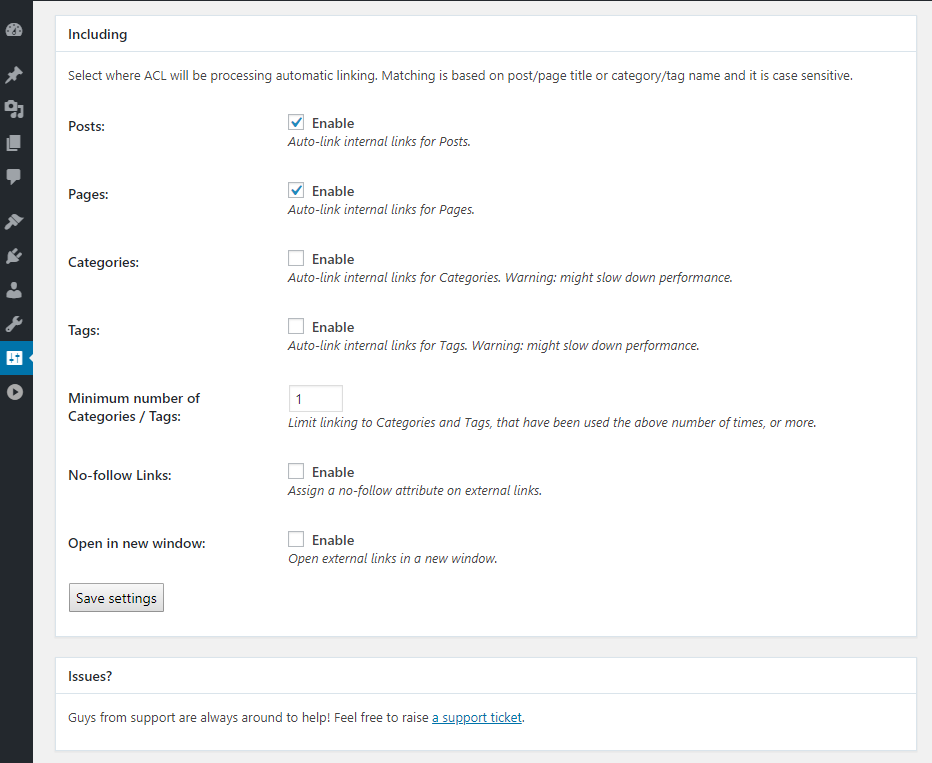
Please refer to the settings area, shown in the screenshots of the item, in order to ensure that functionality is fine for you.
We havent tested Spanish language and thus said, we cannot guarantee its working state on it.
I have thousands of posts on my site, also translated posts with WPML.
Is this plugin compatible with WPML? And does it really Create internal links automatically for thousands of posts?
This is not an autoblogging plugin – sorry.
It would not activate:
Fatal error: Array and string offset access syntax with curly braces is no longer supported in /home/ab6rq1m88ax3/public_html/bestultrasoundmachines.com/wp-content/plugins/automatic-content-linking/automatic-content-linking-functions.php on line 18
Please open up a support ticket within support area, so developers can give a look at your local installation and advise.
Does this plugin still working?
I read a lots of comments saying their website is broken after installing plugin.
Does the latest version solve all the issues?
We are not aware of each and every different setup – but we can confirm that we are around to help, in case you face any issues.
Our plugin works just fine under the last version of WordPress core, yes.
Thank for the very fast reply.
One question: I was used to use the very old plugin “SEO Smart Links”.
You plugin seems like an update of this one; it works like the old plugin?
I mean (very important to me) it will create automatically links in my posts, OR I have to setup a link|URL pattern to make it works?
Let me know, thanks.
Not really sure about this plugin – as we havent used it before.
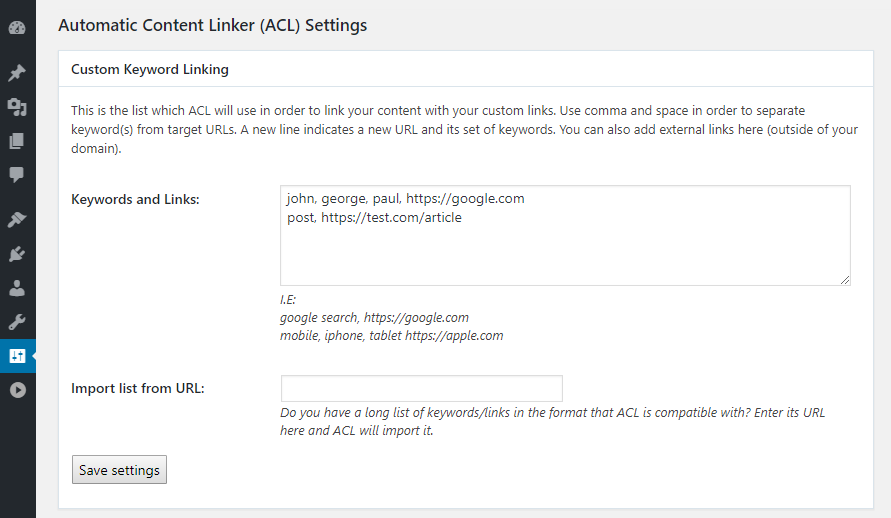
Our module uses one replacement pattern per line, as shown here: https://s3.envato.com/files/267859029/Screenshot_1.png
I see the pattern line.
Question is: this is a MUST setting, or plugin can auto create links without this setting?
Old plugin was able to auto create link from words in my post, if he find they are (example) tags.
Does your plugni can auto create links, or it need the setting in the replacement pattern per line?
It created automatically links for those patterns. If you leave patterns empty, it wont create anything, as it will not know what to replace.
Ok, thanks for clarification.
Not a problem! Cheers!
After installing the plugin, The whole site is broken, I want to write a support ticket, But can’t provide the URL, Because client can’t accept current bad look, So I’ve removed the plugin
Im not getting your “I want to write a support ticket, But can’t provide the URL” sentence.
This item is supported through a support portal and its URL can be found in the support tab.
The plug-in is indeed unusable, which option should I go to for a refund?
-d481325 elementor-section-full_width elementor-section-height-default elementor-section-height-default” data-id=”d481325” data-element_type=”section” div class=”elementor-container elementor-column-gap-no”
Hello.
This account is not a verified purchaser of our plugin.
Please raise a support ticket inside support portal, after authenticating from the account of the purchase.
Hi,
When I activate your plugin it breaks my site and all my H3 tags display as this….
2<—>&<—>8<—>4<—>;<!—> <—>h<—>t<—> <—>o<—>t<—> <—>a<—>k<—>g<—> <—>n<—>l<—>d<—>s<!—>:
How do I fix this?
That’s strange. Please raise a support ticket inside clients area – guys from support will help you with the issue you are facing.
I fixed that issue but now facing another issue. I set the links but they do not apply to my text. I’m using the cooked plugin and would like to auto link the recipe ingredients
??
Hello.
We cannot help you at your support issues here, its sales team which monitors this area.
Please open up a support ticket instead.
Still waiting for a reply…
Hello.
All tickets are being responded by the support team within an 24hrs TAT.
Ok guess I’ll keep waiting…
Yes – If 24hrs have not passed. Elsewise, please check your Junk/Spam folder for an email that might have been assigned there by mistake.
Still nothing. Checked all folders. If I don’t receive support by end of the day I will be opening a dispute.
I repeat that all tickets are being answered according to the support policy of the item. This is currently set to 1 business day (by the way, its Sunday today, support team is not working on weekends).
I repeat it has now been over 5 business days…
As mentioned earlier, all tickets are being answered according to the support policy of the item. This is currently set to 1 business day.
You shall check your email server for responses. Its sales here – we are not connected with the support team – kindly use our profile’s contact form if you want to reach our support team in an alternative way.
Any update?
You can download latest update through your profile’s Downloads section.
In case our development team submits a new version of the item, update date will be refreshed to include the new date.
does this work with Thai language?
We havent tested it under Thai, so we cannot verify the working or nonworking state.
Compatible with custom-post-types ?
It works with ‘post’ post type, the default one of WordPress CMS.
Other post type not working?
example this post type http://videotube.marstheme.com/video/awesome-film-perfomance/
We havent tested out any other podst types as they are outside of the scope of this plugin.
I wait for your test
Testing this is outside of the plugin’s scope (which is to serve the functionality in posts), so our developers will not execute any further tests.
Hi, does it work with WPBakery Page Builder?
This plugin is supposed to use post_content, so even if its not tested with WPBakery Page Builder, things are supposed to run smooth.
OK, so it means that it will work also on pages right?
Yes.
1 Does it support Hebrew? 2 Does it have a demo version?
Only English characters are tested out. We dont offer a demo, since the usage of the plugin is straight forward.
does it work with arabic كيف تواجه التكاسل عن الرياضة this is a small sentence .
Hello.
Only English characters are tested.
Does this work with Woocommerce products?
Hello.
This is supposed to work with every post content’s field and products are supposed to include content.
Will the plugin work with the Russian dictionary of words, with the Cyrillic alphabet?
Cyrillic is not something tested, so unfortunately, we cannot guarantee about its compatibility.
Is this plugin still active?
I am using the WPA SEO Auto Linker plugin. And this plugin have problem error with Special characters eg: ó, è, ã, ọ, ú, ụ, & and more
When i add this characters, link is not show. Does your plugin have this problem? If not, I am ready to buy your plugin. Thanks
I have the same question as the above of phamhongquang. These special characters are Vietnamese language.
We haven’t test those special characters at all, since we dont advertise the support of it at the current version, but this is on our plans for a future release, so dont consider this as a working functionality.
It may work, but since its not tested by our team, we cannot tell a single thing about it.
Does it work for Vietnamese?
Not tested with VT. Our plugin is made to work with UTF8 Chars.
Hi guys does link stay when we deactivate the plugin ? How plugin efect on loading time ? thx and all the best
No, upon deactivation, links are not active anymore.
No performance issues are noted, however, upon a great GBs’ db and options like category/tagging – there might be slowdowns if your server is unoptimized for such queries.
All options which may affect performance are already mentioned in their descriptions: https://s3.envato.com/files/267859029/Screenshot_4.png
thx guys
Anytime 
Demo will be nice 
Noted.