2001 comments found.

Hello. good evening, our thema urna recommended your plugin, we were reviewing your videos… and we really liked that we can put a price according to the ip location (COLOMBIA), and we decided to try the free version… but we couldn’t get it to work…
The plugin does the conversion automatically, but when we put cop in the profile to specify the price it just doesn’t change. PUT IT IN USD.
https://ibb.co/SsH6nnqWe tried to change the profile… and from US to COP and it is impossible! we have tried all the settings in your videos and it just does weird calculations..
We have wpml, on their page they specify that it is compatible, we have wfcm but I think its function is not compatible…
:cry: :cry: :cry: :cry:Hello
To avoid misunderstanding create please short video ( for example by https://chrome.google.com/webstore/detail/screencastify-screen-vide/mmeijimgabbpbgpdklnllpncmdofkcpn?hl=en ) where we can see WOOCS settings first tab, what you do on your site, and what you change, and what issue is.
Hello, I managed to do it with fixed….. we are going to do tests and we manage to configure it, for now it is working.
If we can’t make it work, we’ll write again!
It is important to clarify that we really liked your plugin! and if everything goes well in the tests we will not hesitate to buy it.
Thank you for cooperation and Welcome 
Hello. we did the testing and still love your plugin. we have these two situations. We think it’s something we’re doing wrong.
The page sells internationally and in Colombia. (prices in Colombia are specific)
1. When the language of the page is changed from English to Spanish while in Colombia, it changes the prices, to conversion prices… but not the prices that we configure per product in the video you can see it.
https://drive.google.com/file/d/1KPrOw1xhLGmp7kNv8qPAx8mzEMYL8dMj/view I don’t know if it has to do with the configuration that we are doing in the Geoip. https://drive.google.com/file/d/1IBmUa3WaDFH1kotsct_wFm3BtSpv24TP/viewThanks for your reply!
Hello
GeoIP Rules do not affect this. Do you use third party code to switch currency based on language?
Please drop me exact link to the issue OR even better write me here – https://pluginus.net/support/forum/woocs-woocommerce-currency-switcher-multi-currency-and-multi-pay-for-woocommerce/
Load Ajax?
Hello
Unfortunately the plugin does not have this feature.
Hi. I am looking for currency plugin which can display two currencies at the same time. So, no switching, I need 2 currencies to be visible in the same time. One should be main one and the other secondary but roles must be switchable. I see on your demo there is a dual currency display but secondary is approximately…I need this to be exact per manual exchange rate. Is this possible and please I need to see demo for this. Thanks
Hello
Unfortunately the plugin does not have this feature.
but secondary is approximately – This is the exact conversion, Aprox: – we put this text because the payment will be in another currency
Maybe this feature will work for you – https://share.stackovergo.com/image/i20220801075059.png
This could possibly work but not sure how to activate this. I am currently testing this with free version and I can’t make it to show this approx amount of second currency. I see on your demo that EUR is main currency so it will show it as secondary after I click on USD for example. On my demo where I am testing this I can’t make this approx to show. Please advise.
Hello
Please configure GeoIP rules. This currency (Approx) is displayed if the current currency does not match the GeoIP rules
How Can i Set Currancy switcher after top menu ?
Hello
Yes, Read please: https://currency-switcher.com/how-to-drop-woocommerce-currency-switcher-in-menu
You can use shortcode [woocs] https://currency-switcher.com/shortcode/woocs to place switcher where you want
Hello,
I need the code for the ratio button of two types of currencies to place on specific pages.
Screenshot: https://drive.google.com/file/d/1bGxgHPOJaR6NQ8AbNN7fjXHU2Umshksh/view?usp=sharing
I appreciate your comment, thank you.
Cheers
Hello
To make a custom currency switcher you should hire a developer.
If you have experience in programming, I can tell you about the functionality of our plugin
An example of the custom swither – https://currency-switcher.com/how-to-create-currency-links-without-shortcode
Hello
You can apply javascript code in your case: https://thewebdev.info/2022/02/12/how-to-attach-event-listener-to-a-radio-button-with-javascript and in their actions use function woocs_redirect(currency)
Hi,
WPML?
Thanks in advance!
BR Venty
Hello
this plugin has no conflicts with WPML. But not compatible with third party currency switcher from WPML
But not compatible with third party currency switcher from WPML????
Hello
Yes! WPML has its own currency switcher, of course two currency switchers that are designed by different authors and have the same purpose will conflict
Hello,
1 The price Info can’t be shown 100% on the dropdown under the search field on mobile devices.
e.g. type car.
https://www.aotream.com/mtestr2/Thank you.
https://i.ibb.co/DM1MfCG/WOOCS-Mobile-Search-Dropdown-Price-info-Can-t-be-shown-100.jpgHello
This is a css conflict with the filter template – https://share.stackovergo.com/video/v20220712113149.mp4
Try to add CSS:
.products-search div:hover.woocs_price_info ul { bottom: -30px; max-height: 80px; overflow: auto; }
Hello,
This css code is working fine. : )
Thank you very much !
Hello
Welcome;)
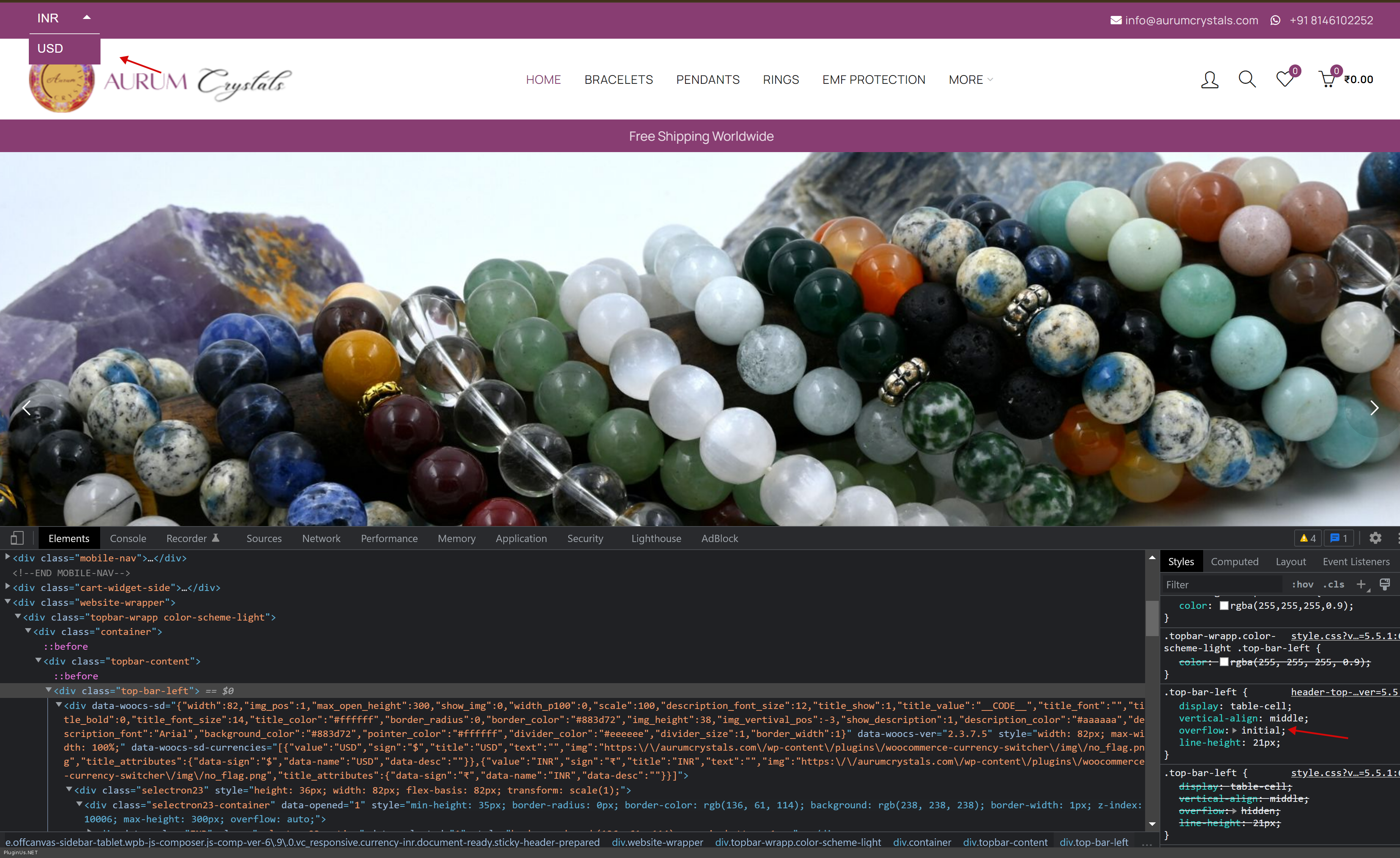
Currency Switcher Not Working. When we click second currency not showing. Check top Left Bar
https://aurumcrystals.comHello
https://c2n.me/4g7MXdG.png – CSS conflict. add to child theme css code next:
.top-bar-left {
    overflow: initial;
}
hello this plugin is compatible with wp all import? wpallimport.com
Hello
Unfortunately, we do not have such data.
But I think there should be no problems, import / export should be in the base currency
You can test it with the free version – https://wordpress.org/plugins/woocommerce-currency-switcher/
When will you add Haitian Gourdes currency (HTG). I bought it but I was surprise that you don’t have HTG currency.
Hello, WOOCS works with any currency, add and use it: https://clip2net.com/s/4g4Gzmk
presale question
Help to configure the cookie so that the plugin is compatible with wp-rocket
Hello
This plugin does not use cookies
Please check these options – https://share.stackovergo.com/image/i20220704104818.png AND https://share.stackovergo.com/image/i20220704104851.png
Thanks for your reply
I have those two options that you indicate me, but it creates a conflict with the Wp-rocket plugin
that makes users see the usd first and then it changes to the correct currency, if I buy the plugin, can you help me solve that problem?
Hello
Ok! That’s right, the plugin checks the current currency and if it’s cached it redraws prices in Ajax mode.
If you want to hide prices before redrawing – https://share.stackovergo.com/image/i20220705103950.png
Thanks again for responding, try to do it in ajax, as indicated, with that the prices load correctly, but when the user scrolls down, the products that load when scrolling do not load the price
Hello
this is an incompatibility with third-party functionality – infinite scrolling
Hello, how are you? I am interested in buying… I have more than one site, can I use the license on another site? how many? thankful
Hello
One license – one domain
Hello,
Currently, we are using free version of your plugin. While testing we found that there is a bug.
Below is an explanation on how to replicate and find. Added video at the end .
We set INR (Indian rupee) as base currency for our Site Globally.
On shop page, when se drag the Max Value from Price slider it changes and shows the INR Values correctly. No issues till here. (Just like what it shows without using any currency plugin)
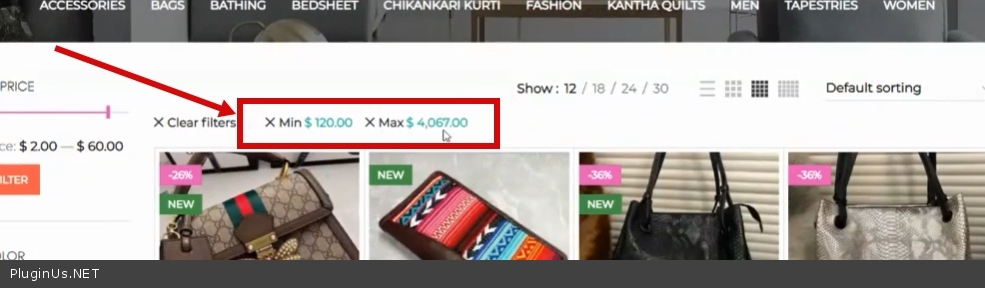
But, then when we switch to USD option (using plugin), then under Min and Max price filter, it did not changes the Values in USD correctly and accordingly. It actually only adds the currency symbol besides Values, but the converted value is Not reflecting.
Rather than that, it shows the same Value , which is supposed to have for INR.
Another point to be noted, is, when we further drag the Max Value from Price Slider, it then started showing Incorrect Values below the Price Slider filter also.
PS: The prices of products itself in the Product Grid and Single product pages are showing correctly, while even the currency is set to USD. The only area where they are showing incorrect results is below Price filter slider results and with Min. and Max. filters results
https://i2.paste.pics/HEAET.png
https://i2.paste.pics/HEAJR.png
Video
https://watch.screencastify.com/v/CACux1pI7F3f3aGVsGrY
PS: We are using Woodmart theme, and they suggest this is an issue with plugin. And they asked to contact you in order to fix this.
Regards
Hello
This is an incompatibility with a third-party price filter.
Please try to do a test with native price filter
I am already using the Native price filter alone. I am neither using the Theme’s price filter nor any other 3rd party price filter.
Please see here-
https://i2.paste.pics/HFL3U.png
https://i2.paste.pics/HFKKO.png
This is the issue with the plugin code itself. We have already asked Theme Author earlier, many a times. They would have already asked to test with Native plugin, if that has been the case. Also, they have suggested to contact you after thorough testing at their end
PS: Many of the users are already facing this issue with the plugin, regarding same issue and this area.
If you could please check thoroughly and fix this in the next update
Regards
Hello
Please note that this is third party functionality – https://c2n.me/4g387VV.jpg – this has nothing to do with the standard price filter. And to fix this, you need customization of third-party functionality. It does not depend on my plugin. This plugin does not convert custom values
I think you might have either misunderstood or probably may not have gone through the video properly
1. Please check that same video from 1:15 onwards to 1:30 seconds atleast.
The Price Values are Not even showing correctly (when we drag price filter slider, while in USD) inside the Native Price filter and below the slider.
https://watch.screencastify.com/v/CACux1pI7F3f3aGVsGrY
Means, even if we ignore Min. and Max price filters, then also the Pricing Values are Not correctly displaying with the Native Price Filter
2. Secondly, we switched to Default Storefront, and then check the plugin by dragging the price filter slider. Then also, the values do Not shows up correctly.
Please see this video
https://monosnap.com/file/BPUv7PL0SQT4loNL40Hq4Urf6sm3rL
PS: From above video it can be seen that Min and Max filters still exists with default Storefront also and not coming from 3rd party
Would highly appreciate, if you could please check it thoroughly again and help resolve this.
As this issue is holding us to buy your multi-featured plugin for our future projects.
Regards
Hello
1) I have seen this and please note that the standard price filter does not have an AJAX mode. on your video the filter works in ajax mode, try reloading the page after filtering – the result will be correct!.
2) please drop me exact link to the issue
Or better write me here – https://pluginus.net/support/forum/woocs-woocommerce-currency-switcher-multi-currency-and-multi-pay-for-woocommerce/
Hello
1). Thank you so much for atleast looking into the issue. Much appreciable
Can you please suggest how can we resolve this issue. Can you please suggest some sort of Code Snippet to be used in functions.php of Child theme. In order to resolve this issue. Or else, can you please help the Theme Developer team member directly.
Or by some other means
2) Actually Theme support member did that test by temporarily switching to Default Storefront theme once, and did that test on his own. That time site was on Development mode, now it is already Live.
Here is the proof – https://i2.paste.pics/HHM24.png
After testing, they suggested that it is the issue with the Plugin (as can be seen from above image URL) and we need to contact them.
You can look on the Shop page of our site. Site URL is on that same previous video
Please suggest. As we have lots of hope with you.
Until you fix it permanently, till then some sort of update in code snippet would be very much helpful for our future projects
Regards
Hello
Unfortunately, I can’t tell you anything from the video and the image.
Please write me here – https://pluginus.net/support/forum/woocs-woocommerce-currency-switcher-multi-currency-and-multi-pay-for-woocommerce/ – and continue discussing this issue.
OK, I can understand. So, one thing
I am using Free version of plugin. Can one register on your support forums without License key also.
Please suggest. If so, I will discuss there.
Regards
Hello
No problem with license number, this support forum is for all our plugins users …
Hi,
I have few pre-sale queries:
1) Can we set custom exchange rates like 1 INR = 0.05 USD (that doesn’t get auto-updated)?
2) Can we set custom fixed product prices for different currencies?
3) INR is our base currency. So except India, for all other visitors will see one common currency i.e. USD, no matter what the visitor country is.
India = INR All other countries = USD
Can we achieve this?
4) Does it fully compatible with Divi?
5) Does it support auto-updates from wordpress dashboard?
Thanks
Hello
Please try a free version – https://wordpress.org/plugins/woocommerce-currency-switcher/
1) Yes. Just set the rate manually and disable the update – https://share.stackovergo.com/image/i20220627105950.png
2) Yes – https://currency-switcher.com/video#video_YHDQZG8GS6w
3) Yes. Set USD as “Welcome currency” and in GeoIP rules INR for India
4) Unfortunately we do not have such information, try it with the free version of the plugin
Watch this video – https://currency-switcher.com/video#video_1
Does it will work with WP Cost Estimation & Payment Forms Builder?
Hello Unfortunately we do not have such information. Please do a test with a free version
Hi team!
Thank you for the awesome plugin.
It was easy to set up and use. However, we need your help with one thing i.e in place of showing the dollar symbol “$” on our site we want to show “USD”. The same thing goes with the welcome currency we are using i.e AED. In place of “د.إ”, we want “AED”.
could you please let us know how can we do that? Once this is sorted we’ll be buying the paid version of the plugin because we have 5 more currencies to add overall.
Looking forward to your quick reply Thank you!
Hello
Please use custom symbol field – https://share.stackovergo.com/image/i20220624084638.png
And check it – https://share.stackovergo.com/image/i20220624084744.png
Hi!
Thanks for your reply. We tried the above method, but could not see any changes on the website frontend. We want to show the custom symbols on the entire site in place of the default ones.
Here are the relevant screenshots for your reference: https://imgur.com/a/XRWUMZCThis is very important to sort before we make the purchase. Hope you understand.
Looking forward to your reply Thanks a ton!
Hello
Ok! Have you added these symbols to the currency? – https://share.stackovergo.com/image/i20220701094240.png
Hi
Thank you very much! I was missing this step.
It works now.
Great! Welcome;)
Hello, is it possible to make it show in 2 currencies at once on the store page and on the product page?
Hello
Unfortunately, the plugin does not have such a feature.
Hello, I am using your plugin for the last month and it has fulfilled my requirements. Thanks for this great plugin. I have set up two currencies and for one of the currency I want to disable a few products. I am not seeing any option in the plugin settings for this requirement. We can set up manual prices within the product editor but we do not have the option to disable products for one specific currency in product settings.
Can you guide me regarding this?
Hello
Unfortunately the plugin does not have this feature. All products must be converted
Hello
Sorry for delay, I just reviewed comments here. If I understood you right, you want for some currencies hide products. I prepared one FAQ article: https://currency-switcher.com/disable-woocommerce-products-for-one-specific-currency/
I added 4 currencies, the main currency is norwegian krone, but the euro rate looks wrong.
https://inannastore.com/product/luxurious-oriental-carpet-queen-versace-a-gray-green-cr02/Can you help me please?
Hello
I did a test – https://share.stackovergo.com/image/i20220616105319.png AND https://share.stackovergo.com/image/i20220616105355.png – Looks like it’s the correct conversion.
The problem is here: https://ibb.co/CJqTmWV
When the currency is set to euro, there is no problem. When other currencies are selected, the euro is problematic.
Hello
OK! I got it. Please write me here – https://pluginus.net/support/forum/woocs-woocommerce-currency-switcher-multi-currency-and-multi-pay-for-woocommerce/
Paste your license key here – https://share.stackovergo.com/image/i20210618130558.png -> https://share.stackovergo.com/image/i20210618130614.png and FTP+ wp-admin access – https://share.stackovergo.com/image/i20210618130637.png – I will fix it
Hello
Great! Thank you
Support worker will definitely answer you.
Hello, i am using your plugin, I used 2 currency for US & UK, default is UK Currency but for Spanish Ip, It,s showing US currency. I would like to use US currency for only US & UK for all other country but seems not ok, please advise if i need to purchase, i have no problem but i need to fix it urgent
Hello
Please check US for USD in the geoIP settings
AND
Check GBP in “Welcome currency”
and do a test
Read this – https://currency-switcher.com/using-geolocation-causes-problems-doesnt-seem-to-work-for-me
Hello im using the free verion with Gtranslate free version also, but i need to fix the CAD translation in Arabic side , how can i do this as manual way ? which file plz ? Thank
Hello
Describe in more detail what you want to translate? Do you mean the currency symbol?
Hello it is all translated but except the CAD, when i click to translate tge dite into Arabic all currencies done perfect but the canadian CAD show bad wrong words it is kind of swear words and it should say CAD instead
Hello
I’m not sure I understood you correctly
please drop me exact link to the issue and screenshots of this word

This item was featured on CodeCanyon

Power Elite Author
Contact the Envato Market Help Team