135 comments found.

Hi, I’m experiencing some issues with a plugin. If I add and then remove product from the cart and go to another page or close the cart by “continue shopping”, same product appears in cart again. Sometimes this products is removed but sometimes it appears again. Please check yourself at smartnature.lt
Hi,
Thank you for sending the website url. I checked your website.
Once you add the product to the cart, the added product will remain as it is until you remove it or purchase it. It will not go away once you switch to another pages. And this is how the cart is supposed to work.
You can check it in our demo page as well https://demo.hashthemes.com/ultimate-woocommerce-cart/shop/
And you website does not have “Add to Cart” button in the product page. The visitor must go to the cart detail page to add the product. If you check our demo in the above link, you will see the actual usage of the cart plugin.
Thank you.
Also i tested by adding the product and then removing it again. And then browsing to another page, and the removed product is not visible again at all.
Hi, I’ve sent you via email screen recording, please check.
I couldn’t find the settings part of the plugin on my site, it doesn’t appear, can you help me?
ibrahim.yavuz4161@gmail.comDid you check the our documentation here https://hashthemes.com/documentation/super-floating-and-fly-documentation/
If you still are not able to find the settings after checking the documentation, the we will help you.
Thanks
merhaba
Wordpress panelinde eklentinin ayarlar bölümünü göremiyorum yardımcı olursanız sevinirim kolay gelsin
5b0eba1c-f58f-4e81-9a3f-e4e00536cf3a
Please check the documentation here https://hashthemes.com/documentation/super-floating-and-fly-documentation/
Hello, I’ve bought premium version of this plugin, but it crashes our website. Free version of this plugin work well though. What could be the problem?
Our website is smartnature.lt
Hi,
Can you activate the premium version and show us the error? or just copy paste the error here so that we can know the issue?
Please provide your contact email so I can provide screenshot and html file of our site when plugin is activated.
You can email us at support@hashthemes.com
Thank you for emailing us. I hope our team was able to fix your issue in email conversation.
Hello,
I got this error when I created a new floating cart :
Fatal error: Uncaught Error: Class “Elementor\Plugin” not found in ultimate-woocommerce-cart/inc/frontend/flying-front.php on line 18
Hi,
From the error above what we can say is that you are using the older version of the plugin. This error was resolved in our earlier update version 1.2.1 so please download the latest plugin and then delete the older one and install the new one. The error will go once you are on the latest updated version,
Thanks
Hi,
We haven’t had reply from you. Please download the latest version v1.2.3 of the plugin. It should fix your issue. If not, please do let us know. We will help you fix the issue.
Thanks
I get a error, when I activate the plugin
Fatal error: Uncaught Error: Class ‘Elementor\Plugin’ not found in /www/wp-content/plugins/ultimate-woocommerce-cart/inc/frontend/flying-front.php:18 Stack trace: #0 /www/wp-content/plugins/ultimate-woocommerce-cart/classes/frontend-class.php(290): include() #1 /www/wp-includes/class-wp-hook.php(307): UWCC_Frontend->uwcc_menu(’’) #2 /www/wp-includes/class-wp-hook.php(331): WP_Hook->apply_filters(NULL, Array) #3 /www/wp-includes/plugin.php(474): WP_Hook->do_action(Array) #4 /www/wp-includes/general-template.php(3042): do_action(‘wp_head’) #5 /www/wp-content/themes/azoom/header.php(37): wp_head() #6 /www/wp-includes/template.php(770): require_once(’/www/wp-content…’) #7 /www/wp-includes/template.php(716): load_template(’/www/wp-content…’, true, Array) #8 /www/wp-includes/general-template.php(48): locate_template(Array, true, true, Array) #9 /www/wp-content/themes/azoom/page.php(14): get_header() #10 /www/wp-includes/template-loader.php(106): include(’/www/wp-content…’) #11 /www/wp-blog-header.php(19): require_once(’/w in /www/wp-content/plugins/ultimate-woocommerce-cart/inc/frontend/flying-front.php on line 18 Er heeft zich een kritieke fout voorgedaan op deze site
Thank you for brining this to our attention. This issue is fixed in our update release and is pending for review. It should be live soon.
Hi,
The update is already live so please update the plugin and let us know if the problem still exist or not.
Thank You.
now i’m getting this error:
Fatal error: Uncaught Error: Class ‘Elementor\Plugin’ not found in /www/wp-content/plugins/ultimate-woocommerce-cart/inc/frontend/flying-front.php:18 Stack trace: #0 /www/wp-content/plugins/ultimate-woocommerce-cart/classes/frontend-class.php(290): include() #1 /www/wp-includes/class-wp-hook.php(307): UWCC_Frontend->uwcc_menu(’’) #2 /www/wp-includes/class-wp-hook.php(331): WP_Hook->apply_filters(NULL, Array) #3 /www/wp-includes/plugin.php(474): WP_Hook->do_action(Array) #4 /www/wp-includes/general-template.php(3042): do_action(‘wp_head’) #5 /www/wp-content/themes/azoom/header.php(37): wp_head() #6 /www/wp-includes/template.php(770): require_once(’/www/wp-content…’) #7 /www/wp-includes/template.php(716): load_template(’/www/wp-content…’, true, Array) #8 /www/wp-includes/general-template.php(48): locate_template(Array, true, true, Array) #9 /www/wp-content/themes/azoom/page.php(14): get_header() #10 /www/wp-includes/template-loader.php(106): include(’/www/wp-content…’) #11 /www/wp-blog-header.php(19): require_once(’/w in /www/wp-content/plugins/ultimate-woocommerce-cart/inc/frontend/flying-front.php on line 18 Er heeft zich een kritieke fout voorgedaan op deze site.
Did you delete the old plugin and install thr new updated version? This issue was already fixed in our previous update release.
now i did and still get the error Fatal error: Uncaught Error: Class ‘Elementor\Plugin’ not found in /www/wp-content/plugins/ultimate-woocommerce-cart/inc/frontend/flying-front.php:18 Stack trace: #0 /www/wp-content/plugins/ultimate-woocommerce-cart/classes/frontend-class.php(290): include() #1 /www/wp-includes/class-wp-hook.php(307): UWCC_Frontend->uwcc_menu(’’) #2 /www/wp-includes/class-wp-hook.php(331): WP_Hook->apply_filters(NULL, Array) #3 /www/wp-includes/plugin.php(474): WP_Hook->do_action(Array) #4 /www/wp-includes/general-template.php(3042): do_action(‘wp_head’) #5 /www/wp-content/themes/azoom/header.php(37): wp_head() #6 /www/wp-includes/template.php(770): require_once(’/www/wp-content…’) #7 /www/wp-includes/template.php(716): load_template(’/www/wp-content…’, true, Array) #8 /www/wp-includes/general-template.php(48): locate_template(Array, true, true, Array) #9 /www/wp-content/themes/azoom/page.php(14): get_header() #10 /www/wp-includes/template-loader.php(106): include(’/www/wp-content…’) #11 /www/wp-blog-header.php(19): require_once(’/w in /www/wp-content/plugins/ultimate-woocommerce-cart/inc/frontend/flying-front.php on line 18
Hi,
Looking at the error, you are still using the old version of the plugin. Please check your plugin version. It should be 1.2.1
Thanks
problem is now solved with 1.2.1 good to know, i had to download the product from the website. via the envomarket on my admin site there was no update available. hence the confusion.
thank you!
Yes, thank you for clarifying. And please follow this tutorial if you want to update your plugin automatically without needing to download the plugin https://hashthemes.com/auto-update-envato-wordpress-themes-and-plugins/
And please do review our plugin if you like it. We will be very grateful of it.
Thank You.
ty, I already did that and I see 1.2.0 in the screen and no update. its ok I do it manualy ty
Great plug-in, only two things I would suggest to elevate this plugin from great to amazing is, to use similar selectors as Woocommerce. Since I’ve added custom code to inject a product when a certain category is found in the cart, this code has now become useless since it does not get injected in the ajax cart. (which makes sense, this is a really personal issue that most will not encounter).
the second thing would be a more common issue and one that I really want, and that makes it go from a “possible” buy to a “guaranteed” buy for me; PROVIDE A SHORTCODE SO WE CAN SIMPLY PUT THE CART WHERE WE WANT IT. Don’t get me wrong, the floating is nice, but I just want a persistent cart in my menu, the floating is interfering with pre-existing floats and as such bloating my ui.
Thank you for your suggestion.
Regarding point number one, it is not possible to have the same product design with all the injected element as the theme display because there is a separate structure of code for the cart added product and also the items added to the cart does not need to display all those lot amounts of elements. It is just the visual representation of what products are added to the cart.
and regarding the second point, we have planned to do it in the next update. But more exciting is that you can add your cart content from the Elementor page builder and we have planned to release this update soon in the next couple of weeks.
And please do the review of our plugin if you liked it 
After update the plugin, contiune shopping button goes to check out, and cart doesn’t desplay on single product pages.
Hi,
There is option to set the continue shopping button yourself. Please check this screenshot https://imgur.com/a/Tpbq0LX
and regarding the cart button, it will display the link that you have set for cart page in woo commerce settings. So please check the Woo Commerce setting.
Also go to Settings > Permalink and save the settings once again.
If it still does not work after following the above procedure, please reply back with your website url.
Thanks
Hi I have purchase this plug in but after installation , our wp dashboard not working as per…Even though we can not modify after publish this plugin..
Assist us for working smooth..
Regards Debobrota
Hi there,
Thank you for letting us know about the issue,
We are confused about what the issue is, so could you please elaborate a bit more clearly so that we could provide you with a precise solution?
We are confused about what you mean by ‘Even though we can not modify after publish this plugin..’
You could also send us a screenshot of the page where the issue is seen. Our support email is hashthemesu1@gmail.com.
Regards
already sent you email..please assist us..
Hi,
Thank you for responding,
We have just checked your email and we have sent you a message. Please check once.
Regards
looks PRETTY NICE!
Thank you
After adding the plugin, the site design broke down and an error appeared:
Notice: Constant WP_POST_REVISIONS already defined in /var/www/u0688155/data/www/faciam.ru/wp-config.php on line 95
Hi,
Thank you for informing us about the issue,
We don’t think this issue is coming due to our plugin.
By the way, did you clone a live-running website? to work offline or something.
But, could you please send us your backend credentials in our email support@hashthemes.com, so that we could check to fix it.
Thanks and Regards
Good luck with sales
Thank you
Thank you very much for your response.
Could you please add the item from this single product page and check the cart design?
https://islandbuddyltd.com/product/online-pos/Additionally, I changed language file(po) to change from English to Japanese. But “subtotal” “discount” “car total” on float cart is not changeable. I was wondering if you could advice which data I should change.
Hi there,
Thank you for your reply,
We have just uploaded the plugin with some design and translation fix that you have addressed previously in our new version v1.0.2.
You will be notified shortly about the update from CodeCanyon.
Hope this fixes all of the issues that you mentioned earlier.
If that didn’t help either then please do let us know we will be here to help you.
Thanks and Regards
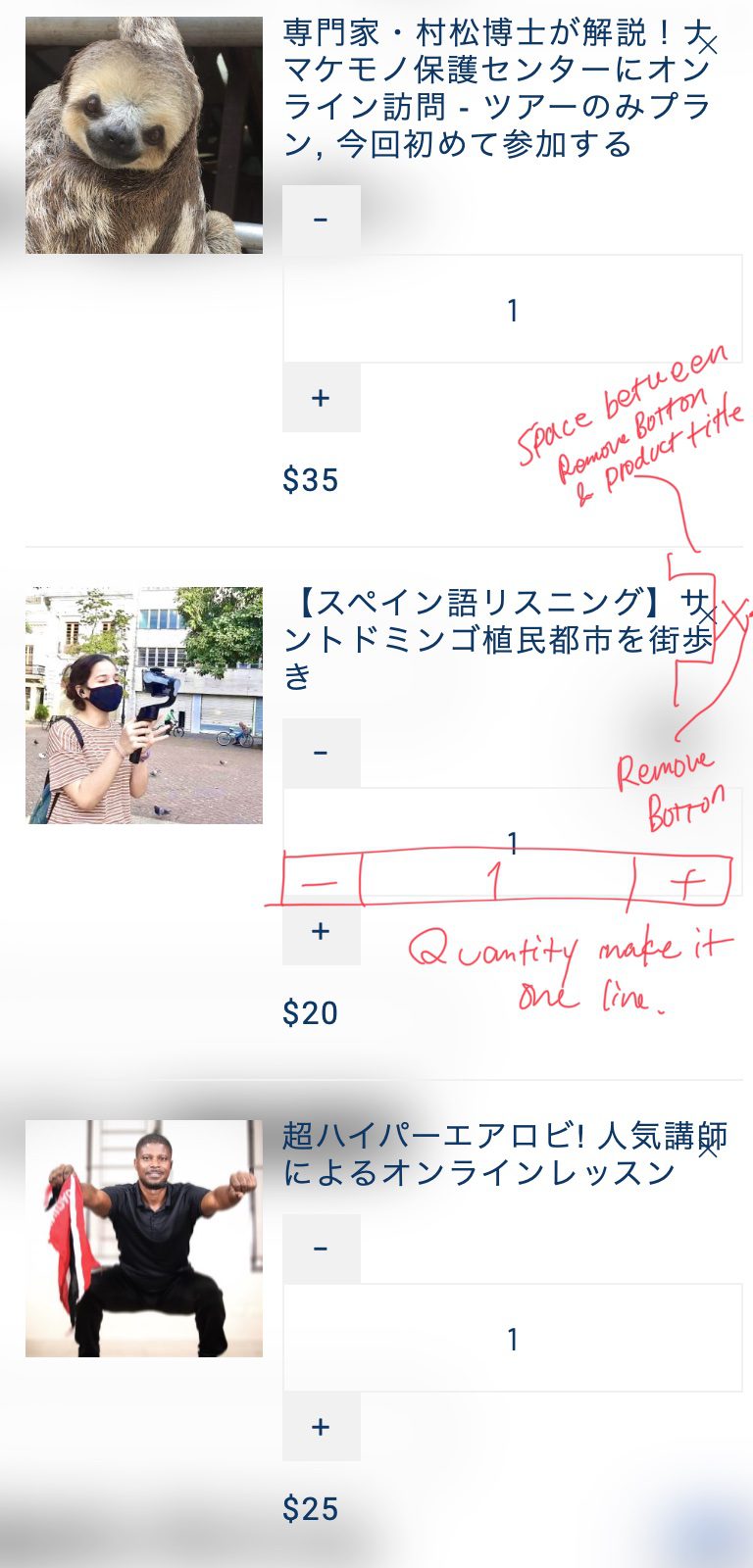
The design is messed on my website as attached. could you please how to fix the below?
1) Make space between X(Remove button) and Product title 2) Make quantity to display in one line
https://islandbuddyltd.com/PDF/Screenshot20210621.jpgHi there,
Thank you for letting us know about the design,
Could you please send us the URL of the site where the cart is displayed?
We will quickly check and fix it as soon as possible. It could easily be solved with a CSS fix.
Sometimes the themes or plugins installed on your site could conflict with ours, so we need to check it once.
You can also email us at support@hashthemes.com
Thanks & Regards
Hi there,
Thank you for your reply,
We have just uploaded the plugin with some design and translation fix that you have addressed previously in our new version v1.0.2.
You will be notified shortly about the update from CodeCanyon.
Hope this fixes all of the issues that you mentioned earlier.
If that didn’t help either then please do let us know we will be here to help you.
Thanks and Regards
Thank you very much for your quick support! I will let you know once I try the updated plugin.
Hi there,
Did you receive our update? It seems like CodeCanyon is taking long to review our update.
So, could you please send us your email? or you could email us at support@hashthemes.com so that we could send you the zip file there.
Thank you
Hi Yes I have received update notice from CodeCanyon and updated to my website. Thanks to your quick support, design is fixed perfectly. Thank you very much.
Two more questions, I would like to ask you if I would like to disappear “discount” and “subtitle”, is it any way to hide?
And could you please let me know where I can set the border colour of buttons from?
Hi,
Thank you for coming back to us,
It was great to know that the previous fix solved your issue.
As for the current issue, we didn’t have these options, so we have just now added these options and updated them in the new version 1.0.3.
You will be notified after the update is approved by codecanyon.
Please let us know if there is any confusion with this update.
Thanks & Regards
Thank you very much for updating the plugin ! Thanks to you, everything works perfectly now. I appreciate your kind and quick support!!
You’re welcome, it was our great pleasure helping you out.
If you like our plugin or support, could you do us a favor by star rating our plugin at: https://codecanyon.net/downloads
Thanks
Congratulations! Nice Work, GLWS
Thank You