6826 comments found.

Hi Support, I apologize if the questions sounds a bit silly because I may have missed something somewhere, but I have not been able to find a way to link a specific song to a menu item. To be more clear, I am attempting to put a link to a mp3 which is fed by a icecast stream in the sidebar menu, and I would like it to be played as soon as I click on it instead of being led to a new page where I can start the playing of this file. is it something that is feasible ? If it is implying more support, just let me know and I will pay for support renewal. Also, I have noticed that albums have a release date, and as my site is mostly composed of radio shows, they are not organised in “albums”, so I was wondering if it would be possible to add a release date field within tracks. Thanks again for this splendid script. Regards, Vincent
Hi,
Currently you can only assign links to menu items, performing some action on click is not supported.
I just noticed, it’s not playing on Chrome (plays smoothly on Mozilla though)
site: https://www.entertainmentnepal.net
What can be the reason ?
Also the redirection of non www to www is not working for me..
Hi,
Seems to be working properly for me. Can you try it in incognito mode so browser extensions are disabled?
Just tried via incognito mode with no extensions, and it’s not working..
Is this on windows or macos?
It’s Windows OS, I tried from another PC too and same thing not working from Chrome.
Tried with Iphone X, Safari browser again not playing, it keeps moving round but doesn’t play.
Do you have that issue on the demo site as well?
Just checked, playing very nicely on demo website (iphone & Chrome), so what setting i might have done wrong.. ?
As i looked into the setting of the demo site, i figured out the issue
With this option it wasn’t working (my current issue): Hide Video (If Enabled)
When i Disabled Hide Video it started working on Chrome on PC.
Also i see the audio playing on demo site wasnt from YouTube (i noticed it when the browser was playing music even on background on my Iphone), and my site is completely dependent on YouTube.
I dont know if this have something to do with the issue.
Thanks, i played music on https://bemusic.1.vebto.com/ : On Chrome browser, as it opened the YT overlay, so it played (had worked in my site too with opening small YT Video).
2ND i tried on my iphone safari browser. As i clicked on play, it popup the yt video above, but didn’t automatically played. After i click on video then only it plays.
Earlier this issue wasn’t there, i hope you will find out the issue and fix it on update.
Mobile browsers have restrictions around automatic playback, you might need to click play button manually on lock screen or youtube player, after that it should work properly.
Hi, so finally i enabled the overlay but it’s still not working on my PC Chrome & mobile device. Can you please try from your end please on Chrome browser.
it keeps rotating like this and never plays: https://prnt.sc/QLJCIY5HRbUn
what might be the issue..
It’s working properly for me on your site. Perhaps there’s an issue with location somewhere (either your computer or hosting or server), one of them could be blocked by youtube.
I understand, but if my hosting was blocked by YouTube it wouldn’t play on Mozilla isn’t it. I am so confused.
Hello, How can I generate Paypal webhook?
Hello, I am trying to understand why this happens and to solve it.
The <volume-controls> tag is bugged when resizing the browser window…
This happens in all bemusic scripts:
https://gyazo.com/f0dd240fdd50dd62bd73ff668cca1021Some clue? Something to do temporarily?
Hi,
There seems to be an issue indeed. This will be corrected with next update.
Hi some music companies are giving me copyright strike is it fair to use the someone else content. they are saying we have used their content without the persimmon
Hi,
Only Official spotfiy and Youtube APIs are used. If content is available on those sites, then they can be used/embed on your as well.
ok that’s mean no music companies are eligible to take any legal action because of all data is coming from spotfiy and Youtube APIs
That’s correct.
Hi Vebto, Is there any news about the next update? We wait on a fix for the queue bug.
Hi,
We’ve no ETA for it yet.
Hello, Does the Live Streaming radio works on the Mobile app also ?
Hi,
It should work on both.
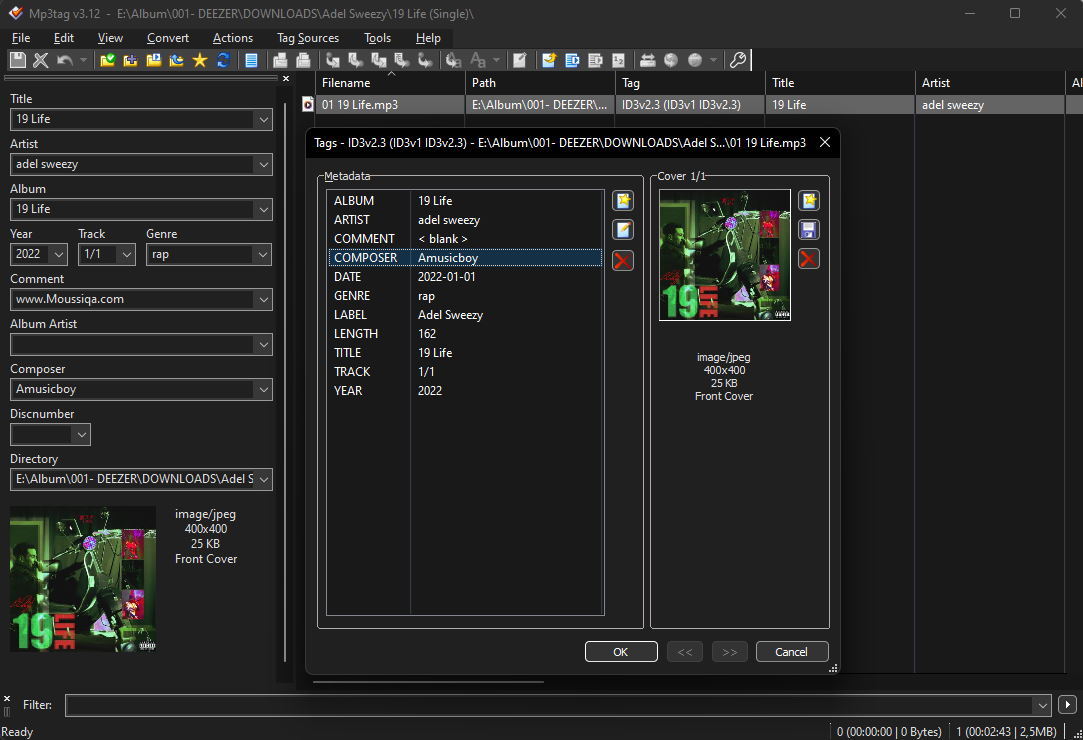
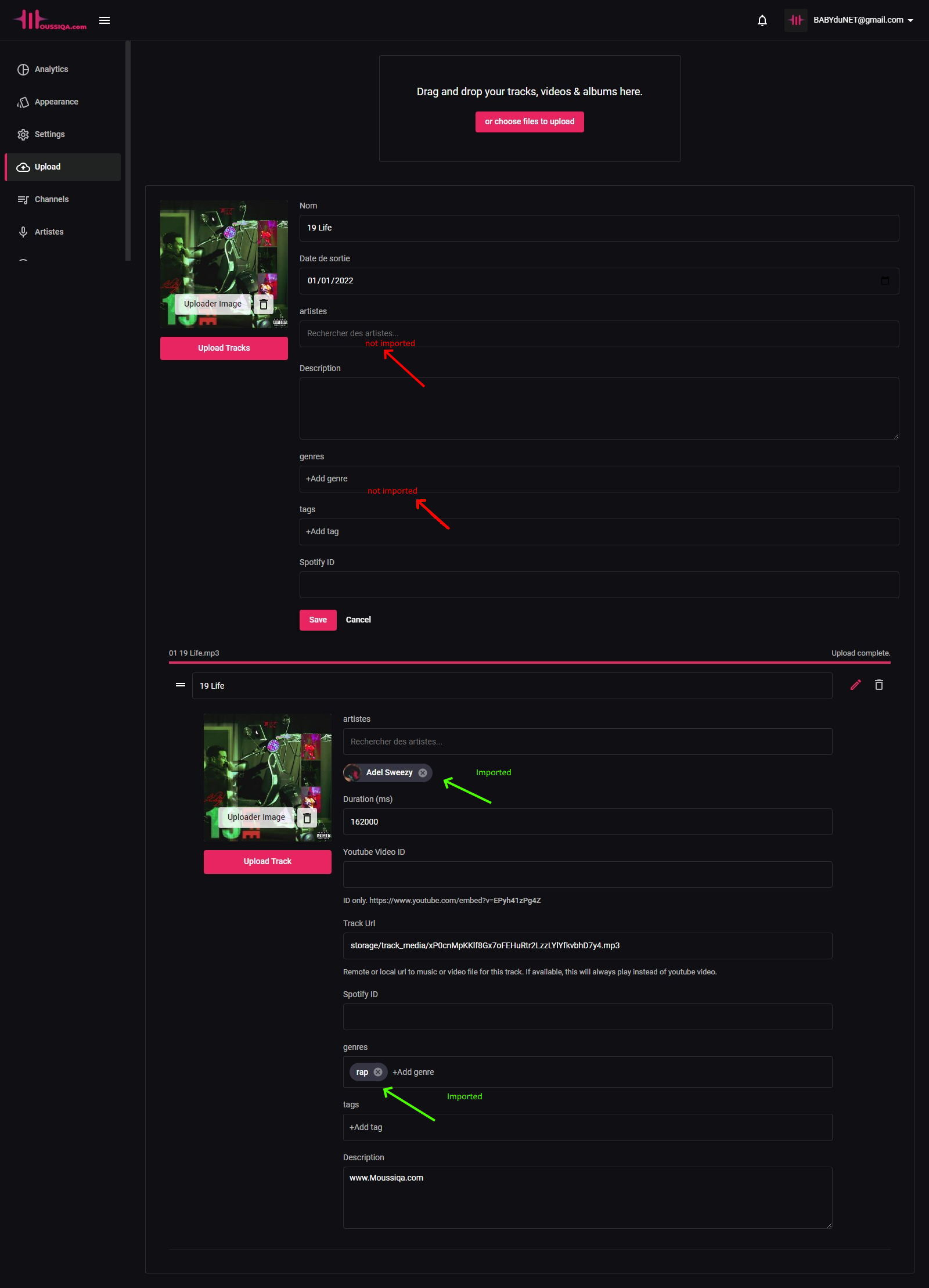
Hi Vebto I use mp3tag to put the tags in the mp3 files, when I import an album, bemusic detects the tags (metadata) of the titles (artist name, title name, genre …) but not in top for album information, it only matters album name, release date. I have to use what as metadata to fill in the artists, genre and tags fields of the album, I tried ALBUMARTIST but it does not work. Thank you
Hi,
Not sure I quite understand the issue, can you clarify a bit please?
I just took a screenshot for you to understand better.
Metadata https://zupimages.net/up/22/12/1gp0.jpg On bemusic https://zupimages.net/up/22/12/4ab4.jpgI have to put what as a tag so that the artist of the album is automatically imported when uploading the mp3 file
Can you create a ticket regarding this on our support site and attach the file you are having issues with: https://support.vebto.com.
Thanks!
Hello I am planning on buying this scrip. My friend at the moment has it and I am looking to see if we can change this Single Device Login Only allow one device to be logged into user account at the same time. So if I was to setup premium how would I add this to the subscription allowing upto 5 logins ? per account
Also can ads be turned off for premium users ?
Hi,
Ads will be hidden for premium users by default.
For login, it’s only possible to restrict to single device currently.
Is there any automatic playlist setup. Like auto adding related songs to the queue.
Hi, There’s no built-in option for this currently.
Why can’t the track title of the popular track page be clickable, it can only be clicked in the display options
The title of the track can’t be clicked, which is a bit cumbersome for the user.
Hi,
This should be improved with next update.
OK, I’m waiting. ETA for the next update?
We’ve no ETA for it yet.
after the last update the site has an error in the database and can’t find music when searching. Driver [mysql-like] not supported.
Hi,
Please create a ticket regarding this on our support site and include your site url: https://support.vebto.com.
Thanks!
If I purchase Extended license, can my users be able to publish a website like spotify? or they can just listen to music which i upload? can’t they create their own website?
Hi,
There’s no built-in option for allowing user to create a site currently.
hey,
we’ve noticed that our users often click in the middle of the artist’s photo, which directly plays popular tracks, and they think that’s all there is to listen to, it would be nice to move the play button in a corner or delete it for artists, so users will always have access to the artist’s page.
thank you
Hi,
I’ll see if we can improve this for next update.
dose it support thridparty links to play music??? i mean if i want to upload tons of music on that server, that might slow down the website server.
Hi,
Yes. You can use url to existing music or video file, instead of uploading it from BeMusic.
On the “stream” version if its playing an mp3, can someone else from their phone or computer hear the same track at the same time mark? ie right now if ANYONE goes to yoursite.com they would all hear track99.mp3 at the 2 minute mark playing
Hi, There’s no built-in option for this currently.
Add the possibility to identify an artist in the playlists, and simplify the management of the playlists too thank you
I want to buy it, but it’s search engine is not so good, can you add YouTube search engine.
Hi,
We’ve no plans for this currently.
Hello Vebto, It is possible to have a One Topic (Genre) platform? Can I add only Christian music and only display Christian music to the users ? I don’t want to have all kind of music. I haven’t test the latest update.
Hi,
Not for automated mode. You could manually create or import only artists and albums you want though.