21 comments found.

hi, I’m trying to activate but during activation its stuck on spinning
Hello,
Thank you for showing interest in the WooCommerce Customer Verification
We apologize for any inconvenience caused.
Please send your query to support@webkul.com, and our team will check and solve your concern. You can also send the ticket ID, and we will address your concern and resolve the issue as soon as possible.
Best regards,
Webkul Team
Could you tell me if it is possible to require the download of several documents to validate the account? (e.g. driving license + phone bill + passport)
Hello There,
Greetings of the day!
Please find the revert-
Could you tell me if it is possible to require the download of several documents to validate the account? (e.g. driving license + phone bill + passport)
->> Currently in our module, we are allowing only one document can be uploaded by customer for verification
If you want to upload the multiple document so we can do it via customization.
you can also connect with us with your complete requirement at support@webkul.com
With Regards
Team Wbekul
Hello, We have contacted you by e-mail and we still have no answer.
Hello There , Greetings of the day !
Please let me know your issue also Please connect with us at support@webkul.com
Thanks & Regards Team Webkul
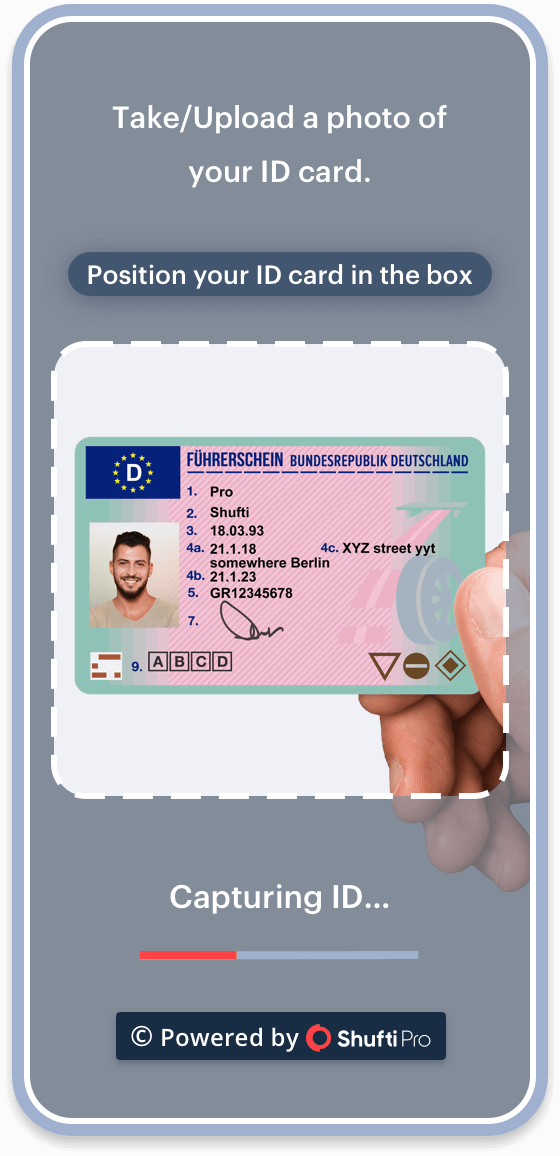
Is there any way to automatically approve the verification when the user uploads a image? And also, could you add some kind of pop-up to explain the user how should the document/picture should be? Something like this: https://shuftipro.com/wp-content/uploads/Phone-1-8.png Thanks!
Hi, I would like to use this plugin combined with another one which adds a “Verified” badge next to the user name. Is it posible to combine both? Like “when user XXX gets verified – add to that user: verified-user status”? Thanks!
Hello There,
Greetings for the day !!!
Thanks for showing interest in our plugin – please find the revert to your queries;
Is there any way to automatically approve the verification when the user uploads a image?
>>> Currently, no but we can customize it so that there won’t be any need for the admin to manually approve.
could you add some kind of pop-up to explain the user how should the document/picture should be? Something like this: https://shuftipro.com/wp-content/uploads/Phone-1-8.png
>>> Yes, it can be done but it will require customization.
Hi, I would like to use this plugin combined with another one which adds a “Verified” badge next to the user name. Is it posible to combine both? Like “when user XXX gets verified – add to that user: verified-user status”?
>>> Please let us know if you are using any third-party plugin for the verified badge feature
If yes, then we will have to check the feasibility of this customization, or if you want us to add the feature,
Please reach out to the team at support@webkul.com so that they can check and provide you with a solution accordingly.
Thanks
is still updated?
Hello there,
Thanks for showing interest in our plugin.
Yes, you may check the changelog on our product page.
If you have any other query or requirements then kindly reach out to us at support@webkul.com
Thanks
Another import aspect will be the protection of the users uploaded documents. How can I change the upload folder? So that why I can in the very least prevent google bots and others from indexing these images.
Dear Customer!
Simply, reach out to us at support@webkul.com and a dedicated person will help you in the resolution of all your queries.
Thanks
How to allow pending users to be able to purchase?
I have been trying to change some of the functions for the “front” however no success. From this file: wp-woocommerce-customers-verification/includes/front/class-wkwccv-front-functions.php
I changed: $verification_status !== 'approved'
to be
$verification_status !== 'approved' or $verification_status !== 'pending'
and
$verification_status !== 'approved' || $verification_status !== 'pending'
without success..
if ( $verification_status != 'approved' )
to
if ( $verification_status === 'rejected' )
However still need some assistance getting to work with WCFM – WooCommerce Multivendor Marketplace
Dear Customer!
As we have checked that you are facing difficulty while making changes to this plugin.
If you want us to do the customization surely we can help you out.
We would request you to reach out to our support team by contacting us at support@webkul.com
Thanks
Also, instead of only allowing verified users to place an order. There should be an option to allow new customers to upload their verification documents while placing an order to also be reviewed at the time of the order. That way for their next order it is already verified for them. This would prevent the loss of new customers being confused about the verification process and potentially it taking more than a few minutes to be noticed.
Dear Customer!
There should be an option to allow new customers to upload their verification documents while placing an order to also be reviewed at the time of the order.
>> Thanks for your valuable feedback!
As you know this process is time taking as an admin can only manually approve customer verifications.
Thus at the time of order, it is not convenient though! if you want we can add this feature for you with the help of customization.
Reach out to us at support@webkul.com so that our team can check and provide you with a solution accordingly.
Thanks
How can I get this to work with WCFM – WooCommerce Multivendor Marketplace
So that the “customers” list also shows if the user is verified or not. As well as in the “orders” list.
Side note, your plugin works with this above plugin but disappears from the wp-admin menu when both are enabled.
The main goal is to just display the user status within the multivendor customer and orders info quick view list as it currently works for the woocommerce orders and users list.
thanks this plugin is actually better than what most think. Very powerful for some businesses.
Dear Customer!
Thanks for your appreciation do checkout other plugins from our end please note we also provide customization service on request -
Contact us at support@webkul.com for any query or custom request.
As you know the WCFM is a third party module so we would require to make customization to make this compatible with our plugin.
Currently, using our plugin the admin can only check from the customer’s list whether the customer is approved, rejected for verification.
If you want the same to be displayed in the order list we can help you attain this feature with the help of customization.
Side note, your plugin works with this above plugin but disappears from the wp-admin menu when both are enabled. >> Yes, this is happening because our plugin is not compatible with a third party plugin.
Whatever extra requirements you have with the plugin can be discussed and we will help you provide a custom solution as per your need.
Simply reach out to us at support@webkul.com for the same.
Thanks
Hello, where are the uploaded images stored? In the media folder? I ask because these uploaded documents are not allowed to end up on Google.
Hello there!
There is a lack of possibility with regards to your concern as images are stored in the default WordPress uploads folder.
If, you have any other issues or queries simply reach out to us at support@webkul.com
Thanks
how to edit this message “You must need to login for the purchase.”
Dear Customer,
This can be done by customization only (Paid Service).
Kindly email us at support@webkul.com so we can assist you in a better way.
Thanks
Hello Webkul,
I was surprised to understand that this plugin is nothing but a blatant copy of User Registration Fields for WooCommerce !!! I went thru your Demo v/s Woocomerce’s Demo and Each and every screen is simply a copy. Just kept a lower price by $10 less to attract users. Why is it so, how can we trust on such copy works ???
Do let me know so that I can decide better.
Dear Customer,
We haven’t copy anything from anywhere this plugin is developed by us as per the special requirement.
If you are having issue or have query kindly email us at support@webkul.com so we can assist you out faster and better.
Thanks
No way, this plugin is a blatant copy ” screen by screen + feature by feature “of User Registration Fields for WooCommerce .. Its pretty evident. You will over look as thats easier than anything else.
I took a cautious decision and have bought the original one from Woocommerce instead of its copy. Buy once Cry One. Say No to Copy !
Dear Customer,
Its your choice to purchase any solution.
In case of any further information or inquiry feel free to revert us.
Thanks
4. Once Admin approves Visitor’s KYC -> Visitor can continue to do shopping till Admin Rejects or Blocks the KYC ???
5. Or is it that for each billed order the Visitor has to again upload document for Admin’s approval ?
Dear Gibraltor,
4. Once Admin approves Visitor’s KYC -> Visitor can continue to do shopping till Admin Rejects or Blocks the KYC ???
- Yes if the admin again reject the customer identity so customer unable to do shopping again.
5. Or is it that for each billed order the Visitor has to again upload document for Admin’s approval ?
- No the customer no need to again upload the document.
Thanks
1. Is this plugin compatible with all themes and multivendor marketplace like Dokan ? Because most of your plugins are incompatible unless we use Webkul’s plugin sets.
2. if a user a/c is unverified does that mean that user cannot do any shopping till account is verified to be active.
3. Is is possible to do old customer verification because if my client’s Dokan based ecom website is old and have many existing customers, then how does it work
Hope all works well, tks
Hello There,
Find below answer to your queries :
1. Is this plugin compatible with all themes and multivendor marketplace like Dokan ? Because most of your plugins are incompatible unless we use Webkul’s plugin sets.
>> It is built for default WooCommerce only. Hence it is comatible with all the themes, and if you found any concern then you can report the same at support@webkul.com and we will look into it.
Rest, if there is any functionaly which is being used by the Dokan at there end then there might be any conflict.
2. if a user a/c is unverified does that mean that user cannot do any shopping till account is verified to be active.
>> Only approved customers can make purchase over the website.
3. Is is possible to do old customer verification because if my client’s Dokan based ecom website is old and have many existing customers, then how does it work
>> It will work for the new customers only.
For any other query, please creat a ticket here – https://webkul.uvdesk.com/en/customer/create-ticket/ to assist you better
Thanks
Hi thanks for your reply. So any one willing to do shopping on my site equipped with Webkul’s Verification Plugin will only be able to do after :
1. Customer do their first purchase -> Upload KYC -> Admin Approves -> Order gets processed -> If Admin Rejects KYC -> Order is not Approved
2. KYC upload takes place right at the registration stage or it takes place after the first payment is done ?
3. If KYC Upload at the account creation stage then it can seriously impact new user creation because w/o KYC Approval Account will not be active and w/o an active account User will not be able to make their purchase
Hi, find below answer to your queries :
1. Customer do their first purchase -> Upload KYC -> Admin Approves -> Order gets processed -> If Admin Rejects KYC -> Order is not Approved
>> Before approval, the customer can not place order.
2. KYC upload takes place right at the registration stage or it takes place after the first payment is done ?
>> It is in the registration itself.
3. If KYC Upload at the account creation stage then it can seriously impact new user creation because w/o KYC Approval Account will not be active and w/o an active account User will not be able to make their purchase
>> It is the current workflow as of now. If you are looking for any modification, please contact here – https://webkul.uvdesk.com/en/customer/create-ticket/ to assist you better
Thanks
Thanks Webkul, for your helpful replies. Just two points guess got missed 
4. Once Admin approves Visitor’s KYC -> Visitor can continue to do shopping till Admin Rejects or Blocks the KYC ???
OR
5. is it that for each billed order the Visitor has to again upload document for Admin’s approval ?
Dear Gibraltor,
4. Once Admin approves Visitor’s KYC -> Visitor can continue to do shopping till Admin Rejects or Blocks the KYC ???
- Yes if the admin again reject the customer identity so customer unable to do shopping again.
5. Or is it that for each billed order the Visitor has to again upload document for Admin’s approval ?
- No the customer no need to again upload the document.
Thanks
Awesome plugin! Is it possible to add more than one uploader? we need to be able to verify at least 2 documents per user when they register.
Dear Customer,
Currently the customer can upload a single doc at a time. We can give you fuctionality to add more than one doc at a time by help of customization only.
To know more about customization kindly email us at support@webkul.com.
Thanks
hi is there anyway to make customers after they register they have to be id verfied in order to see content.
basically they register account then it takes them to a page that makes them upload id. then they cant get past that page unless they are id verfied.
Hello There,
Please create a ticket here – https://webkul.uvdesk.com/en/customer/create-ticket/ and let us know the id verification process. Do admin verify the id manually or it will be done with the help of any third party API?
Thanks
looks IMPRESSIVE!
Thanks!