164 comments found.

Hi, I’d like to know if the plug-in would work for a coworking space where people can book days, weeks and months with different pricing. Or let’s say single days until 7 days cost 35$ per day, then from 7 days on the day is at 25$ (week 175$), for 4 weeks and more the daily price will be at 15$ (4 weeks 440$) and then from 90 days (3 months) onwards it goes down to 3,50$ per day (or 300$ per month). Thank you.
Hi,
Thanks for your interest in ARB booking plugin.
I think you are looking for a booking system like this demo? If yes, of course you can achieve what you want. The ARB booking plugin has the features to allow bookings with different pricing. For example, this demo booking product has the following price variations applied:
7 Days Super Deluxe Room Booking ($35/day)
From 8 to 15 Days Super Deluxe Room Booking ($25/day)
From 16 to 90 Days Super Deluxe Room Booking ($15/day)
From 90 Days onwards Super Deluxe Room Booking ($5/day)
Thank you,
Fluent-Themes
Awesome, thanks. Will buy now.
Hallo, a pre-sales question.
Does your plugin support “packs of bookings”? Can I have a “Silver pack” where the client can book 3 days, a “Gold pack” with 5 bookings and “Best pack” with 10?
When the client buy a package and pays for it, then he can login and book his 3, 5 or 10 bookings, the days he wants…
Is this possible?
Thanks!
Hi,
Thanks for reaching out.
Your desired “Package booking” system is not available in this plugin unfortunately. You can take a look at the Live Demo booking products to know how the booking system works in ARB.
Kind regards,
Fluent-Themes
Hi! I’m looking for a booking plugin for my website, where clients book rooms in a hotel.
Example: - Room costs 100$/day - Client chooses 2 days (1 night): Feb 7 – Feb 8 - Price: 100$ - Client submit the order
Question. Can someone else choose Feb 8 as an available check-in date? Because every our client leave rooms until 10AM, so the room is available in 2 hours on the same day.
Will your date picker calendar show booked (unavailable) days?
Is your plugin provide this features?
Hello,
Thanks for your interest in the ARB booking plugin.
Yes, ARB plugin provide these features. The calendar will show ‘booked’ days in different color and someone else cannot choose that date when it is booked.
Kind regards,
Fluent-Themes
Thanks for your quick reply! One more question – is there a possibility to ordering the form fields? Ex. moving the check-in (start) picker to the top of form.
Change like this: 1. Check-in (start) 2. Dueation 3. Other…
Thanks!
Hi,
Thanks for your reply.
The fields ordering will appear as shown on the live demos.
Regards,
Fluent-Themes
Ok. Maybe our developer can edit it in form template (or overriding it by child template)? Is it possible?
Yes of course it is possible.
Date time Picker does not show in Date or date time field in Availability tab unless we save the product and click on date field again.
Hi,
Thanks for reaching out.
Without evaluating your site it is difficult to say what could be the issue with the availability tab of your admin area. To find exactly what is the source of the issue, please provide your site’s details to the Support Team and they will check and solve the issue for you.
Kind regards,
Fluent-Themes
Hi, I have a question before buying your plugin. My client has a store and sells physical products and events. If a customer books and pays for an event, but it has to be canceled (covid, not enough participants..), can I refund him through the woocommerce plugin ? Will the paid bookings appear as the other product orders in the woocomerce app and bookkeepings ? Thanks a lot for your answer
Hi,
Thanks for your interest in ARB booking and reservations plugin.
1. Yes, if a customer cancels a booking after paying, you can refund through the WooCommerce plugin, as long as your payment gateway supports refunds.
2. The paid bookings will appear as the other product others in your WooCommerce plugin.
Regards,
Fluent-Themes
Hello I have a pre-order question. Is it possible to set billing details and delivery address to display on check out page? We’ve got a service with delivery and need to set up delivery area, thank you
Hi,
Thanks for your interest in ARB booking and reservations plugin.
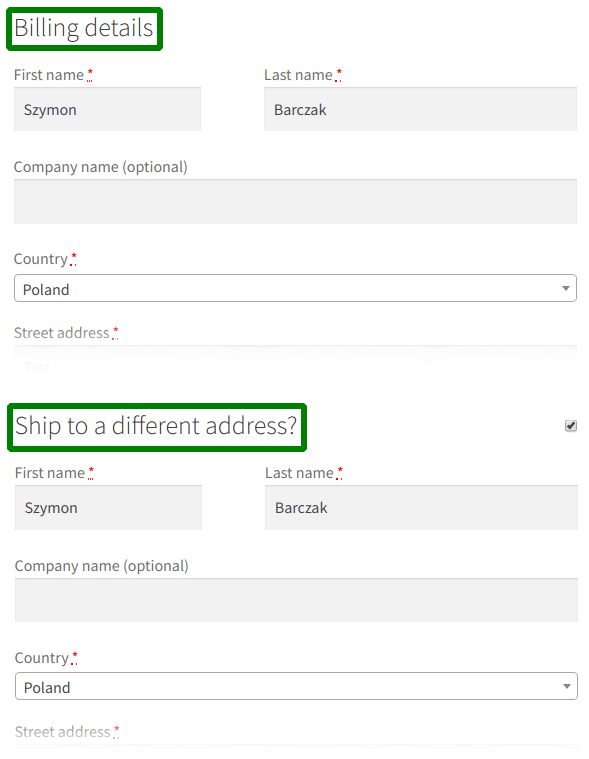
You can use the WooCommerce in-built options to have control over your checkout page. Having billing details is a default option of WooCommerce. Take a look at this screenshot please. There you can see the billing details fields are displaying on the checkout page. You can try the demo products of ARB also, and check how the checkout page displays.
Regards,
Fluent-Themes
Great thank you. Is there a possibility to log into some demo admin panel to take a look at the options ?
Hi,
Each demo products of ARB has it’s back-end preview as well. For example, here is the back-end preview of Hotel booking demo, and here is the back-end preview of Movie tickets booking demo. You can contact the Support Team for more.
Regards,
Fluent-Themes
Hi is it possible to have booking search form so the user search specific dates among hotels with different types of room? Thanks
Hi there,
Thanks for reaching out.
I’m not sure about that, but you can contact the Support Team to get the correct answer. They are the tech people of ARB plugin and they will be able to help you on this.
Best Regards,
Fluent-Themes
Hi
“Check reservation availability ” comes automatically as payment method. I want to deactivate it and activate the credit card. But it is not passive. What is the reason?
https://i.ibb.co/kJNyb3j/asd.png https://i.ibb.co/Gdrscpd/xcv.pngThanks.
Hi,
Thanks for reaching out.
Please contact the Support Team, they can give you insight on this, because they are the Tech People of the ARB plugin.
Kind regards,
Fluent-Themes
The plugin seems to not function with DIVIs latest release 4.14.2 – Unfortunately I don’t know from which earlier version it encountered problems. It worked fine with DIVI 4.9 I know. The calendar on the product page is all grey and you can’t book. Anyone else experience similar problems?
Hi,
Thnks for reaching out.
Please reach out DIVI support with this. No other ARB users are having any issue like this. If you need our support team to evaluate the source of the issue, please contact the Support Team with your item purchase code.
Best regards,
Fluent-Themes
Hi Fluent-Themes, Please can I request a refund ( As per your 15 day Money back guarantee ). The plugin messed up my site. Menus were no longer working in the backend nor could I see ‘Resealable Product’ under the Woocommerce product data option. When I tried to go to your reservation section in admin side it was just blank. My site is running on all the latest of WP and Woocom, Elementor and Elementor Pro, Gravity Forms and php 8.0 Thank you.
Hi,
Thanks for reaching out.
Have you activated the ARB plugin with the 9 digit Token number yet? The documentation of ARB has the instructions written how to verify the purchase and get your unique 9 digit Token number to activate the plugin. Without 9 digit activation, you won’t see ‘Reservable Product’ under the WooCommerce product area.
You can always ask for a refund if ARB does not work as it should. Before that I suggest you to contact the Support Team from here to let them help you to find the source of the issue and fix it for you. If your plugin is not activated with the 9 digit activation Token number, they will do that for you also.
Kind regards,
Fluent-Themes
Hi Fluent-Themes, In this case, it was a user error between my designer’s keyboard and chair. Perhaps on the ARB Settings page by the ‘Activation Token Number’ to have a green tick if correctly activated or a red cross if not, as they had entered the Item Purchase Code instead of going to the https://fluentthemes.com/verify-purchase/arb/ section to generate a Token and there was nothing there saying incorrect token entered ( Would make life easier and save time. ) Anyway, Thank you have a good week!
Hi,
Glad to hear you have worked it out.
It’s a great suggestion to implement green/red tick on the field. We will implement this in the future versions of ARB.
Regards,
Fluent-Themes
Pre-sale question: Hi, Is it also possible to set a minimum # bookings and maximum # bookings for an event? I only want an event to continue if a minimum amount of registrations is met and I can only allow a max certain amount of registrations per event. Is such a thing possible? Also, what happens when the minimum requirement is not met? How will the refunds be processed?
Thanks
Hi there,
Thanks for reaching out.
It is possible to set a maximum number of bookings for an event. The minimum number is ‘1’. If you have 50 seats for an event, users will be able to book until the 50 seats are booked. It is not possible to cancel all the bookings that have already paid, if you do not get a certain number of reservations.
Best Regards,
Fluent-Themes
Hi, but can I set the minimum myself or not? Can people still book individually when I’ve set the minimum at 5 for instance? What happens when I do not receive the number of reservations I want?
Hi,
As I mentioned in my previous reply, the bookings will not be cancelled automatically that have already paid, if you do not get a certain/minimum number of reservations. You can cancel the bookings manually whenever you want. And the minimum number of bookings is set to ‘1’. If you need more clarification on this, please contact the Tech Team from here. They can give you more insight on this.
Kind regards,
Fluent-Themes
I want to update the plugin but, does the newest version, notificate the users of available tickets of a date without clicking the day? For example: on 1st Jan 22 there’s 8 slots, one bought 5 and there’s 3 remaning… does the calendar notify the new buyer there’s 3 left on that date without click’n on it? If it does, I’ll buy it again.
Hi,
Thanks for reaching out.
The ‘remaining slots’ can get changed at any second. That’s why ARB does not send the ‘remaining slots’ notification emails. For example, if an user is notified that there is ‘3 slots’ remaining, and before the user gets to the booking form, some other user books a slot; so, the notified user will get wrong information (there will be 2 slots remaining instead of 3).
Kind regards,
Fluent-Themes
Hi, Is it possible to make multiple day selection, but not consecutive? For example each Tuesday of the month? Thank you
Hi there,
Thanks for reaching out.
I’m not sure about that, but you can contact the Support Team to get the correct answer. They are the tech people of ARB plugin and they will be able to help you on these.
Best Regards,
Fluent-Themes
The product I’ve created isn’t displaying properly. I can’t see the reservation options at all. I have set availability times as in your documentation.
Hi,
Thanks for reaching out.
I have reached the Support Team of the ARB plugin about your query and I am informed that you contacted the Support Team (using this email: pi…r@p….eative.ca) by September 30, 11:49 PM (GMT) and they got back to you within 2 hours (Oct 1, 1:05 AM (GMT)). They asked for some information from you in order to help you with the issue you are facing. But, you didn’t reply to their email since then. The Support Team is still waiting for your reply with required information (Version number of your WordPress, WooCommerce and ARB, List of plugins you are using etc are required to determine any issue and solve them).
Here I can help you by providing information on what can be done with ARB plugin and what cannot be done. To know ‘how things can be done’ or ‘fix any issues’ you need to be connected to the Support Team. They are the tech people of ARB plugin and they will be able to help you on these. Please reply to their email with the required information, and they will fix any kind of issues you are having.
Best Regards,
Fluent-Themes
Hi,
Have you got the solution you needed from the Support? Please let me know if you need me to ping the Support Team on your behalf. If the issue has been solved already by the Support, kindly share your experience with the Support Team of the ARB plugin in brief by replying here.
Kind Regards,
Fluent-Themes
Hi, i’ve read the documentation. I don’t understand if i can edit a booking (order) in each part – ie. add-ons/extras – or just for quantity and date. Thank You
Hi,
Thanks for reaching out.
You can edit a booking order’s each part. The value of each field of your booking form is editable from the admin area. If your booking form has 4 fields, the admin area will show you 4 fields to edit before confirming the booking. If you have 15 fields, you will get all those 15 fields to edit from the admin area.
Kind regards,
Fluent-Themes
Hello, I have a problem, when I put a duration at 1,2, 3, etc … it only displayed me a price for one but it does not multiply if we increase the duration.
Thank you for your help.
I checked the box that the duration was an item…
Hi there,
Thanks for reaching out.
Here I can help you by providing information on what can be done with ARB plugin and what cannot be done. To know ‘how things can be done’ or ‘fix any issues’ you need to contact the Support Team. They are the tech people of ARB plugin and they will be able to help you on these. Please contact the support team with your product URL, and they will fix any kind of issues you are having.
Best Regards,
Fluent-Themes
Hello! Presale : In room reservation demo, we can’t chose the end of our reservation. So, we can only reserve one day. Or i missed sometings?
Ho sorry, just seen duration….
is it possible to have start and end reservation instead of duration?
The duration will set the start and end date/time of the reservation.
Hi
Any compatibility with WooCommerce Extra Product Options?
Hi,
Thanks for reaching out.
ARB plugin has not been tested with the 3rd party plugin “WooCommerce Extra Product Options” yet. So, I am not sure if the plugin is compatible with that one. You can reach out the author of that 3rd party plugin to know if their plugin is compatible with ARB or not.
Do not hesitate to contact the Support Team of ARB booking plugin, if you have any other questions.
Best regards,
Fluent-Themes
Hi
Thanks for that, I have asked them, ARB is basically the only booking plugin that they’ve not made compatible yet.. I’ve tried both together.. but the totals of ARB is different to the totals of Extra Product options and I’m not sure how to fix it.
I’ve managed to sort out the other issues that there were, except this one important one
Hi,
Thanks for your reply.
Hope they make their plugin ARB compatible soon. If you have any other questions/concerns, please do not hesitate to contact the Support Team.
Best regards,
Fluent-Themes
Any way you would do compatibility in near future?
Hi,
We are not working on making ARB plugin compatible with any 3rd party plugins yet. We are working on compatibility with official WordPress and WooCommerce only. Currently ARB is compatible with latest versions of WordPress and WooCommerce.
Kind regards,
Fluent-Themes
Hi, I’d like to use this for our event booking to integrate with our WooCommerce shop. Is it possible to specify specific dates that will be available for booking?
For example, 1st October 7pm to 10pm for 22 people but then say the same booking for 27th October? I hope that makes sense.
Hi,
Thank you for reaching out.
Yes, it is possible to specify specific dates that will be available for booking. You can set the booking availability as you mentioned in your example.
Best regards,
Fluent-Themes
if it this plugin doesn’t fit for my clients requirements is a refund possible?
Hi,
We offer 100% refund if our plugin does not work as it is described or the plugin doesn’t work the way it should.
For any other reason you can view the refund policy from here: https://codecanyon.net/page/customer_refund_policy
Kind regards,
Fluent-Themes
Hi, Is it possible to Set ‘Check In/Out’ dates as Available : a customer chekout the 08/25/21 and an other customer can check in the same date ?
Best, Valérie
Hi,
Yes, of course. After a customer checks out (e.g. on 08/25/21 12:00 P.M), that slot/room becomes vacant/empty on that date from 12:01 P.M; and ARB will make that slot/room available for new ‘booking / check ins’ automatically (unless you set it otherwise). Thus, another customer can check in on that same date.
Best regards,
Fluent-Themes