541 comments found.
Hi! can I set a credit limit per customer?
Hi rquirola, WooCommerce B2B hasn’t this kind of feature in its list, sorry!
Is there any plan to add a feature to let us add new Account Details Fields? (we want to add a few company related fields to the my-account / registration form but I can’t find such an option in this plugin)
This feature is very handy specially when we want to integrate our website with the 3rd party services to keep our customers’ data synced with the the info we have in our CRM.
Thanks
Not at the moment, WooCommerce has predefined hooks to do this and there are several plugins dedicated to this purpose. We will consider the feasibility and impact of this feature for any future updates, thank you
Please add quantity field to the Live Search results. The Live Search field can be used as a mean of quick order as well, and in b2b sites products are usually ordered in bulk and quantity field is a must.
Thanks
Thanks for your suggestion, we will check its feasibility and impact for a possible future update!
I see there is an option to hide price from the guests.
We have multiple User Groups, and we want to hide price from some of those groups as well (this is normal in B2B to have an “Unapproved Member” group that also can’t see the prices). Also, the replaced link will be “You’ll see the prices once your account is approved” or something like that.
Is this possible to hide the price from specific User Group? if not, is there a plan to add that feature? (this is important for b2b websites to only show the prices to the members that are actually approved, not any member who is registered. To avoid competitors absue and info stealing)
Hi Dadparvar, how are you? I hope so! No, the prices are only hidden from customers who are not logged in. Depending on your specific needs, you could activate the “Moderate registration” option to decide which users to enable after your appropriate checks, or use the dedicated prices per group to view different prices to customers not belonging to any group (GUEST)
Hi! In the latest update, is it possible that the display logic of the products has changed? Before the update, if a product has a mix of default group category and private group category both groups can view the product? And now only the private group can see the product. is this possible? or do you always have this restriction? Thank you.
Hi sitosite, how are you? I hope so! No, the logic with which products and product categories are displayed or hidden by group has not changed. Please, refer to our support channel:
https://support.woocommerce-b2b.com/in order to ask for support. Thanks.
Hope these informations can help you to resolve your doubts, best regards

Hi, i need to show, in the product page, the regular price and discount price. Is it possible? Have i to change some code? THX
Hi lukezed, how are you? I hope so! Please, can you refer to proper channel for support:
https://support.woocommerce-b2b.com/Our team will be happy to help you solve your doubts. Best regards
Hi I am trying to open a support ticket but it won’t let me register. Keeps saying “ERROR: User login is wrong or is already registered. Please choose another one.” Can you please help i have a few questions I need answering asap please. Thank you
Hi fnhc, how are you? I hope so! If user is already registered, please try to recover your password or please register with another email address, so our support team will be happy to help you solve your doubts. Best regards
I just purchased your plugin but I think it doesn’t work according to my requirements. I need different product price per unit (x1) for b2c clients and different product price per package (x20) for B2B clients. Could you please help me how to implement that with your plugin?!
Thank you very much.
Hi tonyblue, how are you? I hope so! Please refer to:
https://support.woocommerce-b2b.com/in order to ask for support. Thanks and best regards
Extraordinary plugin with lots of features. My site currently using this plugin. Selling particular
. I have never faced any problems regarding this plugin. For B2B market, this plugin is very useful. Making payments and all functions go smoothly.Hi there, can you display an RRP for logged in customers?
Hi fnhc, how are you? I hope so! WooCommerce B2B doesn’t have this kind of functionality, sorry, but regardless of it, you can add custom fields using WooCommerce’s default hooks. Best regards
Great plugin with great options. Everything looks so simple but so effective…
Hi,
Our website was developed by a 3rd party company and when we sign in to WordPress with an admin account, we are unable to view the product pages and navigation menus on the frontend assigned under the B2B settings.
Do you have a solution on how to resolve this please?
Thanks in advance
Hi mimmt, how are you? I hope so!
Unfortunately with this information it is quite difficult to be able to give you a suggestion  Can you please open a ticket on our portal dedicated to support:
providing more information, examples and requested data to allow us to carry out a verification? Our team will be pleased to answer you as soon as possibile.
Best regards
Hello I had a question about plugin features, I wanted to know if partners can add products themselves?
and also know that is WooCommerce B2B support multivendor solutions?
Hi panotour, how are you? I hope so! If you refer to the “Partners” group in the demo, it is a sample group to which you can assign your customers. With WooCommerce B2B you can create different groups to group your customers, but as customers in WooCommerce they don’t have the skills to add products, they just buy. At the moment, we have no information about the use with multivendor solutions, sorry. I hope this information will help resolve your doubts, best regards
how do I make my custmer able to choose to switch from one account to another
Hi espoir93, how are you? I hope so! Your request is not clear to me, WooCommerce B2B does not have any functionality that allows switching customer accounts, but the need is not clear to me either. Could you please open a ticket in the specific area dedicated to our users explaining your needs and purposes, perhaps with examples? Thanks and best regards
I have created several groups with more or less important reductions (example: invited group 20%, bronze group 30%, silver group 40% ...) I want my customers to be able to choose to move from one group to another . because on your module if the customer chooses a group when registering, he can no longer choose to move to another group, Thank you for answering me
Hi espoir93, you’re welcome! Thanks for the clarification, now your need is clearer. Unfortunately, however, WooCommerce B2B does not allow the user to change their group at will, precisely because discounted sales prices are linked to it, so the shop manager must be in control of the group assignment. I hope this information will help resolve your doubts, best regards
Hello. How can i lock the roles in my account? Today they can register to unde group but under edit page they can pick again? I need to lock them so they cant change.
Hi captain, how are you? I hope so! Your request is not very clear to me, I’m sorry, could you please open a support ticket to our support team:
https://support.woocommerce-b2b.com/providing more details about your need? Thanks and best regards
In the registration form, they can pick the group they want. Business or private. But then they login and go to /customer-area/ there they can choose again? I like to freeze that. So they cant change.
Hi capitano, I’m sorry, but I still don’t understand. WooCommere B2B does not allow you to choose your role, it allows you to choose your group (if you activate the relative option) but once chosen, only the shop manager can change it and never the customer himself. Again, could you use the support portal to provide more details (screenshots, examples, credentials) to understand your request please?
Hello. I want to translate ( User Role ) in the registration form. This word is not covered in the admin section or in the loco translation files. Yes it is in there, but it dont work for the register form. Can you tell me where i can fint this hard code, so i can translate it. I have looked trur a lot of codes Thanks.
Hi captain, please refer to:
https://support.woocommerce-b2b.com/to ask for support, providing requested data. Thanks
Hi, I need to create two product category trees, the one for individuals and the other for professionnals.
Some products need to be visible by the two groups, so I’ve set them in the two trees.
But doing like this, these products are neither visible to guests, nor to individuals, nor to professionnals.
How do I do this?
Is it possible to restrict some categories/products to certain countries using this plugin? (if not, is there any plan to add such a feature? This is a critical feature for large scale b2b stores)
We have over 100 categories and 2500+ products and we need to restrict purchase/shipping to some countries, based on the product and/or category.
Hi Dadparvar, no, WooCommerce B2B doesn’t have this kind of functionality, sorry. Thank you for the suggestion, we will check the feasibility for any future developments, but at the moment this is not planned. Best regards
Hello! Is there an option on the plugin to have product compare in front end? Also with this plugin can i have some products with price that can be purchased and others with no price and a form to request quote? Regards!
Hi carloscid, I’m sorry, WooCommerce B2B hasn’t a compare function. Regards quotations, it works as payment method, so customer can quote an entire cart, not a single product.
Thanks for your answer, one question about the quotation, can that be for products without price? For example if i have some products with price they can be bought normally but if i have products without price they can be added to cart for quotation? Regards!
You’re welcome! It depends on how WooCommerce is set up, but bear in mind that if you set up a zero-priced product, your customers might as well buy them. You can take a look at the live demo:
https://demo.woocommerce-b2b.com/wp-admin/to simulate your desired scenario and check the functioning of the quotations.
Hello! giing it a quick look i couldnt figure out how to make “quotable” products, basically my idea is to have some products with no price just for quotation and some products with price for direct buy in the same website, looking forward to your comments regards!
Hi carloscid, in WooCommerce B2B quotation is a payment method, it is not a simple request for information on a single product. Therefore, by inserting products at zero price, they would be purchasable.
Thanks for the clarification! So there is no way to have some products with no price shown that can only be quoted and some products with prices that can be directly purchased in the same site? Regards!
Hi carloscid, no, WooCommerce B2B hasn’t this kind of feature
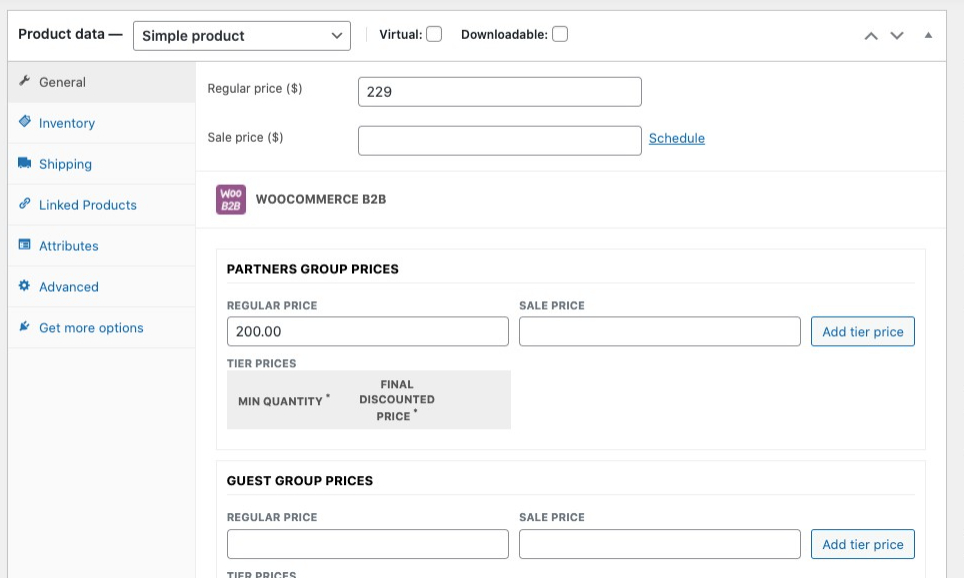
Hello, I create a Partners group and test with apply to be a Partner and login as a partner. It seems that the price is still show the default price (guest price). I add the new price in the Partner field already but why in my website is not work? I am trying to register in your support link but I can’t get any email from your system. So, I ask you here.
For Example, the guest price is $229 and I set partner price $200 but the website still show the price $229 not $200 for Partner member login.
https://upload.cc/i1/2021/06/05/fQLlZe.jpegHi phraisohn, please refer to:
https://support.woocommerce-b2b.com/to ask for support. I sent a password reset for your account, please check spam folder. We need more informations and access details Thanks
Updated I found it that It must set The price rule > Show prices assigned to single product.
now it works.
Great phraisohn! I’m glad you resolved! Best regards
Hi, I have more question. Is is possible for use the different Featured Product Image for different group?
Thank you
No, WooCommerce B2B hasn’t this kind of feature, I’m sorry