2576 comments found.
Hi! Is it possible to integrate with the ReHub theme? Unfortunately, the player is not displayed on the product page, in categories. Best regards!
Hello
Can you show me a link ?
We cannot guarantee full integration with any site but basic woocommerce integration should work – https://zoomthe.me/knowledge-base/zoomsounds-audio-player/?s=woocommerce&ht-kb-search=1&lang=
Cheers!
Radu

Hi, maybe I’m missing it but I cannot seem to figure out how to connect the audio to the player I’ve created a name for. Do you please have some basic videos available online to explain how to make a playlist? Or can you share screenshots here? I’m frustrated that this isn’t easier. Thank you.
Hello
We are creating a 101 series in the following days
The main playlist is – https://www.youtube.com/playlist?list=PLBsCKuJJu1paAkH0V0pHcrFvZxRFIPIaG
Cheers!
Radu
Hi there,
I was looking for some Text was included in the file : DZSAPPView.php which I believe its worth to put it under Portal Link in the Setting Section of the Admin Control Panel.
The words are : About | Share | Add To | ADD NEW PLAYLIST | and other english words in that file.
the problem i have to change that words every time i have to update the script !!
Hope you can move those Text words in the control panel.
Regards,
Hello
We’ll see what we can do to add them to the zoomsounds > settings > translate
Cheers!
Radu
Thanks .. Appreciate your support
the settings,It has been loading in a circle and the setting parameters cannot be saved,why?thanks.
Hello
Send wp-admin login via https://zoomthe.me/sendadmin/login-details.php?sendftp=off
Input ” https://codecanyon.net/comments/26527214 ” in Additional Details field ?
Cheers
Radu
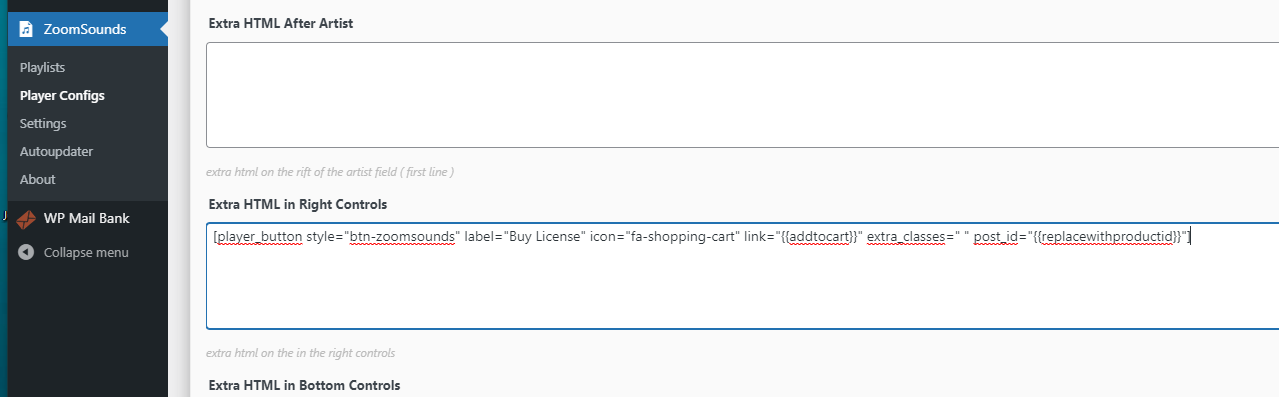
{{replacewithpostid}} and {{replacewithproductid}}
is not working.. please advise
thank you so much
Hello
Can you show me a link so I can see what you are trying to achieve ?
Cheers!
Radu
Im using this shortcode https://www.bdurpublishing.com/build/wp-content/uploads/2021/04/player-config.png
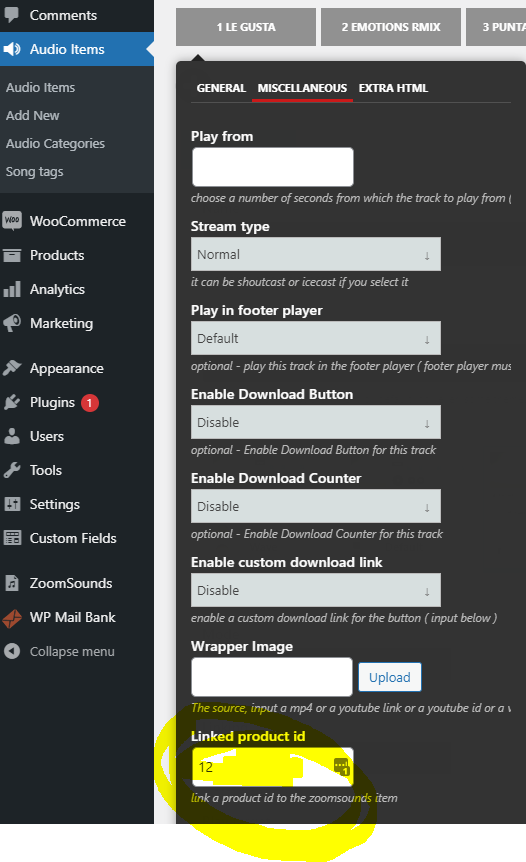
and I have the product linked ID
https://www.bdurpublishing.com/build/wp-content/uploads/2021/04/linked-id.pngbut the BUY button is not echoing the product ID
https://www.bdurpublishing.com/build/2021/04/15/dancing-ritmo-vol-1-latin-vibesplease help
Any update?
Hello
I made this video for you to explain – https://zoomthe.me/knowledge-base/zoomsounds-audio-player/article/use-optional-meta-boxes-for-use-in-extra-html/
Cheers!
Radu
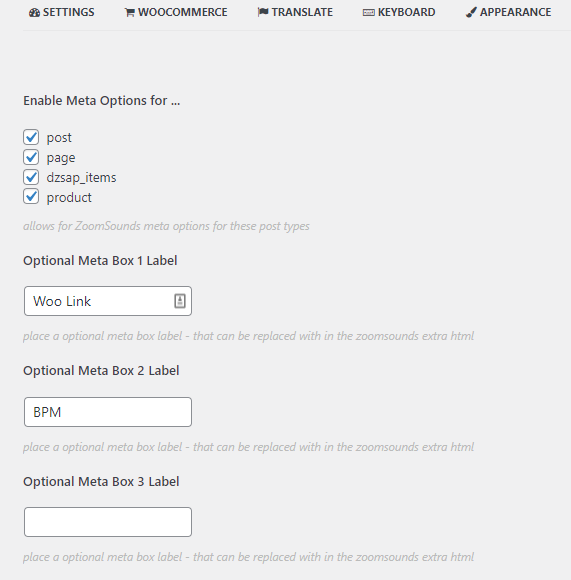
Thank you. I may have a found a bug that these checkboxes are not saving, see screenshot https://www.bdurpublishing.com/build/wp-content/uploads/2021/04/Capture.png
I check them save then go back and they are unchecked.
Might explain why {{meta1val}} is not registering on link https://www.bdurpublishing.com/build/2021/04/15/dancing-ritmo-vol-1-latin-vibes/
hovering over the BUY button…
Thank you for all your help.
Sorry, I forgot to mention you should update to 6.36 via zoomsounds > autoupdater
Cheers!
Radu
I updated and the https://www.bdurpublishing.com/build/wp-content/uploads/2021/04/Capture.png checkboxes is still not saving… Thank you
Hello
I cannot reproduce the bug , and that link is not loading for me
Cheers
Radu
Which link? https://www.bdurpublishing.com/build/wp-content/uploads/2021/04/Capture.png Thats a screent shot of the checkboxes that is not saving. everytime i check , save then refresh it shows unchecked.
Because I want to use the {{meta1val}} but its not working.
Hello
Send wp-admin login via https://zoomthe.me/sendadmin/login-details.php?sendftp=off
Input ” https://codecanyon.net/comments/26508041 ” in Additional Details field ?
Cheers
Radu
I sent the credentials 2 weeks ago, any luck?
Yes, it is fixed
the boxes save now
I sent the reply on mail
Cheers!
Radu
How do we use the optional meta boxes?
Hello
Can you show me a link so I can see what you are trying to achieve ?
Cheers!
Radu
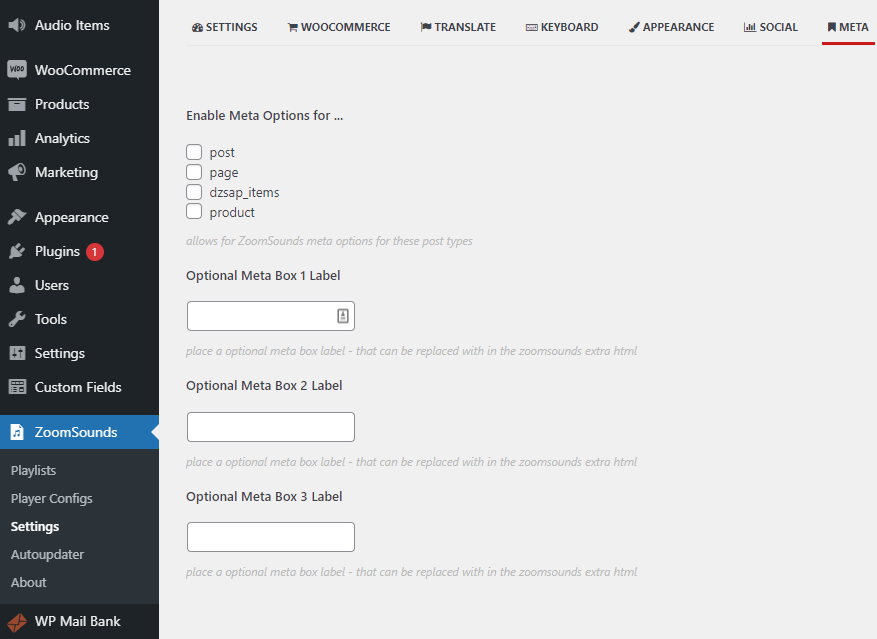
I would like to know how to use these (see screenshot)... https://www.bdurpublishing.com/build/wp-content/uploads/2021/04/meta-boxes.png
so maybe instead of the add to cart function, I can just add url to go to the product for the BUY button seen on…
https://www.bdurpublishing.com/build/2021/04/15/dancing-ritmo-vol-1-latin-vibesbecause each song will be different url
love the player just need help thank you
Any update?
Hello
I made this video for you to explain – https://zoomthe.me/knowledge-base/zoomsounds-audio-player/article/use-optional-meta-boxes-for-use-in-extra-html/
Cheers!
Radu
I have been using Zoomsounds with WordPress and PowerPress (by Blubrry) for our podcast for 3+ years and it has been great. This evening, however, I updated from v. 5.89 to v. 6.35, and the player disappeared throughout the site. None of the shortcodes (neither the PowerPress shortcodes or the regular inserted shortcodes) are bringing up the player—it just reverts to the next default player. I see that others had this issue with 6.34, but I used the AutoUpdater and it says in About that I have v. 6.35. My site is www.parsingscience.org. Thanks for your help!
Update: After taking out “Extra Classes for Player” from the MISC menu, I can now get any of my player configurations to show up when using shortcodes, but this doesn’t help with replacing the PowerPress player. I have both PowerPress options in the Settings -> Developers turned on, but since the update PowerPress reverts to the standard MediaElement player.
Hello
Can you show me a link ?
We have not done any development for that integration for years in any of the versions
Cheers!
Radu
Hola, he actualizado a la version 6.35 pero igual no puedo crear una lista de reproducción, en el editor de wordpress se muestra, pero ya cuando salgo a la vista web ya no se muestra.
Updated the downloads file as well
Cheers!
Radu
Hola, tengo la versión Versión 6.29 y no puedo crear una playlist. Puedo ver en el editor de wordpress pero cuando lo veo en la web ya no se muestra.
Hello
Update to 6.35 via zoomsounds > Autoupdater
Cheers!
Radu
please make intgrtion for wcfm and dokan multivendor stores
Hello
There are no roadmap for this at the moment
Cheers!
Radu

Hi there, After upgrading the script to the newest version = 6.34. I am facing problem to not be able to download any audio file hosted in different folders other than the the wp/wp-content/uploads | following errors is thrown when i press download button : failed $fileUrl – https://www.majalisna.com/multimedia/240/2-1245967582.mp3failed – Array ( [type] => 2 [message] => file_get_contents(https://www.majalisna.com/multimedia/240/2-1245967582.mp3): failed to open stream: no suitable wrapper could be found [file] => /home/maja/public_html/wp/wp-content/plugins/dzs-zoomsounds/inc/php/ajax/ajax-download.php [line] => 225 )
Noting that there is no problem if the file is located under /wp/wp-content/uploads !!!
Please Help
Hello
Seems you do not have file_get_contents / allow_furl_open on your server
Try the update 6.35 via zoomsounds > autoupdater it should use curl if you do not have file_get_contents
Cheers!
Radu
allow_url_fopen is deprecated in PHP 7.4.0. !! After updating to 6.35 .. now the download is working perfectly. Thanks alot for quick support.
Hello
Thank you!
Cheers!
Radu
Hello, Is there a way to have a buy now link to woocommerce product from the playlist?
A button on the right controls by the volume bar of
https://www.bdurpublishing.com/build/test/ that can go to this page? https://www.bdurpublishing.com/build/product/le-gusta/ Ive played with the options and i can seem to figure it out? I Looked at AUDIO ITEMS > EDIT AUDIO==================
And is there a reason why your player’s shortcode doesnt work on the product’s variation description text area…
if you look at https://www.bdurpublishing.com/build/product/le-gusta/ under Track Version, Im having to settle with the default player….
Thank you in advance
Hello
Add to cart button is this – https://zoomthe.me/knowledge-base/zoomsounds-audio-player/article/add-add-to-cart-button-to-player/
But alternatively , you can input a custom link there
Cheers!
Radu
I am using this [player_button style=”btn-zoomsounds” label=”Buy Licence” icon=”fa-shopping-cart” link=”{{addtocart}}” extra_classes=” ” post_id=”{{replacewithproductid}}”] But its not calling the Product ID and is the product id just numeric? or do i have to input something like ID=123
and can I also add the buy now/add to cart on the playlist’s menu?
Also do you have a documentation on all the options we can use in the shortcodes and how to use the extra meta options found in the settings. Thanks
Hello
Yes, you can use a product id manually inputed
Cheers!
Radu
Bonjour, J’ai acheté votre plugin pour un projet. Cependant les playlistes ne s’affichent pas quand j’insère les shortcodes sur les différentes page. Que ce soit avec elementor, gutenberg ou divi page builder, le résultat est le meme
Hello
Do you have latest version 6.34 via zoomsounds > autoupdater ?
Can you update and let me know after if it worked ?
if not, can you show me a link ?
Cheers!
Radu
Hey Radu, I have updated your player to the latest version 6.34 (from 6.18) and now the entire player is gone and not displayed on the site anymore… I am still using this shortcode:
[zoomsounds_player type=”detect” dzsap_meta_source_attachment_id=”” source=”” config=”skinwave-with-comments” thumb=”” cue=”off” autoplay=”off” loop=”off” open_in_ultibox=”off” enable_likes=”off” enable_views=”off” play_in_footer_player=”on” enable_download_button=”off” download_custom_link_enable=”off” faketarget=”#dzsap_footer”]
Thanks
Can you show me a link to your page ?
Cheers!
Radu
Sure, here’s a link: https://2020.beats24-7.com/product/island-v2/
Hello
Update to 6.35 via zoomsounds > autoupdater
Should be fixed after
Cheers!
Radu
Hello, yes, it’s solved now. Thanks, cheers!
Hi Radu,
How to you attach MP3s to a Playlist in ZoomSounds > Playlists? I am not understand it; I created a Playlist, then it generates a Shortcode but the Shortcode doesn’t show anything?
Also, I have spotted the + button to ‘Add From Library’ and clicked ‘Update’ then inserted the Shortcode ‘[zoomsounds id=”test-playlist”]’ nothing is showing in my post?
Hello
That should be enough
Do you have latest version via zoomsounds > autoupdater ?
Can you show me a link to your page ?
Cheers!
Radu
I purchased ZoomSounds today, created a playlist, and added it to a post. The preview player appears on the Edit Post screen, but does not appear on the live site. WordPress 5.7 running DotLife theme.
Hello
Can you show me a link ?
Do you latest version via zoomsounds > autoupdater ?
Cheers!
Radu
Hey, I know my support has been expired, but I’m working on a second site with your player (don’t worry, I will purchase a second license soon). Hopefully you still want to answer my question. I would be very grateful!
I’m working with WooCommerce with a playbutton overlay. I’ve got filters, sorting options and grid display installed on my site. Whenever I change these filters, the play button overlay disappears. Do you maybe have a code ready to get the play button visible, even after changing the filters?
Kind regards, Koen
There’s also a bug which I can’t figure out myself. The footer-player redirects to the homepage of my site. So whenever I want to increase/decrease volume or skip a part of the .mp3, it redirects to the homepage. Any idea how I can resolve this problem?
Hello
Might be some sort of conflict
Can you show me a link ?
Cheers!
Radu
Try to change the price filter or change the grid mode, the play button won’t be visible anymore.
for the bug: https://gyazo.com/c7d0f86b3f2c64b1d0d33031f337a7b3 as you can see, there is a tag which leads to the homepage. I am not 100% sure if it comes from your plugin.I also experience a lot of empty scr errors. When I try to update the plugin, some settings get deleted (WooCommerce overlay doesn’t work for example).
’’I am not 100% sure if it comes from your plugin.’‘
It didn’t, fixed the problem 
I’ve updated your plugin on a test site and the following errors are still there:
1. The play button disappears after changing the filters. I’ve updated the plugin on a test domain, but it didn’t show up either. Check out: https://testing.euphoricwave.com/sounds/
2. Amazon S3 works partly. I can’t browse through the song on the footer player, it starts all over again (check out: https://testing.euphoricwave.com/sounds/hardstyle-vocal-pack-1/)
3. In the update I am not able to insert external links in player in Elementor. I really need this feature. As you can see in the link below, it only allows local media and no external links.
https://gyazo.com/b8946cc75fcec178e17c8fee6b205ccdHello
1. Try to to go to ZoomSounds > Settings and enable
Repair Ajax Players
2. It works for me. I’ll try to search if there are any special settings for a streaming bytearray
3. Hmm, I’ll have to check, do you know of any fields that allows both upload and inputing manual input ? In any of the Elementor Widgets
Cheers!
Radu
1. Awesome! Works amazing
2. Yes playing works, but I can’t skip a part of it. Is there a way for me to fix it by myself? It’s a bit urgent for me to use S3 haha. I tried Google Drive and Dropbox, but no success either.
3. It is possible with WPBakery, but at the moment I am not aware of any widgets of Elementor with this possibility.
Hello
I have tried https://www.euphoricwave.com/sounds/hardstyle-vocal-pack-1/ and I can skip through the track
Cheers!
Radu
Yes because I changed it to local media which works fine, S3 still doesn’t work correctly.
I really liked this plugin, but bugs keep coming and coming…
Hello Koen
The not secure error is not from us – you are using a HTTP:// link instead of HTTPS://
Show me a link where amazon s3 does not allow skipping and we will try to fix
Cheers!
Radu
Hi wordpress version: 5.7
I can’t find the way to create a playlist. After creating I insert in one page but never is displayed.
Single tracks appears correctly but if in this page i try to insert one playlist tracks and playlist don’t appears.
Looking at console appears following error:
TypeError: t.last is not a function
<anonymous> audioplayer.sourcepack.js:3558<anonymous> audioplayer.sourcepack.js:3565Thanks for your helping. Regards jon
Hello Jon
Update to newest via zoomsounds > autoupdater
Cheers!
Radu
Hi Radu,
Could you please try to explain the section ‘Audio Items’? Is this where we must enter ALL mp3s first?
Then I see a ‘Submit for Review’ button, but I can’t see how to Publish it, is this normal behaviour?
Further, at the top, you have the Add Playlist / Add Player options, so it’s very confusing to me, as there is also the Audio Item Settings underneath…
Could you please clarify, I am a bit lost and it’s been a few years since I tried the plugin.
PS: don’t worry, I know that this is the plugin I am going to use and I like what I saw already — just a bit lost as the documentation is a bit scattered
Hello
If you use the Playlists feature, the Audio Items will be created automatically
You can add them manually as well
Cheers!
Radu
Hi Radu,
You haven’t really answered the questions. Right now I am still trying to lean the plugin and there are some issues:
When I create an Audio Item and I add a Category and/or Song tags, they show in the ‘Audio Item’ page, BUT they show ZERO count when I click on either ‘Audio Categories’ or ‘Song tags’... Further, when I click on a ‘Audio Categories’ or ‘Song tags’ it doesn’t take me to the page—instead I get the following message:
From https://gbzoom01.local/Audio%20Category/audio-category-1/
I get: It seems we can’t find what you’re looking for. Perhaps searching can help.
Search…
They don’t attach to Audio Items….
Am I doing something wrong with the plugin or is there a bug?
As someone mentioned already, under ZoomSounds > About > Activate ZoomSounds… Current version is 6.29, latest version is 6.16! When I click on update nothing happens.
And now the last straw; I tried the following shortcode [zoomsounds_showcase_audio_cats] and I cannot edit the page anymore!!!
I get the following errors:
1) Fatal error: Uncaught Error: Call to undefined function dzs_get_query_arg() in /Users/xxx/Local Sites/gbzoom01/app/public/wp-content/plugins/dzs-zoomsounds/inc/php/DzsapShowcase.php on line 28
2) Error: Call to undefined function dzs_get_query_arg() in /Users/xxx/Local Sites/gbzoom01/app/public/wp-content/plugins/dzs-zoomsounds/inc/php/DzsapShowcase.php on line 28
Now I have to delete the page as I cannot edit it anymore. Luckily I am not live!
Hello
Update to 6,34 via zoomsounds > autoupdater
Should get fixed
Cheers!
Radu
Hi Radu,
1) ZoomSounds > Update = server offline… so cannot update.
2) Also as mentioned before; ZoomSounds > About Current Version = 6.29 Latest Version = 6.16
Same as before!
Radu, can we use the Shorcote with a player in Excerpts for Post Archives?
I’have found a way, please ignore this question. Thank you
Hello
you can try this – https://zoomthe.me/knowledge-base/zoomsounds-audio-player/article/have-audio-players-in-audio-items-archive-excerpts/
Cheers!
Radu
Where do I insert this exactly Radu?
ZoomSounds > settings
search in the search field
zoomsounds audio posts archive page
Hello
The fatal error is fixed in 6.35
once you do that you can go to zoomsounds > settings > developer and modify
Rewrite categories label
set there
audio-category
then, you can flush permalinks – https://typerocket.com/flushing-permalinks-in-wordpress/
I tried your site but it does not work
Cheers!
Radu
My playlists have completely disappeared. I’m on 6.29 but I’ve seen you say there’s 6.34 out. Where? I’m also seeing there’s a mismatch with the latest and current version as well as the communication server is down. Can we get this fixed?
Also, your demos have stopped working properly on your site. None of the options are affecting the player and the search features don’t produce results.
https://drive.google.com/file/d/1u_6c0-KYuPgrr4ZrJMhlh9kb5BJyL2OT/view?usp=sharingHello
Latest update
zoomsunds > autoupdater
You should always have daily backups in /wp-content/uploads/dzsap_backups folder
Cheers!
Radu
Radu, Backups are not my issue. Since updating to 6.29 my playlists don’t work. If 6.3+ fixes this issue, I would like to be able to update.
Hello
6.34 should be available via zoomsounds > autoupdater or download latest via codecanyon
Cheers!
Radu