1125 comments found.

timeline is not displayed correctly.
Hi There
please contact us contact@coolplugins.net
with your demo link ,so we can check this issue at your end
Thanks
Is there a way to disable “read more” on some stories, but retain the link on others?
Use story-content=”full” inside your timeline shortcode and then add links inside story content html.
Hi,
tested local, the Timeline Stories Pagination doesn’t work in posts, it returned the same,
but in pages working properly (page/2/ etc.),
WordPress 5.5.3
is there a solution?
Regards
WordPress 5.5.3
Hi there,
Thanks for detecting this issue. We will fix this issue in our plugin’s upcoming versions.
Thanks
I updated the plugin to v3.5.1 and wordpress to v5.6, the issue still exists. You have change log up to v3.5
Hi there,
We have just fixed some plugin compatibility issues with wordpress latest version in v3..5.1. We are already working on this issue. And we will realease plugin update soon.
Thanks
Hi team, i didn’t tested the plugin since i report the issue, did you fixed it?
Regards
How do I remove my license from my old website to put onto my new one?
Hi There
you can remove key by follow given step
https://prnt.sc/vx79s5Then after register it in your new domain
if you still not able to deactivate key, please contact us contact@coolplugins.net
with your key
Hello guys, is there a way to resize the thumb image in a portfolio timeline, mine are too big. Thank you. Best regards
Hi there,
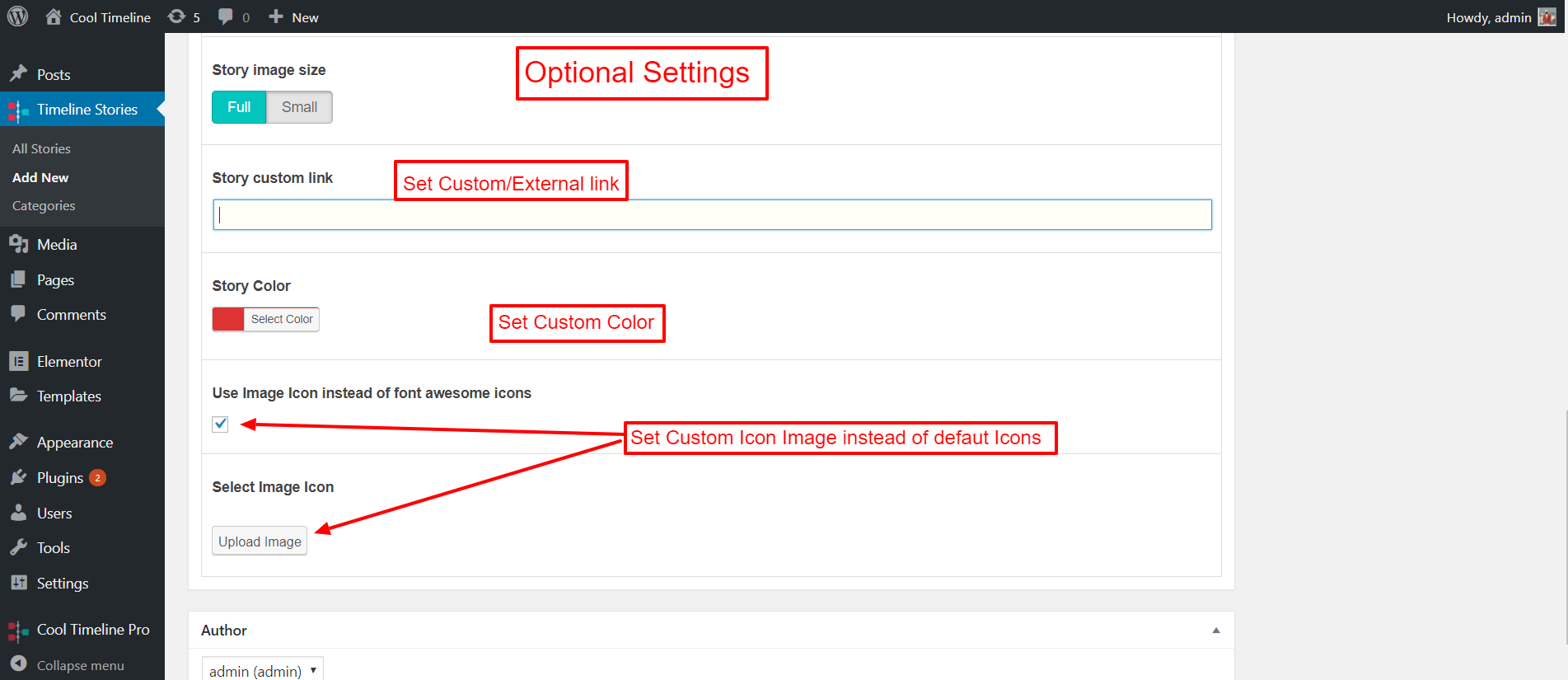
You can choose image size either “Full” or “Small” inside individual timeline story “Story image size” option.
Please check Story image size option in this ( http://docs.coolplugins.net/wp-content/uploads/2019/02/optional-settings.png ) screenshot.
Thanks
I migrated my site to the public domain from a staging site on 11/30. Now, when I try to re-enter the code to verify my purchase of Cool Timeline Pro, I receive an error message that it is still active on the staging site – which no longer exists. I am not sure how to get the license transferred. Any help would be appreciated.
Hi there,
We already have an option on registration page to deactivate the license to use on another domain.
Or Please share your license key at contact@coolplugins.net I will deactivated your license from our license manager, then you can use on another domain.
Thanks
Hello! I use your awesome plugin on a client’s website and we have different timelines there.
I want to deactivate the “click” on images in only one of those timelines. Explaining better: When user click on the image on a specific item of the timeline, i don’t want it to open that image on a popup. I want it to do nothing at all. But only in this specific timeline.
How can we achieve this?
Thanks !
Hi there,
The current version of Cool Timeline Pro plugin does not support image link settings different for different timeline designs. Image link( popup ) settings is global setting.
But you can achieve this( disable popup on image in specific timeline ) by applying Custom CSS.
If you could share your timeline page and let me know in which timeline you want to disable popups than I will provide you custom css solution.
Thanks
Amazing !
This is the URL: https://www.somaurbanismo.com.br/testes-ir-longe/ Password: testeirlonge
Timeline is the only one in the page (A horizontal Timeline under the “Nossa História” Title)
Thanks Sir!
Hi there,
Add this custom CSS inside Cool Timeline Pro Settings >> Extra Settings >> Custom Styles
body.page-id-13064 .cool-timeline-horizontal .full-width{
    pointer-events: none;
}
Thanks
It seems to work nicely ! Thanks sir, great Support, as always !!
Hi there,
Please try to provide a few minutes from your valuable time to add a review on codecanyon – https://1.envato.market/CTreviews
Thanks
I am getting errors when activating:
License Verification Status: ❌ License is not verified yet! Invalid license code
Developer’s Support Validity Status: ❌ N/A
Need this to work ASAP for a project
Please mail us with your purchase information at contact@coolplugins.net
Hi,
Is this possible with your plugin Want like this, when mouse scrolling bar progress moves at the bottom. https://www.interchiro.com/en/chiropractic-phases-of-care#phase-3Hi there,
The current version of Cool Timeline Pro plugin does not support this ( https://www.interchiro.com/en/chiropractic-phases-of-care#phase-3 ) type of progress bar. But in Cool Timeline Pro plugin Year navigation bar is available, you can set this navigation bar to any position (Left/right/bottom). Here is a naviagation bar demo link:- https://cooltimeline.com/demo/timeline-scrolling-navigation/
Thanks
Hello, I bought this plugin and now unfortunately I have to find out that you can’t translate everything with PoEdit. Is there maybe an update? Some texts cannot be translated and are not found with PoEdit.
Hi there,
Please mention the texts, that are not avialble inside .pot file.
Thanks
- Hi, XXX! Please enter and activate your license key for Cool Timeline Pro plugin for unrestricted and full access of all premium features.
- Thanks for using Cool Timeline PRO WordPress plugin. We hope it meets your expectations! Please share a few minutes from your valuable time to add a review on codecanyon or WP.org, it works as a boost for us to keep working on more cool plugins!
- Rate Now! ★★★★★
- Not Interested
- Cool Timeline PRO Settings
- All Stories
- Add New
- Categories
- Not found
- Add New Story
- All Items
- + Add New Item
- Date Format( mm/dd/yy hh:mm )
- Use Image Icon instead of font awesome icons
- Select Image Icon
- Upload Image
- Add New Item
- Welcome
- Thank you for choosing Cool Timeline Pro.
- Plugin’s Documentation
- Find the required documentation here for the plugin. The complete plugin is explained here for a smooth experience.
- Do you have question?
- Feel free to contact us through our support forum. You can also write us at contact@coolplugins.net
- Submit A Ticket
- Registration
- Enter License Key
- Enter Email Id
- I agree to share my purchase code and email for plugin verification and to receive future updates notifications!
- Don’t have a license? Check Here To Purchase
- How To Find Key?
- Login your Envato Market / Codecanyon account.
- Hover the mouse over your username at the top of the screen.
- Click ‘Downloads’ from the drop down menu.
- Click ‘License certificate & purchase code’ (available as PDF or text file).
- A product certificate file with the purchase code will be downloaded.
- Check here for detail instructions…
- Left
- Center
- Right
- Yes
- No
- no
- No(Default style)
- Short (Default)
- Full (with HTML)
- Lowercase
- Uppercase
- Capitalize
- None
- In Popup(CT Lightbox)
- In Popup(Theme Lightbox)
- Story detail link Disable links
- Enable
- Disable
- Save Changes
- Left Side
- Right Side
- Bottom Fixed
- Please use below added shortcode for default timeline.
- Please use below added shortcode for multiple timeline (category based timeline).
- Horizontal Timeline.
- Vertical Content Timeline(any post type).
- Horizontal Content Timeline(any post type).
- No Stories is Available For Migration
- Please Share Your Valuable Feedback.
- Thanks for using Cool Timeline PRO WordPress plugin. We hope it meets your expectations!
- Please give us a quick rating, it works as a boost for us to keep working on more cool plugins!
- Here’s the link:-
Hey there,
Thank you for sharing this list. I’ll hand over this to our developer’s team and try to make these test available for translation in upcoming version of the Coll Timeline Pro.
Thanks.
Thank you, but there could be more that I haven’t seen now.
Hi Is it possible to have for on timeline the read more option and for another one not? I just can find the option in the global settings but not on the block settings. Thanks
Hi there,
In the current version of Cool Timeline Pro plugin “Display read more?” option is only avialable in global Settings.
If you don’t want to show read more button on another timeline then you can hide read more button only by showing “full” description of stories on that timeline.
Thanks
Thanks
Unfortunately like that the header in the timeline remains clickable and so you are redirected to the story page…
[cool-timeline category=”ict-die-anfaenge” layout=”default” designs=”design-4” skin=”default” show-posts=”25” date-format=”d F Y” icons=”YES” animation=”flip-left” story-content=”short” based=”default” compact-ele-pos=”main-date” pagination=”ajax_load_more” filters=”no” filter-categories=”” order=”DESC” ]
Maybe it’s also due to the layout I’m using? (Tried with short and full and only if in settings I disable the read more option the header isn’t clickable anymore)
Hope it’s some understandable what I mean 
Hi I just wanted to know if there is a possibility to disable the stories navigation. To be more clear: When I click on an entry on my timeline the story opens and at the bottom I can navigate to a story before or behind. This is what I don’t want to see. Thanks
Hi there,
We are using wordpress default post as timeline story single page. Before/behind navigation is your theme’s features, so you can hide this navigation only through theme opions or theme customization.
Thanks
Thank you very much – didn’t realize that sorry – now I know where to look…
Hello ! I’m using this amazing plugin of yours, to build a horizontal timeline in this website:
URL: https://www.somaurbanismo.com.br/testes-ir-longe/ Password: testeirlonge
In the Desktop version, its already perfect.. with the ecxatly design that we want.
However, in mobile, We would like to show a very small part of the next story, to instigate the user to swipe to see it.
How can we do this?
Thanks
Hi there,
The current version of Cool Timeline Pro plugin does not support this feature ( show a very small part of next story ).
Thanks
I have a timeline and two things are not working out: 1) I have selected the dates display to be off, yet it continues to be displayed. 2)I have selected the items to be displayed in ascending order, yet it continues to be displayed in descending order.
Also – can the direction of the scrolling be changed (the most recent item on the right and the past on the left and then scroll backward in time)
Hi there,
Please share your timeline shortcode and website specific page URL, where you have added timeline.
The current version of Cool Timeline Pro does not support this feature ( the most recent item on the right and the past on the left ).
Thanks
The time line shortcode is: [cool-timeline category=”” layout=”horizontal” designs=”design-2” skin=”default” show-posts=”10” date-format=”F j” icons=”NO” story-content=”short” based=”default” items=”” start-on=”0” autoplay=”false” autoplay-speed=”3000” order=”DESC” ]
As you can see, there is no update to the shortcode when I change the settings (date display is set to off and item order set to ascending).
Hi there,
Your timeline shortcode is not correct due to this ASC order is not working. Please use this shortcode.[cool-timeline category="" layout="horizontal" designs="design-2" skin="default" show-posts="10" date-format="F j" icons="NO" story-content="short" based="default" items="" start-on="0" autoplay="false" autoplay-speed="3000" order="ASC" ]
And Disable Stories Dates? option is only for vertical timeline designs.
Hi,
when I add a link to the text area of a story, then the link text is always underlined. Is there a way to disable this?
Hi there,
Don’t worry, we will provide you some solutions. Could you please share your website URL with us.
Thank you,
Sure, https://www.juergenreiss.org/ Scroll down to Work Experience then have a look at “Read more”. I already tried with ” text-decoration: none;” but the link is always underlined.
Please just add this style in Custom CSS section:-
.cool_timeline .content-details a {
    border-bottom: 0;
}
That helped, but the underline is still there when hovering over link. I want no underline whatsoever for links. Btw: how do I make this link blue? And is there a documentation about .cool_timeline .content-details?
Please just add style on : hover state and you can apply blue color on the same CSS styles.
How do I change the link color? I tried to add color: pink; to both ”.cool_timeline .content-details a” and ”.cool_timeline .content-details a:link” EDIT: ok,is the solution is to add an !important to the color? That seems to work, though not sure if this is the right way of doing it
Hi
I’m trying again. We have transferred our sansbox-version of our new website to our actual URL. Now, the license no longer ‘works’. Will you please help us here:
License: ab3f4c6e-e923-48be-8852-04226331ba9c
Our domain is: https://strandhotelgluecksburg.de/ (not yet opened) and, the domain where it was used until now was: https://kjellerup.biz/hotel/ (now dismantled).
Thanks
Hi there,
Please don’t share license key here.
We already have an option on the registration page to deactivate the license to use on another domain.
Ok currently I have deactivated your license from our license manager, now you can use it on another domain.
Thanks
Hello,
I like the plugin that you are offering here; more specifically the styling. However, before I invest in what you have built, I need to know that your plugin will display my data in a synchronoptic view.
There is a website that offers exactly what I am looking for. It is called Time Graphics. You can find it here: https://time.graphics/
It’s great. It displays data in the synchronopotic view and even fades the lines for approximate dates. It’s missing a few particular options; but for the most part, it’s perfect. Here’s the thing, though… The data is not managed in Wordpress; it’s on another website.
So, I guess what I am asking is… Does your product, this plugin, come with the ability to display data in the synchronoptic view? Can data be displayed as approximate dates? When a user visits my website, will hovering over an event on the timeline display a popup of information they can read? Can I change the colouring scheme of the timeline to match the theme I already have going on my website?
This is very important to me. Can you help?
Hi there,
Thanks for showing interest in our plugin. Yes sure, We will happy to help you.
Unfortunately, Our plugin does not support synchronoptic view.
You can only represent stories in the available layout only. And you can email adjust timeline color from the plugin settings panel. Here are the available layouts
https://cooltimeline.com/demo/ Regarding the popup for more information queries. We have already integrated minimal design for this requirement. Please take a look at the demo. https://cooltimeline.com/demo/horizontal-timeline-minimal-design/Best Regards, Narinder Singh Team Cool Plugins,
I need to update the domain that is tied to this license as we have moved from dev to production. How do we do that?
A response is sent via email. Please check.
Thank you for contacting us
Hello, i’m trying to Build an Horizontal Timeline for a client, however, i’m facing 2 problems with the medias size:
(1) The images are too Horizontal. I would like to add some height to them.
(2) The videos are Bugged (please, see the Timeline, you’ll understand)
Please, can you help me to fix these 2 problems?
URL: https://www.somaurbanismo.com.br/testes-ir-longe/ Password: testeirlonge
Thanks!
Try below custom css, your theme is overriding video iframe so it adds extra space.
.cool-timeline-horizontal .fluid-width-video-wrapper {
    padding-top: 0 !IMPORTANT;
}
.cool-timeline-horizontal .timeline-post iframe {
    position: relative !IMPORTANT;
}
.cool-timeline-horizontal .full-width img {
    max-height: 100% !IMPORTANT;
}
@media only screen and (min-width: 740px) {
  .cool-timeline-horizontal .timeline-post iframe {
      min-height: 400px !IMPORTANT;
  }
}
It seems to work fine.
Thanks a lot, this is the kind of support that shows us why you deserve the success that your product have !
Thanks !
Thanks for showing trust inside our product.
Try to provide a few minutes from your valuable time to add a review on codecanyon – https://1.envato.market/CTreviews
Done! Thanks ;]
Can this timeline have 600-700 items (Mix of text only and image)? How is the data managed for such a huge timeline? I am looking at this demo with mix of Text/Image items spread across months and years: https://cooltimeline.com/demo/vertical-timeline-modern-design/#light-skin
Hi there,
In Cool Timeline Pro, there is no limit on number of item. You can add any number of items. You can use default pagination or ajax load more pagination to manage huge timeline. Here is pagination demo link:- https://cooltimeline.com/demo/timeline-ajax-load-more-pagination/
Thanks
What happens if there are like 100/150 years on the right hand side? Does that turn into a scroll? Also isn’t it possible to have some sort of automatic load in the timeline wherein new entries are automatically loaded when the user reaches the end?
Actually, The current version Year section only support single year functionality not year range functionality. But you can represent this type year format using custom order based timeline.
Sorry, the current version does no support automatic load more. It support only click based load more stories functionality.