516 comments found.
Pre purchase question. This is for a film festival and I created a custom post type for that with numerous custom fields. Some of the posts have a video short and some have images. So the first thing is I want to confirm I can use mixed media and still use the controls for exact height display. the second, can I do an overlay on focus and pull from 3 or 4 custom fields from a post for the overlay content? Thank you
Hello,
1) the plugin can be connected to a custom post type
2) the plugin takes the “Featured image” for the thumbnail in the grid, but videos is only supported in the popup and you need to specify the URL for it in the Media Boxes fields (below each post), so you can have something like this: http://www.castlecodeweb.com/wp-mediaboxes/blog-posts/# (the second image has a video)
3) if you are using the ACF fields then yes, you can use them in the skin editor to place your fields in the overlay 
Best, David

I am having issues displaying WPMB on this page (theme=Divi): https://pineridgetech.com/electrical-contractor-services/traffic-signal-construction-and-maintenance/ and other pages of this site. It worked before but I’m unsure when it stopped working. Please assist.
Hello,
Try setting the thumbnail size to “thumbnail”, like this: https://imgur.com/a/28qPdPI
if it works then you need to upgrade to the latest version of the plugin (re-download the plugin from CodeCanyon to get the latest version)
I hope it makes sense
Best, David
Hello David and thank you for the quick reply! That seems to bring the gallery back square, but I need to make it so that it click/pop blows up the images. Any reason why this one failed but my other client sites are doing what they should be doing without updating? Thanks!!
Hello,
There was an issue with the latest version of WP (5.6), they changed how the “original resolution” of the images is calculated, so many plugins had to update to take this change into account.
So if your other sites are not experimenting issues they may not be running WP 5.6
About your issue, is the popup not working on your site?
Best, David
Copy that, and thank you for the clarification! I do know one is, but I installed it more recently than this one. Same link, can you see that the photos are now square and don’t pop. I guess my question is how do I get it to do this again: not be square (they were all different sizes) and pop open: https://katewhitneylucey.com/corporate-event-editorial-photography/ (not popping quickly but give it a sec)
1) About the popup, in the “thumbnail link” option do you have it in “Open the popup”? it should be like this: https://imgur.com/a/Sy0cecq
2) About the square photos, you need to set back the “thumbnail size” to “original resolution” but you would need the latest version of the plugin so it works in your WP installation
I hope it makes sense
Hey! First, by mistake I commented asking this on the other version of this plugin, I’m sorry.
I have created a Custom Media Gallery, added a few filters, several images and gifs and everything run soomthly. I’ve been trying to add videos as well, but when I try to add them to the gallery they are not displayed on the media folder. I uploaded them as .mp4, is that correct? Could you help me with this, please?
Thanks in advance! Best, Gonza
UPDATE: I found out a video that shows how to set a popup to be an iframe instead an image. I managed to do that but when I click on the image thumbnail a whole wordpress page is open and not just the video. The video is hosted on my own website. Can this be done this way? Or it needs to be on YouTube or Vimeo? Thanks again! Best, Gonza
Hi Gonza,
yes, it would need to be added as an iframe, you just need to specify the URL of your mp4 file, for example try with this one: https://www.learningcontainer.com/wp-content/uploads/2020/05/sample-mp4-file.mp4
although I would suggest to use youtube or vimeo because it has its own controls
Best, David
Hey, this actually doesn’t do what I thought (which was give me the ability, in the WPBakery builder to give each post box a custom description). So I won’t be using it and would like to request a refund.
Thanks so much! Chris
Hello Chris,
Please contact me via email here: https://codecanyon.net/user/castlecode#contact
Best  ,
,
David
Hi! I created a portfolio with your plugin but everytime I open a picture in lightbox, it appears twice. I can’t figure out why is this happening, could you give me a hand, please?
Thanks!
Hello,
By any change in the admin settings of your portfolio you set the thumbnail to open the popup? and also you have an icon to open the popup in the skin editor? if so the popup is probably triggering twice (one when clicking on the thumbnail and another one when clicking the icon) I would recommend to remove the action from the icon
Let me know if this makes sense
Best, David
Hey David! that was the problem, you were right! Thank you so much for your quick response! Best regards!
awesome
hi ,, am just installed the plugin , every things work fine.. but when i click on thumbnail doesnt any thing happened !! no popup is working .. kindly reply to me at my email w.designer@gmail.com ,, thanks
sent you an email
kindly assist me.
Hello Kally,
Very strange, those icons are from font-awesome, any chance you could give me access so I can check it out and fix any compatibility issue? you can contact me privately via email here: https://codecanyon.net/user/castlecode#contact
Best ,
David
Hi David, the issue is solved. thank you for your help.
Awesome
My support has ended but I would gladly renew it if I can get a simple yes / no answer to my question.
We make custom cakes and cupcakes, so an image says more than a thousand words. Our image gallery contains hundreds of images of different types of cakes, which I would like to put on one single page for inspiration four our customers. They must be able to use multiple filters on these images.
For instance: for a cake with Frozen time I want a customer to be able to fiter on “custom cake” and “frozen”.
Is this possible with your plugin? If so: can you provide me the neccesary help to set this up?
Hello there,
in other words, you would like an item to be under 2 or more categories/filters? correct? if so then yes you can, when adding categories to your items just select multiple of them.
If you are using custom post types it would be here: https://youtu.be/hnEdgzt4pHU?t=111
and if you are using the Custom Media Gallery it would be here: https://youtu.be/m2O3idiHIW8?t=48
I hope this makes sense
OMG: you are a lifesaver! Thank you so much for your quick reply! This is exactly what I’m looking for!
awesome
I’ve got 12 filter items which results in not one but two rows of filters. There is no space however between the first and the second row. How can I add extra space underneath these two rows of inline filters?
Hi,
Can you show me a living example online? so I can send you an exact CSS for that purpose, you can contact me privately via email here: https://codecanyon.net/user/castlecode#contact
Also don’t forget to renew your support period
Best, David
Can someone look at a website I am managing? The images does not show on a page I have the short code on.
Hello,
I’ll be happy to take a look at it, can you send me the link to your site?
You can contact me privately via email here: https://codecanyon.net/user/castlecode#contact
Best, David
Hello, I have problems with Media Boxes because it’s crashing with two plugins: Logo Carousels and Essential Grid. When I activate Media Boxes this two plugins do not show any content. The funny part is that I have installed and active Photo Albums and does not interfere with them, could be that the problem? That the same engine twice is crashing with those plugins?
Hello,
wow, strange, can you show me a living example online? or could you give me access so I can check it out? you can contact me privately via email here: https://codecanyon.net/user/castlecode#contact
Best, David
Hello, you have helped me with this issue before but it seems to be happening again. Nothing is showing for my media box galleries anymore. Example – https://www.divtrk.com/2019/05/07/chevy-1500-2/. There are no images showing on the pages for these galleries. How can I fix this?
Hello,
I’ll be happy to take a look at it, can you give me access to your WP? you can contact me privately via email here: https://codecanyon.net/user/castlecode#contact
Best, David
Hi Sk,
By any chance in the “Ratio” setting you have “0×0”? Under the Thumbnail tab, if so, try setting it to “1×1”
Let me know how it goes
Best, David
Hi
The plugin is not working as expected currently. For some reason it multiplies the skin that I made and it wont allow to delete them.
https://prnt.sc/vy96dyAlso the changes in the portfolio settings page don’t take effect everytime, have to refresh a couple of times.
Karl
Hi Karl,
Can you give me access to your WordPress? I will be happy to take a look at it and see what’s going on
You can contact me privately via email here: https://codecanyon.net/user/castlecode#contact
Best, David
This issue got resolved super fast, very good support! Thanks
thank you for your nice review
After importing all portfolios – I get this
The post type with the key “cpt_pinterest_style” is not longer available please change it for something else.
I can not use those, please help
Hello,
By importing the portfolios you are importing the settings and configuration, the images and content comes from your custom post types, you can create your own by using the “Custom Post Type UI” plugin (which is free), here’s a video tutorial on how do to it step by step: https://www.youtube.com/watch?v=hnEdgzt4pHU&ab_channel=castlecode
Additionally you can watch more video-tutorials here: http://www.castlecodeweb.com/wp-mediaboxes/documentation/#videotutorials
I hope this makes sense
Best, David
Hi! I’m building a portfolio about different traffic solutions. I got the filters working just fine, but the format I’m planning on is a bit tricky.
The solutions are made as info cards (texts + graphics). In my vision the card opens as a pop up when clicked (this works fine), but under every card there should be a link to download the image in PDF format – this is for accessibility reasons too. Is this somehow possible? I of course have URLs for each PDF already, but I’m not sure how to connect them with the images.
BR, Maiju
Hi Maiju,
Yes, that’s possible, are you looking to have that link in the popup? or in the cards (in the grid)
do you have an example already so I can take a look? you can also contact me privately via email here: https://codecanyon.net/user/castlecode#contact
Best, David
hello i’m trying to build a gallery with images and videos. couldn’t find any instructions on how to add youtube/vimeo videos to an image gallery.
can you please advise? thanks
Hello,
For a custom media gallery you can add YouTube/vimeo videos as follows:
http://www.castlecodeweb.com/files/plugins_comments/9.mov also this is possible if you are using posts or custom post type as the source!
I hope this makes sense
Best, David
nevermind i found a video in the comments below with instructions
Awesome
Is there an event (callback) so I know when the layout is done? Thanks
Hello,
Yes, there’s a callback in Javascript, you would have to know some JS in order to use it though
Best, David
I know some JS … can you lead me in the direction to which callback? I need to know when the layout is done, so I can tell fullpagejs to resize the section to fit the content. Thanks
$('#grid').mediaBoxes({
      finishLoading : function(){
             console.log('done loading!')
      },
});
just contact me privately via email here: https://codecanyon.net/user/castlecode#contact so I can send you the latest version
Best, David
Hello, I purchased this plugin and I love it! I have one question about post type. Is it possible to use category filter function with the same post type as the theme already has? For your better understanding,
http://togetherfi.cafe24.com/ -> this is the current post type that the theme already has. http://togetherfi.cafe24.com/?page_id=2453 -> But, If I apply category filter function to the theme it shows new post type.I would like to use the current post type. Is there any way ?
Thank you
Hello,
thank you
You can use custom post types for the plugin, but the categories/filters must be the ones from WordPress as well, if the theme you currently own have a custom filter of their own I’m afraid the plugin will not be able to use it
Best, David
Hey again David,
Hope all’s well.
I’m just wondering is it possible to use Media Boxes to link to another page? I have the image displaying as normal in the container but I’m trying to have it so when a user clicks the magnifying glass this would lead them to a linked page.
What do you think, is it doable?
Thanks, Rob.
Hi Rob,
Yes it is possible, just navigate to the skin editor and set the icon to link to another page, as shown in this right second: https://youtu.be/CqidrXpl7wM?t=32
I hope it helps
Best, David
That’s brilliant thanks mate!
It worked but can I set it up to direct to a custom link for each image?
yes you can
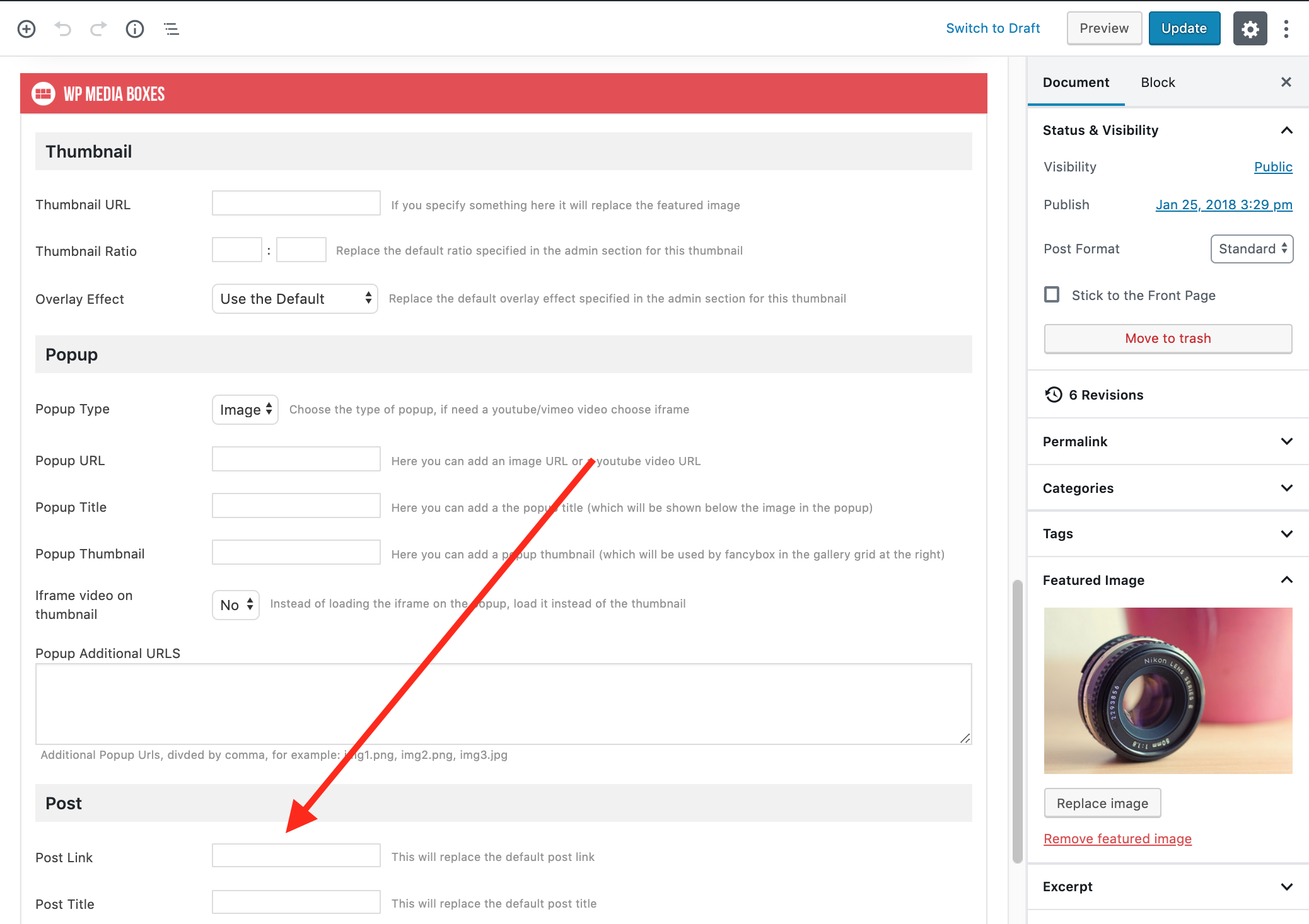
You can change the post link to a custom one, on each post you’ll find some options for the media boxes, just set the post link to something else, like this: http://www.castlecodeweb.com/files/plugins_comments/18.png
Or are you using the Custom Media Gallery?
I must be going blind, haha! Thanks again mate!
I’m glad it is working
Hello my friend. I want to replace my existing plugin at devcanvas.org—> Portfolio with your plugin. Is it appropriate for the job? Thank you.
Hello,
Yes, you can integrate it in your Wordpress Page
Best, David