96 comments found.

Pre-purchase question, Does it compatible with WP Ultimo?
Hi. I have clients that use it along with WP Ultimo, and I have received report about and fixed at least one issue related to WP Ultimo. I cannot claim full compatibility though just based on this, since there are many features in both of the plugins and I haven’t done full testing for compatibility. So all I can say is if you notice any issues and report them to me I will do all I can to fix them. Regards.
Bonjour nikolaydev, j’ai crée un clone de mon site principal avec ns cloner ( version gratuite ) mais j’aimerai utiliser votre plugin pour créer des clones de mon clones.
Théoriquement cela devrait aller car il est mentionné que l’on ne peut pas cloner le site principal donc si je fais comme cela c’est théoriquement ok non ?
Merci d’avance pour votre réponse 
Hi. Yes, no problem. Thank you for purchasing. (I used Google Translate to read your comment).
Hi! Pre-sales questions:
1. Can this copy an existing sub site (source) to a NEW subsite (target) WITHOUT THE POSTS? I want to use the source site as a template and want its pages, tags, categories…but NOT the source sites posts in the target.
2. Can it copy w/o the posts AND without the categories?
3. Suggestion: Add a multisite backup module!
Waiting on the answers for #1 and #2 and Thanks!
Hello.
I can add an option to delete all posts and an option to delete all categories at the end of the copy process, which would be the same as not copying them basically. But first buy the plugin, and then give me a few days to do it.
Keep in mind that the main site cannot be copied. Also just to be clear we are talking about the feature to automatically copy a template site upon new site creation.
About a backup module, thanks, but I don’t plan on doing any new modules at this time.
Regards.
Respectfully, deleting the posts and the categories is not 100% the same as the images will be left over. Also if the source has 5,000 posts (which mine DEF has as its 4 years of posts that will be copied), copying the posts as part of the cloning process will take a loooooooooooooong time…and then deleting the posts will also take a long time…so not copying the posts in the first place was the goal.
But I like the totality of the options and appreciate you adding the options for me.
Soooooooooooo…
Purchased!
Thanks for answering!
The images are separate things, in both cases they would remain. If you also want me to delete only the images that are in posts, and leave the rest, that is too complicated, and I don’t want to do it. It would also take more time, since files delete slower.
About not copying the posts in the first place, I cannot do that because the plugin copies the whole database tables, not all things one by one. It is much faster this way and better.
If you want also the images, it would be better to refund you and not do the option.
Im good as there is additional functionality that makes the plugin worth it.
Please proceed with adding the option to delete posts and categories upon completion as thats extremely useful and thank you!
OK, thanks
By the way, if you just delete everything from the template site that you do not want to be copied, it would be much better. That is the whole idea with a template site, you set it up in a way that is ready to be copied and used as template. But I guess you are using it also as a normal site or there is another reason you don’t want to do that. Actually if you are using it as a normal site, you can make a copy of it, and use that copy as a template site and delete there all the stuff you don’t want to be copied, while keeping the original and using it as normal site.
ps. I will still make the option, I said, but I am just saying that it could be a better way.
Send me an email at nikolay@nikolaydev.com so I can reply and send you the version with the new options (since I am not releasing a new version for now only with these changes).
email sent from e*n@gmail
thanks, got it
Did you receive my email by the way? Just checking here in case it got into the spam folder or something.
If DID go to spam  – I got it now and thank you!
Ah, this Google mail blocks too much… Try whitelisting my address or something. Or maybe the subject was very long.
[PRESALES]
Your plugin has a bulk email module, i understand that it has preset selectable limits of upto 240/480/720/etc emails per Hour… How can a user dial in their chosen mail rate, especially when many hosting companies like SiteGround limits outgoing emails upto 400 per hour. So the settings of 280 is too less and 480 is bit too much to settle with. Any comments ?
Thanks
Hi.
I can add an option to choose the exact value if you want. I will have time to do that this weekend, but only if you have purchased the plugin by then (otherwise there is no need to hurry and do this for now).
Also I want to tell you that the setting is for the maximum email sending speed, the actual speed will be lower depending on the number of pageviews you site gets (since automatic background tasks in WordPress execute on pageview). But you can also force the maximum speed once the emailing task starts, but you have to leave the page open in order to do that.
Also keep in mind that the email users module is for you to send an email to your users when you need, it is NOT for them to subscribe for newsletters or posts, there are no forms for them to fill. You decide when you want to send them an email and you do it. They can unsubscribe though if you allow it. I hope that is clear.
If you have any questions let me know. Regards.
Also, the plugin is only for WordPress multisites. It should be clear, but some people still don’t understand that.
Hello Nikolaydev,
Well understood and I have designs to use this for my WP Multisite. I wonder why/how else any one would want to use because for Single Site it has no use. Appreciate your clarity, Let me decide as I am fiddling with few options before I let plastic card get charged
Thanks.
Cool, no problem
Also there is no SMTP option or any other method, it just uses the default wp_mail function to send emails. So to use SMTP you will need to somehow make wp_mail use SMTP, like with a plugin or maybe server configuration (I am not an expert on those, I assume it is possible as well).
hello friend, very good, could you ask any questions? Is there any possibility for my clients, for example to buy a subscription and generate the site automatically? the site already predefined by me? can I turn off the plugins and themes add / activate module?
Hi. There is no subscriptions and no buying features in the plugin. You can globally disable plugins (different from deactivate) which hides them from site administrators on the plugins page (not their menus, but does not allow them to activate/deactivate them). And you can enable (not activate) plugins on some specific sites, which will allow control. But if you are looking to sell subscriptions you should look into the plugin WP Ultimo.
hey its perfect i am looking for but, i need a api to create a site from other site with all theme and plugin, tell me details
Hi. There is no API in the plugin. If you can come up with a way to use the WordPress API to call the function in my plugin that copies sites, maybe it could work, but I don’t know if this is even possible.
I have 30 or 40 sites do delete in a multisite droping the tables too, this plugin help me to do this in a bulk action?
Hi. Yes. You can use the Cleanup module of the plugin to bulk delete sites. You can choose if you want to permanently delete the sites or just mark them as deleted. The permanent deletion will drop the tables too. Regards.
Thank, i didnt had sure viewing the screenshots. how do i select this sites? by id and separate by colon?
You can see the Delete Sites form in the screenshots and video preview as well. There are different parameters by which you can target sites (like how old they are, or how many posts they have). You can also provide a comma-separated list of site IDs which to delete, or alternatively which to skip and delete all else. If you are doing it by ID you would have to write the IDs manually, there is no feature to select the sites from some list of something. Regards.
Also I want to mention that if you want to see what are all the options in the drop-down menus in the form visible in the screenshot (after you click the menu), these are described here: https://nikolaydev.com/beyond-multisite-documentation/cleanup/
does this need to be network activated or just activate on main site?
Hi. Network activated. And you shouldn’t be able to activate it any other way.
hi,
I have pre-sale question:
1. can we network activated X plugins only available for some allowed sub-site using this BeyondMultisite?
2. is this compatible with WPUltimo?
Hi.
1. Can you please try to better explain this question? With the plugin control module you can network disable (different from deactivate) plugins so site administrators cannot control them (activate/deactivate). And you can enable some of these network disabled plugins per site, so only some site administrators can control them. But all network activated (different from enabled) plugins are disabled for everyone, meaning they cannot control them (activate/deactivate). This is the best way I can explain how it works. You can also bulk activate/deactivate on multiple sites again if the plugins are not network activated.
2. I cannot claim compatibility with this plugin because I am not testing compatibility with other plugins, I am testing with WordPress core. There are thousands of plugins. I am only fixing issues that are reported by clients. Recently one of my clients that uses WP Ultimo reported a problem with the captcha module and I made it compatible. I haven’t received other reports for problems with WP Ultimo so far. If you see any issue you can let me know so I can fix it.
Regards.
1. I have a plugin that is network activated, so I want to allow some sub-site access that plugin but another site should not allow access that plugin.
Because I want some of plugin is defaulted active and accessible for some sub-site only
By “allow access” you mean to allow them to control it (activate/deactivate), right? This cannot be done with my plugin. All network activated plugins cannot be controlled by site admins. It would have to be network deactivated, then you can bulk activate it on all sites, and then you would be able to network disable it, and site enabled it on some sites to have access. But it would not be active by default on new sites in that case. I guess I can think about adding a feature for chosen plugins to be activated by default on new sites, but for now there is no such feature.
Accessing the plugin is not activate/deactivate, but using the plugins.
for example sub A-J by default has active woocommerce, but sub K-Z has no woocommerce.
In this case we also hide the ‘wordpress Plugin’ menu (this is easy by css)
Ah, so you want to deny them using the admin pages of the plugin while it is still activated on the site. My plugin does not have anything like that.
I will try to explain the feature better on my plugin item page, I see why you would think it has that, where I say plugin access control. Now I see that it is not very clearly explained.
Yes I was thought about it that your plugin might be able to control it
Yeah it is very hard to explain this with few words, and I don’t want to have huge text no one will read where I am just listing the features. Also the terms disable, no access, are used differently by different people. I will think about the best way to explain it.
thank you.
is possible to have the feature I was mentioned in the future release?
Sorry, I don’t want to do this feature. Try searching for some access manager plugins.
hi can addon be able to have two different websites example.com/1 and example.com/2 use only one core setup?
Hello. You mean two websites in one WordPress installation? You can do that without a plugin, with just WordPress multisite (wordpress network): https://wordpress.org/support/article/create-a-network/ My plugin just adds additional features to the multisite built in feature.
thanks alot for sharing this
no problem
Hi, nice plugin, congrats!
I would like to to just be able to view which plugins n themes r activated through a site list. Is it possible to activate just this module? I don’t want more stuff being loaded without reason in my network…
I’m also worried about the way that is shown. I know another one that brings the site list in the plugins page. But I have almost 1000 sites. For sure this approach would crash db…
Hi, thanks. Yes, no problem. You can turn off the other modules, and 1000 sites is not a problem. One of my clients has 10,000 sites, and I have used it in a network with 5000 sites. The way it works is, to see the list you click a link for the chosen plugin/theme, and then wait for the list to be generated. This is done in chunks with multiple requests, so it does not timeout. If you have a lot of sites you would just have to wait more time for the list to be generated. If you have any issues you can contact me, since you get 6 months of support included as well. Regards.
Hey! Can I create a default site (including page content, theme settings etc…), which is setup for the customer on registering?
Hello. The super administrator can choose one site (except the main site) that will be fully copied (including content and settings) into newly created sites automatically on site creation. So yes, if that is what you mean.
“Bulk delete leftover database tables” this is based off of the table prefix right?
Yeah, and the site ID is in the prefix and we can check if the site exists. If it does not, then these tables are just from some plugins that were active before the site was permanently deleted.
Hi, I will create a multisite but I want to ask you; if one subsite traffic is so much higher than others that can effect to other sites load time? if effects there is a solution for it? via server side or in multisite?
Hi. I don’t think that having a multisite would slow things down more than having the same single sites on one hosting. So I guess just have enough server resources for all sites.
Hello Nikolaydev, can the cleaning function be used for stand alone sites? Given your plugin title doesn’t seem to be case but trying my luck. thks.
Hi. You mean sites that are not multisites? No, the plugin can only be activated on a multisite.
What do you need exactly, maybe I can help you somehow to do it?
Hello team, looks to be a great plugin in the drought of good multisite plugins. A few queries: 1) the main domain multisite installation has over 300 pages, custom post types, over 2000 images etc. Does cloning to a sub-domain site do a clean job of replicating everything? I don’t want anything in the target site? Hope it won’t impact/create clash of data in the source main domain site. Pls confirm 2) does the cloning then would mean literally doubling of images in the library? The current main site is almost 4GB. Will cloning double the size of wordpress installation. My concern is we have to create 7 child (sub-domain installations). 3) lastly, does the developer license acting as a unlimited domain license? Asking as my agency can officially use this for any new clients in the future. Thanks in advance.
Hello.
Thank you, it is just me, no team .
The plugin does not clone the main site! It currently can only make copies of sub-sites.
Copying a site replicates everything, yes. Also replaces mentions of URLs and links with the correct domain. Of course there is no way of knowing if it will work properly with every single plugin or theme in the world. Some of them do some weird things. If someone notices a problem, they can report it to me, so I can find a way to fix it. Also all images will be copied and they will take double the size on the server, yes.
About the license, I am not really familiar with these stuff. I am just using the pre-made licenses that Envato offers. If you are asking about the extended license, that is $89 for my plugin, you can read about it here: https://codecanyon.net/licenses/terms/extended
You can also contact Envato here to ask them about license related questions: https://help.author.envato.com/hc/en-us/requests/new
Regards. Nikolay Nikolov
Hi,
I’m using this setting for duplicate sites: https://i.imgur.com/g96w3r0.png, but everytime the user created for the new site is Administrator, can you help me in how to set an specific role for the user created with the website that we copy?
Example: Everytime that we create a new site add the new user with role ‘Teste’ (I have multiple roles on my site using admin-role-editor plugin) ! Thanks!
Hi.
From what I understand, you want when a new site is created, the new user that would usually be its administrator, to be another role instead.
This is not part of the site copying process. It is a new user, and its role is not part of the site you are copying.
I did some tests, and I think I was able to make a small plugin to help you change that role though. I haven’t tried it with a custom role though. Send me an email at nikolay@nikolaydev.com so I can reply and send you the plugin to try.
Regards.
Sent you the e-mail, you are awesome!
Thanks, I replied now.
Hi, we figure out almost everything to work with your plugin.
About the notification question the answer was:
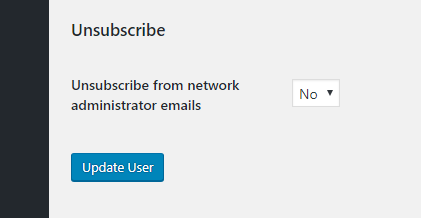
This field is not add by your plugin? https://i.imgur.com/nPILece.png if yes, how to set to YES (default) ? At moment each new user when I try to edit it has the NO option as default.
And notifications we mean add an option to users see in a new menu all the notifications sent by e-mail in wordpress too. Exemaple: “My Notifications” menu if user click it will list all messages sent by SuperAdmin using your plugin feature.
Thanks!
Hi.
I am glad you figured out most things, I try to explain them and make them easy to use.
The notification field is probably from my plugin, but you have translated it wrong. This is how the original looks like: https://res.cloudinary.com/djywkn92o/image/upload/v1572677355/unsub_l98ty5.png So you see it says UNSUBSCRIBE, so the opposite of subscribe. So NO mean everyone will receive emails by default. This option is used by the Email Users module of my plugin.
About the feature to see the emails in a new menu in the admin dashboard, sounds interesting. I will think about it more when I do the next version. Thanks for the idea. But keep in mind that adding new features is not part of support, and I am not promising any time frame for releasing this feature.
Regards.
There’s any way to Receive Notifications checkbox load checked for all users (default) ? And also the sent notifications show also in dashboard in some specific area like facebook and other tools have?
Hello.
I don’t think that my plugin has a checkbox called Receive Notifications. Where are you seeing this checkbox?
About the sent notifications, you mean the ones about site deletions of the Cleanup module? There is a big red message in the dashboard area of sites that are scheduled for deletion. So they can see it there too.
I am a little confused by some of your questions, please explain in more details, so I know exactly what you mean, which module, which feature and so on.
Regards.
Hi, about the duplicate site feature I found the way it works, thanks!
Just an question, there’s any way to remove an website and not ask to user for confirmation if we are super admin?
And when the copy is created the new e-mail is not changed automatic, its pending to accept… there’s any way to change the new e-mail 100%?
Thanks and congractulations for this amazing plugin! Keep doing this great job !!!
Hi.
About removing a website, what do you mean? You just want to delete a website without asking the site administrator? A super administrator can do that, yes. Just delete it from the network dashboard -> sites. Or am I not understanding the question?
About changing email, are you talking about the email address in the general options of a site? WordPress sends a confirmation to the new email you have entered, you have to confirm there.
Regards.
Also, thank you! I am glad you like the plugin