2203 comments found.
Hi, I want to have same look of your demo. Could you tell me the theme of your demo? Thank you.
Hello, Why this plugin not work with SEO? Also can you help to translate it to Arabic?
Hello,
Thank you for using Sabai Discuss.
We are using the TwentyTwelve theme on our site.
> Why this plugin not work with SEO?
Please see https://codecanyon.net/item/sabai-discuss-plugin-for-wordpress/3455723/faqs/17807
> Also can you help to translate it to Arabic?
Please see https://codecanyon.net/item/sabai-discuss-plugin-for-wordpress/3455723/faqs/15557

Can we change this alert when the question is submitted? – Your post has been submitted successfully.
Hello,
Thank you for using Sabai Discuss.
This will require modifying the English language file or using a 3rd party plugin such as the “Say What” plugin. For further support with the issue, please make sure that you have a valid support package with the plugin and contact support.
can not post video??, is it a bugs?
Hello,
Thank you for using Sabai Discuss.
You can post videos and we are not seeing any issue with the feature. If you need support with the issue, please contact support so that we can help you out.
I have installed wp seo yoast , even then question title is showing question page title insted of question title – https://cryptomaa.com/cryptos/q/total-supply-of-yfvalue-yfv-token-after-burn
Hello,
Thank you for using Sabai Discuss.
We do use the latest version of Yoast on our demo site but we are not seeing such an issue. If you need support with the issue, please contact support so that we can help you out.
How can the Q & A be monetized, apart from Adsense… for example, is there a “pay for experts’ advice” function?
Hello,
Thank you for your interest in Sabai Discuss.
Unfortunately there isn’t any monetization feature available.
is it compatible with wpml? after i installed wpml , page is not translated.
Hello,
Thank you for using Sabai Discuss.
Unfortunately it is not compatible with the multilingual content feature of WPML.
the question page is not translated, ok , wpml said you can join their Go-Global Program https://wpml.org/documentation/theme-compatibility/go-global-program/ they will help you make your product 100% compatible with WPML for free. thx
We do know the program however unfortunately it is technically not possible since Sabai Discuss does not utilize post types or custom taxonomies.
Hi, can I use the plugin without buddypress / bbpress?
I want to create q&a section for user without register and ask a question by just fill the question form. Thanks
Hello,
Thank you for your interest in Sabai Discuss.
BuddyPress or bbPress is not required to run Sabai Discuss.
> I want to create q&a section for user without register and ask a question by just fill the question form.
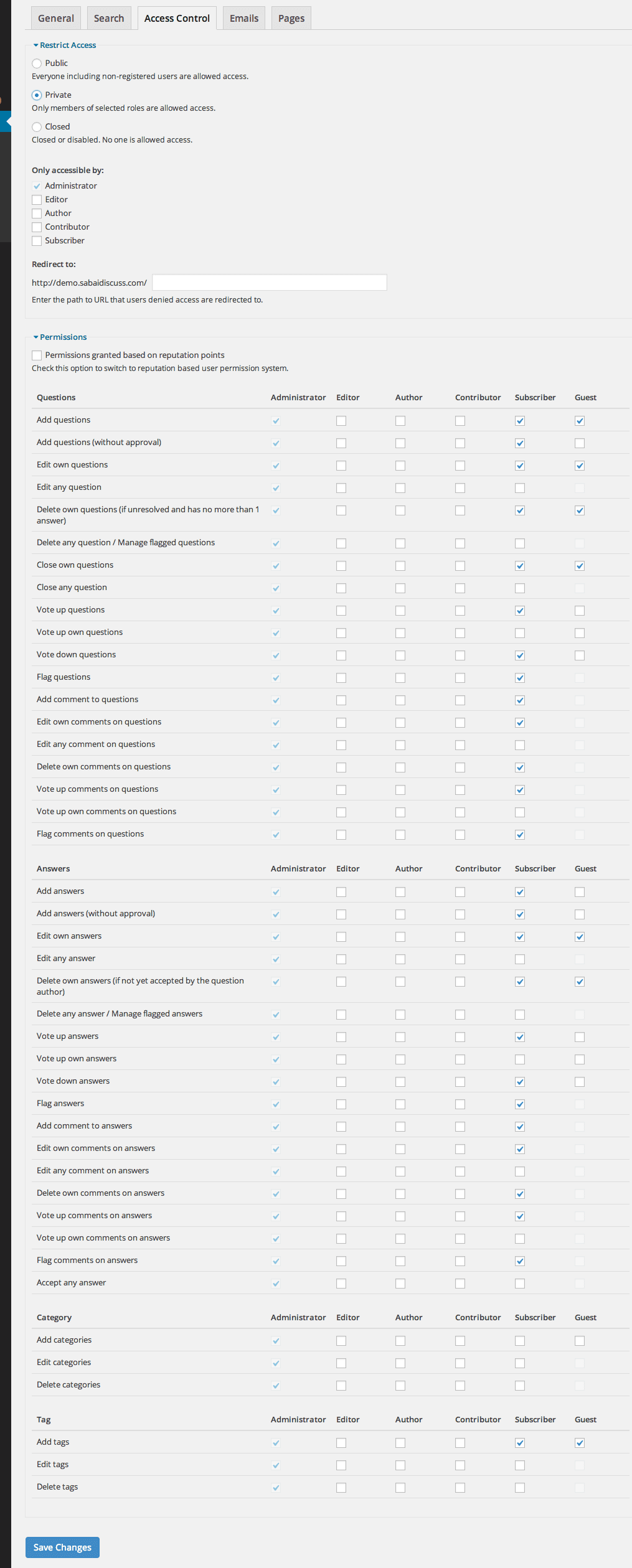
Yes, you can grant the permission to add questions and answers to the Guest user role.
Hi, is it possible to use Sabai Discuss (i.e., ask and answer questions) without users have to register/log in?
Hello,
Thank you for your interest in Sabai Discuss.
Yes, you can configure access control settings so that the Guest users can submit questions and/or answers. https://s3.envato.com/files/144927226/screenshots_discuss/admin_settings_acl.png
Hello, I have a few pre-sale questions
-may I ask if I can create multiple forum on 1 site? i.e. Forum A & B totally separated on two different pages
-can I mark a user as “expert” or “officials” manually? so that users can easily identify them when they post answer?
Thanks!
Hello,
Thank you for your interest in Sabai Discuss.
> -may I ask if I can create multiple forum on 1 site? i.e. Forum A & B totally separated on two different pages
Yes, you can create any number of questions (or forum) pages on your site.
> -can I mark a user as “expert” or “officials” manually? so that users can easily identify them when they post answer?
Currently there isn’t such a feature available unfortunately.
Thank you for the great plugin. “Posting questions” work good but “posting answer” end in timeout error. Do you have any suggestion?
Sorry. I found the problem checkin PHP error log. It was a bad configuration of smtp server.
hi you have not answered my question, can i change the color of the theme, and there is problem with plugin whenever the user tries to login it directs them to backend login. how could i direct them to front end login??
Hello,
Thank you for using Sabai Discuss.
If you are using some kind of custom script or a 3rd party plugin for displaying your frontend login page, that script or plugin should implement such feature so that users are redirected from the default login page to the custom frontend login page. You may also be able to find a plugin that lets you add such redirection.
Hi, I get below fatal error when I activate the Sabai plugin.
Fatal error: Uncaught Sabai_NotInstalledException in /var/www/wordpress/wp-content/plugins/sabai/lib/Sabai.php:405 Stack trace: #0 /var/www/wordpress/wp-content/plugins/sabai/lib/Sabai.php(66): Sabai->_loadAddons() #1 /var/www/wordpress/wp-content/plugins/sabai/lib/Sabai/Platform/WordPress.php(1131): Sabai->loadAddons() #2 /var/www/wordpress/wp-content/plugins/sabai/lib/Sabai/Platform/WordPress.php(1258): Sabai_Platform_WordPress->getSabai() #3 /var/www/wordpress/wp-includes/class-wp-hook.php(287): Sabai_Platform_WordPress->onInitAction(’’) #4 /var/www/wordpress/wp-includes/class-wp-hook.php(311): WP_Hook->apply_filters(NULL, Array) #5 /var/www/wordpress/wp-includes/plugin.php(478): WP_Hook->do_action(Array) #6 /var/www/wordpress/wp-settings.php(540): do_action(‘init’) #7 /var/www/wordpress/wp-config.php(101): require_once(’/var/www/wordpr…’) #8 /var/www/wordpress/wp-load.php(37): require_once(’/var/www/wordpr…’) #9 /var/www/wordpress/wp-admin/admin.php(34): require_once(’/var/www/wordpr…’) #10 {main} thrown in /var/www/wordpress/wp-content/plugins/sabai/lib/Sabai.php on line 405
There has been a critical error on your website. Please check your site admin email inbox for instructions.
Figured it out. In a multi-site, you have to active the plugin from the individual sites dashboards, not the network dashboard.
Hello,
Thank you for using Sabai Discuss.
Yes, that is correct. Sabai Discuss does not support network activation.
hi there, where is the color setting for the plugin, i have find difficulty to change the button color etc.? what is the solution?
Hello,
Thank you for using Sabai Discuss.
There isn’t any color settings in the plugin unfortunately. Can you please tell us which button you are referring to exactly?
Hello,
how to configure the captcha? I have keys but I do not know where to configure, where are the Field add-on settings?
You write:
reCAPTCHA site/secret keys must be obtained from Google and configured in Field add-on settings.
Thanks!
Solved, found it
Hello
Is it compatible with the Elementor and Visual Composer plugins and integrates with them?
Hello,
Thank you for your interest in Sabai Discuss.
The plugin should work fine with those plugins, however there isn’t any feature specifically that integrates Sabai Discuss with those plugins.
hello,
the permalink for the questions Urls not include ”/” at the end even if i choose to include ”/” at the end of Urls from permalinks setting, please see this pictures:
the permalink url end with ”/” at question editor: https://yadi.sk/i/terknReNuyIf1g
in wp permalinks setting the url end with ”/” too: https://yadi.sk/i/fcDo2p0ShbYbtw
but the url for question remain without ”/” : https://yadi.sk/i/kncG5DpEwzXkdQ see also https://yadi.sk/i/Cf1noj4oCdqbPw and this https://yadi.sk/i/704ttdhMvg3YEQ
please fix this because this make errors in certain plugins i use in my wordpress.
thank you.
please help! how i can solve this problem?
Hello,
Thank you for using Sabai Discuss.
You can try adding the following line of code to wp-config.php:
define('SABAI_WORDPRESS_URL_TRAILING_SLASH, true');
For further support with the issue, please contact support.
Hello, I was able to add the shortcode to a Tab, looks great, but when I click on the question, it goes full screen, how can I keep it all within the tab space? Thank you
Hello,
Thank you for using Sabai Discuss.
Unfortunately it needs to be displayed on a full single page and that is not possible.
Hi, we’ve found some bugs in your code and fixed it by ourself. Maybe you like to fix it in the next release?
1. In the templates you used sabai-discuss-discuss as textdomain, but the correct ist sabai-discuss.
2. In the Autocomplete Class in the function preRenderCallback() you missed the translation for “Searching…”. We’ve added this:
searching: function () {
                return "%19$s";
},Sorry, the code is:
formatSearching: function() { return “%19$s”; },
We’ve found another bug, the select2-spinner is wrong linked: /wp-content/plugins/sabai/assets/select2/images/select2-spinner.gif
It should be: /wp-content/plugins/sabai/images/select2/select2-spinner.gif
Hello,
Thank you for letting us know! We will have a look and see what we can do for the next update of the plugin.
> 1. In the templates you used sabai-discuss-discuss as textdomain, but the correct ist sabai-discuss.
We were not able to find any template file that is using “sabai-discuss-discuss” as the textdomain, can you please let us know which template file you are referring to exactly?
> We’ve found another bug, the select2-spinner is wrong linked: /wp-content/plugins/sabai/assets/select2/images/select2-spinner.gif > It should be: /wp-content/plugins/sabai/images/select2/select2-spinner.gif
There is no folder /wp-content/plugins/sabai/images and /wp-content/plugins/sabai/assets/select2/images/select2-spinner.gif seems to be correct, can you check your server and make sure the image exists in that location?
Hello
I see the following error when activating!
public_html/wp-content/plugins/sabai/lib/SabaiFramework/DB/MySQL.php on line 2
Hello,
Thank you for using Sabai Discuss.
If you are looking for support with the plugin, please contact support using the support form on the following page. https://codecanyon.net/item/sabai-discuss-plugin-for-wordpress/3455723/supportIs there a way to expand the ‘Add Comments’ textbox/field by default? At the moment the textbox is hidden and you need to click on the hyperlink for ‘Add Comments’. Thanks.
Hello,
Thank you for using Sabai Directory.
Unfortunately currently there isn’t any option for that available.

This item was featured on CodeCanyon

Elite Author
Contact the Envato Market Help Team