2001 comments found.
Hi! I’m trying to make my plugin compatible with your plugin. Can you help me please? (I’m working on a customer’s website)
I am using “woocommerce_before_calculate_totals” with very high priority, but your plugin still makes changes to price after. You have some idea, what hook I can use?
Thank you
No problem I figured it out:
// add WOOCS compatibility if (class_exists(‘WOOCS’)) { global $WOOCS; $currrent = $WOOCS->current_currency; if ($currrent != $WOOCS->default_currency) { $currencies = $WOOCS->get_currencies(); $rate = $currencies$currrent; $price = $price / ($rate); } }
Hello
Great!

Hi, when i try to open the plug in/ it wont stop loading. basically its unlimited loading
Hello
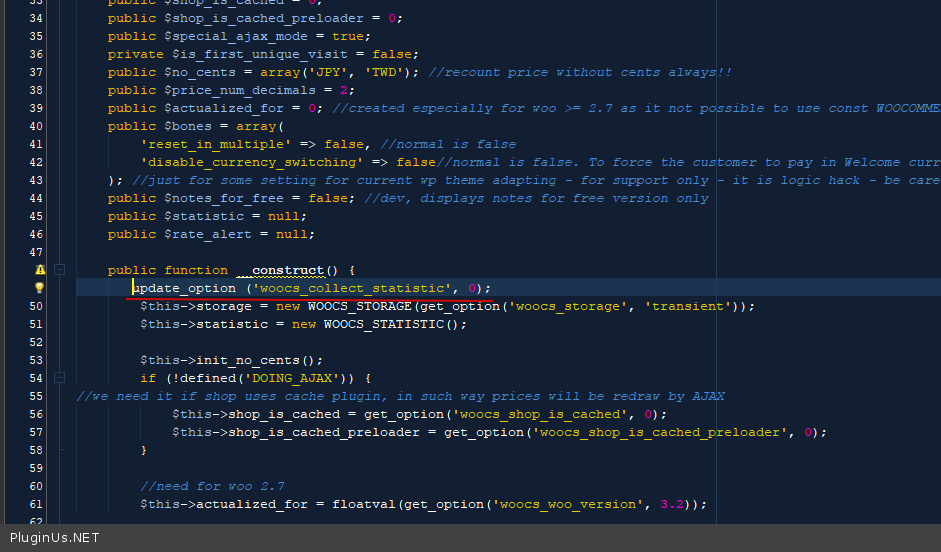
Please try to add code in file – \wp-content\plugins\woocommerce-currency-switcher\classes\woocs_after_33.php – https://c2n.me/480QuWc.png
update_option (‘woocs_collect_statistic’, 0);
hi sir/madam, is this plugin is currency converteo also ? becouse i give the produt price in sri lankan rupees LKR100 and when i change currency form LKR to DOLLER didnt convert to product price to doller and it visible $100 , why this and if i convert the LKR100 TO $ doller it’s price is 0.54, but my web site prouduct price is $100, what i do now ? please help me urgent
Hello
Please read this – https://currency-switcher.com/currency-recounts-wrong-double-zero-and-others/
Drop me exact link to the issue
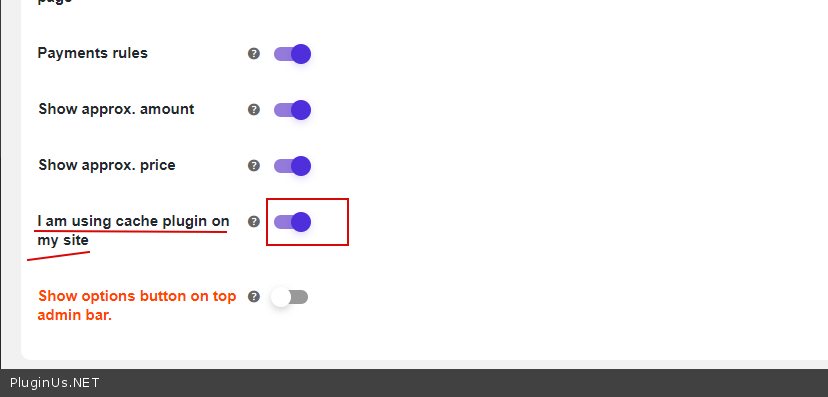
after never using this plugin for over a year i now implement it – full integrate it into my new website and right at the last minute after going live i find it does not work without the ‘i am using cache’ switched on. doing this moves the price below the variation description and messes up everything i have been working on for 6 months. how i put the price back in the place where it is supposed to be?
FYI screenshots
With your cache switch on: https://www.netpal.xyz/wp-content/uploads/2020/06/Screenshot_cache-switch-on.png
With your cache switch off: https://www.netpal.xyz/wp-content/uploads/2020/06/Screenshot_cache-switch-off.png (but the plugin no longer works on mobile)
Hello
Please write here – https://pluginus.net/support/forum/woocs-woocommerce-currency-switcher-multi-currency-and-multi-pay-for-woocommerce/
Paste your license key here – https://c2n.me/43SC6rb.png -> https://c2n.me/42HBIt7.png
add exact link to the issue
Hello
I answered you on the forum
yes, it takes 24-48 hours for a reply so i expect another reply next week. i don’t know why you want admin privileges to my website when you should know how the plugin works as you built it
Hello
You can create site clone on subdomain by https://wordpress.org/plugins/duplicator/
when you should know – reasons depends of the site scripts set, hosting options, php, etc …
Hi good day.
I am very interested in buying the plugin, but I have two questions.
First: the plugin contains the Argentine currency, that is, the Argentine peso.
Second: how to know if the plugin does not have integration problems ?, I say this because in the past days I installed one, and had problems with another plugin that I have installed on my website (sensei).
Please appreciate your timely response
Hello
The plugin supports all standard currencies – http://en.wikipedia.org/wiki/ISO_4217#Active_codes
Do test with free version – https://wordpress.org/plugins/woocommerce-currency-switcher/ ( the free version has the same code as the paid version )
Hello. I’m using your plugin that was in addition with a Konte theme. I’m using a payment module for woocommerce from one of my local county banks “Tinkoff bank” and I’m having an issue of converting currency while paying. By default i’m using USD on my website. My module for now only acquire in RUB. So at the stage of checkout all products are in USD and after pressing proceed to payment button USD converting to RUB identically in numbers. Lets say, if product is $10 on payment stage there will be 10RUB. Developers of payment module said I should fix it somehow on my side. Can it be related to your plugin? Do you, perhaps, know how to resolve this issue?
Hello
Please drop me exact link to the issue
Hi, Just tried a new feature with the “Show price info icon” and now I can’t access the settings anymore (WooCommerce – Settings – Currency). Here’s a screenshot of the loader: http://prnt.sc/stl92o
How can I access the settings to turn that off? It’s on a staging site and I have done a lot of work between the last backup and when this happened.
Hello
Please write me here – https://pluginus.net/support/forum/woocs-woocommerce-currency-switcher-multi-currency-and-multi-pay-for-woocommerce/
Paste your license key here – https://c2n.me/43SC6rb.png -> https://c2n.me/42HBIt7.png and FTP+ wp-admin access – https://c2n.me/42BAoj4.png I fix it
Hello. Pre-sale question if you please. Set USD as default currency in Woocommerce, but when type price, field marked in EUR. Also, remove IP geolocation, but website still show and convert price in USD. For example, need to be 1699 USD, but website convert it to 1830 USD, because think that main currency is EUR. Best regards.
Sorry for spam. Case resolved.
Hello
Ok! Great
Hello, will the coding modification you recommended for currency switching with the LearnPress plug-in work in the latest versions? You provided some code 2 years ago in the comments.
Hello
You can create an adaptation request – https://currency-switcher.com/woocs-labs/
Hi
This is a pre-purchase question. I have your free version on trial with 2 currencies with the default being GBP. When you change between pages in our website, the currency changes. Please see the links below:
https://alwayschic.co.uk/product-category/earrings/ shows in GBP https://alwayschic.co.uk/product-category/necklace/ shows in USDCan you tell me how to fix this issue as we would like to buy the licence and get 3 currencies but want to know it will work properly first.
Thank you
Hello
Read this please – https://currency-switcher.com/currency-recounts-wrong-double-zero-and-others/
check option – https://c2n.me/47JQLAT.png
Is there a currency xml or csv that can be imported if shop is selling worldwide?
Hello
Describe your question in more detail
Hello, is this compatible with WCFM (multi-seller marketplace)? thanks.
Hello
Unfortunately I do not have such information.
You can try a fry version of the plugin – https://wordpress.org/plugins/woocommerce-currency-switcher/
if there are problems with incompatibility – https://currency-switcher.com/woocs-labs/
Hi, can your plugin already support AffiliateWP? The last mention is three years ago that you will finish it. I need to know to buy your plugin.
Hello
Please read this – https://currency-switcher.com/affiliatewp-easy-affiliate-marketing-wordpress-works/
You can test it with a free version – https://wordpress.org/plugins/woocommerce-currency-switcher/
Hi
Can we put the exchange rate manually? Using services like Yahoo and all are making 2% loss for us. Can add 2% to conversion?
Kindly guide. Thanks
Hello
Sure: https://currency-switcher.com/hook/woocs_currency_data_manipulation/ or use field Interest in the tab Currencies
Hi,
We are selling products that we buy from our manufacturers in different currencies. For example we have one supplier who we pay in Euros and another in GBP. Does your plugin allow us to list some products in Euros and Some in GBP please?
Thanks.
Hello
Unfortunately, all products must be stored in the same currency.
Hello
Trick: You can provide each supplier different links on the same catalog, for example:Thanks, but that’s not the point. The point is to have the right pricing on the products, we buy products in several currencies and need to ensure we advertise the right price to our customers.
Hello
As I wrote above. Unfortunately this plugin will not help you solve this problem.
Hi, i have a presale question, i need to know if this is compatible with the payment gateway stripe and mercadopago
Hello
this should work correctly
But better do a test with the free version – https://wordpress.org/plugins/woocommerce-currency-switcher/
Hi your plugin is fully compatible with any dynamic pricing plugin here in Codecanyon??
Hello You can check it here – https://currency-switcher.com/codex/#compatibility
Hi there, the plugin cannot work on my site Checkout page. Can you help me check it? This is my site link http://www.koso.com.sg/zh/checkout-cn/. Thanks.
Hello
Please write me here – https://pluginus.net/support/forum/woocs-woocommerce-currency-switcher-multi-currency-and-multi-pay-for-woocommerce/
Paste your license key here – https://c2n.me/43SC6rb.png -> https://c2n.me/42HBIt7.png and wp-admin+FTP access – https://c2n.me/42BAoj4.png
is this plugin works with Astra theme?
Hello
Yes, this should work correctly. But better do a test with the free version – https://wordpress.org/plugins/woocommerce-currency-switcher/
hello, pre-sale question, the plugin compatibility with WooCommerce extra product options?
Hello
Please check a list – https://currency-switcher.com/codex/#compatibility
You can do test with free version – https://wordpress.org/plugins/woocommerce-currency-switcher/

This item was featured on CodeCanyon

Power Elite Author
Contact the Envato Market Help Team