203 comments found.

Hello Bookly Staff Cabinet add-on allows your staff members view and manage their calendars and services on the front-end.
Version 2.9 Ok https://www.ncclive.it/appuntamenti/
Update Version 3.0 does not work blocks the whole website
Hello,
Thanks for your message.
Please send us an email to support@bookly.info with this ticket number 125026 and your purchase code for Bookly PRO so we could look into this matter.
Many thanks,
Richel
Like us? Rate us!
High rating = More sales = More functions and flexibility
===
Documentation |
FAQ |
Feature Requests |
Video Tutorials
Hi Guys,
I’m having an issue with the modals / pop-ups with this as well. Tried your suggested CSS fix with no joy.
I’ve raised a ticket (12478), what’s your current response time like?
Thanks!
Hello,
Thanks for your message.
A team member should reply to your email shortly if they haven’t yet. Could you check the ticket, please? Our ticket number is, at this time, six-digits but you’ve provided us a five-digit ticket number.
Many thanks,
Richel
Like us? Rate us!
High rating = More sales = More functions and flexibility
===
Documentation |
FAQ |
Feature Requests |
Video Tutorials
I’ve had a reply and it’s being looked into, thanks 
I would like to get a refund for the is item.
Hello,
Thank you for your message.
Please check this link regarding the refund procedure: https://help.market.envato.com/hc/en-us/articles/202821460-Can-I-Get-A-Refund-
Before you ask for a refund, please refer to Envato Market Refund Rules to be informed of the situations when Envato is not obliged to give refunds: https://themeforest.net/page/customer_refund_policy
Thanks!
Kate
Like us?
Rate us!
High rating = More sales = More functions and flexibility
===
Documentation |
FAQ |
Feature Requests |
Video Tutorials
HI, add-on staff cabinet dont work, dont show botto to public on page.
Hello,
Thank you for your message.
Please send us an email to support@bookly.info with this ticket number #124435 and admin panel access so we could look into this matter.
Thanks!
Kate
Like us?
Rate us!
High rating = More sales = More functions and flexibility
===
Documentation |
FAQ |
Feature Requests |
Video Tutorials
Purchased & Installed. Purchase Code Entered Correctly
Nothing Working. No error messages.
Add-On Main Screen shows … Staff Member (0).
However, I can view all staff when clicking ‘Staff Members Order’ and I can ‘Add Staff’ but newly added staff are still not shown or accessible.
I can also add categories, but no categories are shown.
Please Advise. iDex… 5th May 2020 @ 07:45am
Hello,
Thank you for your message.
Please send us an email to support@bookly.info with this ticket number #124006 and admin panel access so we could look into this matter.
Thanks!
Kate
Like us?
Rate us!
High rating = More sales = More functions and flexibility
===
Documentation |
FAQ |
Feature Requests |
Video Tutorials
Thank You for your reply.
I cannot unfortunately, provide you with access to my admin panel as my system contains confidential client and staff details, as well as payment and other information I have a legal obligation to keep secure.
I cannot share this information with anyone or allow access to it, particularly when I do not know who or what legal entity I am dealing with or what country you reside within.
You can be confident that I can carry out technical instructions you may provide.
iDex… 5th May 2020 @ 14:35pm
Hello,
Thank you for your message.
Please, make sure that your Bookly and Bookly Pro versions are updated to the latest ones (18.2 and 2.5). After that, please go to debug mode: your-site-name/wp-admin/admin.php?page=bookly-debug Check if there are error in the database scheme. If so, please, click on Fix database scheme button.
Will be waiting for your reply.
Thanks!
Kate
Like us?
Rate us!
High rating = More sales = More functions and flexibility
===
Documentation |
FAQ |
Feature Requests |
Video Tutorials
Resolved
Thank you for your prompt support.
iDex… 6th May 2020 @ 07:10am
Hello Can I create a staff page? I mean To be a page that displays all staff
Hello,
Thank you for your message.
You can create such page where you can insert the information about your staff members. But in fact it can be done with the help of Wordpress options, not via Bookly Pro.
Or could you provide me with some more details concerning your request?
Thanks!
Kate
Like us?
Rate us!
High rating = More sales = More functions and flexibility
===
Documentation |
FAQ |
Feature Requests |
Video Tutorials
2- Is it possible to add a special schedule for each doctor on his personal page?
thanks
Do you provide a dashboard for members “without wp admin”? Is there a demo?
Hello,
Thanks for your message.
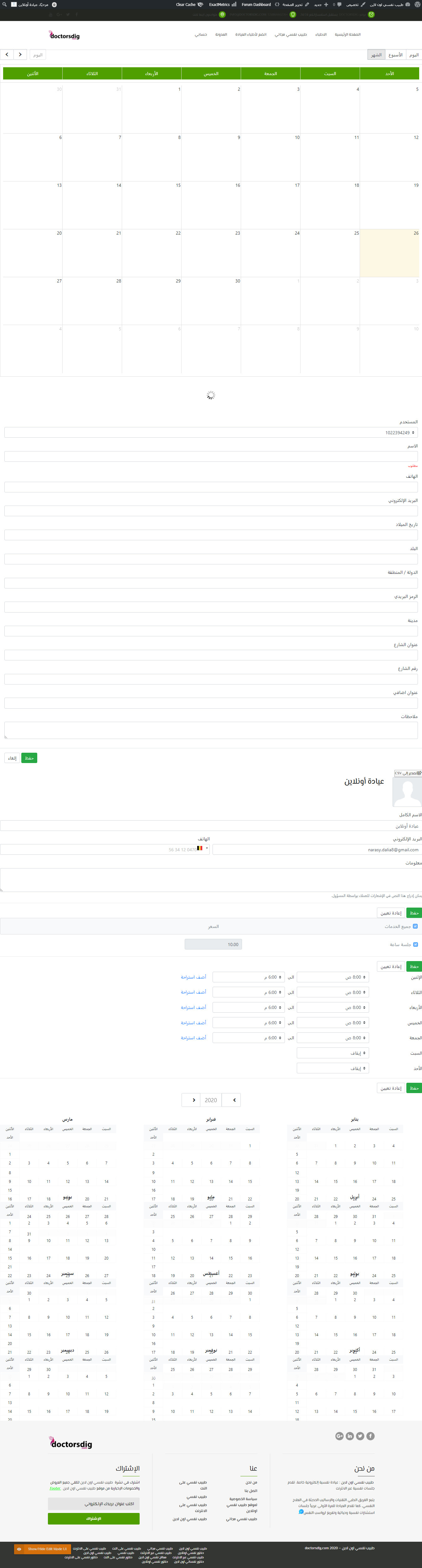
The Bookly Staff Cabinet Add-on: https://support.booking-wp-plugin.com/hc/en-us/articles/115003349989-Staff-Cabinet-Add-on allows your providers/staff members/employees to manage their bookings, own calendar, view and update details, manage services, prices, schedule, days off and special days, as well as export their calendar information into a CSV file without access to the WordPress admin panel.
Please check the demo https://booking-wp-plugin.com/demo/staff-cabinet/ or try the sandbox of all plugins and all add-ons: https://www.booking-wp-plugin.com/demo-list/ to get a better understanding of how Bookly works and be able to discern if Bookly fits your business needs. And, if interested, you can find more features and add-ons at https://www.booking-wp-plugin.com/features/.
If I’m off-base or if you have additional questions or concerns, please send us an email to support@bookly.info with this ticket number 123062 so we could look into this matter.
Many thanks,
Richel
Like us? Rate us!
High rating = More sales = More functions and flexibility
===
Documentation |
FAQ |
Feature Requests |
Video Tutorials
Hi, on the booking form there is a way to put birthday fields, why there is no way to put a shortcode on the notification form to the staff member ??? I need to recive it in email notification, can you share here a shortcode which is necessary to put on the Email notification to recive clients brithday on the email message (booking confirmation) ?
Hello,
Thank you for your message.
Currently, such option is not supported. You can leave your request here: https://ideas.booking-wp-plugin.com/boards/feature-requests/ and if it gets enough votes it might be implemented in the future release.
Or you can use Bookly Custom fields add-on: https://codecanyon.net/item/bookly-custom-fields-addon/21113970
Thanks!
Kate
Like us?
Rate us!
High rating = More sales = More functions and flexibility
===
Documentation |
FAQ |
Feature Requests |
Video Tutorials
this shortcode [bookly-staff-schedule] does not work with new bookly version 17.9
Hello,
Thanks for your message.
Please send us an email to support@bookly.info with this ticket number 122231 and your purchase code for Bookly PRO so we could look into this matter.
Many thanks,
Richel
Like us? Rate us!
High rating = More sales = More functions and flexibility
===
Documentation |
FAQ |
Feature Requests |
Video Tutorials
Please tell me something cos I dont fully understand this. I have Bookly PRO with 3 calendars for.3 staff members, is Bookly PRO offers functionality of separate accounts to let each of those staff members see only their data on the wordpress backend ? I wish to avoid one member can see data of other member ,his appoitments ,elients etc. I am building kind of portal for physioterapeutist , my client as an administrator can create their personal record ,calendar and subpages their calendar will be displayed and its ok, but I wish to let those staff members can login to wordpress backend and see only their own calendars and clients nothing more. Is it doable with Bookly Pro or should I purchase some addons for this ?
Hello,
Thank you for your message.
Staff cabinet add-on is designed to provide your staff members with their personal cabinet where they can check/manage their appointments. Your staff members will be able to see only their own appointments. There is no option to see the appointments of other staff members.
You can find the detailed description of the add-on by following this link: https://support.booking-wp-plugin.com/hc/en-us/articles/115003349989-Staff-Cabinet-Add-on
Thanks!
Kate
Like us?
Rate us!
High rating = More sales = More functions and flexibility
===
Documentation |
FAQ |
Feature Requests |
Video Tutorials
ok, everything is clear now but one more question, can those staff members build up their own services only for themselves ? Completely indepedendly between each other, and also from the system admin who see everything
I have purchased it and see one problem, staff member “bookly supervisor” can see in their individual wp panels calendars of other staff members, that cant happens. Also they dont see in their panels the list of their services they dont have “services” option in their panel to add their own how to enable this ?
Hello,
Thank you for your message.
I advise you to choose “Supervisor” role for your staff members. Bookly Supervisor allows your staff members to see the appointments of all staff members.
As for the services, staff members can’t add services via Staff cabinet add-on. That can be done only via WP admin panel.
Let me know if you have any other questions.
Thanks!
Kate
Like us?
Rate us!
High rating = More sales = More functions and flexibility
===
Documentation |
FAQ |
Feature Requests |
Video Tutorials
I thought they can add their services they provide, therefore I have purchased this addon ): This how it works on my clients side is he is the owner of the company also physiotherapist but he wants to attract other physiotherapist from his area to join his website and publish on it their calendars and use the booking system for themselves (of course I am aware of that my client will have to create accounts for them and give them access manually and its ok but I want to limit his job only to that), list of their services which will vary from others so the idea was they could work separately from each other. But as I see this addon still requires some kind of supervisor, so my client will have to create list of services hisself for each new “Staff” but truey they are not his staff but independent physiotherapists This what worries me are two things, one of those “staff members” who is truely independent therapist, he see others calendars and also list of booked appointments of others, it should not looks like this, he should see only his own services and bookings and calendar. In that case I dont understand the whole idea of this addon if anyone see each other calendars ,services ,prices etc. It should be 100% separated.
You wrote “Your staff members will be able to see only their own appointments. There is no option to see the appointments of other staff members.” – but they see each other calendars appoitments and services – how that may happens ?
Should I set something as an administrator to limit the staff panel to their own data ?
Hello,
My colleague Kate mentioned the Bookly Staff Cabinet (Add-on) where the staff members are able to see only their own appointments. Please read more in our documentation: https://support.booking-wp-plugin.com/hc/en-us/articles/115003349989-Staff-Cabinet-Add-on
I’m afraid there is no possibility to use the plugin as you want – to separate the services in such a way. You have either to give admin/supervisor role to the physiotherapist to give them possibility to add an set up their services or there has to be one supervisor who does this.
Regards,
Olya
Bookly Customer Support
Like us? Rate us!
High rating = More sales = More functions and flexibility
===
Documentation |
FAQ |
Suggestion Board |
Video Tutorials
Ok, understood but your colleague Kate told me they will dont see each other reservations, services and calendars, do you want to tell me thats not true ?
Ok as I understood to separate that data I mentions the only way is to use if from the front end and shortcodes you mentioned on the video right ? But how I can avoid to let them open up from the wordpress backend Bookly tab, there all calendars bookings are visible to each others despite I attached Bookly role to the users they from the backend can browse other staff calendars and bookings, that should not happens.
ok it seems I already limited the backend view of SuperVisors by using White Label Branding, so it works like a charm now. Ok, that means this topic may be closed cos I already solved the problem I can let the supervisors manage only their data from the front end, their rates for specific services but I dont understand fully the sens of having services price settings from the back end, why is it for if the supervisor staff bembers can modify their prices individually from the frontend profile page ?
Hello,
Thank you for your message.
If you mean that you don’t want your staff members to edit the prices in Staff cabinet section, you can just remove this section completely: you need to remove [bookly-staff-services] shortcode.
Let me know if it works for you.
Thanks!
Kate
Like us?
Rate us!
High rating = More sales = More functions and flexibility
===
Documentation |
FAQ |
Feature Requests |
Video Tutorials
no I dont, this what I have on the front end staff member is ok, but Bookly Administrator (owner of the website) who creates globally all those “services” can also set the prices and I dont understand why is it for if the staff members can modify their individual prices themselves – just question not the ask to change something (:. Individual services prices (staff) as I understood overwrites those global prices set by the BooklyAdministrator, if it works that way its ok, Staff can leave the prices set by Bookly Admin or change them for himself only, and its ok
last more question, ist there any way to put bellow contact form during booking process checkbox with accepting Privacy Policy ?
Hello,
Thank you for your message.
That can be done with the help of Bookly Custom fields add-on:
https://codecanyon.net/item/bookly-custom-fields-addon/21113970You need to create Checkbox Group and point the link to Privacy Policy page: http://joxi.ru/1A53ZzxfGxx4Zm
Let me know if it works for you.
Thanks!
Kate
Like us?
Rate us!
High rating = More sales = More functions and flexibility
===
Documentation |
FAQ |
Feature Requests |
Video Tutorials
Hi there! I have a big team, more than 10 members, but i can only get 2 clientes per hour. How do i configure?
Hello!
Thanks for reaching out.
Could you please tell me more about your scenario?
How many services these 10 staff members are providing? What is the duration of the service – is it 1 hour?
Thanks!
Julia
Like us? Rate us!
High rating = More sales = More functions and flexibility
===
Documentation | FAQ | Feature Requests | Video Tutorials
when creating a Staff Cabinet frontpage you will at the same time give them access to backoffice at wordpress? where they will have a lot more possibilites? I dont get it?
Hello,
Thanks for your message.
The Staff Cabinet Add-on: https://support.booking-wp-plugin.com/hc/en-us/articles/115003349989-Staff-Cabinet-Add-on allows you to let your employees manage their bookings, own calendar, view and update details, manage services, prices, schedule, days off and special days, as well as export their calendar information into a CSV file without access to the WordPress admin panel. Essentially, you would create add the shortcode of the Staff Cabinet in a page on your website that gives your employees the ability to view their own bookings, calendar, services, etc.
Please check the demo: https://www.booking-wp-plugin.com/demo/staff-cabinet/ to have a better understanding of the Staff Cabinet Add-on.
If you have additional questions or concerns, please send us an email to support@bookly.info with this ticket number 117161 and your purchase code for Bookly Pro so we could look into this matter.
Many thanks,
Richel
Like us? Rate us!
High rating = More sales = More functions and flexibility
===
Documentation |
FAQ |
Feature Requests |
Video Tutorials
Hi there,
I recently purchased Staff Cabinet plugin and entered purchase code. Created new page for staff members but when logging in as any staff member is get this message: You don’t have permissions to view this content.
Can you please assist with this.
Hello!
Thanks for reaching out.
Please, check that you access that page with a WP user account that’s linked to a staff member and is associated with the editor’s role.
Thanks!
Julia
Like us? Rate us!
High rating = More sales = More functions and flexibility
===
Documentation | FAQ | Feature Requests | Video Tutorials
The z-index of the calendar in my staff cabinet is having issues and stopping me from accessing the modal form that pops up. May you assist me with this issue, please?
I’ve emailed you the login credentials to my wp site admin area. Thank you.
Hello,
Thank you for your message.
Your request is in work. Kindly wait for the results.
Regards,
Kate
Bookly Customer Support
Like us? Rate us!
High rating = More sales = More functions and flexibility
===
Documentation |
FAQ |
Suggestion Board |
Video Tutorials
Good afternoon
I’m using the Staff plugin and when access Bookly Staff Cabinet – Calendar pops up the calendar correctly, however, when I select any scheduling to modify, or create a new schedule, when opening the screen to put the information is all locked.
I need to know how to fix this problem
Hello,
Thank you for your message.
Please, check this instruction: https://support.booking-wp-plugin.com/hc/en-us/articles/360015593774-Incorrect-display-of-pop-up-windows-in-Customer-Cabinet-Add-on-and-Staff-Cabinet-Add-on-
Let me know if it works for you.
Thanks!
Kate
Like us?
Rate us!
High rating = More sales = More functions and flexibility
===
Documentation |
FAQ |
Feature Requests |
Video Tutorials
Presale: 1- can this plugin allow multi vendors to register and set up their calendar?
Hello!
Thanks for reaching out.
Bookly is an ultimate online appointment scheduling and service booking solution for almost any business which sells services. You can create different staff members and each of your staff members can have his own services: http://prntscr.com/pp39xu
If you want your staff members to have their personal cabinet where they can manage their appointments, it is possible with Staff cabinet add-on: https://codecanyon.net/item/bookly-staff-cabinet-addon/20005540
I advise you to generate your personal demo version to see if Bookly suits your needs: https://www.booking-wp-plugin.com/demo-list/
Thanks!
Julia
Like us? Rate us!
High rating = More sales = More functions and flexibility
===
Documentation | FAQ | Feature Requests | Video Tutorials
Thank you for the reply I shall check but before I do can you advise if I have to self register each vendor (staff) in the backend admin or can I have it setup as each staff can register themselves and auto approve.
Hello!
Thanks for reaching out.
You should register all staff members by yourself in the WP admin panel, they can’t register by themselves.
Thanks!
Julia
Like us? Rate us!
High rating = More sales = More functions and flexibility
===
Documentation | FAQ | Feature Requests | Video Tutorials
Hi I recently bought the Staff Cabinet Addon but I have a problem. When a staff member cancels an appointment from the calendar on the frontend the page gets darker and the popup appears but no action can be performed. It´s necessary to refresh and the appointment is not cancelled. I think the idea is the page gets frozen but not the popup. Thanks in advance.
Hello,
Thank you for your message.
Please send us an email to support@bookly.info with this ticket number #112072 and admin panel access so we could look into this matter.
Thanks!
Kate
Like us?
Rate us!
High rating = More sales = More functions and flexibility
===
Documentation |
FAQ |
Feature Requests |
Video Tutorials
Hello,
recently I created a staff calendar in a page. Viewing this page I received this error: You don’t have permissions to view this content. May I provide the details in a support ticket?
Hello,
Thanks for your message.
Please send us an email to support@bookly.info with this ticket number 111434 and your purchase code for Bookly Pro so we could look into this matter.
Many thanks,
Richel
Like us? Rate us!
High rating = More sales = More functions and flexibility
===
Documentation |
FAQ |
Feature Requests |
Video Tutorials
Why would this plugin not allow the user to sync their Google calendar from the front end? I purchased this plugin so no backend access would be necessary but because you omitted such an important piece of functionality, this plugin becomes useless. Was this not possible?
Hello,
Not really sure what you mean by “not allow the user to sync their Google calendar from the front end”. If you mean that you would like to allow each staff member to synchronize his own calendar, then I’m afraid this is not possible as only a user with admin rights can do this and yes, there is a need of backend access as all the settings for the booking process is being set there, including the staff members. Let me know if you meant something else.
Regards,
Olya
Bookly Customer Support
Like us? Rate us!
High rating = More sales = More functions and flexibility
===
Documentation |
FAQ |
Suggestion Board |
Video Tutorials
Editor role can sync their own Google Calendar from the back end. They do not have to be an admin. My issue is that they cant do it using this plugin. I am confused why you cant code this feature.
Hi,
Thanks for your message.
Please send us an email to support@bookly.info with this ticket number 110210 and your purchase code for Bookly Pro so we could look into this matter.
Many thanks,
Richel
Like us? Rate us!
High rating = More sales = More functions and flexibility
===
Documentation |
FAQ |
Feature Requests |
Video Tutorials