130 comments found.

Hi, Great plug-in! One question, how can I turn on timed comments?
I can’t seem to turn it on with this extension.
Thanks!
All good. For anyone else. Player Config > Under Tab “Skin-Wave”
Thank you I wrote an article
https://zoomthe.me/knowledge-base/zoomsounds-audio-player/article/turn-on-timed-comments/Cheers!
Radu
Radu, The only thing I can think of that has changed, which may be of some consequence is that I had the host update the PHP recently. It was updated to PHP 7.4 (alt-php74). I’m not sure if that of any issue, or not.
Rich
Hello Rich
Weird – I don’t seem to be getting issues – https://indiemusic.space/audio/bass-1/ ?
Cheers! Radu
I noticed that you were able to post the song. However, when I tried to post, after you, I received the same error message. Perhaps it is a browser issue? What browser did you use to post with? Just attempted the same with a different browser than I normally use (Chrome). Using Firefox, I received the same error. Looking over your file posted, I see nothing different between it and the others I and others have tried to post.
Hello
This was uploaded with Firefox 59 now – https://indiemusic.space/audio/bass-2/
Maybe we can figure the pattern ?
I hope we can find and figure out the patten. I’ve tried with Chrome (84.0.4147.89) and Firefox (78.0.2) and both failed. Just received not from user that he is able to upload… or, at least thinks it is back. I just noticed there is not way to send you a png file. Will post link to it shortly.
Update from user: He is not able to upload, but noticed the uploads you made. Asked him to test uploading himself. Will add to this post the results.
Radu. here is a link to the png as promised… https://indiemusic.space/Rich/grab.png
Could not update the post above, as it time out for editing. The user, apparently, was not able to upload himself, but rather, reported seeing the evaluation uploads that were made by you, Radu.
On an aside, just attempted to upload using Safari (13.1.2 (13609.3.5.1.5)). No joy. Unable to upload, received same error message.
Conducted some additional investigation, this morning. It would appear that the issue has to do with the ISP limit on file size. It was changed, unknown to me, to a max file size of 2MB. I am working with them now, to change this to a more acceptable number. Thanks Radu.
Radu, got the solution implemented.
The issue had to do with the update of PHP, which by default changed the file upload size to 2MB, not retaining the 16MB size I had previously set.
Thank for your assistance in tracking this down. Well done.
Hello @rich_indie
Thanks for coming back with the solution
Cheers!
Radu
No worries. Happy to be able to help you, while helping myself. 
Thanks Rich
Hello Rich
Weird – I don’t seem to be getting issues – https://indiemusic.space/audio/bass-1/ ?
Cheers!
Radu
Main Issue: Music Playlist Creation for BuddyPress User Profiles
I bought this plugin with the intentions of building my own social media platform for various music artists and more. Apparently this “BuddyPress Integrated” feature is not straightforward and simple as presented. I have been dealing with nothing but issues for weeks now with this plugin. All I want is for users to:
1) Create a profile – (Accomplished)
2) Users login and upload music to their profile – (Accomplished)
3) Users uploaded songs appear on their profile page/section – (Accomplished)
4) Users can view and play other user songs and are able to create their own playlist and add it to their BuddyPress Profile Page. Similar to other media playlists such as MySpace, YouTube, Amazon Prime Music, Apple Music, Soundcloud, Reverbnation, etc. – (Not Accomplished) – It just simply does not work at all when I login as a BuddyPress User and try to create my own music playlist from my profile page or if I try to make a playlist from each song one by one.
OTHER ISSUES
Where are all of the shortcodes and options for:- zoomsounds_showcase
- zoomsounds_player
- dzsap
I just want what I paid for to work correctly as described in its description. Thanks!
Hello
You can consult this article – https://zoomthe.me/knowledge-base/zoomsounds-audio-player/article/portal-add-user-playlist/
—
https://zoomthe.me/knowledge-base/zoomsounds-audio-player/article/showcase-shortcode-options/—
We don’t have this kind of documentation for the player because it’s usually generated with the shortcode generator > ZoomSounds > Settings > Shortcode Generator
Cheers!
Radu
I have waited days for your reply and it did not solve anything. I have already read through all of these articles for weeks. That’s why I finally decided to comment on it. All I wanted is for Buddypress users to upload music and create there own music playlist as the product description said.
But thanks, I know now that I do not need to spend another night trying to make this work when it will not. I will look elsewhere for a product that really does work as described in its demo/description.
And for the record those short-codes are not all working.
Hello! I have a BuddyPress platform and would like to show my users a waveform of their audio that they upload as a comment or as a post. Currently it’s just a bar with a line and a play button. The simple one.
Does your plugin with Buddypress addon provide what im looking for? ^^
Hello
Yes, it does
Cheers!
Radu
Hello Radu! Are you able to send me a demo? ^^ It does replace this player? https://prnt.sc/t2om49.
Hello
If you make an account and log here – https://zoomthe.me/soundportal
and click upload
you should see a demo
Cheers!
Radu
Good afternoon! Tell me, please, how to make a normal form of loading tracks in the Buddypress account, as shown in your preview?
Hello
Some questions answered here – https://zoomthe.me/knowledge-base/zoomsounds-audio-player/article-categories/portal/
Cheers!
Radu
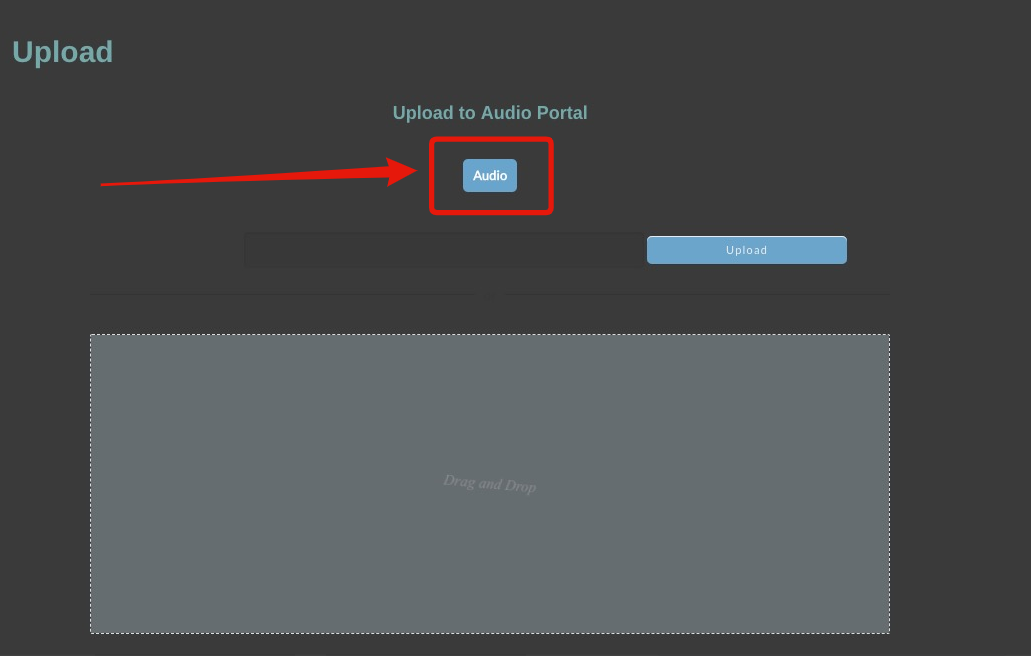
Hi, what is the “Audio” button for in the front end submission form? This: https://i.gyazo.com/346a603db9c3727d04af926efbdec58e.png
It is posible to record the audio talking or the user needs to upload an audio file?
Thanks!
It was an option to choose between Audio and SoundCloud
We will remove it cause it does not make sense now
Record Audio only on custom work
Cheers!
Radu
Hello Radu,
Had some joker attempt to upload a song, without including that song. Now, I got a ghost entry with no audio attached. Can edit the item, but can not remove (delete) the item. I, suppose, I could attach an audio file to the entry and then see if I could delete it, but thought I should ask you about it first, to see if there might be an alternative way to remove the item. Thoughts?
Hello
You can remove it via dashboard > audio items – with or without song
Cheers!
Radu
That’s well and good IF you have “Audio Item” as a choice in your Dashboard, which I Do Not.
Got it removed, by adding an audio file to the entry and then deleting it.
Hi,
I just bought this and when I insert this on a page [audioportal_playlist] it shows that and nothing else, like if it was just plain text. As well, when I try to upload a song, after uploading, it gives me a page cannot be displayed. Do I need to add a custom post type for this to work?
What I need, is that registered users can upload an audio track and when they do, a playlist shows all files uploaded on another page. I’m working offline right now so cannot share login details  Please help, and thanks!
Hello
It’s [zoomsounds_upload] for the upload page
https://zoomthe.me/knowledge-base/zoomsounds-audio-player/article-categories/portal/Cheers!
Radu
Hello, is it possible to display all new uploaded songs from all users on one page? And is it also possible to display the songs in the BuddyPress newsfeed?
Hello
Yes
you can use this shortcode
https://zoomthe.me/knowledge-base/zoomsounds-audio-player/article/showcase-shortcode-options/-
Cheers!
Radu
Unfortunately only a blank page is displayed.
Can you help me there? I have inserted this code: [zoomsounds_showcase feed_from=”audio_items” count=”5″]
and I would like to add the Waves to the list. A list like in the profile tab “Songs” with all upload songs from all users.
This code works: [zoomsounds_showcase feed_from=”audio_items” ids=”” style=”widget_player” orderby=”likes” order=”DESC” count=”5” style_widget_player_show_likes=”on”]
But as I change anything, it’s just another blank page. Can I change the style here with Waves? A list like in the profile tab “Songs”.
One more question. How I deactivate the profile tab “Playlist” on the user profiles?
And one more question! How can I edit the audio player that appears after a track is uploaded? (Single Audio Page)
Hello
For waves, you just need to set style to player
— https://zoomthe.me/knowledge-base/zoomsounds-audio-player/article-categories/portal/—
https://zoomthe.me/knowledge-base/zoomsounds-audio-player/article/change-audio-player-configuration-in-single-audio-page/—
Cheers!
Radu
Here’s an interesting conundrum. It appears that artist who’ve are allowed to submit/upload their music are not able to edit the descriptions of that music, once it has been uploaded, although administrators are.
Is it possible for someone to explain why this is the case, that artists are not able to edit the descriptions of their own music?
Thanks
Hello
We can add that option. But how do the normal users edit their songs ?
Cheers!
Radu
Well, at present, normal users, from what I can tell when logged in as a normal user, can only delete their posted songs and do not have the ability to edit the descriptions in any way. The only option is that ‘normal users’ contact me and let me know what they need edited in their song descriptions and then I’ll do the edit for them.
After doing a bit of digging, found that if the ‘normal user’ is given the privilege to ‘edit published Audio Items’ they will be able to edit their own songs, but not others. It would seem that allowing that privilege to be ‘turned on’ to ‘normal users’ would do the trick. Now, I just need to go through all the ‘normal users’ and activate it and then find a way to do the same for any new ‘normal users’.
Updated to add: Got that figured out.
Hello
I added the feature for you
Cheers!
Radu
Thank you Radu. You work wonders. Should one use the “Autoupdater” to get this enabled ?
Hey
Zoomsounds > autoupdater
And portal you would need to redownload and install – or use envato market plugin to autoupdate
Cheers!
Radu
How do someone upload there song in the buddypress without need the admin access
Hello
You will need a frontend uploader – https://zoomthe.me/knowledge-base/zoomsounds-audio-player/article/page-with-frontend-uploader/
Cheers!
Radu
how do I put it in the buddypress in order to do that
it only doing youtube how can I do mp3 and soundcloud and etc
Hello
The uploader ?
Can you show me a link ?
Cheers!
Radu
I need your help I been emailing you guy
Hello
We’ll reply to email
Cheers!
Radu
I am still waiting on the reply
The plugin is not performing as expected. The layout of items in the chart is messed up. The playlist feature does not work on the user profile. Images don’t appear when adding them to a track during creation. Redirect after song addition returns 404. I need some help please. The plugin is unusable as is.
Hello
You can solve redirect by repairing permalinks – https://www.hostinger.com/tutorials/wordpress-broken-permalinks
Cheers!
Radu
You can send me link for the layout items issue
Cheers!
radu
After the plug-in fiasco (Thank you for tracking that one down), the only issue I can still see is that the artist Song page is back to showing only 5 songs. Suggestions on this?
Hello
Send me again wp-admin login on my mail and I will have a look
Thank you!
Radu
Sent the info again. Sent it to the support email address. Thanks. Rich
I am having trouble with the single audio item view. When clicking on a song the link redirects to https://mydomain.com/audio/"song-title" but there is nothing on the page. Just the post title. empty content and comments. What do I need to do to show the actual song template if any?
Thanks.
Hello
Can you show me an actual link ?
There should be a player and some description .. share .. add to playlist buttons
Cheers!
Radu
Hello
Send wp-admin login via https://zoomthe.me/sendadmin/login-details.php?sendftp=off
Input “https://codecanyon.net/comments/23642351 ” in Additional Details field – I can check
Cheers
Radu
does this plugin require buddypress to work? I can’t find any portal for users to upload or manage songs. Is there a song dashboard or something?
After Users lost the ability to Upload new music to the site, the ability to Like a song disappearing, and the modification you, Radu, made allowing more than 5 artists songs to be shown on their profile page, I’ve decided, after waiting 8 days on advice, that I will try the “auto-update” capability of the plug-ins to try and resolve these issues. If that doesn’t work, which I suspect it wont, I will then manually download the files and attempt to manually update them on the site (simply pasting them over the already in place).
My users are worried and checking in with me every day about when a resolution to these issues might be expected. I have nothing to tell them, as I have no idea, having not heard anything. I’m hoping that together we can resolve them.
Hello
Not sure what would be wrong with the upload page
Does it not upload the file or on pressing submit, nothing happens ?
Cheers!
Radu
The upload box appears for a split second and then completely disappears. The consequence is that no one is able to upload any new music. You can see for yourself at: https://indiemusic.space/upload-song/
Hello
Seems like an error in your plugin – Simple Commenting Plugin – it’s rendering the other plugins to not work
Cheers!
Radu
Deactivated the plugin mentioned and the upload song page is back. The “Like” capability is also back. The only issue I can still see is that the artist Song page is back to showing only 5 songs. Suggestions on this?
Thank you, Radu! Rich
Radu, Can you work your magic on the issue where the Artist Song Page is only showing 5 songs again? Or, maybe, tell me how to correct it? Thanks
Rich
the plugin do not work with my buddypress please advise
Hello
Can you share me a link or explain what is not working ?
Cheers!
Radu
I am still waiting on the reply in the email
It seems there is an issue that just cropped up this morning. The upload capability is GONE. I was notified by a user that no one was able to upload any music, as the upload box is gone. I checked the short code, which looked fine, however upon loading the page the drop box that normally appears does not.
Radu, could you please take a look at help me out. https://indiemusic.space/upload-song/Thank you, Rich
Another odd thing noted is that the mods you made last seem to have also disappeared. Should I update the plugins by downloading again and then reinstalling, or wait for you to take a look?
Just to keep you informed, was informed by a user this morning that the song “like” capability had also disappeared. Definitely something odd happening.
Checking in to see if you might have any advice, or updates, on this situation. Thanks…