292 comments found.
Hi, would this work with https://preview.codecanyon.net/item/contact-form-7-popup/full_screen_preview/21083030
Hi there,
Thanks for reaching out. We have not tested with that plugin, you may try to see. Let me know your findings.
Best regards,
Kelly
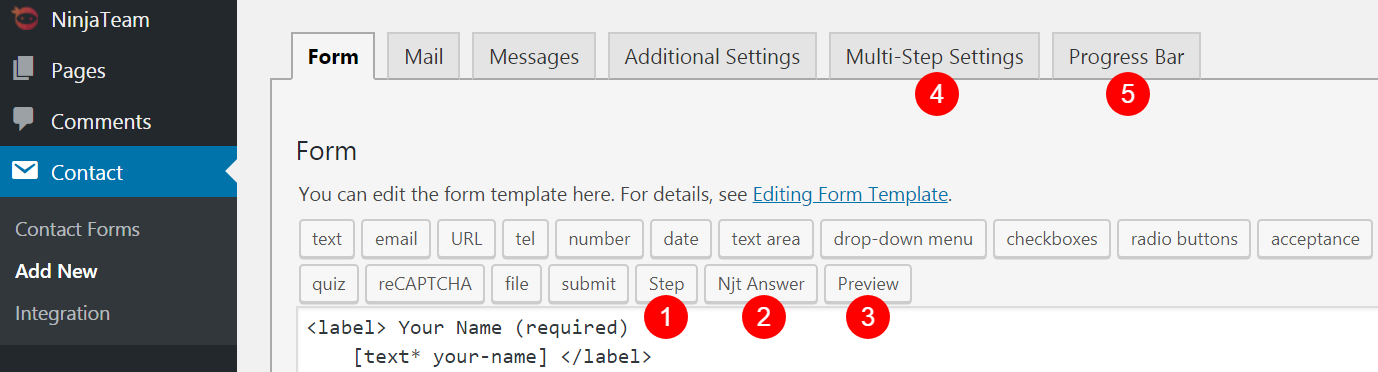
hello , i purchased your plugin but i need to know how to create more than 3 steps , i have around 10 steps
Hi,
You just need to click on “Step” tab to add a Step, it’s the no 1 here https://ninjateam.org/wp-content/uploads/2018/09/01.png
Please let me know if there is anything else I can ever help you with.
Kelly
Urgent pre-sale question.
I need to split 1 single contactform7 in to 5 different columns using visual composer on the same page.
Is this possible with your plugin and how can I achieve it ?
Regards
Hi there,
Thanks for reaching out. Our plugins help create steps for your form and you can have unlimited steps. Please see our demo here https://demo.ninjateam.org/contact-form-7-multi-step/
Please let me know if there is anything I can ever help you with.
Kelly
Thank you for the quick reply. I need to split the form in different columns on the same page without using the steps. Is this possible with your solutions.
I saw in the comments from 3 years ago that a client of yours needed the same functionality and you replied :
Hi marcie73, You need not use columns to divide your form. Just design your form from top to bottom, then use Shortcode from our plugin to divide the form. Of course, you can use Visual Composer to use columns in each step.
Please let me know if you have any questions, Tommy
I need the same thing.
Basically use your solution to split up the form around the page in different columns but without using the next, next (step) buttons.
Hi there,
I hope I get what you mean clearly. If you just want to split a form into columns without “Next” buttons, you can use VC only.
Kelly
Hey there!
We’re looking to use this with Zoho. I see Contact form 7 and Zoho work but was wondering if this form will integrate with Zoho as well?
Thanks!
Hi there,
Thanks for reaching out. We have not tested with that, you can purchase to try. If it does not work, we will provide you the refund 100%.
Thanks and Best regards,
Kelly

Next step isn’t working on iPad iOS 9.x.x
Hi jonnygiggle,
Thanks for reaching out. That sounds a strange issue. Have you tested on other iPad iOs versions?
Kelly
It works on my iPhone 11 Pro Max, just not iPad Mini
I think it has to do with the version compatibility of jquery on older iPads.. if yo have a fix, i’m willing to pay for the fix.. even though I’ve already purchased the bundle
Hi there,
Sorry but it’s hard for us to fix because we can’t reproduce the issue  All of our devices are updated to the latest version of iOS.
Kelly
Here’s a video of whats happening.. it’s acting as if the form isn’t complete when you go onto the next step.. but there isn’t anything else to complete. https://bit.ly/2p5DzQA
Webhead’s Multistep Form plugin for CF7 works just fine on old iOS versions, and is half the cost. So let me know if the NinjaTeam isn’t able to “reproduce the issue” ... I’ll just get a refund.
Hi there,
Have you tested our demo https://demo.ninjateam.org/contact-form-7-multi-step/ on iOS 9? Is it the same issue?
Kelly
Hi,
Pre-sale question. Is contact form 7 Multi Step Pro compatible with WPML?
Thanks, Tiago
Hi there,
Thanks for reaching out. The answer is Yes! They are compatible with each other 
Let me know if there is anything I can ever help you with.
Kelly
Hello, we purchase the plugin but the steps are not working at all. We don’t have other plugins installed and it is also not working with the default theme. Can you help? Here is the form: https://yourplanmanager.com.au/sign-up/
Please check this link, I set it up for test propose and I’ve used your form in the demo: https://yourplanmanager.com.au/test-multistep/
Hello there,
Thanks for reaching out to us. In this case, please submit a private ticket with your login credentials at https://ninja.ticksy.com/ and our support team will help you check it.
Kind regards,
Kelly
Hi,
I’m interested about your plugin but :
- Is there any limitation with the steps? I have more than 20 steps.. - Is there a possibility to get conditional steps? Considering the previous answers - I need to add images on my proposed answers. Do you know a plugin compatible with yours ?
Thanks a lot.
Hi there,
Thanks for reaching out. This plugin supports unlimited steps. To have conditional logic or images, you need use other plugins. There are many of them on WordPress.org, you can test them.
Let me know if you have any other questions.
Kelly
However, using the free plugin “Contact Form 7 Multi-Step Forms”, the PDF no longer filled and was no longer sent to my email as an attachment.
There are going to be quite a lot of fields to fill in the PDF, so I need to separate it with multiple steps.
I need to know if this plugin will work with it or not. If there’s any way you can test it for me that would be great.
Thanks
Hi there,
Thanks for reaching out. You can purchase and use it, if it does not work, we will give you full refund, so no worries much.
Thanks and Best regards,
Kelly
Ok thanks.
Thanks and please let me know if there is anything I can ever help you with.
Kelly
Is this compatible with CF7 Repeatable Fields or another
Hi there,
Thanks for reaching out. The answer is Yes! You can use our plugin with CF7 Repeatable Fields.
Please let me know if there is anything I can ever help you with.
Kelly
Is there a way to change the transition between forms? I really don’t like the bounce effect, I thought this would have been an option when I purchased as it states it is fully customisable?
Hi there,
Currently the plugin does not have the option to change the transition effect, but we will update it in the future.
Please let me know if there is anything else I can ever help you with.
Kelly
Hello, is it possible to disable the transition effect between steps? Or are there other ones available, e.g fade? Thank you,
Hi there,
That function is not available yet. We will consider to update it.
Thanks and best regards,
Kelly
is it possible to have the final back button removed as its next to the submit button and as its on the right people are clicking back all the time rather than submit.
Hi there,
The answer is Yes! Please submit a ticket at https://ninja.ticksy.com/ and our support team will help you do it.
Thanks for reaching out,
Kelly
Is it possible to customize the Progress bar style on this plugin?
Hi there,
Currently you can not customize it but we may add it for future updates. Let me know if you have any questions.
Best regards,
Kelly
Hi there,
It maybe different in style, you can try this lite version first https://wordpress.org/plugins/cf7-multi-step/
Let me know if you need any other question.
Kelly
thank you for the answer, is the https://wordpress.org/plugins/cf7-multi-step/ only two step plugin?
Yes, it is.
Hi, I want to recreate this form using this plugin http://bit.ly/2JVLMNL is it possible?
Hi there,
Thanks for reaching out. It can not look like as the same as that form because the progress bar style is different.
Please let me know if there is anything I can ever help you with.
Kelly
Can I make it so it auto moves to next question without the next buttons?
Sorry but the plugin does not have that function, we still need press Next buttons.
Kelly
Hello and thank you for this great plugin. My question: is there any issue with WP Bakery (aka Visual Composer)? When we use the plugin only with Wordpress (even with Gutenberg) – everything is fine. But when we use Visual Composer the distance between the green step-icons and the sublines are without any space! Hope you can help us.
Thank you and beste wishes, Helge
Hi Helge,
Thanks for reaching out. This plugin works well with WPBakery Page Builder. If you get any issue, please submit a private ticket with your login credentials at https://ninja.ticksy.com/ and our support team will help you check it.
Kelly
Disappointed in the promised costumer service. I’ve requested assistance last week on the plugin in, and again today. Still no feedback regarding the issue.
Hi there,
Thanks for reaching out. Sorry for late response since your request came on weekend. We have replied your ticket, please check and reply there.
Best regards,
Kelly
Pre-Sales: Is it possible to have one feild such as “email” and the scond step go to a separat page? Scenario is a lead capture email field on the homepage which would sign them up to our mail chimp, and the rest of the form would be filled out from the separate page.
Hi there,
You can make one form using our plugin with steps, and you can use this plugin https://codecanyon.net/item/contact-form-7-database/14684587 to save every step of the form even user does not complete it. Then from the email field saved, you can export the list and upload into MailChimp for later use.
Please let me know if there is anything else I can ever help you with.
Kelly
Hello there. I have a step with a file input field and button that skip this step if a user has no file to upload. How can I do that? Is there a wp hook that I could use?
Also, I would like to know. Is it possible to save a user’s data on every step into a database? Thanks.
Hi mmarckus,
Thanks for reaching out. Let me answer your questions.
1. It can be a custom work becase that feature is not available at the moment.
2. You can use this plugin together, it helps save a user’s data on every step into a database https://codecanyon.net/item/contact-form-7-database/14684587
Please let me know if there is anything I can ever help you with.
Kelly