540 comments found.

Hello !
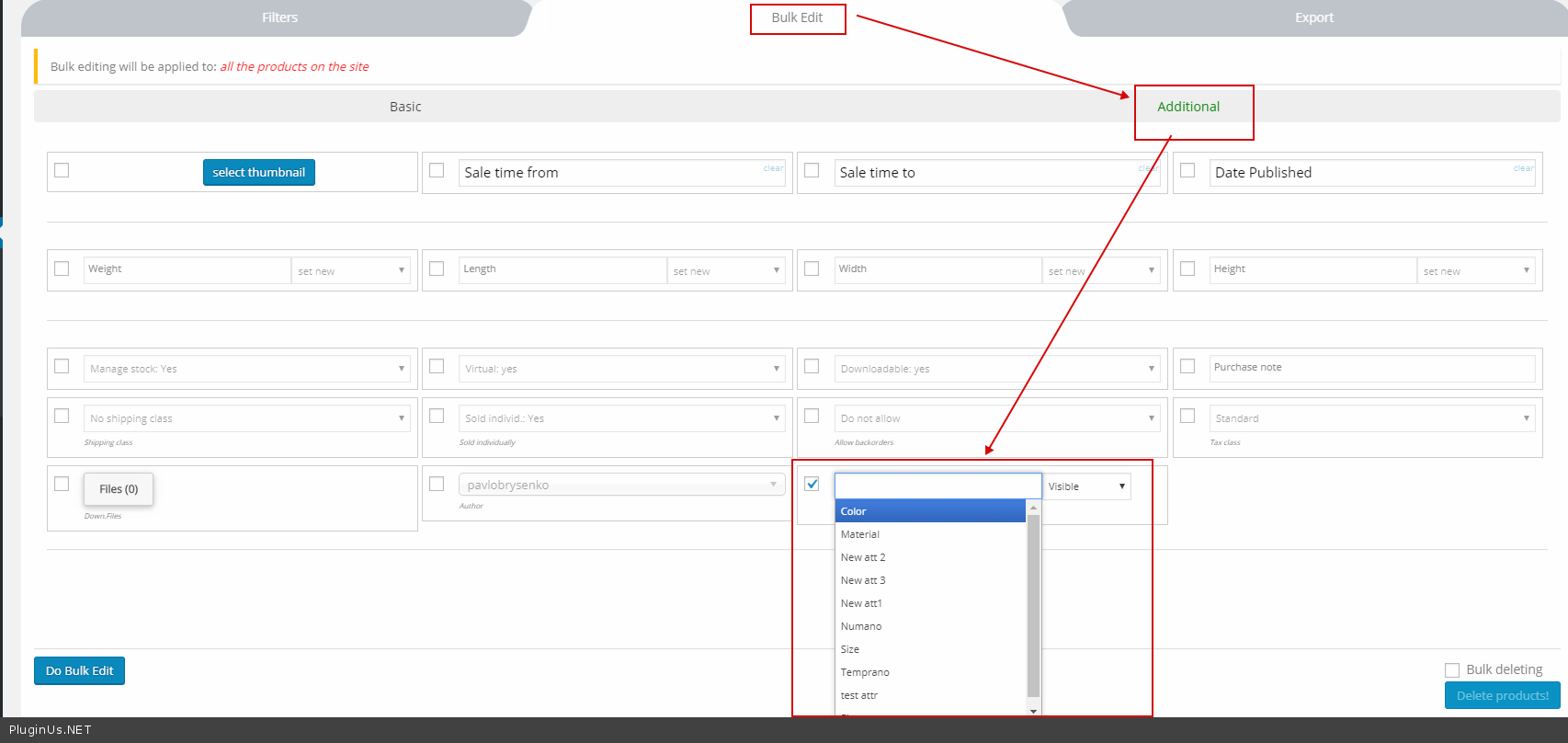
Wondering if it was possible to bulk edit/update a specific attribute visibility for all products (all are simple products) with the pro version ?
Thanks in advance for your answer.
Best Regards, Valentin
Hello Valentin
Yes, it’s possible – https://c2n.me/42SoqOd.png
Thank you for your answer, awesome product !
Hello
Welcome;)
Hello,
I am interested in buying this plugin. Would it be possible to directly upload a digital file from the bulk sheet?
Hi, after updatei cant find delete sale price in bulk edit. How do i bulk delete sale price from product variations?
Hello
Try in file – wp-content\plugins\woocommerce-bulk-editor\classes\models\products.php add this code – https://c2n.me/41IhH0L.png
if($field_key == 'sale_price' AND $value<0){
    $value=false;
}
Then try to delete sale price – set it as -1
Hello
Read this please: https://bulk-editor.com/howto/how-to-remove-sale-prices-by-bulk-operation/
It is not working. It puts sale price to 0 but than it shows regular price with sale price 0. See screenshot. Bulk editor https://prnt.sc/olxphh, front page https://prnt.sc/olxprh. Do you still have previous version where you had option delete sale price? That was working ok.
Hello
By the way, I just tried minus 101% of regular price – and sale price not visible, try it …
Try also code suggested above, for more convenience in sale price operations it will be in production also
where you had option delete sale price? – such option not existed
Ok i’ll try tomorrow. In your documentation you also have delete option.
I have inserted code as you wrote above.
it still shows 0 sale price.
Hi i fixed the proble. Have to change code from (AND $value<0 to AND $value 0) and now it works. I can set sale price 0 and select set new and sale price is gone. OLD CODE: if($field_key ‘sale_price’ AND $value<0){ $value = false; } NEW CODE: if($field_key 'sale_price' AND $value 0){ $value = false; }
Hello Ok! Great!
Hello
Unfortunately we do not have such information
But I think yes. Please watch video – https://bulk-editor.com/video-tutorials#video_1290 AND https://bulk-editor.com/video-tutorials#video_3044
Ok thanks it works
But I have one problem again. How to make specific variable from attribute from woobe?
Now I make it manually, uncheck “use for variation” button from unwanted attribute for variation-save it,go to variation menu, and make variable from all attribute.
How to edit all of that from woobe?
Hello Please watch video – https://bulk-editor.com/video-tutorials#video_2506
Is it possible to export csv file with meta data in the list below fora bookable product?
- product add ons - resources - Booking time - booking duration - booking starts at
Hello
Yes! If you add this meta data – https://bulk-editor.com/video-tutorials#video_1290 AND https://bulk-editor.com/video-tutorials#video_3044
I want to buy this product but i am not sure for it is supported to Booking appointment plugin cost to update cost and also cost field available in export . Please help me..
Hello
Try free version – https://wordpress.org/plugins/woo-bulk-editor/
And watch video please – https://bulk-editor.com/video-tutorials#video_1290 AND https://bulk-editor.com/video-tutorials#video_3044
some time bulk edit not work I must click 2-3 time when change an option
Hello
Can you drop me a video with this error?
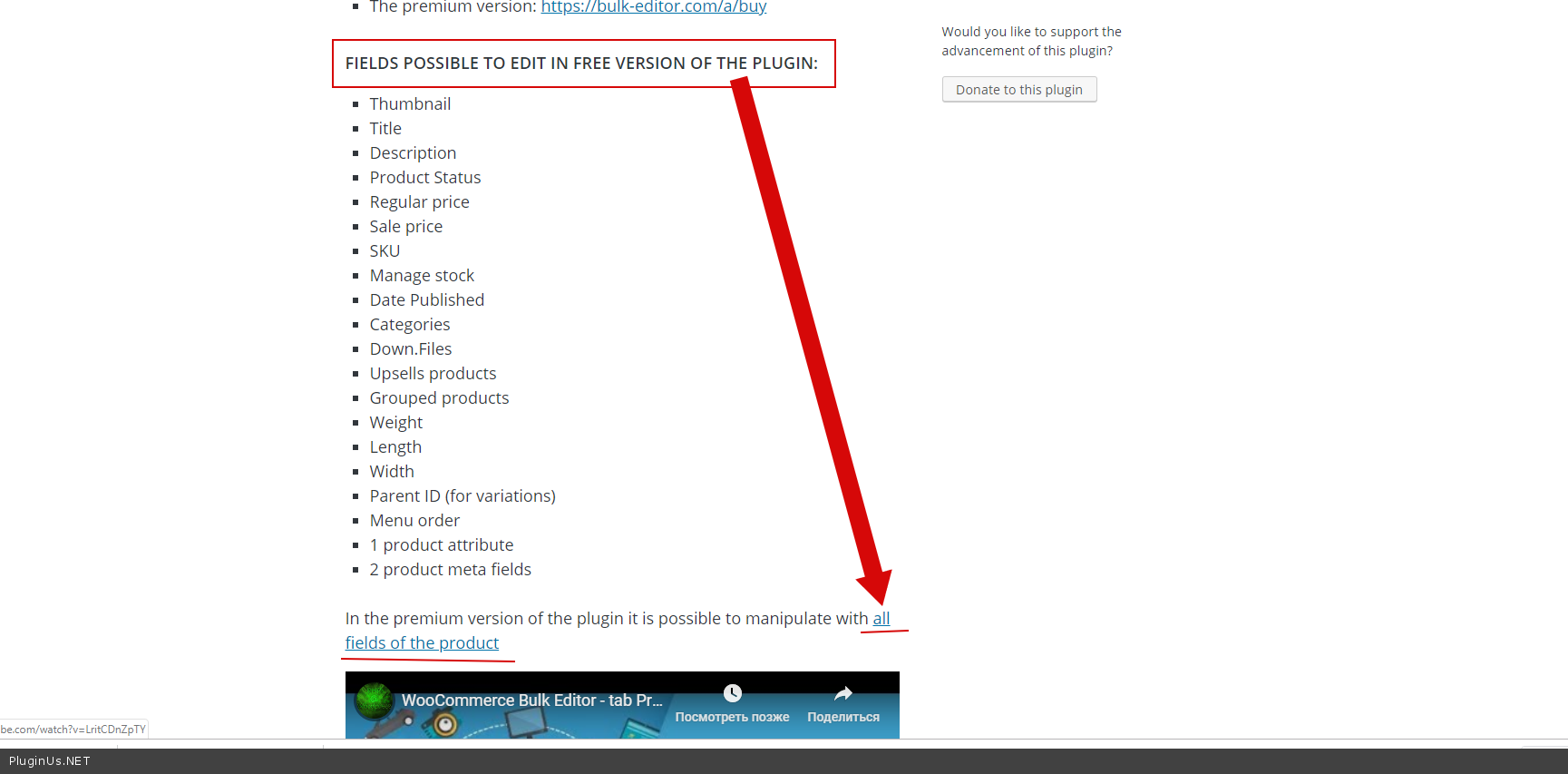
what is the different free and pro ?
Hello
Please read this ( https://c2n.me/42x1o6V.png ) – https://wordpress.org/plugins/woo-bulk-editor/
Hello, thanks for the great plugin that saves a lot of time.
1. There is an idea to make an universal search string by name (like on any website), without entering the filters tab. Of all the filtering functionality, I use only this line and there is no need to open this cumbersome interface.
2. I am using Electro theme template.There is an attribute tab on the product page that is not shown if values are not filled in (for example, weight). After filling the weight through your plugin, the tab is still not displayed. But if you go to the item card and just save it without any other actions, the attributes tab will be displayed with the weight of the item. Do you have any idea how to solve this?
Hello
1) Please add your idea here – https://bulk-editor.com/forum/
2) Unfortunately we do not have a ready solution. It looks like the plugin has to activate the hook for this feature to work correctly. Please contact in support of the current theme, ask them for the name of the hook
Hello, Do you have a licence option which includes multiple websites?
Hello
Not. For each site you should buy a separate license.
Hello, i was wondering what php libraries does this plugin use. Thank you.
Hello
This plugin does not use PHP libraries.
Can the “WOOBE” plugin edit custom fields from other plugins?
Because I will buy a plugin https://codecanyon.net/item/woocommerce-custom-fields/11332742
Thank you
Hello
Yes, please watch video – https://bulk-editor.com/video-tutorials#video_1290 AND https://bulk-editor.com/video-tutorials#video_3044
thank you
Hello
Welcome;)
Good day. I will not find an opportunity to delete the description of post_content from the product group
Hello
very strange! Please drop me video with this error
Hi,
Is this plugin compatible with wpml? We have 3 languages with 3 difference regular price tha we need different valiue for.
Thank you
Hello
Yes, try please firstly free version: https://wordpress.org/plugins/woo-bulk-editor/
https://bulk-editor.com/wpml-compatibility-announcement/HI, I want to ask if I can edit seo title for product tags in bulk.
Hello
This plugin can only edit fields that are stored on the product side.
If it is stored on the side of the products – https://bulk-editor.com/video-tutorials#video_1290 AND https://bulk-editor.com/video-tutorials#video_3044
Hi, Under “Settings” tab, all fields are not showing up any more. They used to wokr fine, and now, without any action, they’re all gone. See screenshot attached https://snag.gy/7xIMkG.jpg https://snag.gy/pvs0go.jpg I have purchased PRO version Please help
Hello, I have still same issue, I can’t see anymore the feilds of title, description, slug,... undet the tab: “Settings” Please could you help. I have made a video to show you and help to solve the issue. Where can i send it
Hello
I answered you on email
Hello! I ask a 10% discount. But as a result I get a 100% discount. Why
I see the same error with many users. Personally, I do not know how to work with the code, and I’m afraid to go there. Could you fix this as soon as possible in the new version?
Hello
Please write me on support – https://codecanyon.net/item/woobe-woocommerce-bulk-editor-professional/21779835/support
Paste your message and wp-admin access I will check it
Why stock quantity is not updated? I have the PRO version, I am super user of this woocommerce, and quantity (products variables) in variations doesn’t change with BIND editing, just one by one…
Hello
please write me on support – https://codecanyon.net/item/woobe-woocommerce-bulk-editor-professional/21779835/support
Paste your message and wp-admin access
I’m having the same problem reported by other users. When I set the promotional price to -1 or leave the field blank, the frontend appears 0.00 (free product). I have already edited the file wp-content\plugins\woocommerce-bulk-editor\classes\models\products.php add this code – https://c2n.me/41IhH0L.png
if($field_key == ‘sale_price’ AND $value<0){ $value=false; }
and even then it does not work what should I do?
Hello
Please clear all cache and do test
Thanks for the feedback. I cleaned the cache and also tried for an anonymous flap, even then the error persists. I’ve taped a video so you can see, I believe this is easier.
The video link is https://youtu.be/NTf2DzA3LiA
Hello
Please write me on support – https://codecanyon.net/item/woobe-woocommerce-bulk-editor-professional/21779835/support
Paste your message
Hi there, I have just purchased the PRO version and I have as well found same bug for Sale Price. When editing in bulk list the sale price and giving a value = 0, then on front end it sets the price of the product to 0 ! So for free! This is a serious issue. Would you mind to update the plugin with a fix for this asap please? Let me know I can send screenshot or video capture
I mean even putting no value in the sale price filed (leaving it blank) then still it sets price of product = $0 on front end.
Then I have to go and edit the sale price into product page to remove the “0.00” value so woocommerce displays the regular price.
I think in your code, you should just assignate value = ”” for the sale price if we put no value in bulk editing. That’s it and you ll got the fix  Thanks
Hello
Try in file – wp-content\plugins\woocommerce-bulk-editor\classes\models\products.php add this code – https://c2n.me/41IhH0L.png
if($field_key == ‘sale_price’ AND $value<0){ $value=false; }
Then try to delete sale price – set it as -1
Hi, thanks for your reply. But shouldnt be the patch to fix this issue. I understand this is custom code and won’t come or fix the issue for future updates. - By default in bulk editor you set a “0.00” value, seems to be in integer. But in Woocommerce by default the Sale price is set empty, no value at all if we don’t enter anything. couldn’t you set as empty field like in woocommerce to fix it?
Hello
This is a quick fix.
In the new version we fix it

This item was featured on CodeCanyon

Power Elite Author
Contact the Envato Market Help Team