215 comments found.

Hi, I would like to see an example for creating a shortcode that would only permit Subscriber user role in the chatbox. Can you please help?
You can try with below shortcode {yobro_chatbox role=”subscriber”]
No, sorry that didn’t work. It’s still showing all the users when I click on ‘New Message’.
Hi Can you please open a support ticket regarding your issue with relevant screenshots.
Demo doesnt work  login details user1 password
Hello, You can try it with below credentials
usename: demo2 password: demo2
Does this integrate with wordpress users? I.e. when you are logged into wordpress, are you able to use the chat feature without creating a new user account?
Yes, our plugin uses wordpress user you don’t need to create another user. Any logged wordpress user will be able to chat.
can i set user rolls for diffrent functions Basically I need it to work like this
User level A: can post and earn points once get to 200 points he becomes user level B and he can choose best answer .
User level B: same as A need him to have extra function such as able to see all messages between users and Mark inappropriate chats between users.User level C: all above and all inappropriate chats are sent to him and he grade the chat as okay , not okay or extremely not okay alongside with him being able to upgrade users from A to level B. When users get a extremely not okay on one of thier chats he gets a negative point
User level D: can do all above also he can block users once a user get three or five negative points also he writes notes on all inappropriate chats he also able to change question and answers of users only he and admin can make users level C and B.
Sorry! I am afraid you are mixing some other functionality with a messaging plugin. I don’t think this type facility is available in any messaging plugin.
Hi there, your chat plugin looks really nice and clean! I’m just wondering if you need to use BbPress or Buddy Press to use it? I’d like to use it on a marketplace Wordpress site where logged in members can message a buyer directly. Eg. by clicking a button “chat with seller” on the listing page of an item for sale. Would this be possible? Thanks 
No, You don’t need BbPress or BuddyPress to use our plugin. We use default wordpress user to chat with each other.
Great thank you for the prompt reply!
So would we be able to set it up in a way that you can click a button “chat with seller” on the listing page of an item for sale? Or when you go to the chat will you see every Wordpress user listed there, as we don’t want to do that for privacy reasons, we only want chats to be instigated from a sale page.
Also, I clicked “Demo” but I’m having trouble finding the chat window to test. I can see the videos but when I click Messenger it says “login to chat” and I can’t see chat windows in the BbPress or BuddyPress demos.
Thanks for your time and clarifying
Hello, You can put a send message button to a user profile or any product page. And any other user who is already logged in into the site can send message to the user by clicking the send message button but after the message is sent the user will be redirected to a page where all of his old message conversations are listed. All of these are done with different shortcode.
Hello, Does this plugin provide floating icon (that open floating window) showing online friends and other friends list. and allow to chat from the there? or the user have to access the profile page to send message?
Sorry that type of feature is not available.
The demo is very hard to find and not intuitive to get to. When I did find the messenger after getting logged in I could not attach a simple image. Just say there and would not send.
Hello, We are really sorry you felt that way. We are continuously working on our plugin to make it better. And currently we have disabled the image upload option from our demo. Our image upload functionality works just fine. We have provided menu for our each functionality. You can check each functionality from menu.
Hello, can use this plugin as a chatroom on specific page? Where all the users can chat with each other.
Regards
Sorry group chat system is not available user can chat with each other but not in group conversation.
Hello,
Can you please answer few questions: 1) Does this plugin stores chat history in the backend for admin purpose? 2) It has the reply through email function? Like when a user sends a message to a person… he gets an email notifying of that message and can reply to the chat through that email? 3) It has the jquery snippets? to start a chat window etc…
Hello, Sorry this plugin stores data in the database encrypted. Email notification not implemented but we have provided enough hooks to implement it easily. No, there is no jquery snippet.
Hello,
Please, what options do you offer, AJAX or WebSocket powered realtime conversations, or …?
Do you have option to block logged-out users ?
Your demo doesn’t work, cannot login, please could you fix it ?
Thank you …
Hello, We use AJAX not realtime chat. Yes only logged in user can chat and user can also block anyone. I just checked our demo and its working just fine. Can you tell us what kind of issue you are facing?
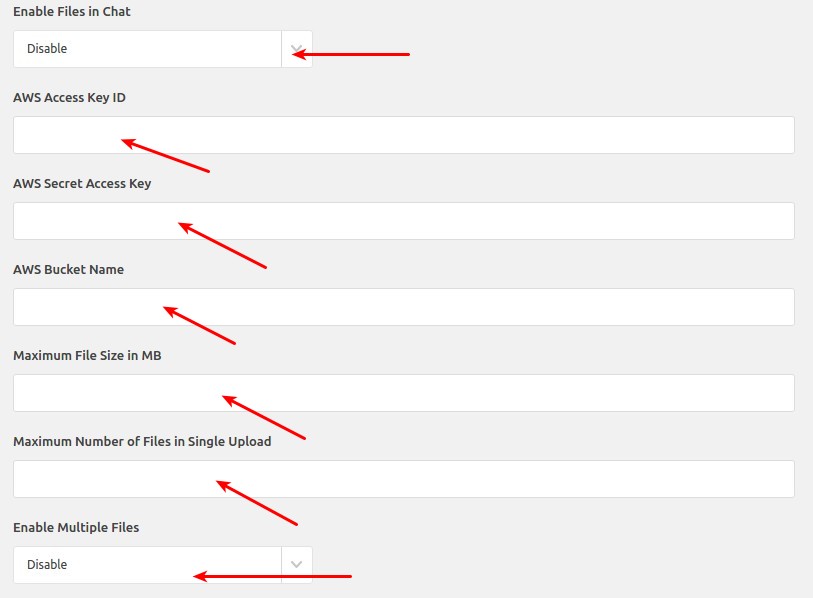
I don’t understand what all this aws is. You need to purchase an account outside of this plugin for it to work?!
with this plugin can i manage chat + private messaging + ticket system or i can integreted it with other ticket + private messaging tools?
If in ticket system you want chat like system then you could do that with the plugin.
Hi, I purchased and installed the plugin. First you should write that the php mbstring extension is required and needs to be installed.
So I successfully installed it and even though I’m logged in as a user, I get “Please login to chat”. Also the list of unseen messages shows 1 unread message but there is no message and from the same user to himself.
Please help it’s urgent.
please submit a ticket to our support site, https://redqsupport.ticksy.com/
hey i have a presale question i am running a site whit buddypress and i was wondering if this plugin will directly massage the user. for exemple when members click on other members profile there is a message button once you click on it will you be automaticly redirected to a message box that you can wright or you have to automatically wright the user name to message him thank you
Yes you can do that using our plugin.
yes but will it redirect to members directly or you have to automatically wright members user name and then message him
In your profile page you will get a send message button. After clicking that button you will get a popup with two options If you have texted the person before. One option will be send new message another will be go to conversation page if user has previous conversation with the user.
After sending new message the user will be redirected to conversation where they may continue their conversation.
perfect thank you
Pre-sales question: when will you implement Email Notifications. It’s the only thing stopping me from buying.
Hello,
We provided enough hooks to implement email/sms notification for customer. Some of our customers have already implemented email notification using those hooks. I think if you could write some custom code then you can easily implement email notification system.
Regards RedQ Team
Hooks ? What is that ? I’m not a developper or a coder. That’s why I buy plugins. Could you give me a link to those hooks ? Please provide me with instructions that it’s possible and I will give you my money by buying your nice plugin.
Can you do that ?
Hello, For details about wordpress hooks. Check the below link https://blog.teamtreehouse.com/hooks-wordpress-actions-filters-examples And yes we provide custom support if needed.
Can you do it for me. Take my money !!! It the price is right, yes I’ll pay you. Where do email you for custom work ? The plugin is worthless without email notifications. How do the user know he has a message and that he has to rush back to my site to read it ?
Also, I’d like email notifications with a the text of the message in the mail. So the busy user does not have to leave his workflow to go to my site. With a link to go to my site if he wants to. Please give me an email to ask for the custom work.
Sorry for posting multiple times.
Please email to support@redq.io about custom work.
I sent you the email 4 hours ago. Regards.
Hi We have forwarded your email to our developers for them to have a look and provide you with estimation.
Hello, I have a question before I buy. My client needs Private Messaging between models on his site and users. We want to restrict user to user conversations but keep Model to user and user to model private conversations. Can this plugin handle that? Thank you. Eric
Hello, For that you don’t need the plugin functionality. You just need few custom logic on the template where you will use our shortcodce. Like if visited person is a user and he is on on user profile then the shortcode won’t be visible. I mean you have to do some custom coding.
Regards RedQ Team
Hi, I have a few pre-sale questions:
1. does this plugin work between just basic WP users (no BuddyPres)? I run WCFM Marketplace. 2. Is it possible to embed the messenger with a shortcode and will it only display to logged in users? 3. Does it send e-mail notifications when a message is received by a user?
Also the demo seem not allowing sending pictures when I have tried today. Is assume that’s a bug?
Thank you
1. Yes it will work with any wp basic user. 2. Yes it is possible. 3. No our plugin doesn’t have built in email support but we have provided enough hooks so you can easily extend the plugin to built it.
Thank you
Welcome
I’m wondering if we can specify who can chat with one another? For example, we’d like to use this for staff/students but have students only correspond with their specific teachers? Can you please let me know if this is an option?
Sorry no such option not currently available.
one more question do you relay have to connect with AWS ???
https://s3.envato.com/files/262352056/screenshots/image-1.jpg WHY YOU CAN DELETE FILES IN 150 DAYS FROM YOUR SERVER ??? CAN YOU ADD THIS FUNCTION DELETE FILES IN 20 – 360 DAYS ???FOR EXAMPLE SOMETHING LIKE THIS https://www.awesomescreenshot.com/image/4002488/db7b4746fa58233a02fc89effe11377c
Sorry we didn’t provide any option to delete attachments after specific days.
If you want to enable attachments support then you have to configure AWS settings
that is very bad
We didn’t provide such options because if someone use it as a forum chat then every attachments could be needed. Still I could talk to the developer about the possibility of the feature you are requesting.
tat Option can be on or off see tis https://www.awesomescreenshot.com/image/4002488/db7b4746fa58233a02fc89effe11377c
Hello, We are not using the using the plugin you are talking. We have built a custom service for aws s3 attachments storing.
pleas fix this i will by later today
also this button is not working https://www.awesomescreenshot.com/image/4000866/8a4ce9cfd22803697ee7e8b03ce055b2
also can you add a function to delete the chat ? that Will be good https://d.pr/free/i/Iv0ATe
please don’t Igor me
Hello, I didn’t understand you first query clearly. And the button works on my end I couldn’t find any issue. And Our plugin also have option to delete message one by one.