516 comments found.

Hi there, does this plugin work with Vimeo videos?
Hello,
Yes the plugin supports YouTube and Vimeo videos in the popup 
When I select a skin for the portfolio and save it, it doesn’t actually save that field value. When I refresh the page, it shows that the field is empty again.
So I can’t get rid of the error “This portfolio does not have a skin, or the skin choosen does not exists anymore.”
I have disabled and re-enabled the plugin. I have created a new portfolio and new skin to no avail.
Please advise. Thanks, Matt
Hi Matt,
wow very strange, I haven’t see this issue before, any chance you could show me a living example online? also all the other fields are saved? (so only the skin select is not being saved)
Please contact me via email here: https://codecanyon.net/user/castlecode#contact for better support
Looking forward to solve this issue
Best, David
Thanks for the speedy reply, David!
Here’s a screencast showing the issue: https://intentioninspired.com/wp-content/uploads/error.mp4Thank you for the video!
I tried several testings in order to reproduce this issue and I couldn’t, it worked fine in all my testings.
I see that the other portfolio you created is working fine, so can you test this: try selecting the “Course Image” skin in the “articles” portfolio
let me know if it works or not? (want to see if the problem is the skin)
Thanks for helping me get to the bottom of this.
Correct, the first portfolio I created worked great but every other one I make after that produces the same issue.
I tried what you suggested to no avail. So I don’t think it’s related to the skin.
very very strange, is there any chance you could give me access to your admin panel (to the Media Boxes settings) so I can run few tests in the plugin? you can contact me privately here: https://codecanyon.net/user/castlecode#contact
I also have a new version (v1.1.2) which I haven’t upload it to CodeCanyon, I could send you that more recent version in order to see if the problem is solved.
I just PM’ed you with a login. Curious to see if that new version will do the trick!
Hi Matt,
The problem is fixed, it seems that the “Yoast” plugin is adding thousands of terms and that caused the Media Boxes to crash, but I found in an online forum that those terms by Yoast are private and shouldn’t be use by any third party plugins, so I excluded the private terms from the Media Boxes and now it works 
You can see it in action here: https://intentioninspired.com/blog/ I added this fix as part of the next update that I will later on upload to CodeCanyon
thank you for reporting this
Ah ha! Thank you sooooo so much for diving into this issue for us and getting it resolved so soon. 10/10 plugin and 11/10 support beautiful work!
Thank you 
hello, i have a quick question. the pop up content demo looks like it will work for me… but i need to have the popup be html with image and text… i see you can do a webpage but can you just do custom html in there? thank you
Hi,
yes indeed, you can place a webpage via iframe, but at this moment even though the popup supports HTML content there’s no option to specify the HTML content for the popup.
I will probably add this in a future update
Best, David
Please help I can’t figure out how to create the responsive portfolio
Hello,
Here are some video tutorials on how to create your first portfolio http://www.castlecodeweb.com/wp-mediaboxes/documentation/#videotutorials
If you still need more examples please let me know
For further help contact me privately via email here: https://codecanyon.net/user/castlecode#contact I will be happy to help you out
Hello, is there a way to remove the the media-box-content which is showing up as a white band? I don’t need it. Also, how do I change the color and opacity of the the background when an image is opened? here is the link: https://maryloumccollum.com/test-gallery/# thank you for your earlier assistance.
Hi,
1) you can disable the “content” in the skin editor, like this:
http://www.castlecodeweb.com/files/plugins_comments/12.png
2) You can change the background and opacity with this peace of CSS (just add in the portfolio settings in the CSS tab):
.fancyboxMB-bg{
    background: red !important;
    opacity: .5 !important;
}
I hope this makes sense,
Best, David
Hi, hey I just bought WP-media boxes and I’m having some issues in making it work the way I need it. I found two things are not making sense.
I need to display (randomly) many images that need to link to an url within the same site (page)
So when I select source “custom media gallery” which is the ideal, I select the images I want, but there is no place to add a link to point to, when I click it it opens the image but what I want is to click on the thumbnail and link to the url I want. Also, it displays the images in the same order and not randomly like I want it.
If I select source “media” it does allow to set it random but if I do a custom the option disappears 
So then I decided to try with the source “pages” in this case the random is possible, I can set a featured image so its good but now I have the issue that it displays obviously all pages and that’s not the ideal because it will display everything including, contact us, or any other no-related page to the gallery.
How can I go around this? Why cant pages be selected one by one, or is there a way to make the source pages to have exceptions pages? to tell the source add all but no home page or contact us etc.
I like your work, I even bought the standalone version in the past but I have no use of this one if this cannot work the way is intended.
Thank you
Hi,
thank you for buying my products
there are 2 possible solutions, here they are:
1) You can add a custom post link to the images of the “Custom Media Gallery” here’s how to add extra information to those images: http://www.castlecodeweb.com/files/plugins_comments/9.mov but unfortunately you can’t set a random order to this type of source, maybe in the future I’ll add this feature
2) I think this is the best solution for your case, use Custom Post Types so you don’t use your pages, and you will be able to use the “random” order, here’s how to do it: https://www.youtube.com/watch?v=hnEdgzt4pHU
I hope all of this makes sense, if not send me an email here: https://codecanyon.net/user/castlecode#contact and I’ll be happy to explain more
Best, David
Hello, I just purchased your plugin and have some questions 1-my images have doubled and I can’t find out why 2- the tool bar is not showing up 3-the image are getting cropped by the header
here is a link to the test gallery: https://maryloumccollum.com/test-gallery/
thank you for your assistance. SanBlue
Hi SanBlue,
Here are the answers to your issues:
1) that’s because there are 2 triggers that opens the popup, one is when you click on the thumbnail (specified in the admin section in the “Thumbnail” tab, the option named “Thumbnail link”) and the other one in the “search” icon you have, so this is what I recommend you:
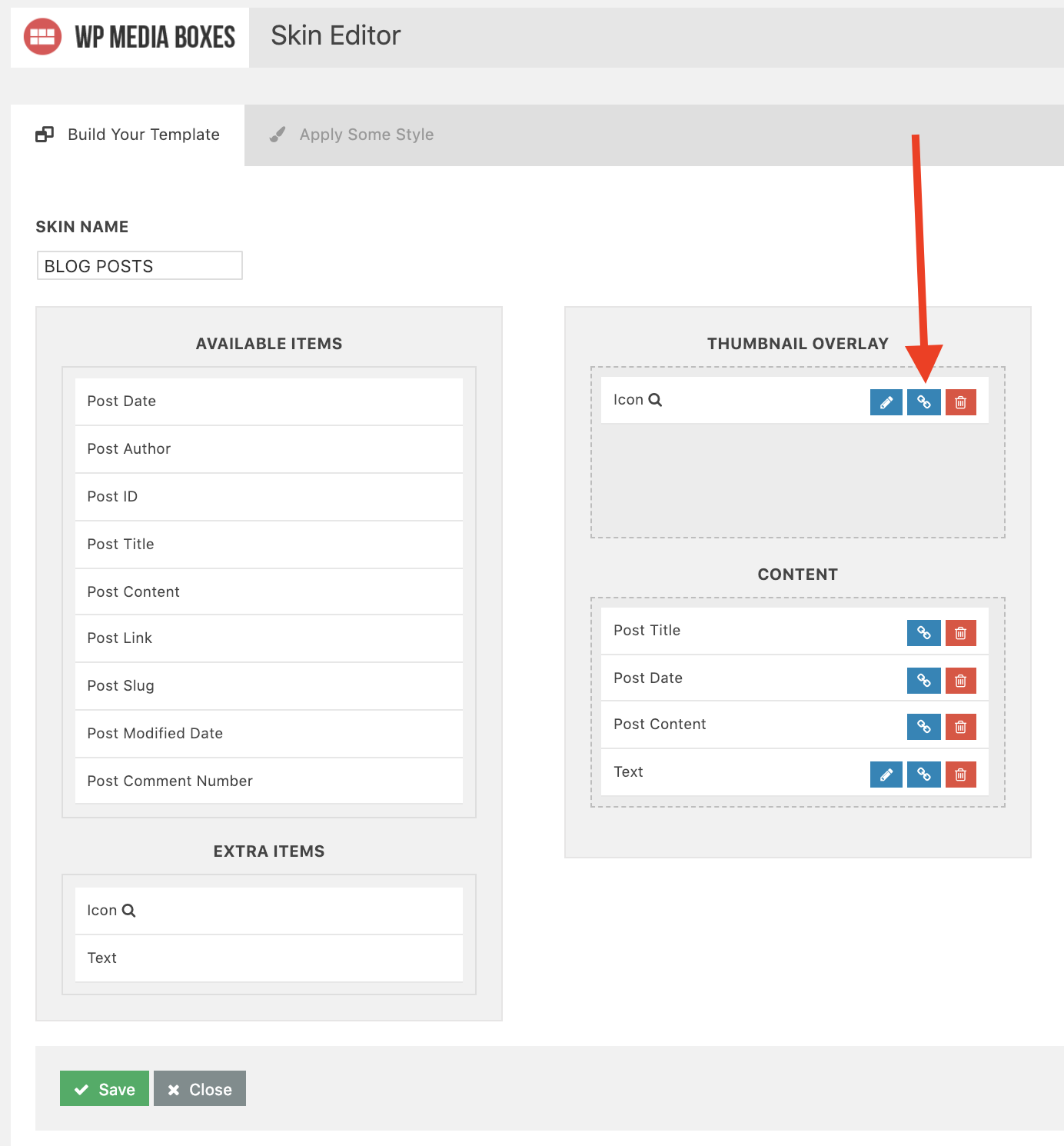
Go to the skin editor and open the skin you are currently using, then on the search icon click the “link” icon, as shown here:
http://www.castlecodeweb.com/files/plugins_comments/11.png
then set the “Action” option to “Nothing”
that should do the trick
2) and 3) this is a simple CSS fix, just add this peace of CSS in the “CSS” tab in your portfolio settings:
.fancyboxMB-container{
    z-index: 99999999 !important;
}
I hope this makes sense
Best, David
Hello, unfortunately your plug-in does not work as it is shown on the demo page. Please tell us how we can add for example a video to the gallery or we will refund the money.
Best regards
Hi,
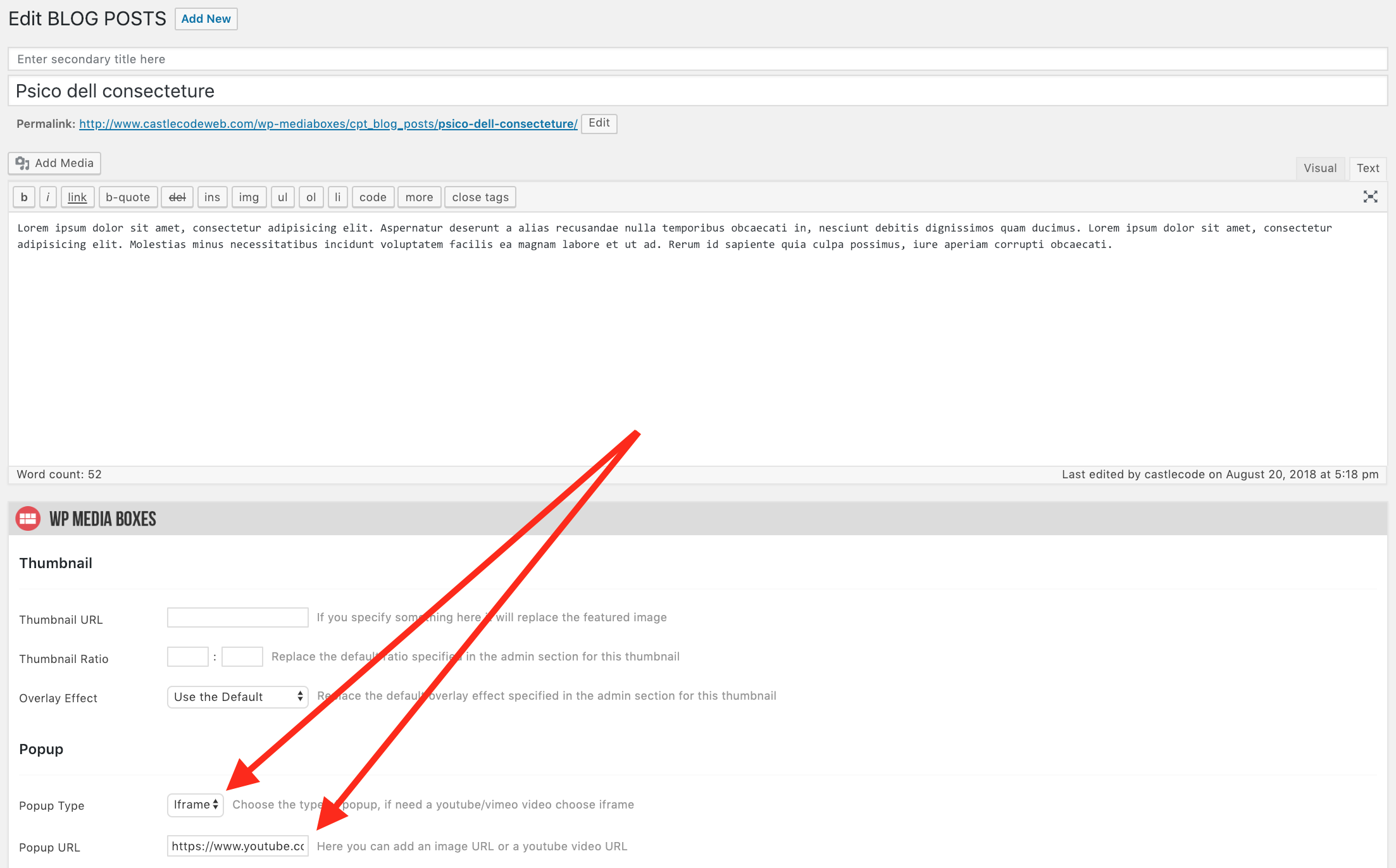
Go to the post you wish to add a youtube video and set “Popup Type” to ”iframe” and in the “Popup URL” insert the youtube video, like this:
http://www.castlecodeweb.com/files/plugins_comments/6.png
if you need further help I’ll be happy to show you an example, just contact me via email here: https://codecanyon.net/user/castlecode#contact
Best, David
Hi,
Is there a way to disable the Media Boxes panel from displaying in the Dashboard on posts, pages, etc? I’d like to disable this panel for my client’s website.
Thanks, Beth
Hi Beth,
yes, this is possible, see how in this video: http://castlecodeweb.com/files/plugins_comments/10.mov
I hope it makes sense
Best, David
Do you plan to enable showing post excerpts as an option for the gallery? I’m using the plugin to show galleries of images, which i then want to show a gallery of the galleries, but not the actual content (as that isn’t the point). You do have an option for adding replacement content, but the excerpt is already there and often filled as a “short content” filler for display and i was wondering if you’d add the excerpt as a display option?
Hi Glen,
Yes I think this is possible, I will include this for the next update thank you for the suggestion!
Hello,
I’m using your WP Media Boxes Portfolio and like it quite a bit so far. I do see two things that are odd right off that could use help with.
1. All of the tooltips text is invisible, and seems to be the same color as the background of the box it is in. is there a way to change this so i can see the tooltips?
2. When i choose the Magnific Popup, it show double arrows on the lightbox slides. Is there a setting to keep this from happening?
3. When i’m using the Fancybox, it loads the popup lightbox under my header (the magnificent loads over it). Is there a way to change this? do i need to adjust the z-index or is there just a setting for this? None of the selectors i can identify seem to do anything to adjust for this.
Thanks, that’s all i can see that has an issue so far. Let me know
Glen Allan
I actually did find that an image URL was saved as the background for the arrow, of another arrow. So i changed it in my main CSS.
Hi Glen, thank you
1. Can you describe which tooltips, the ones in the admin panel?
2. You mentioned you already found the solution for this one, right?
3. Yes, this may just be a z-index problem, can you show me a living example online so I can take a look and see what’s going on?
Also you can contact me privately via email here for better support: https://codecanyon.net/user/castlecode#contact
Best, David
I sent you the answers in an email as requested
Pre-sale questions: 1) is it possible to have sub categories for filtering i.e. category 1 >> red, blue, green category 2 >> autumn, fall, summer etc.? 2) can images be added to an existing gallery; i.e original post has 6 images I later want to add 5 then 8 etc.?
Thank you in advance.Paul
Sorry, just thought of another question: can galleries created with CPT be filtered/sub-filtered by custom taxonomies? Thanks again, Paul
Hi Paul,
2) each post is one image, and yes you can add more posts to an existing gallery/portfolio and the plugin will update automatically
3) you mean “custom taxonomies” created by a third party plugin? if so which plugin you are using to create custom taxonomies? (so I can test it out and see if everything works)
Best, David
Custom Post Types UI for for cpt’s and taxonomies and Advanced Custom Fields for custom fields.
Ultimately what I am trying to do is create a gallery that can be sorted with multiple levels. So there would be All, CAT1, CAT2, CAT3 but each category would have sub-levels say colors, seasons, locations, etc. and/or secondary filters based off of custom fields; where there would be All, CT1, CAT2, CAT3, RED, BLUE, SUMMER, FALL
Ohh yes, the custom taxonomies and CPT from the plugin “Custom Post Types UI” works perfectly with this plugin (I tested my self)
about multiple filters this is what’s supported by the plugin: http://www.castlecodeweb.com/wp-mediaboxes/multiple-filters/
you can have multiple filters but they are always visible
Hi there, I just purchased Media Boxes and then discovered that it is for displaying posts, not media content. I thought I could use Media boxes to create single posts. I have a multi media blog and I create posts that have images, videos, iframe content. I wanted a cool way to create my posts. I don’t blog – as in, I don’t have any text. I was soooo excited. But your plugin is completely the wrong thing for me. I don’t need a grid for displaying posts. Would you mind very much refunding the money? I am so sorry for asking. Kind regards, Isla
Hi Isla,
the plugin can also be created from the Media Gallery, you can see how here: https://www.youtube.com/watch?v=m2O3idiHIW8
Also the plugin can read custom post types, you can see how here: https://www.youtube.com/watch?v=hnEdgzt4pHU
but if you think this still doesn’t work for your please contact me privately via email here: https://codecanyon.net/user/castlecode#contact
looking forward from your response
Best, David
So excited to discover Media Boxes is now available for Wordpress. Can the Media Grid include HTML content? Isla
Hi,
Yes, you can place HTML inside your post content, sent you a response in your other comment.
Best, David
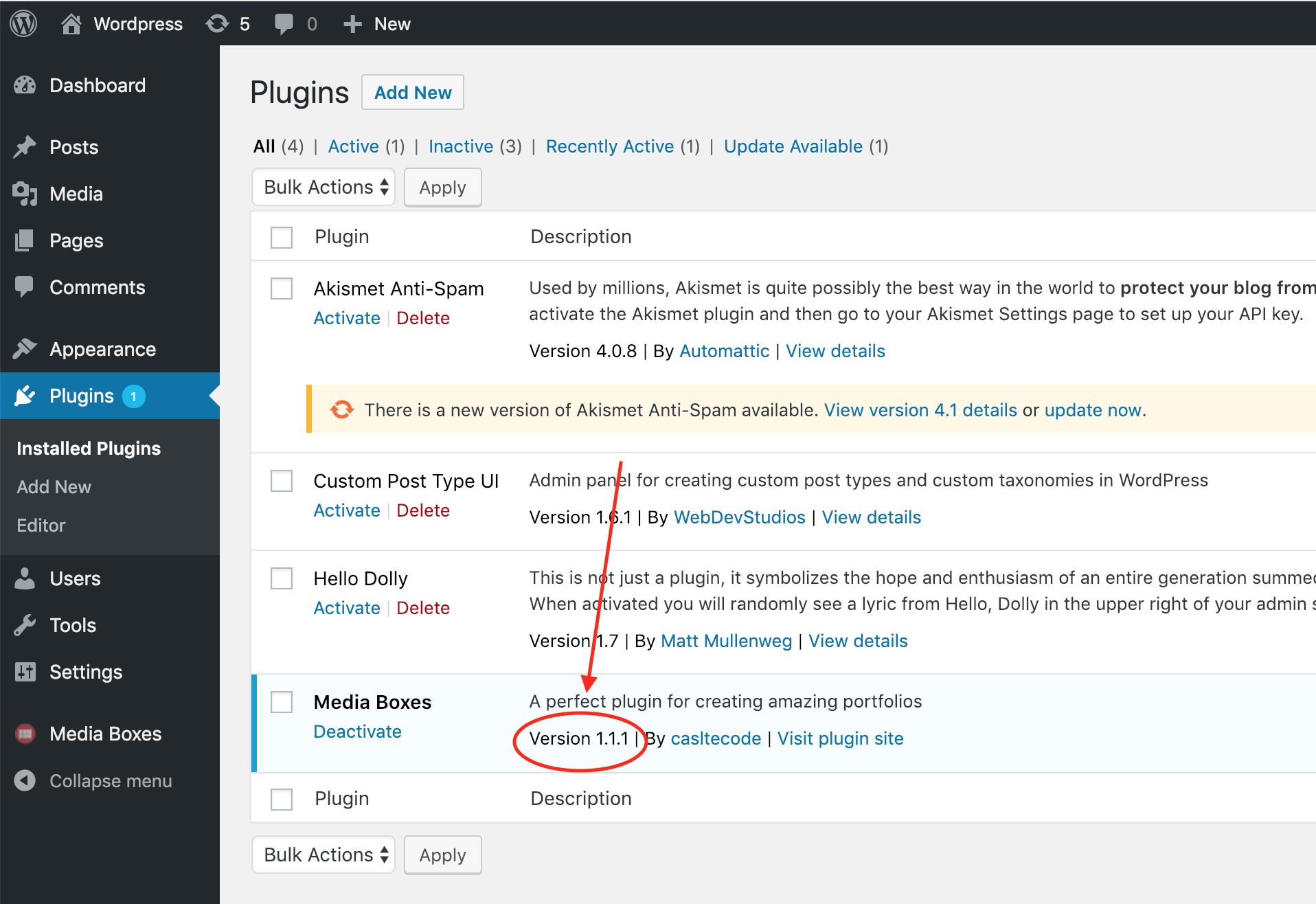
Hi castlecode, I just want to let you know that your update is not showing the right version code in the Dashboard >> Extentions page of WordPres.. should show v1.1.1 but it is still v1.0. Regards
Hi,
thank you for reporting this!!
do you mean here?http://www.castlecodeweb.com/files/plugins_comments/8.png
Please let me know
Exactly, but yeah, I only see 1.0 here… May be the files I’ve downloaded on Evanto Market are not the right ones ?? I don’t know…
I think I found the problem, you are probably using the “Installable Wordpress file only” link (in your downloads page) which I forgot to update, but I just did!
Please try again and let me know if now it works
I appreciate your help!
Indeed, that’s what I did. And i should have told you cause I was suspecting it to be the issue here. haha. Hope you didn’t search for too long. I’ll download it again. Thanks
Thank you a lot for reporting this
Hi, I have this error: wp-content/plugins/castlecodeweb-wp_media_boxes-fe2e893c2784/class_media_boxes_shortcode.php on line 90
Hi Rosaria,
did you create a skin for your portfolio? You can also import the ones from the example folder.
Once you have skins go to your portfolio settings and in the “Layout” tab select the skin you wish to use and click save
Let me know how it goes
Has this been tested with WP 5.0? I have been using PhotoMosaic which no longer seems to be working.
Hi,
yes, this plugin works with WP 5.0 I’ve tested it
Best, David
Cool…can you look at my home page…I see the second to the left column out of line with the rest. These files are all the same size. Also, what is the toggle to have a gallery so that everything resizes but fits in one area – https://www.robertbaker.photography/ My old Photomosaic plugin still works on this page….this is how I need everything to end up… https://www.vegassurfphoto.com/hamptons-surf-safari-2017/
Hi,
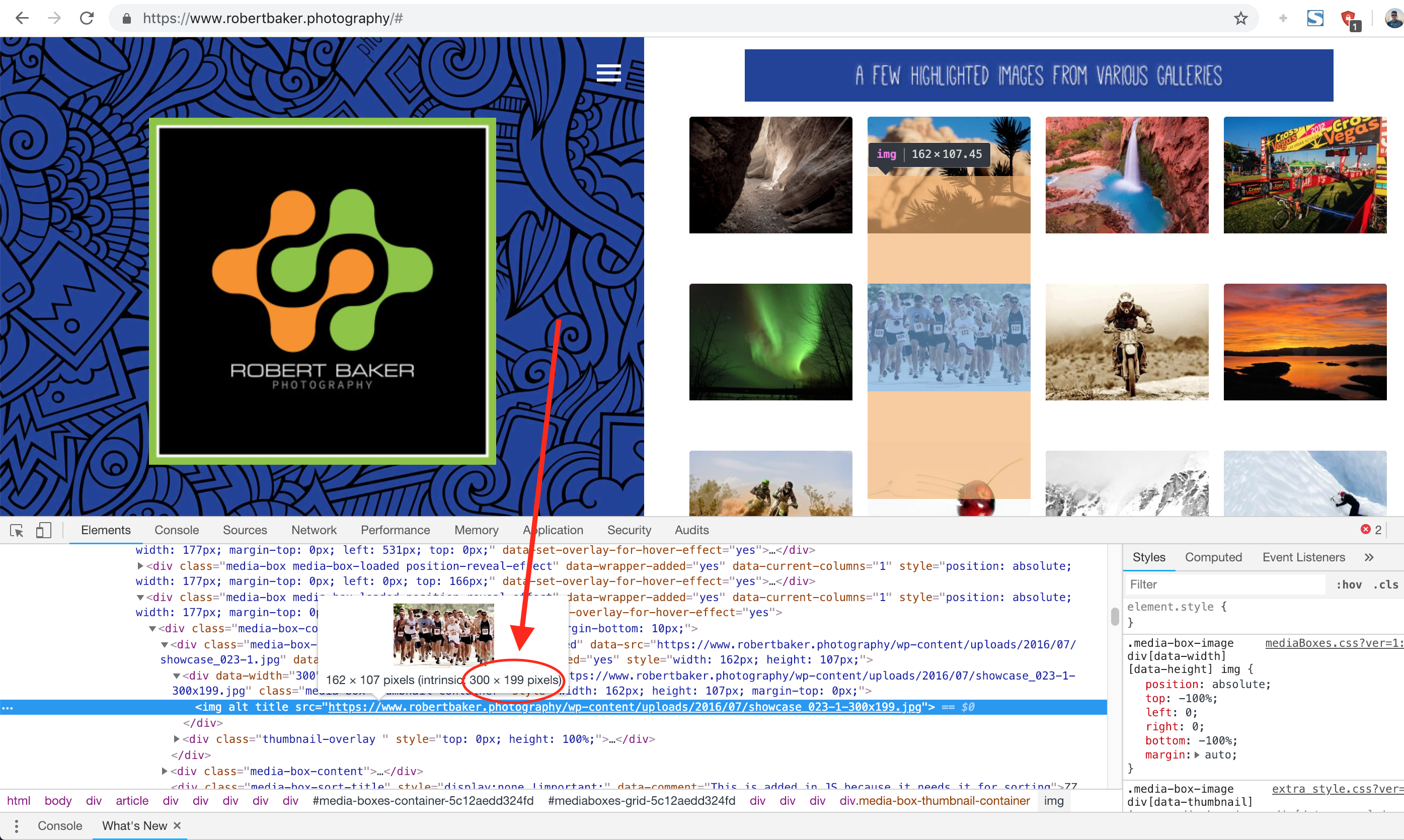
1) I noticed that all your images are 300×216 but you have one image (the one with people running) that’s 300×199, this one:
http://www.castlecodeweb.com/files/plugins_comments/7.png
Also you can tell the plugin to use always the same aspect ratio, just navigate to the portfolio admin settings and go to the “Thumbnail” tab, in there you’ll see one option named “Ratio” you can specify there 300 : 216
2) I don’t quite understand your second question, can you explain a little bit more?
Best, David
Hey David, thanks for the super-fast reply. That one image was the culprit. Per my #2 request, I am looking for something that accomodates an autoresizing masonry output…..such that any sized image will resize the thumbnails to make the overall gallery neat and tidy.
Hi,
1) Glad to see that now it looks perfect
2) Ohh you mean that the masonry output fits perfectly so no gaps/empty-space at the bottom?
if so, unfortunately the plugin doesn’t have this feature, the only similar thing will be to set the global ratio to something (like I mentioned in your request #1), but you wouldn’t have a masonry output you would have all your images of the same size.
I will try to research if this can be done using the current masonry logic I currently have.
Best, David
Hi,
We tried contacting you about 11 days ago around the page categories, but didn’t receive an email from you.
Please assist us with the Wordpress plugin and page categories.
Thanking You!
Hi,
I emailed you back 11 days ago but haven’t heard back from you, I emailed you to this address: chr**@outintheclouds.com
can you check your spam folder maybe? (I just sent you another email) if no, any chance you could provide another email address so I can contact you directly via email?
Looking forward to hearing from you
Best, David
hello, I bought the plugins, because you can insert video URLs from youtube and vimeo, but it took a couple of hours and I do not know how this operation is done, please I need help
Hi,
Go to the post you wish to add a youtube video and set “Popup Type” to “iframe” and in the “Popup URL” insert the youtube video, like this:
http://www.castlecodeweb.com/files/plugins_comments/6.png
if you need further help I’ll be happy to show you an example, just contact me via email here: https://codecanyon.net/user/castlecode#contact
Best, David
Hello, I was wondering if you could help out with filtering.
I am having troubles setting up the a portfolio gallery with multiple filters. Doesn’t really state it anywhere in your documentation.
Hi,
I will show you a small video-tutorial for this today
Best, David
This is the page and each of the gallery items are to be in a different category, when you select the filter it needs to change what is showing on the grid. Currently it doesn’t https://www.shitmykidsdo.com.au/projects/commercial/
I see the plugin is detecting only one category, any chance you could give me access to your WP so I can leave you a working example, you can you contact me via email here: https://codecanyon.net/user/castlecode#contact
Best, David
here’s how to create multiple categories: https://www.youtube.com/watch?v=0cXBSr-Lk04
this is what I did for this example: http://www.castlecodeweb.com/wp-mediaboxes/multiple-filters/
if you still want an example you can contact me via email though
Best, David