5707 comments found.

Dear author, I’ve got paid plugin and also theme included plugins, can you advise what is the best way to protect our sites against another attack? Did any of wp-config information got stolen? downloaded? shall we change passwords for MYSQL DB? Please release statement
Hello,
Apparently only the wp-config.php file was replaced during this attack .
You need to install the last update (9.644) to apply the security patch.
In my case, wp-config was removed, but I’m wondering if it was stolen in any way?
I already patched it, but if they have your DB credentials and details of wp-config ?
Please change your database password then, if you want, contact me from the support page sending me the log file of the server, I will check it : https://codecanyon.net/item/wp-cost-estimation-payment-forms-builder/7818230/support
I’ve already done it, what I’m trying to get out of it here, if you can make a statement to others, what steps would you recommend people to take to protect their sites?
Here is the way to follow :
- Change the database password
- Fix the wp-config.php file by filling the database informations
- Apply the last plugin automatic update that will fix the security issue and will remove the problematic files from the uploads folder if they still here
Is there a possible way to insert a TIP employee section. I want to make a slider that scales from $100 to $1000 and adds to the total depending on what they choose.
Yes, it can be done by using a slider item and using a custom calculation like that on it :
0
if ( [your condition here] ){
  1
}
The unit price of this slider will be $0 by default, and will become $1 if the defined condition is filled. This unit price will be automatically multiplied by the selected quantity and added to the total ($100 to $1000) .You can use the button “Add a condition” above the calculation field to visually create your conditions .
Can I apply this tip to an employee if I list 5 different employees, or I guess make step 1 pick your employee and make step 2 how much do you want to tip?
Yes, you can create a dropdown for the employee choice then a slider for the amount. Feel free to contact me from the support page sending me the url of the form if you need help on a specific point : https://codecanyon.net/item/wp-cost-estimation-payment-forms-builder/7818230/support
Hello,
It can be used to create a form like the first part of the mentioned tool, but there is no card designer tool like the second part, sorry .
can you show me how the email will looklike once customer submit it
Here is a screenshot of the default email : http://www.loopus-plugins.com/_tmp4420/screen_emailDefault.png .
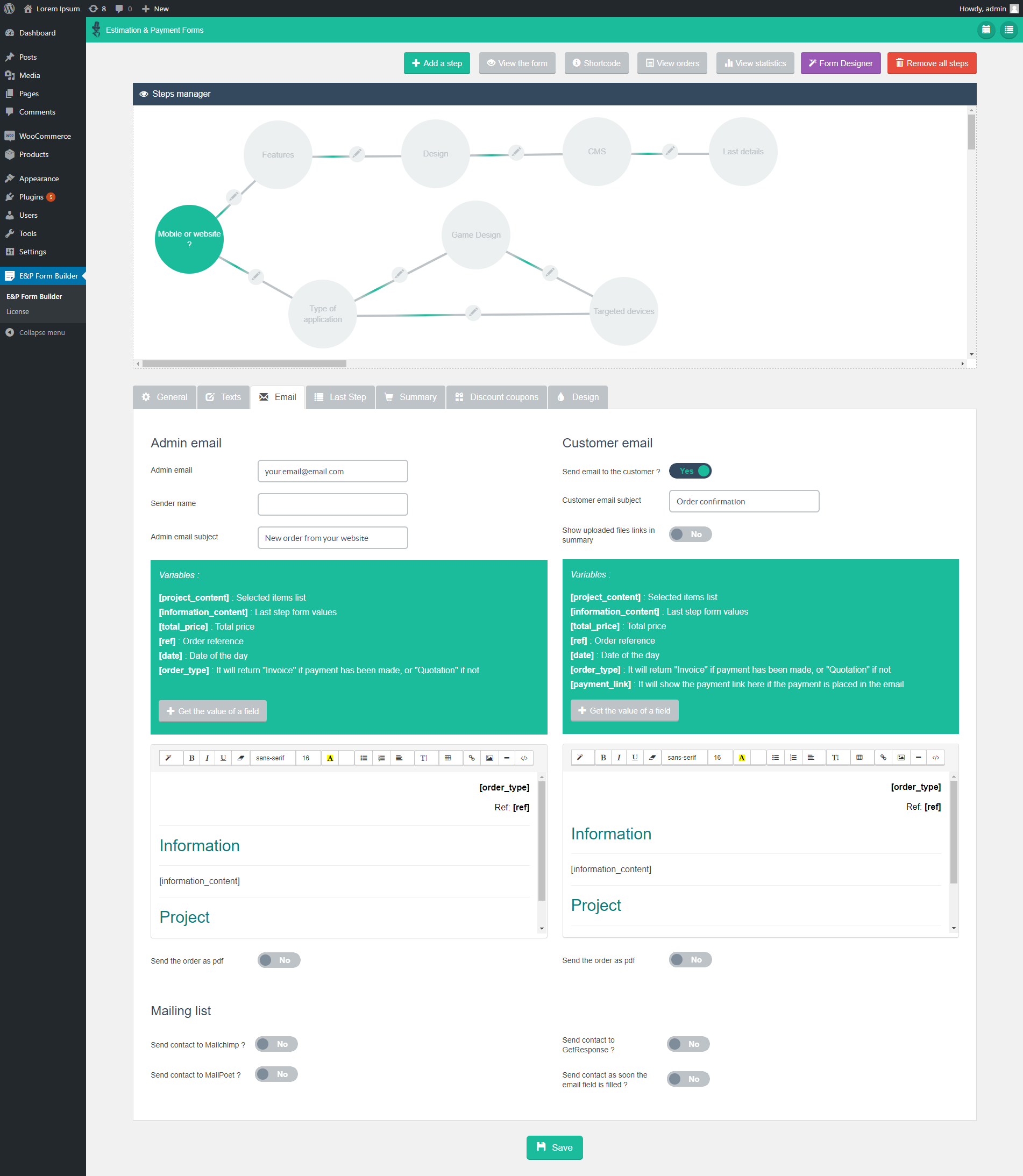
You can freely edit the email content directly from the “Email” settings tab of the form : https://s3.envato.com/files/254852532/screen_4.png
and will i be able to make mathematic conditional from one input of quantity?(im making cost form for brochure) price per pcs 1-5($1/pcs) 6-10($0.8/pcs) ... diffrent price for different quantity and then laminated price 1-5($0.2/pcs) 6-10($0.18/pcs) ... and then folded / non folded 1-5($0.05/pcs) 6-10($0.04/pcs) ....
are you able to create conditional math based on quantity
im making a cost form for printing company a brochure
price per pcs : 1-5 ($1/pcs) 6-10 ($0.8/pcs) laminated per pcs : 1-5 ($0.2/pcs) 6-10 ($0.15/pcs) folded : 1-5 ($0.02/pcs) 6-10 ($0.01/pcs)
Yes, you can do that by using the price custom calculation tool : https://www.youtube.com/watch?v=xH8frpa7wL0 . You need to create the wanted conditions, and the wanted price for each one, ex :
if ( [item-1_value] == 'default' && [item-2_quantity] <=5 ){
   1
}
if ( [item-1_value] == 'default' && [item-2_quantity] > 5 ){
   0.8
}
if ( [item-1_value] == 'laminated' && [item-2_quantity] <=5 ){
   0.2
}
if ( [item-1_value] == 'laminated' && [item-2_quantity] >5 ){
   0.15
}
etc ...
Feel free to contact me from the support page sending me an export of the form if you need help on a specific point : https://codecanyon.net/item/wp-cost-estimation-payment-forms-builder/7818230/support
I’m glad the security issue has been fixed. I lost many important files and so glad to have daily backup. Have you reached out to all WP themes providers who bundle your plugin with their theme?
Hello,
Yes, I am really sorry for that. Yes, I contacted the authors of the themes that use this plugin .
Does the current download contain the security patch?
Yes, the last update with the patch is online .
Awesome. I feel for you. Been there.
Thank you very much.
Hi Loopus,
I’ve experienced the security issue and had my wp-config file deleted. I have found the files that seem to be uploaded and removed them and have updated the plugin. Is there anything else I need to do to prevent the breach happening again?
Thanks!
Hello,
Yes, I am really sorry for that. I fixed the security flaw and sent the correction as automatic update and to codecanyon. Please install the version 9.644 to fix it .
We have also been hacked. It was presumably via a file exploit (even we just accepted upload for the image file formats) We can see a folder with a htaccess inside it:
“AddHandler application/x-httpd-php5 .tss AddType application/x-httpd-php5 .tss” and a .tss format and a css file.
Hope this helps to fix it!
Thank you very much for reporting, I found the security flaw. Thousand times sorry for this major issue ! I fixed it and sent the update to codecanyon and as automatic update.
They could manage to delete the wp-config file of wordpress. Really strange.
Yes, they found a flaw that allowed them to upload a .htaccess file in the upload folder, to make other files executables. Sorry again 
We have also just been hacked by a file upload exploit by the IP 194.140.192.6
Hello,
Thanks for this new report, I’m on .
Thank you very much for reporting, I found the security flaw. Thousand times sorry for this major issue. I fixed it and sent the update to codecanyon and as automatic update.
We have also been hacked today via this plugin – We are having some real problems right now and some core website files have been deleted. This was an extremely large client site and causing ongoing down time.
Hello,
Are you the same user than notime00 ? I’m waiting for the asked details. If no, please contact me from the support page sending me the webhost report that mentions the plugin, and the cause of the problem (problematic file and its path), the used plugin version and an export of the forms, I will check it : https://codecanyon.net/item/wp-cost-estimation-payment-forms-builder/7818230/support
Hi, no different person.
Ok, so I wait your email, thank you .
Thank you very much for reporting, I found the security flaw. Thousand times sorry for this flaw. I fixed it and sent the update to codecanyon and as automatic update .
I have had the plugin on a customer site for a while, and all of a sudden the site is down. I have spoken to the host and they say your plugin has been hacked:
So in this case the site is being hacked through the WP_Estimation_Form plugin. The compromise essentially allows any unauthenticated user to upload new files. We’ve blocked the offending IP address 194.140.192.8 network wide but it’s likely they’ll simple change their IP.
Unfortunately its still taken down the site!
Hello,
It sound strange : no executable file can be uploaded by the files fields, the permissions of the uploaded files are checked by the script, and the files are uploaded in a folder whose name is generated randomly on the server side, invisible to the user. Please contact me from the support page, indicating the used version of the plugin, the exact report sent by the webhost and an export of the form, I will check that : https://codecanyon.net/item/wp-cost-estimation-payment-forms-builder/7818230/support
Thank you very much for reporting, I found the security flaw, really sorry for that ! I fixed it and sent the update to codecanyon and as automatic update .
Hi so I just bought this and it’s not working at all. I feel like it might be a CSS issue because everything is there, it’s just everywhere on the page. I will send you my URL but I don’t want to post it here.
Hello,
Please contact me from the support page : https://codecanyon.net/item/wp-cost-estimation-payment-forms-builder/7818230/support , I will check it .
Well received, please can you enable the option “Ajax navigation support” in the “General”’ settings tab of the form ? It should fix it.
It doesn’t load up for me to edit it. It’s on the infinite load loop. How do I fix that?
I replied to your email .
Hi, I have a question regarding the woocommerce integration. I have a form where a customer fills out the details. Afterwards they add a product to the cart with the Woocommerce integration. My question is, is it possible for the written customer details to also be there in the backend admin order section?
Right now, I can’t see the details from the form when a customer orders a woocommerce product with the form.
Thank you in advance 
Hello,
All the values filled in the form should be visible in the stored order. If these fields are placed on the last step, please verify that the option “Hide final step” is disabled in the “Summary” setting tab . Otherwise, please contact me from the support page, I will debug it .
pre sales question i’m a web developer. I charge different prices for each small business. I may charge $350 for a hair salon and $1500 for a day spa. In your website calculation demo. On the first step I want the business owner to choose their business. On step 2. Is their a logic that allows my service prices to fluctuate based on the type of business the person chooses?
Hello,
Yes, of course, you can do that by using the price custom calculation option on your items.
Hi, we just bought your plugin and play with it. We bought it because “Users can save their current selection and finish the form later” . We supposed they can have more calculation saved somewhere in backend and to change them later. And how to add access to users with specific role (at least editors) and only main admin to create forms? It’s awesome, you did great work, but I am afraid that this plugin is not for us.
Hello,
The mentioned option shows a button in the form that allows the user to save the current values filled and selection done. Then, when the user come back to this page, the form is automatically filled with the saved values. If you can’t create the wanted process with this plugin, feel free to contact me from the support page, I will propose you refund : https://codecanyon.net/item/wp-cost-estimation-payment-forms-builder/7818230/support
Thank you. Could we exchange this to PHP version? Not WP. We really like your work, but we can’t use it now.
Yes, no problem. You can buy the PHP version and ask for a refund for the WP version from here : https://themeforest.net/refund_requests/new
Hi
i am having a real trouble in the last step when people input their email they sometimes write it wrong and i want them to double write their email to make sure they got it right , is there any way to add another email field that gives u a warning and stops the submit if the emails are not identicals ?
Regards
Once the second email field created (and its option “Is required” enabled) , you can use this code in the “Custom JS” option of the form :
var titleField1 = 'Enter your email';
var titleField2 = 'Enter your email 2';

jQuery(document).ready(function(){
  jQuery('[data-title="'+titleField1+'"],[data-title="'+titleField2+'"]').change(function(){
    if(jQuery('[data-title="'+titleField1+'"]').val() != jQuery('[data-title="'+titleField2+'"]').val()){
        jQuery('[data-title="'+titleField2+'"]').val('');
    }
  });
});
Simply replace ‘Enter your email’ and ‘Enter your email 2’ by the exact titles of the two email fields . It will empty the second field if its content isn’t similar to the first one (so the final button will be disabled, since this field is required) .
Hello,
I am seeing four versions of the Gravity Form (stacked on top of each other) at the final step. The Gravity Form is simple Name, EMail, Comment, Newsletter, but it shows up multiple times o the last page. Any idea why this would be?
Hello,
Please can you contact me from the support page and send me a temporary access to the backend ? I will debug it .
I have a E&P form in the bottom of a page built with the X-Theme; it does not display on Firefox until the page is refreshed. The same form displays fine on Chrome, Safari and mobile. I have this shortcode [estimation_form form_id=”8”] in a Classic Raw Content element. I am raising the same question to the team at the X-Theme. Your guidance will be appreciated,
Hello,
Please can you send me the url of the page ?
Hi Is it possible to change the format of the tooltip on the slider from 10000 to 10 000 so that it is more readable.
Hello,
Thank you for the suggestion! I just added it, it will be a part of the next automatic update. Feel free to contact me from the support page if you want it immediately .
Great cant wait will make life so much easier. Then one last thing, don’t want to sound like a burden, is there a way to set the increments of a slider to 0.5. When I enter any value smaller then 1 then it just keeps reverting to 1 or 0.
jQuery(document).ready(function(){
    jQuery('[data-title="My Slider title"]').slider('option','step',0.5);
});
But the price calculation will round this quantity before calculating the item price.
Worked like a charm. THANK YOU so much for the great help.
When I add conditions to a form, the form fields keep disappearing. I’m working on a local development machine.
Hello,
Please can you put it online then contact me from the support page, sending me a temporary access to the backend ? I will debug it .
Hi there, purchased your plugin. After installing and creating a new form the first issue occur. The form is loading and loading if I change any field and save it afterwards within “General, text, Email, Last Step, Summary, Discount Coupons, GDPR or Design”. Why does it happend?
Hello,
If your server uses Wordfence Firewall, please simply enable its option “Learning mode” (https://www.wordfence.com/help/firewall/learning-mode/) .
Otherwise, please contact me from the support page by sending me a temporary access to the backend, I will debug it .