296 comments found.

Hello,
My item purchase code is: 6515e787-9e53-4ec6-9081-1e4948ed85d6
I bought it 3 days ago. I would like to request a refund because the plugin is not what I was expecting. Please facilitate the process, so I can review it positively.
Thank you, looking forward to hearing from you
Hi,
contact me privately via email: https://codecanyon.net/user/castlecode#contact
Best, David
Hello, I have purchased your plugin flipping cards 3d. How do I use your code in a responsive grid in a page? as you can see, http://valuemhdemo.eu/hellas3d/hometest-2/, the mobile view is bad. Can you please help me resolve this?
Thank you, looking forward to hearing from you
Hi,
I just checked your site, and saw that you added the flipping cards in a column container, I’m guessing that’s from your theme.
if you want something responsive, it depends what responsive behavior you want, do you want something like this? http://www.davidbo.dreamhosters.com/?page_id=11 or that it adapts to the 100% of its container?
Best, David
Yes I would like to have the cards as your demo please and particularly to have the cube effect/transition. Please guide me how to fix them in than manner. Do you need admin credentials to facilitate the process? thank you, looking forward to hearing from you
Hi,
yes I can set you an example in your WP installation, please send me the details via email here: https://codecanyon.net/user/castlecode#contact
Best, David
and here is my purchase code: dd204965-3468-48fd-82f7-383c6f02ba87
Sent you an email 
Hi, after installing Flip 3D, the flip feature doesn’t work with Facebook instant article.
Sent you an email
After upgrading to Wordpress 5.0, I get this error message when trying to use the plugin:
tic method FC_Options::add_menu_page() should not be called statically in /home/sassysuite1/public_html/wp-content/plugins/flippingCards/index.php on line 303
Do you know how I can fix this, or will you be updating the plugin? We get several thousand hits to our website per month, so I need to know if this will work or if I need to find another solution.
Thank you.
Hi,
I have the fix for this, can you contact me via email here: https://codecanyon.net/user/castlecode#contact
so I can send you the new version, also I’ll be pushing this update to CodeCanyon
Best, David
I would be very happy if your plugin also supports IE11. How could I achieve that?
Hi,
Currently this is not supported, only the fallback fade effect, sometime ago I tried to make it work on IE11 but to many bugs came in, it worked but with plenty of small bugs.
Best, David
I’m experiencing a small glitch with the card flip. When the user hovers on/off a card during page load, the card flips and stays on the backside. Hovering again flips it to the frontside.
I have cards filling front page of the website, so this happens frequently enough to create a problem with user experience.
Is there anyway to hide cards (or delay the effect) until after the page is fully loaded? I think that would eliminate the glitch.
Hi Michael,
do you have a living example online? so I can take a look
Best, David
Hi,
by any chance you manually added the class “mouseenter” to the flipping card container?
Yes, it’s looks like a leftover class. I was working on another solution before Flipping Cards. Looks like removing it fixed the glitch. Thanks so much!
glad to hear that  indeed, the plugin uses that class in order to detect if the plugin has been initialized
Hi, i’m trying to style the back of some cards differently and saw you previously posted this comment: https://codecanyon.net/item/flipping-cards-3d-wordpress/4135044/comments?page=7&filter=all#comment_8339975 but when I try to add a class to one of the cards’ shortcodes, it doesn’t stick and appear on the website.
For example, when I try the below:
“[ fc_back back_class=”greenbackcard” class=”greenbackcard”] Test
Neither back_class or class adds the class attribute.
Has this changed?
Hi,
It should be working, can you show me a living example online? so I can see what’s going on.
Also you can contact me privately via email through this form: https://codecanyon.net/user/castlecode#contact
Best, David
I dont know what to do.
It looks like this: http://www.directupload.net/file/d/5068/r9e9rfz2_jpg.htm
What do you mean with insert html of picture? Like URL? I tried many things but it just dont work.
Lastly I used this shortcode but it also didnt worked.:
[flippingCard]
[fc_front]
< img src="healty-man-7.png" / >[fc_back]
< img src="unhealthy-man-7.png" / >[/fc_back]
[/flippingCard]
Hi David,
that means that the URL of the image is not being found, also you are missing the [/fc_front], here’s a working example so you can start from it:
[flippingCard]
[fc_front]
<img src="http://www.castlecodeweb.com/mediaboxes/example/gallery/thumbnails/thumb-6.jpg" />
[/fc_front]
[fc_back]
<img src="http://www.castlecodeweb.com/mediaboxes/example/gallery/thumbnails/thumb-6.jpg" />
[/fc_back]
[/flippingCard]
if the issue persist, can you show me a living example online? so I can take a look and see what’s going on
Best, David
Ok, here is a living example https://generation-sonnenschein.de/raetsel-test/
I insert exactly the code that you provided but it doesn’t work.
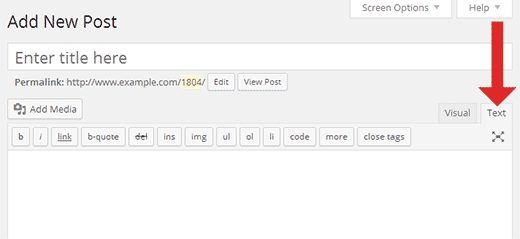
https://generation-sonnenschein.de/raetsel-test/are you using the “text” editor in WP? like this: http://cdn3.wpbeginner.com/wp-content/uploads/2014/07/wp-text-editor.png
Ok, thank you. Now we are coming closer . But it’s still not clean. It’s to small and it hides a part of the text.
I see, try the following steps:
1) Add this peace of CSS to the css/flipCards.css file (at the top)
.fc_card-container .fc_card>div{
  top: 0 !important;
}
2) In the admin page of the flipping cards set padding to 0
Ok, I changed CSS and it looks better now. But it’s still not like it should. The image is very small no matter which height or width I enter in plugin settings. Also its on the right side but I choosed the left side. On mobile devices the image is out of the screen.
1000write this:
1000pxalso if you want something responsive, you can use percentage width, for example:
50%
Hi, I´ve bought your plugin Flipping Cards. Thanks in advance, It´s great. I have a question: Can I track clicks on a flipping car? How can I do it ? Thanks!
Hi there,
I don’t quite understand, can you explain a little bit more?
Best, David
I need to count the number of clicks on the cards through Analytics. Is it possible?
Currently the plugin doesn’t have this feature :/
Hello!
My partner and I are building a site and we would like to use your Flipping Cards plug in to display a grid of cards that are 3 cards x 3 cards at 300×300 px. I for the life of me just can’t get them to line up correctly. Can you help us out please?
Our site is:http://hungercoalition.flywheelsites.com/
Please let me know if you need admin access. Thank you. Jess and Bree
Hi Jess and Bree,
try adding this peace of CSS:
.fc_card-container .fc_card {
    top: 0;
    left: 0;
}
I hope that’s what you meant
Is there a way to make the image flip over and show another image?
Hi,
yes, that’s totally possible, you can add any HTML on each side of the card, so you can add an image in the front and another image in the back
Best
Dear sir,
I want to buy this code but when I view the demo through chrome there is no flip effect it just a fade-in for the elements, also could I make it image flip to another image through the admin panel
Thanks for your time and your reply is much appreciated
Hi,
Sorry for the delay, I was on vacations
very strange, I see it working on my end (on Google Chrome v63.0.3239.84), is it working on Firefox?
and yes, you can have one image in the front and another one in the back, you can add any HTML in the shortcode (in the back or in the front side), for example like this:
[flippingCard]
[fc_front]
     <img src="myimg.png" />
[/fc_front]
[fc_back]
    <img src="myimg.png" />
[/fc_back]
[/flippingCard]
Best, David
Hi!
I purchased your Flipping Cards 3D Wordpress package, but it isn’t working right on Safari 11. Cards are showing their front only when they are hovered, but front sides should be visible immediately when page is loaded.
I ended up with the free code exactly to same point and I really believed this package what cost should work. My flipping card problem is showed here: http://natjak.com/karo/esimerkkisivu/First row is free code and your plugin is on second row. I hope you send me some code to add make it work as soon as possible.
I noticed that there’s some odd shadow under the card, how can I remove it?
Best regards,
Katja Nevalainen
Hi Katja,
1) You can remove the shadow by adding this peace of CSS:
.fc_card-container .fc_card>div {
    -webkit-box-shadow: none !important;
    -moz-box-shadow: none !important;
    -o-box-shadow: none !important;
    -ms-box-shadow: none !important;
    box-shadow: none !important;
}
you can add it in the css/flipCard.css file (at the top)
2) about your another issue, when I load your page on safari I see this: https://imgur.com/a/VKBmW I don’t have to hover the cards in order to see the front side, do you see something different when you first load the page? (I also tested on chrome and I the same, I see the front side of the cards right on page load)
Best, David
Thank you for your answer!
Code to remove shadow worked nicely.
I added a screenshot of an empty page (how Safari 11 loads page, both in my home and at work) to http://natjak.com/karo/esimerkkisivu/
I really hope you can find some solution to this problem.
Best, Katja
Hi again!
It works right after I cleared all recent history, thanks a lot for your help!
Katja
awesome
Hi,
In some screen views, the FlipCards overlap the static navigation bar. Here’s the web page: http://kurecreative.com/services/
Thanks,
Jon Cullen
Hi Jon,
Try adding this peace of CSS:
div.fc_card-container {
    z-index: 99 !important;
}
you can add it at the beginning of the css/flipCard.css file
Best, David
I am trying to use the ratio parameter and it is giving me odd heights which is causing undesirable behavior with my tiles. Every other row only has one tile compared to the odd rows which have three (as intended). Here is the page that I am having trouble with:
http://www.nd.com/product/use-cases-tiles/I am also having problems with the responsiveness scaling too small. I set a min-width on the div’s within the [flippingCard] shortcode, but it is ignoring that minimum. Can I apply minimums directly to the [flippingCard] shortcode?
Any help is greatly appreciated.
Hi,
You can add max and min width to the shortcode via CSS, with these lines:
div.fc_card-container{
    min-width: 377px !important;
    max-width: 413px !important;
}
you can add this lines at the top of the flipCard.css file
Best
Thanks, Sir. The min/max works perfectly. However, the initial question was missed, which is that the ratio parameter is causing unequal heights which is causing the div’s to be off by 1 or 2px and making the rows uneven. I’m using ratio=”1:1” so the width and height should be the same. Any thoughts?
Hi,
can you show me a living example online?
Sorry for the delayed response. I really thought I fixed it, but after investigating further I really think it is something wonky with the ratio scaling.
http://www.nd.com/product/use-cases/If you start scaling down the window slowly, you’ll see that it ends up with a case where there are 3 tiles across the top and the next row is just 1 and it is because one or more of the 3 tiles has extra height to it that causes it to float weird. On my co-workers screen using 1280×800 it does this, but not on my screen. However, if it is not messed up on yours just slowly decrease the width until you see it.
Your assistance it greatly appreciated! Thanks!
Hi,
try the following, open the js/flipCard.js file and find this:
var cardW = cardContainer.width();then replace it for this:
var cardW = parseFloat(window.getComputedStyle(cardContainer.get(0)).width);then clear your cache and try again
let me know how it goes
Hello,
It works better on the resize aspect, but the initial load is still a problem. If you set your browser window to 1280×800 (netbook size) you can see that the first tile’s height is still abnormally tall causing the weird tiling issue. Any additional thoughts?
Hi,
Try adding this line of CSS:
body{
    overflow-y: scroll !important;
}
Best
I’m not sure what that would have to do with the height of the first tile, but I added it and no change. The first tile at 1280×800 still is sized at 390.719px whereas the other two tiles in the row are sized at 385.109px. You can see a screen capture of what it looks like here:
http://www.nd.com/wp-content/uploads/2017/09/Capture.pngAgain, this is if you resize your browser to 1280×800 (I use Chrome plugin Window Resizer) and then refresh the browser it renders the heights incorrectly.
Thanks!
Hi,
the issue is that when the page first loads there’s no scroll-bar so the width is different for the first card, but later on we add height to the flipping card (with JS because of the ratio) so the scroll-bar shows up, so now the 33% with scroll-bar is different than 33% without scroll-bar
it is kind of confusing, but with that line of CSS the scroll-bar is present from the beginning.
I tested out with the resolution you mentioned, and I see it exactly as the screen shot you sent, but after adding that peace of CSS above then the first card has the exact same height as the others
did you add that line of CSS in this page?
http://www.nd.com/product/use-cases/ since I don’t see it in the source code, you can add it at the top of the the css/flipCard.css file
Best, David
Hi, I just purchased Flipping Cards 3D.
I tried to remove the default styling around the box, but it looks like it’s still there, especially on the left one:
http://milltownweb.com/kurecreative/services/ (Under STRATEGY)Is there a way to just remove ALL the styling (borders, shadow, etc)?
Thanks,
Jon
Hi Jon,
I don’t see a border, but I do see the shadow, in order to remove it add this peace of CSS:
.fc_card-container .fc_card>div {
    -webkit-box-shadow: none !important;
    -moz-box-shadow: none !important;
    -o-box-shadow: none !important;
    -ms-box-shadow: none !important;
    box-shadow: none !important;
}
I hope it makes sense
Hello (again)!
I just purchased the plugin. I would like to know how I configure the admin page and customize the flipping cards in the live preview? Thanks!
Hi,
this is how I configured the live preview (the admin panel and the shortcodes I used):
http://www.davidbo.dreamhosters.com/plugins/configuration/
Best, David
Hello!
I had a few questions before purchasing the Flipping Cards 3D plugin. Our Wordpress is running the Beaver Builder Plugin for page designs/layouts. Are there any known incompatibility issues with this plugin? The second question I had was, what is the difference (other than the obvious code difference) between the Wordpress and Javascript version? The reason I ask is that we’d eventually like to include these tiles in a filterable/searchable page that would shuffle the tiles based on the searched or filtered criteria. If you have a solution for that, I’m open to listening as well. If you do not have a solution, then which version of your plugin would best be suited for eventual enhancements to include this type of search capabilities?
Thanks in advance for your response!
Steve
Hi Steve,
1) Our customers haven’t report any issue with “Beaver Builder”, as long as it supports shortcodes it should work.
2) The difference is that with the WP plugin you can use shortcodes to implement the flipping cards (instead of adding HTML)
Also the CSS and JS are imported automatically (once you activate the plugin), otherwise you would need to import them manually
3) Currently the plugin doesn’t have filterable/searchable (since the flipping cards are completely individually, they are not a grid)
You could add this feature to either (the WP or no-WP version)
I hope it makes sense
Best, David
Pre-sales question: Is this plugin compatible with Flatsome Theme? I want to use it with pictures and posts, is this possible?
Hi,
the plugin is compatible with any theme, the plugin doesn’t read automatically post or images, you create each flipping card individually and inside each side of the card you can place any HTML
Best, David