654 comments found.
Hello, I still have the same problems about your dropzone. One year later, the contact form is still waiting for a resolve. I bought another extension for support…but no answer :/ and nothing resolved. Thanks to answer me about this again !
Am working on a general update for the forms its part of what is being resolved been quite busy lately i need to release this in about a weeks time
Ok, but before general update could you resolve this problem you said me you will resolve ? thanks
Allow me work on it this week will send you the solution by Wednesday
greetings
Thanks, regards.
Sent you an email
Hello, for the dropzone form, into the file smart-form.js a part of code is :
var usingFallback = true,
smartForm = $('#smart-form'),
smartSubmitButton = $('#submit-all'),
But I don’t have button with this id in smart-form.js files for the multi-step form look :
$("#smart-form").steps({
...
labels: {
    finish: "Submit Form",
    next: "Continue",
    previous: "Go Back",
    loading: "Loading..."
},
it becomes very urgent now. Can you check ? I sent you all access Regards

We seem to be getting hit with a lot of spam, even with captcha setup… Our logs show they are hitting the smartprocessor.php file by itself. Is there anything that you would recommending for blocking access to this file in this way?
Hello mobius1980 can you change the submission process for the form?
hi~ I am very interested in your product, but there are 2 questions. 1. Is your form modifying the code generation yourself, or is it generated in a drag-and-drop manner? 2. Where will the data submitted by the form be stored? How do I view the submitted data? thanks
1 – You modify it your self so its not drag drop 2 – On submission you can set up a database or theres an option to store the data in a CSV file and you can view it in the admin area included with the form. For this to work you have to set the option of CSV to true so that the data is submited there
To view the form data go to yourform/php/admin/ set the login details so that you are allowed to login in the users file inside the admin folder
Let me know if you need any help regarding this
hi~ I added some fields, but they are not reflected in csv. But the default Full Name, email is displayed in csv. Demo address: https://yours.app/kyc/
Add those fields to the CSV list in Smartprocess.php
hi~ 2 new question 1. I modified $ headerRowFields, but in the generated csv, the title still hasn’t changed (Sender Name, Email Address, Telephone, Website, Services, Budget, Time Frame) 2. How do I clear historical data in csv because many are test data Thanks
Sory about that – You can delete the generated CSV file a new one with the new details will be automatically generated
thanks for you reply. but, what about this: I modified $ headerRowFields, but in the generated csv, the title still hasn’t changed (Sender Name, Email Address, Telephone, Website, Services, Budget, Time Frame)
It wont work remember some data is already in the CSV file – on generating the CSV file header rows with their names are generated so they cant be modified unless we delete the CSV file and another one with new values is generated
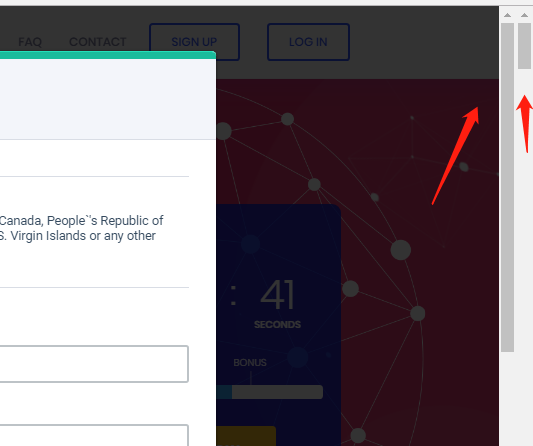
Thank you very much~ but i found a problem. I used contact-modal in a page. After clicking the pop-up layer, I found 2 scroll bars on my page. How can I solve this problem?
Open the css folder and look for a css file named smart-addons
Look for this line below
.smartforms-modal-scroll{ overflow:hidden; }
You can either remove it or play around with the overflow
can you share a link to yo page I look at what is happening
Hi elflaire,
Thanks for the great setup! I have a question concerning validation:
The field input should be validated, if its shown. No validation needed, if it stays hidden.
Could that be done? If yes, how?
- SImone
Thanks Simone
You can use the ignore option in jquery validation
ignore: ”.ignore”
email form does work.. only says smtp error.. but i tested credentials with other and works fine.
Which other did you test with please clarify?
yes.. sure.. sorry.. I use this form http://www.fastpaclogistics.com/forms/contact-dropzone/ works good… send and receive email.. but when go to http://www.fastpaclogistics.com/forms/contact-dropzone/php/admin/ does not show nothing.. just blank on dashboard.
Did you enable CSV in the settings file to TRUE?
Ops, my bad.. works, but I’m concern.. why pdf is not attached, i changed on settings and smartzone.js for accept word and pdf.. but only send jpg,png and word , but never pdf attached, just received email subject, content and header but not attached.
I am working on an update where the pdfs are generated by the mpdf library that way its easy to attach and send the pdf with the current setup its hard to do so.
Hi Staff, is it possible set vertical switch? Thanks R.
Hello Bendiro you want to create a vertical switch for which elements?
I need to create a control panel to manage some devices where you can power-on or off some light but in vertical way I need to much spaces to do that, and graphics is not really nice. Can you help me?
You mean something like this? http://jsfiddle.net/MJWrJ/ Ignoring the width coz its adjustable
hello
I tried to make the image upload work, but I receive the image of this format and not attached piece. (5b205da4ee3e0test.jpg) how can I do to recover this image
the link for my form :
http://article.rugbysphere.com/Hello Langelucan, send me an email with your FTP details i take a look at your php code.
Hello Langelucan, send me an email with your FTP details i take a look at your php code.
Small typo in Smart Forms 4 current build
Search for ” margin-top: 15 p; ” replace “margin-top: 15px;”
.smart-forms .spacer-t15 { margin-top: 15 p; }
Small typo in Smart Forms 4 current build Search for “-webkit-perspective: 1000;” replace “-webkit-perspective: 1000px;”
THANKS Summsel am going to look at it and update the forms by next week am currently working o updtaes thatnks for pointing that out
How can I add CRUD functionality (Create, Read, Update, Delete) to the database of your form.
Hi Bobby my laptop blew and i have been in a mess kindly i am just recovering some of my data kindly bear with me i get through this tonight i will give you appropriate feedback to all your queries
Thanks
Having an issues with the “chained select” form. I have the javascript added so that the select functions work within the form, but when I hit submit the form will not submit. It’s kinda the same issue I had with the step form… hit submit and the form doesn’t submit.
Is there a way for me to download a sample “chained select” form because I didn’t see one within the sample forms that came with my purchase.
Hello Elflaire,
How can I ensure an error is shown both below AND on top of any option-group element? I have tried playing around with the code below but it does not seem to work to the error message below the option-group ALSO before the option-group.
errorPlacement: function(error, element) {
      if (element.is(":radio") || element.is(":checkbox")) {
        element.closest('.option-group').after(error);
      } else {
        error.insertAfter(element.parent());
      }
Thanks in advance for your help!
Hello Jonasl i had a technical hardware problem with my work laptop blew and i have been offline am just recovering some of my data kindly bear with me i get through this weekend i will give you appropriate feedback to your inquiry
Hope your hardware problems are fixed. Kindly get back to me on this topic, as I still haven’t received feedback on this? Thanks
The hardware issue is fixed thanks… How do you want this to appear we can clone the error into a tooltip or something of sorts.
The way it is displayed does not matter so much. A simple “error” div above AND below is fine. Thanks in advance!
ALright let me make a demo i will post it here
I am still waiting for this. Please share the demo. Thank you.
Sorry for the delay on this am juggling between updating the forms and support. I am soon releasing an update but will still sort for you
Thanx
Dear Elflaire, it has been 3 months now and I still haven’t gotten a response from you on this. Why am I purchasing Support if you do not actually provide it? Kindly get back to me on this ASAP. Thank you.
Alright let me send you this tonight like i told you am working on releasing the update but let me fix your query tonight
Again, yet another message but no actual help, Elfaire. Kindly follow up on your promises. Thanks.
Your request has no official documentation with the validation plugin i had to beat here and there to get it working its not as straight forward as you imagine. Tried to research about it in vain so that’s the closest i can get sorry about the promises but also almost took me the whole week to com to grips with it. So there u have it
Thanks for your patience
Regards
The idea is that you basically cannot clone an error message since they use IDs it would produce wrong markup
What i did i created a dynamic element (p) and ech time an error is placed, i copy its text into the dynamic element then prepend the element to the parent of the options group
To hide / show the element i use highlight and unhighlight
Thank you very much, Elflaire, this is what I was looking for!
Great thanks for the purchase and your patience
URGENT!! I just got the “Datatables Editor” addon to go with your form. How do I integrate the files with your form to get it to work correctly?
REALLY need help with this
So essentially I just want to add CRUD (Create, Read, Update, Delete) functionality to your form.
Hi, I’m having a small issue with the form. When I hit submit it just sits there and doesn’t submit… http://gacapus.com/std-forms/test-kit-order/
How can I add an additional login page for the form itself, so that if someone stumbled upon the form they will have to log in to fill it out.
Hi there, I have recently discovered an issue with “dropzone.js” and I am unsure how to solve this?
The Problem
If an uploaded file name contains an UPPERCASE LETTER (anywhere), then the file does NOT get attached to email notification ( via smartmessage.php)?
When: $removeFilesUploaded = false;
The problem file does make it to the server into an uploaded files folder. I can also see that the UPPERCASE LETTER are converted to lowercase during the process and these files when manually downloaded from the server are perfectly fine?
I have done further tests to see if any other file naming conventions create a problem with files attached to the email notification. These are my findings:
1) alllowercase.jpg = no problem (attached)
2) alllowercase-no-white-space.jpg = no problem (attached)
3) with white space all lower case.jpg = no problem (attached)
4) 02939 9293 9944.jpg = no problem (attached)
5) 0293992939944.jpg = no problem (attached)
6) numbers and letters with white space 95432.jpg = no problem (attached)
7) white space and one Uppercase letter.jpg = PROBLEM (not attached)
 no-white-space-and-one-Uppercase-letter.jpg = PROBLEM (not attached)
9) numbers-and-letters-no-white-space-and-one-Uppercase-letter-0001.jpg = PROBLEM (not attached)
You get the picture!
I would really like your help to solve this issue as it is VERY likely that UPPERCASE LETTERS could appear in file names.
Cheers 
Hello Monkeybutter l i had a technical hardware problem with my work laptop you can rename the file once its uploaded on the server and remove the dashes it should solve let me test it i will give you feedback on this…
dont worry – I have gone with a different solution now.
Hello,
I purchased 2 different form plugins, but they don’t seem to work with Hebrew.
Does your plugin works with Hebrew Language?
Thanks
IF Hebrew uses RTL then we can set that in the CSS so that the forms support RTL languages its not complex really i should help in case you need hep regarding this
Thanks you for your reply, actually I thought it was a wp plugins, so I purchased it by mistake, I would like to use it anyway but are there any videos with instrucions?
Thanks
Currently no video instructions only the detailed documentation, we can create a simple automated WordPress plugin which we can use in WordPress as well to enque all the scripts and styles
sound good, how much would it cost?
You can send me an private email we discuss details
Hi there great set of resources. Q) How can I make the dropzone file uploader an optional feature in a form? Currently, if the user does NOT upload a file the form CANNOT be submitted? I can see the code in smart-form.js bit I am struggling to implement a solution for this? I did just try commenting out:
if (myDropzone.files.length == 0){
                                $("#myDropzone").addClass('dz-attachment-n').removeClass('dz-attachment-y');
                                errorMsgs = dzNoAttachment;
                                $("#myDropzone").after(dzErrorMsg);
                                dzErrorMsg.find('p').html(errorMsgs);
                            }
But the form will still not submit? Any help would be appreciated
I have some implementation in that regard send me an email i share it with you
Brilliant Will email you shortly.
Sent message to you via your support on Envato
Alrigt
Hi there, been 5 days and not received any email / support from you? Can you still help? cheers
Sorry had errands out of office let me send this tomorow
No probs, I look forward to receiving your solution via email
What gives my friend? I am still waiting? This is now the third time of asking? Are you gonna send me anything?
Sent the files via email
Check your email
finally – thank you
Let me know if you need help with the integration
Thanks, will let you know if I run into any issues
Run into a couple of issues. I require some help! – Sent you a support email.
Alright let me look at it and respond ASAP
Don’t worry. I fixed the problem in the end.
Hi
There is possible to create a form, and at end of filling it, it open a website in a new tab, according to form field values?
Example:
1) City 2) Region 3) Product type
So, the redirect must be something like www.domain[city].com/[region]/[product-type] Where keywords between “[ ]” are dynamic, according values entered by user.
Yes you can do that with either PHP or even Javascript can do it as well its pretty simple you just capture the field values as variables then store them when posting for redirection
Everything in the form is working just fine, wanted to know in the admin page, how could I logout a user for inactivity? Say if they leave the page, the system will automatically log the person out
It should since we are using a session
It doesn’t. I have been able to come back to the tab after hours or days and I’m still logged in. Any way to force the logout?
Alright, try the following
Inside login.php above the line that starts a session
session_start();session_set_cookie_params(0);So it should look like this
session_set_cookie_params(0);
session_start();
In the same file (login.php) i noticed that in some versions of PHP ereg is deprecated so it returns an error so replace this line
if (!ereg("^[A-Za-z0-9]", $_POST['username']))With this one
if (!preg_match("/^[A-Za-z0-9]/", $_POST['username']))Let me know if this closes the session once the browser is closed
Followed instructions and cleared the cache and everything and still the same result.
could be your browser is set to remember tabs which poses a more complex ajax php solution let me look over this then get back
Thanks a million!
A more simpler solution would be using a timed session so the session gets cleared every after a number of hours or minutes
I think you are right.