104 comments found.

Hi It’s a presale question. Does your plugin copy /update menu link too ? Best regards
Hello, Thank you for showing interest in our product. No, It will copy/update posts, pages and custom post types and also users. Thanks
so , that’s mean if I create a new page and new link in a site I can update ( important I juste need to update)them in all the other sites
that means , sorry
If you can create a new page and new link in the site and update them to other sites then it will sync that page with link. But not sync Menu which is in Appearance->Menus.
The plugin description says it includes support for the ACF image field, but I’m only seeing the meta information copied, not the actual image attachment. Is this the expected behavior?
Hello spainhower,
We regret for the inconvenience caused.
Would you please share temporary WordPress Network admin credential’s with us so that we can look into the issue.
Email address: obtaininfotech@gmail.com
Let us know if any concerns! Thanks
I tested the plugin again, and was unable to reproduce the behavior that I mentioned above (the image attachment was copied over as expected).
Ok fine!
Hello, I just bought your puglin. It seems simple and effective. But, it does not copy translations of WPML?
Hello,
Apologies, As we mention in product description for third-party plugin supported. So WPML is third-party plugin and not support our plugin with it. We can customize our plugin and give a support of this plugin. Let us know about your thoughts and contact us by bellow form.
Contact Us: https://www.obtaininfotech.com/contact-us/
Let us know if any concerns! Thanks
I have my site/main, then I want to get the news of the site/a and the site/b and site/c and for all the news on the site/main. Does this do it automatically? And is there any version I should run for a few days to test?
Hello dowamp,
Thank you for interest in our product.
Yes, This plugin do manual process but our another plugin do auto and backed have a option to sub sites to main site auto sync. So this will sync auto sub sites to main site. Please have look bellow plugin
WordPress Multisite Posts, Pages and Custom Post Types Sync Plugin: https://codecanyon.net/item/wordpress-multisite-posts-pages-and-custom-post-types-sync/20143748
Let us know if you required more assistance/details of this.
We are looking forward to your reply.
Thank You.
Hi,
I’m also interested in details about the ACF support, will it copy media that’s within Repeater Fields and Flexible Content Fields? These types of fields can also be nested.
Also in relation to the ACF gallery field comment from vhuus, are you saying it does work or doesn’t? Your reply wasn’t clear.
thanks
Hello,
Thank you for showing interest in our plugin.
Currently, It’s support Text, Text Area, Number, Email, Password, Wysiwyg Editor, Image, File, Select, Checkbox, Radio Button, True / False, Google Map, Date Picker, Color Picker and Message field types.
For Repeater Fields, Flexible Content Fields and Gallery Fields, We can customize our plugin and gives support for this same. Let us know about your thought and contact us by bellow form.
Contact Us: https://www.obtaininfotech.com/contact-us/
Let us know if you required more assistance/details of this.
We are looking forward to your reply.
Thank You.
Can we ever expect an update which involves the ACF PRO – Gallery field?
Hello vhuus,
No, We can customize this plugin and give a support for ACF Gallery filed. Please contact us if you want to customization for same.
Contact Us: https://www.obtaininfotech.com/contact-us/
Thank You
No Categories We bought this plugin b/c you said it does categories. We have 500 of them – that need to be replicated across 8 sites. WTH?
Hello kcsf,
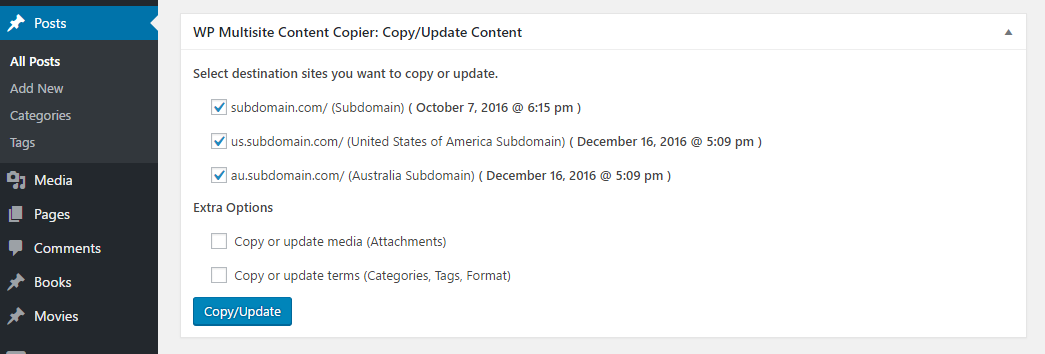
When you copy/update post, there is one extra option to https://0.s3.envato.com/files/218836173/screenshots/screenshot-4.png ‘copy or update terms’. Checked ‘copy or update terms’ option and copy/update this post in all the 8 sites. You will see copied/updated post with related categories copied.
Let us know if you require more assistance/detail of this.
Thank You
hi Pre sales question can this plugin sync custom post type on two separate domains and installations? for eg. abc.com and xyz.com is two different domains on different server
Hello synergy_networx2014,
Thank you for showing interest in our plugin.
No, This is unfortunately out of scope for the this plugin.
This plugin will help you in WordPress Multisite Network. WordPress Multisite Network providing this Mltidomain functionality to make two different domain in single admin.
More Details: https://www.obtaininfotech.com/contact-us/
We are looking forward to your reply.
Thank You
hello.Can it be used to synch media across site in the network?
Hello nicodweb,
Yes, It’s sync media which is in posts, pages and custom post types.
Let us know if you required more assistance/detail of this.
Thank You
Thanks ! Ok.Their is no way to copy/synch only Media table and folder (i want all my sites using “the same media lib”)
Posts, Pages and Custom Post Types have a option to Copy/Update media.
SS: https://0.s3.envato.com/files/218836173/screenshots/screenshot-4.png
In Media, We can make one add-on plugin for this and sync media in all the sites. Please contact us: https://www.obtaininfotech.com/contact-us/
We are looking forward to your reply.
Thank You
Hello,
I activated the extension by account I find it nowhere on my dashboard
How to do ?
Thank you
This plugin ( WP Multisite Content Copier )
Hello bharrag2004,
Thank you for purchasing our product.
Please follow the bellow installation steps:
1. Go to ‘Network Admin’ -> ‘Plugins’ -> ‘Add New’
2. Click on ‘Upload Plugin’
3. Upload ‘WP Multisite Content Copier PRO’ plugin zip
4. Activate ‘WP Multisite Content Copier PRO’ plugin
Documentation: https://www.obtaininfotech.com/documentation/wordpress-multisite-content-copier/
Please let us know, if you required any additional details/assistance on this.
Thank You
Hello, I’ve got a question before buying. Can the plugin copy over data based on category? For example, can I tell it to copy over all of the posts that are categorized in “category 1”? Or do I have to do it manually per post. Thanks!
Hello anthonymcordo,
Thank you very much for showing your valuable interest in our product.
Currently, This plugin can copy data based on categories and have not individual category selection option. You can see bellow screenshot.
SS: https://0.s3.envato.com/files/218836173/screenshots/screenshot-4.png
For based on your requirement, We can customize plugin and give a specific category selection option. You can see like bellow.
SS: https://drive.google.com/file/d/0B7xM1zYrfd7XWTA5VERBY3RQUVE/view?usp=sharing
Contact Us: https://www.obtaininfotech.com/contact-us/
Please let us know, if you required any additional details/assistance on this.
Thank You
Hi, I sync some custom post type posts, but the plugin does not associate it to the author, can you help me?
Hello hslaszlo,
Thank you very much for showing your valuable interest in our product.
Sure, please send the site details: https://www.obtaininfotech.com/contact-us/
Thank You
Hi
I’ve bought your plugin today but when I try to copy pages/posts etc over too additional sites on my multisite I get random images appearing. Sometimes there are no images and other times the images are random ones from the media area, but not the correct ones.
Kind Regards Alex
Hello alexstills,
We appreciate your genuine response, we have go through the issue faced by you, we will reach you soon with best suitable solution, stay in touch with us.
Thank you
Hello alexstills,
We are working on this.
Thank You
Hi Obtaininfotech
Thanks for this. Please let me know if you would like any more details from me.
Kind Regards Alex
Hello alexstills,
Now we have fixed latest ACF image type field issue and we have uploaded the latest zip on codecanyon store. It will take 4-5 day for review. Please send your email details by contact us form if you want now. So we will give you latest zip.
Contact Us: https://www.obtaininfotech.com/contact-us/
Thank You
Hi
Just wanted to says thanks for the support. Seems to be working like a dream now. Great effort from you guys.
Cheers Alex
Hello Alex,
Thank you so much.
Hi, I purchased last night and installed – we have a multisite setup with WPML (english / french), is language not taken into account when copying content? We tried copying but no matter what we tried, copied posts did not show up in the destination site. Any help would be appreciated.
Hello mglaesser,
Currently, This plugin is not support with third party WPML plugins. Within a month we will give a support with third WPML plugins.
Can you please provide more details with WPML plugins and version. So, we can help you easily. Contact Us: http://www.obtaininfotech.com/contact-us/
Thanks
Hallo,
following scenario: I’m running a multisite with 30 sub-blogs on subdomains. Can your plugin be used to bring all posts from the sub-sites and to the main page? And can it be automated, like check every hour or something like that?
Thanks
Hello quentro,
Yes, You can bring bulk posts/pages from one site to other sites. it’s not automated and we can provide custom solution as per your requirement like make one cron and it will check the posts/pages to every hour or every day. This will be separate cron which will not affect to this plugin.
Contact Us: http://www.obtaininfotech.com/contact-us/
Thanks.
Does this work with Woocommerce in multisite?
Hello SLSOL,
Currently not support WooCommerce.
Thanks.
Hello SLSOL,
We have released WooCommerce Multisite Content Copier plugin and it’s support WooCommerce products to copy/update in multisite. You can review this plugin from our store.
Review Link: https://www.obtaininfotech.com/product/woocommerce-multisite-content-copier/
Thank You
Hello SLSOL,
We have released WooCommerce Multisite Content Copier plugin on Codecanyon. You can review with bellow link:
https://codecanyon.net/item/woocommerce-multisite-content-copierNice product 
Thank you 
Hi,
I want to upgrade to your pro. but – there is something I couldnt make working with your plugin.
I have a post, inside the post I do “Add Media”—it is added as IMG elements into the post with specific URL of the site e.g. XXX.mymultisite.com
now – I want to copy to 2 additional sites in my WP; copy works good BUT when I check the other sites, I see that the images are still pointing to XXX.mymultisite…/1.jpg and not to the current site.
is there anything not correct that I do ? how can it work?
Hi rexy108,
Currently copy/update media which is featured image, ACF Image field in post, page and custom post. In content this is simple copy/update content from one site others sites. If you want by our PRO version than will give a one more additional options to replace content media file path related sites.
Thanks
Does this have an auto update and/or copy feature if I want to share all blog posts or a specific category to another domain within multisite?
Hello roguevoice,
No, It’s not auto update. When you save or update post that time you can just click on copy/update button in post bottom of multisite copier section and if you want to copy category then it’s have a advance option to copy category or not. Not just category it’s also copy tags, or custom terms.
SS: https://0.s3.envato.com/files/218836173/screenshots/screenshot-4.png
Thanks
Very nice! Good Job!
Hello kisded,
Thank You