31 comments found.

will this work for the menu effects in https://merck.com ? please advise
Hi, No matter what would like to use in the content. So this addon support all shortcodes and contents.
You didnt answer my question properly – i need to replicate all the menu effects in https://merck.com please take a look and advise. Please check out a video of the desired outcome for the menu here https://drive.google.com/file/d/1yKmbnyN2iql0Ac7eSHQaeX9kWvJt6PgK/view?usp=share_link
You can do as like as plugin demo. Please check the demos properly and you decide to purchase or not. Thanks
thanks – not good enough answer for me to buy, have a nice day
Maybe you can check this one and you can do anything without depending.. https://codecanyon.net/item/overlay-menu-wordpress-plugin/15708036 have a great day.
Presale question: Can the off canvas menu open with a link? I’m wanting to use it for store locations. So throughout the site if I have “See Locations” buttons, I would want it to open. Or, does it only open from the hamburger menu?
Hi maybe you can use for any trigger https://codecanyon.net/item/overlay-menu-wordpress-plugin/15708036 so you can use and trigger anything with this plugin.
Hello!
Im interested to this plugin but i have few question before to buy:
1) Can i apply this menu on all the pages instead to add one by one with Elementor?
2) Can i customize the icon with an image instead fontaweasome?
3) On the Top version the icons its on the lower part of the page, is it possible to show it in the top right?
4) Can i customize the alignement of the menu items?
5) Eventually its possible to test the plugin before to buy it?
Best regards and thank you for the answer
Please check the demo and backend screenshots and buy according to this thanks
Hi! Presale questions: Can the hamburger icon be changed to the 3 dots (meatball) ? Will this work with any theme and not effect the standard header menu? is it just a short code for the icon /menu placement? will this conflict with the header mobile responsive menu? can i have each page have a different slide in menu? Thanks!
Hey there thanks for the interest. I will check your questions on the plugin and will give you an answer quickly please wait a bit. I will update you asap. Thanks
1. You cann’t change the icon right now but we can integrate it quickly. 2. It won’t be affect any theme or plugin. Slick Side menu do not touch any theme or plugin and it’s working standalone with WPBakery Page Builder. 3. I don’t think it will conflict with theme-based mobile menus. 4. Yes you can use it with different menus per page.
I hope these answers helps to you.
Regards
Lisa JOY
Thanks! When will the icon option be available? My client requested that so it doesn’t look like the header menu icon
You’re welcome! we are working on right now and probably it will be available within 1-2 days later. We’ll inform/update you via email or this thread.
Great Thanks!
We have integrated all of the functionality supported right now! It’ll be updated within 1 hour later Just FYI. Thanks!
Plugin updated to 1.0.8 and fixed some bugs.
Hello, I am using this plugin on a menu but I have a problem.
Two menu items take the visitor to different section of the same page, i.e.:
menu item 1 -> https://www.mysite.com/page
menu item 2 -> https://www.mysite.com/page#anchor
If I have opened /page and click on menu item 2, the page scrolls to #anchor but the menu does not close.
This is a strange behavior because all links are expressed in absolute format, which is to say: https://... rather than just anchor
Please let me know how I can solve this.
I would post this request on the forum but I can not find the section dedicated to this plugin.
Thank you and kind regards,
Paolo
Hey there I will check and let you know the solution. Thanks!
You need to use custom JS for it:
<script>
jQuery( document ).ready(function($) {
$(".closeit").click(function(){
  $("#c-menu--leftslide").removeClass("is-active");
  $(".c-mask").removeClass("is-active");
});
});
 </script>
Did you resolved it.
My mobile menu stop scrolling since recently… can´t find way around support site. Any ideas, please? Thank you
Hey there thanks for your purchases! You can sent your requests here and our support forum https://themeofwp.com/support/ Can you share your website URL?
Will this menu work with Avada theme? thanks, Buddy
Hey there yes it will work all themes and plugins
not appear !
Hey there please set all settings and chose an icon for it. Also if you can sent your admin credentials ti us via email we can setup it for you. info @ themeofwp.com
hello email send virginie.bootz@gmail.com
thanks
Hey i will check it asap please be patient and thanks for your purchases!
Did you sent it to info@themeofwp.com ? I’m not displaying it. Please sent it again.
Also you need to activate WPBakery page builder and slick side menu together.
can active for me ?
Plugin updated the version 1.1.0 and Icons visibility fixed. You don’t need to update it so I’ve updated it to the latest version on your site.
hello i not look icon menu !!! not work ! i’m on firefox !
You only define it this page http://royaumebamougoum.com/about-us/ if you want to define site wide you can use settings and check “use side wide option”.
hello i want all page of my site
I’ve activated it side wide. http://royaumebamougoum.com/
Go to the widgets and define any widget to the menu content. Also you need to delete defined slick side menu in http://royaumebamougoum.com/about-us/
i want just all my pages please with menu left (select menu) and also it’s possible to put an height ? (i want height of the picture of home page)
i can send picture ? on your mail?
You can sent a picture and also you should do it by yourself but its easy we can help it to you.
hello can you give your email adress please?
Hi! Do you know if I can adapt the Slick Slide to brq.com menu look?
Hey there! absolutely yes.. please check this demo https://wp.themeofwp.com/slickslidemenu/top-menu/ You just need to insert your dropdown code into the Slick Side on VC that’s it.
I hope this helps to you. 
Question…... do you have plans to update the software? We are running WPBakery 5.4.7
Hey, the plugin compatible with all WPBakery Visual Composer versions. So there is no update needed at this time.Also if needed we will update it periodically.
Thanks Kevin J.
hi there the plugin has h1 somehow how it can be removed for seo poprpeses thanks
You mentioned about
<h1 style="color:{$slidemenu_titlecolor};">{$slidemenu_title}</h1> Open the vc_extend.php and find line 498 and change tag as your needs.
hi ive just purchesed the item i see that when menu is open content behind cant be crolled is theres a way to enable scroll and remove overlay
thanks
Hey there, thanks for the purchase! currently when click to the opener icon overlay shows up and still you are allowed to scroll background content elements. But if you want to close overlay when scroll bar scrolled you can try to add like this:
https://api.jquery.com/scroll/I hope those was clear. Thanks!
Hi There,
I am considering using this plugin for a project. Do you think it is possible to have an offcanvas animation like this one?
http://www.aidanzealley.com/offcanvas/rightonly.htmlThe one you use floats the navigation on top of the content instead of moving all the content.
Thanks
Hey there, it’s not push/move the content. As you can see it’s displaying content with overlay. But We’ll release a new plugin like your demo.
Also this plugin works different and this is standalone WP plugin: https://codecanyon.net/item/overlay-menu-wordpress-plugin/15708036
Thanks!
Hi Mate, I bought the plugin and it seems to work nice. Is it posible to add the trigger to an image to show the menu? I dont seem to get this to work. Do you maybe have an example of the code to use? thx
Hey there! thanks for the purchase! we’ll ad image icon both open/close in the option but you can trigger any image with wrap img with <a href="#about" class="c-menu__close">About</a>. I hope this helps to you until the update comes to you.
hmm I dont seem to get it working: I added the line you suggested but it just doesnt popup. at the bottom of this page there is “about” with the trigger but it doen’st do any thing. www.minglemush.nl
I’ll replicate it and will let you know the code asap.
Did you wrap I’ve shared code with image?
Also where should I click to trigger it? where you injected it?
At the moment it is just a text button, the one you suggested “a href=”#about” class=”c-menu__close”>About”. When that one works it is no problem for me to et a image to work. This code is already in the page. A t the bottom above the footer you see “About”, this is the trigger. In visual composer I added the element fort slick slide menu. It should appear on the right. When I turn on “show on page load” it works so It is only the trigger button that needs to work.
Do you have a sample page for this? I need to check what you need exactly.
hi: I made an simple page with just the about trigger and the SSM element activated on the page with visual composer. : http://www.minglemush.nl/test/
Hi again, please wrap with this:
<a id="c-button--leftslide" class="slicknav-toggle righttop" href="javascript:void(0)">Your Image here</a>
hi mate, you can’t add javascript:void(0) to you wordpress page it strips it right out.
no problem just you can use # or empty for now
sorry mate it is still not working for me
Because it needs this js for the trigger your link:
<a id="c-button--leftslide" class="slicknav-toggle lefttop" href="javascript:void(0)"><span /></a>
<script>
        jQuery(document).ready(function($) {

            /**
            * Slide left instantiation and action.
            */
                var leftslideMenu = new Menu({
                wrapper: '.wpb_wrapper',
                type: 'leftslide',
                menuOpenerClass: '.slicknav-toggle',
                maskId: '#c-mask'
            });

                var leftslideBtn = document.querySelector('#c-button--leftslide');

                leftslideBtn.addEventListener('click', function(e) {
                e.preventDefault;
                leftslideMenu.open();
            });
        });
    </script>
Please copy this into the text mode : (I’ve tried this works properly)
[vc_row el_class="custommenu"][vc_column][vc_column_text]I am text block. Click edit button to change this text. Lorem ipsum dolor sit amet, consectetur adipiscing elit. Ut elit tellus, luctus nec ullamcorper mattis, pulvinar dapibus leo.

<a id="c-button--leftslide" class="slicknav-toggle" href="#">Trigger Menu</a>[/vc_column_text][/vc_column][/vc_row][vc_row][vc_column][slickslidemenu slidemenu_direction="leftslide" slidemenu_trigger="click_trigger"][/slickslidemenu][/vc_column][/vc_row]
Here is the working demo of the code above:
http://wp.themeofwp.com/slickslidemenu/trigger-menu-in-content/Plugin Updated to v1.0.7!
1. Now custom icon position allowed 2. Custom icon fonts allowed 3. Design tab added 4. With some fixes more stable.
As usually, simplicity makes it perfect
@st1s Thanks for your thoughts.
Plugin Updated to v1.0.7!
1. Now custom icon position allowed 2. Custom icon fonts allowed 3. Design tab added 4. With some fixes more stable.
Hi!
I think this it what Ive been looking for. Is it the same thing as the Basel and Savoy theme is using for their cart?
Is it possible to make it wider? Possible to make it load faster? Possible to change icons?
Best regards, Stefan
Hi I’m glad you have found what you need!
Yes approximately look like them. But our off canvas menu has a lot of triggers.
For now you can do it by manually from the css but those will be very good improvements for the next update.
You can change the speed from the
.c-menu { transition: transform 0.1s ease 0s;}
You can change the width and icon from the css too. But we will integrate them quickly with next version within a couple days later.
Thanks for interested.
Im using savoy theme. Is it possible to use this instead of savoy menu?
Also did you make so change of icon is easier than knowing a lot of php? I read about it above from another post pisaacwilliams.
Im tired of savoy menu and I want to use yours instead. Possible to have the cart with count on this menu too?
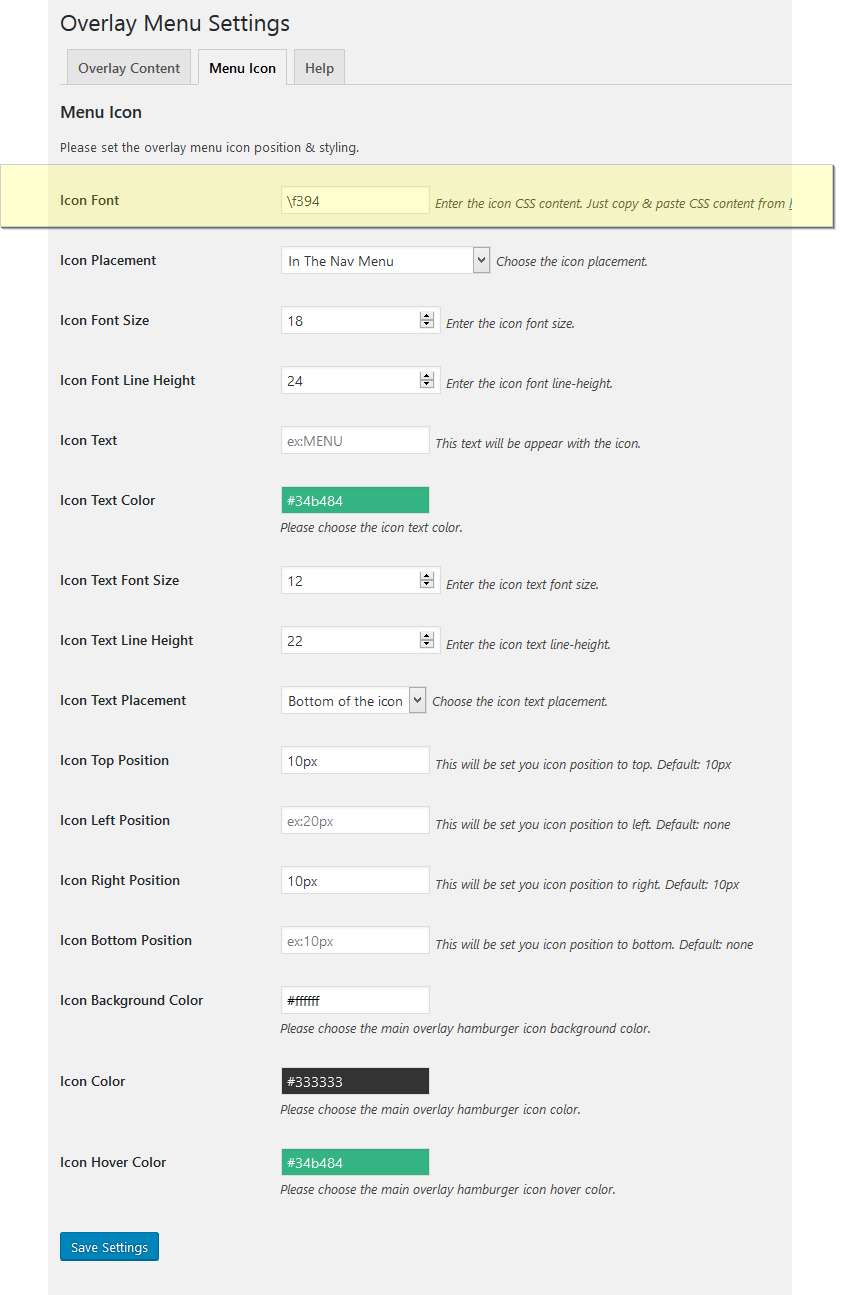
Thanks for your interested. It works with 99% themes. But you should consider to buy this plugin https://codecanyon.net/item/overlay-menu-wordpress-plugin/15708036 Also you can change easily the icon like this: http://imagizer.imageshack.com/img922/465/0dPxcc.png simply copy and paste the icon code into the setting area. (you don’t need to edit any php code)
You can use anything in a widget area for both plugins (shortcodes, menus, etc.) If you have a shortcode for the cart with count, why not! you can use anything in.
Plugin Updated to v1.0.7!
1. Now custom icon position allowed 2. Custom icon fonts allowed 3. Design tab added 4. With some fixes more stable.