8274 comments found.

Well my problems continuous with
Review Lista Page and Photo List Page
See the vídeo.
http://www.portaldacasaverde.com.br/video/sabai5/sabai5.htmlHas anyone managed to solve this problem?
Hi,
Is it possible to assign core WP Categories to listings? The reason for doing this is that I need to query listings in some way. If it is possible, how would I specify this in a shortcode, e.g. [sabai-directory], or how do I query listings directly?
Another thing is I found a workaround by creating custom fields that represent categories. But the problem now is how do I query listings by these custom fields? Again, is there an option in shortcodes for this, and if not, how do I perform post queries directly then? What is the post type I need to specify?
Thanks
I’ve just asked this Q in more detail on Stack Overflow: http://stackoverflow.com/questions/43595203/how-to-query-listings-in-sabai-directory-plugin. Can respond to it please?
Hello,
> Is it possible to assign core WP Categories to listings?
That is not possible unfortunately.
> But the problem now is how do I query listings by these custom fields? Again, is there an option in shortcodes for this
Yes, you can filter listings using the [sabai-directory] or [sabai-directory-listings] shortcode with the “filter” paramter, for example [sabai-directory filer=”field_xxx=value”]
Is their a way to connect your directory to BuddyPress users or members? You did a kick ass job on this directory…I love it!
By connect… what I meant was businesses or listings to BuddyPress Users. I have a very large site http://filemakertoday.com with over 44,000 members worldwide and most are data & custom app programmers or consultants with their own company’s…that is the reason for this request.
Hello,
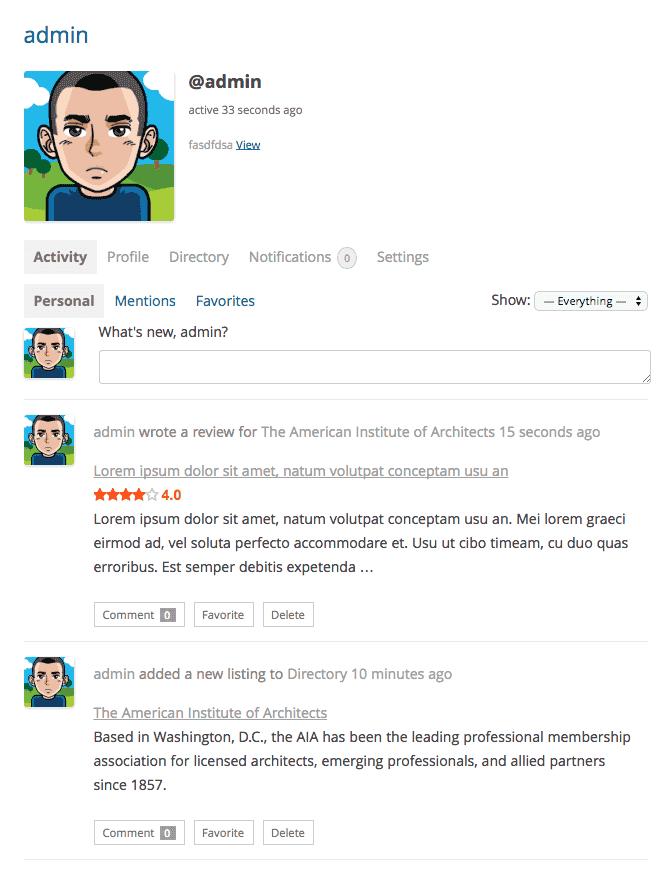
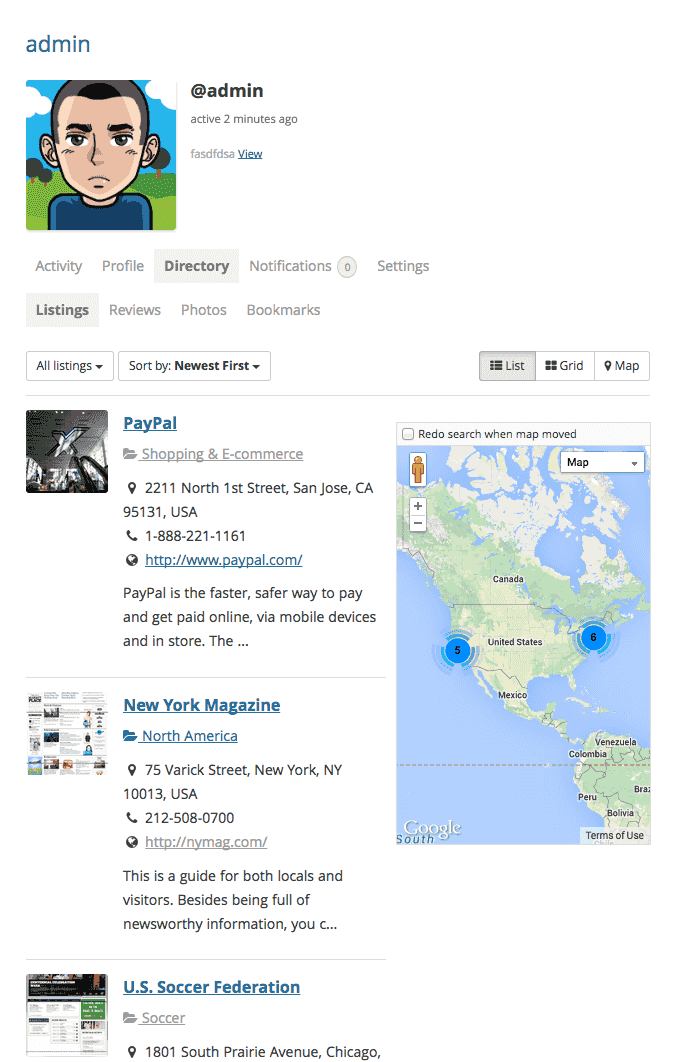
Yes, the plugin does have the feature to integrate your directory with BuddyPress. Listings for each user can be displayed on the profile page and also in the activity stream, as you can see in the following screenshots.
https://0.s3.envato.com/files/144927025/screenshots/buddypress_activity.pnghttps://0.s3.envato.com/files/144927025/screenshots/buddypress_profile.png
Hi, great plugin! Just one thing. Can I add multiple addresses for a listing with a marker for each on the map as well? Not sure how to enter businesses that have more than 1 location / address? Thanks.
Hi, also have one more question. Is it possible to have a shortcode that will list results of a particular search. So for example if I wanted to list results on a page for a certain category in a specific location such as “plumbers in London”. I want to build page templates and then add a shortcode to the page templates to show particular results. Is this possible? Thanks.
Hi, I have resolved the additional addresses for a listing using the information on your support page here: https://codecanyon.net/item/sabai-directory-plugin-for-wordpress/4505485/support
I just need help now with the second questions about search results in a template.
Thanks.
Just to clarify that for my second question about search results in a template file. I want to display results from a specific category and a specific location. So wondering if it is possible to use a shortcode that contains the category and the search location.
I want to add this to a template file so that the results display on a page as soon as it loads rather than there being a search performed.
So for example if I created a page for ‘Plumbers in Birmingham’, the page would instantly show these results without a search being performed.
Is this possible?
Thanks.
Hi, I have resolved the second question now too using your shortcodes information here: https://demo.sabaiapps.com/sabaidirectory/shortcodes/
This is an amazing plugin!
Thanks so much for making this 
Will give top stars review for the plugin now.
Hello,
Thank you for your comment on the plugin and the updates on the issues and we’re sorry about the late response. Please let us know if you need further support with the plugin!
Bug: In my listing there are fields that are only available when you select a certain category. I fill in all the fields. Afterwards when the user wants to edit the listing at the frontend he have to reselect the category so that the fields become visible. (Firefox Browser 52.0.2 (32-bits)
Also the google map bug is still present. Look at previous mail some months ago.
Hello,
Thank you for letting us know and we will take a look at the issue with category dependent fields and get back with you.
Any news concerning this ?
I’ve created video where you can see what is not working. If i want to edit the listing i have to reselect the category before the fields become available.
https://youtu.be/47bbBzXhCOMFeedback from author : This issue has been fixed in version 1.3.40 to be released soon
Thank you very much !!!!
Suggestion: add a next listing and previous listing in the listing editor allow quicker editing
Hello,
Thank you for the suggestion and we will see what we can do.
Hi, is it possible to create multiple directories within one installation and can they be styled different? For example one directory for local business with adress fields and map, another one for jobs with contact data and another one for tools with screenshots, url and description?
Hello,
Yes, you can create multiple directories with our plugin and also complete independent settings for each directory as you can see on our demo site which is currently running 3 directories on a single site (https://demo.sabaiapps.com/sabaidirectory/). Please see the following FAQ for details on creating multiple directories: https://codecanyon.net/item/sabai-directory-plugin-for-wordpress/4505485/faqs/15158
Hi there,
I would like to hide the directory listing from public view that is i want to hide “http://websitename.com/directory/listing” from public view but edit function needs to work as usual : “http://websitename.xyz/directory/listing/listing-name/edit?dashboard=1”
My goal is to keep the user dashboard just with edit option..is it possible?
Thanks.
Hello,
Unfortunately we do not think that is currently possible.
Hello!
I sent a reply to an email a few days ago, but haven’t gotten a reply yet. It is regarding hooks for categories to be preselected and an Google Maps API issue.
If you have answers for that, it would be great!
However, I also have another question that needs urgent attention.
I have thousands of categories and multiple subcategories within subcategories. I allow for wildlife sightings to be added, and need them to be sorted in a taxonomic way, where every species is a subcategory in a hierarchy. For example: lion needs to be under cats, which is under carnivores, which again is under mammals. This is great for listing searches. However, it is not very good when it comes to finding the correct species when adding it on the form, as my members need to go down one category at the time and need taxonomic knowledge to find what they are looking for. A lot of species are not self-explanatory. This is very inconvenient and lots of members are put off by this.. My website is just now going live for the first time, and complaints about this inconvenience is flooding in..
I need it to be possible to have some sort of search function for categories when adding a form, similar that on the search function in the front end, where you search for listings. So that people can type in what they are looking for, and the correct category (species) suggestions comes up. Then they do not need to traverse the maze of subcategories to find what they are looking for.
Is this possible to add? With code, then how? This is a crucial aspect of my site and I really need it sorted out somehow before I loose members.. This issue is also one of the reasons I want hooks for preselected categories. However, a search function would solve this issue big time! The rest of the plugin is great, and the very best I’ve come across for my purposes (and I have tried a few), but this one thing really is holding me and my website back at the moment..
Thanks!
Well, I’m not going to swear in a public discussion forum, but **!!! I cannot believe I didn’t see the option to add “text input field” at the top of the settings for the category field! That’s exactly what I asked you for! Finding that thing made so happy I almost did a little dance here! It has been the one thing holding me back for so long and I was about to give up on fixing it, and there it was all the time… THANK YOU for having the foresight of adding that option! Just stupid me that didn’t see it before!! This plugin is just perfect!
Hello,
Great, thank you for the update and also please wait for the reply to your feature request that we received via e-mail.
Hi, is there any option to connect a new listing to a buddypress group? I would need to see the information, that there is a new listing related to a group in the activity stream of a group. Thank you!
Hello,
Unfortunately there is no such option with the plugin at this moment.
Hi, Export feature for when? Thanks
Hello,
We do plan to add the feature to the later version of the plugin. For details on later version of the plugin, please contact support as this section is for providing support with the current version of the plugin.
I have searched through the comments and saw a few posts from 3 years ago that said you were adding a way for someone to pay before they post a listing.. I cant find if you did add this or anyway of finding it in the plugin. Any update on this? The goal is to have someone pay for a listing first before they fill out a form.
Hello,
Unfortunately this is not yet possible. It is however still on the planning stage.
I bought it ))
Onokazu, what file i need to edit and what exactly ? In admin part there are no such settings. Thanks !
P.S. https://codecanyon.net/comments/16239454 – about this
Hello,
We’ve replied to your question, please continue on the discussion there. If you have already replied there as well, please wait for a reply there as well.
Hi ! Could you give answer on my question ? https://codecanyon.net/comments/16239454
I want to buy, but i need a small bug fix.
Hello,
We don’t think it is a bug, however it is possible. Please see the reply there.
Thank you ! I will buy script today. I hope, that if I can not make it by myself, your support will help me with this !
There is a very clever little plugin called Browser shots https://wordpress.org/plugins/browser-shots/ You embed this shortcode in a post [browser-shot url=”http://link-to-website” width=”600”] and you get an image of the website. Is there away this could be used in creating a record? Lets say you were creating a directory of websites and it allowed you to have a image of site in the record.
Hello,
We do plan to add the feature as an option to the later version of the plugin.
Hi, We have purchased this for our client and so far its nearly working as we want it to! Just two quick questions..
1. For some reason the review system is not loading on our site when you click into a listing. Its just a white empty space under the tab with no review?
2. How come the contact forms wont show unless a user is logged in? We want the listing system to just work for guests to view listings and contact the listing when they want but the form only shows up if I am logged in (as admin). I have checked the permissions in the back end but nothing there is working when I make changes to them.
Can you please advise? Thanks
I have also checked console and I have no javascript errors? I just dont get why the reviews wont show up and my contact forms only appear for the admin when logged in? Thanks again
Hello,
1. You may want to try enabling the debug mode by following the instructions in this FAQ: https://codecanyon.net/item/sabai-directory-plugin-for-wordpress/4505485/faqs/17467
2. In order to let guest users submit messages through the contact us form, you will need to grant the Add Lead permission to the Guest user role from Directory -> Settings -> Access Control.
Hi, my directory using sabai geolocate doesn’t ask to share location on my localhost. is there any solutions? it appear only listing.
Hello,
The geolocation feature works only when your site is hosted under https. For further support, please use the account that you used to purchase the plugin.
Hello, My webpage for sabai plugin is https://sacekimleri.com/sac-ekimi-merkezleri/
My problem is The pages tab is not working. Like 1-2-3-4-5.. And the search section is not working. Could you please help?
Hello,
The problem is that sacekimleri.com and www.sacekimleri.com are considered different domains in javascript request and since your site has www.sacekimleri.com configured as the website address, the plugin is not able to load content when you are viewing the site from sacekimleri.com for security reasons. You can see that the URL https://www.sacekimleri.com/sac-ekimi-merkezleri/ works fine. You will need to configure your server so that any request to sacekimleri.com is automatically redirected to www.sacekimleri.com.
Hello. And in this plugin you can integrate Yandex maps?
Hello,
Unfortunately no.
Facebook has launched its own browser (smartphone) but the plugin give error with geocoding 1) User deniet geolocation 2) Marker problem
a) No problem with other browser Chrome, ecc) b) No problem in PC
Please watch yourselves: https://www.lasiciliainrete.it/patrimonio-culturale-attorno-a-te/Hello,
Isn’t it for viewing Facebook pages only? Do you have the URL where we can download the browser you are referring to?
The Browser is internal Facebook. It can be turned off but not everyone can do
(I not speack english). after 5 months did not deal with the problem. Facebook use an Internal Facebook (smatphone android) maps not work good (markercluser). problem reported over 5 months ago. From PC work from android and facebook browser not work. Not work also whit the other app. it works instead with chrome and Android. by now people almost always use facebook posts to go to the site. please do something. please check yourself whit android an app facebook (It can be turned off but not everyone can do) https://www.facebook.com/siciliaonline/posts/10155700362614803