23 comments found.
Good luck with your sales
Thank you!

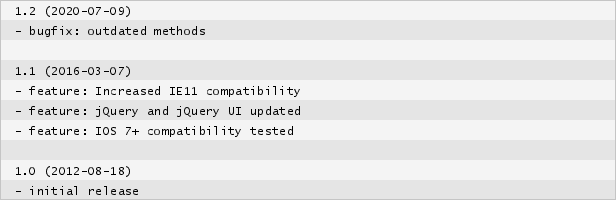
Hi, Update details please?
Perfect, thanks.
i was wrong. I have bought this menu instead of wordpress menu. How can i solve the question?
Hi!
You can request a refund for this item (click here to get refund) and then purchase the correct one.
Thanks, createIT
Hi, a question, it is possible to show the back button with the fade effect AND the breadcrumbs ? Im tryng to get it but I can
Hi!
It should be possible to use both elements at the same time. Please start a new ticket on our support forum http://createit.support/ with your site url and access, so we could check why it’s not working for you. Our team will be more than happy to help you there.
Thanks, createIT
Ok thanks, I found that. Now, it is possible to add the link to the breadcrumbs elements ?
if it so I can provide you the url. Please
Hi!
I’m afraid that is not possible to add the additional link to breadcrumbs, they are generated automatically. Sorry about that 
Thanks, createIT
it is not possible or it is not included? it can be done somehow ? Do you customize ? We can arrange something.
Hi!
It’s not included. I believe that everything is possible with javascript  Though I’m afraid that customization would cost much more than the plugin itself. Feel free to contact us via premium@createit.pl with more details (site url and what exactly should be changed) if you would like us to prepare the quote for you.
Thanks, createIT
Guys I have send the files… please check your email
Hey there. I am using your plug in in conjunction with Bootstrap and want to use Bootstrap’s collapse functionality with some of the links (that don’t have any further lists nested within them).
I want the collapsible content to be hidden on default and only shown when the corresponding link is clicked (it expands vertically). The problem is the way the height of the outer #drilldown div is being calculated doesn’t account for the possible expansion of anything within, so even when the link is clicked and the Bootstrap functionality is toggling it to be visible, it doesn’t show (if I use developer tools and increase the height of #drilldown then I can see it).
I am wondering if there’s any way to change how the height is being calculated in the JavaScript. I wouldn’t even mind if it was like a fixed minimum height.
Thanks!
Hi!
Thanks for contacting us! I believe that for sure we can at least define minimum height for the links, though we will be able to give you more complex solution if you send us url with example of the issue. Can you please start a new ticket about that on our support forum http://createit.support? Our team will be more than happy to help you there.
Thanks, createIT
Ok I submitted a ticket here: http://createit.support/forums/topic/collapseexpand-height-issue/
Thanks.
Hi!
Thanks for letting us know. Someone from support team will contact you shortly.
Thanks, createIT
Hi there, I have some presales questions… It is possible on the menu and breadcrumbs to load a link to a webpage even in the parent UL´s ? Just like the facebook help center… when you go inside from a parent UL it charges a page on the data area, and you can navigate back from the menu itslef and from the breadcrumbs and grab and show the page called… got it ? Is that possible ?
Hi!
Unfortunately website url can’t be added in parent item. You can use it only in the way presented on our demo. Sorry about that!
Best Regards, createIT
ok thanks
a question… on your demo page the example #11 “Skin: system Features: callbacks and event usage” it supposed to load some data right ? so, that data can be a url on a iframe ? because thats exactly what I need… load a Iframe without refreshing the page… Is that possible ??
hello ?
Hi!
Sorry for the waiting time! Yes, in example 11 you can see how to call custom content in menu, it should work properly with iframe as well.
Thanks, createIT
Guys, Im still searching for a solution for my project and I check your latest example “Skin: minimal Features: custom ajax queries on menu position click” there is nothing shown on the Iframe, and is just what I need, but seems not to work… Can you checkit out please ? And another thing. Previously I eas asking for a UL link, but I was wrong, what I need is just to load a page on a Iframe on every linked click, (no matter if has childern or not), and add the same functionallity (links) to the breadcrumbs, as you have on your example 11. Is that possible ?
And, another one.. Is possible that when you click on “start” returns to the main page on the iframe, and second, it is possible that whan you drill on the menu you check a link without children, the latest deep and shows on the iframe where you are i.e. (1 > 2 > _)
Hi!
Indeed I can see that some iframes does not load properly, though it’s some issue with iframe code (it’s blocked because of mixed http and https content), not the script (other examples work correctly). In default plugin settings we don’t have option to reset iframe after clicking on Start button. You would need to call some additional event for this. I’m not sure if I understand the second question – do you mean to display breadcrumbs inside the iframe?
Thanks, createIT
Okay, thanks for answer… the second question is just to show on the breadcrumbs the page you are on, like parent(linked)>chilren(linked)>grandchildren (not linked and current page) just to emulate a server side breadcrumbs for example. is that possible? and finally, as you said that I have to call some aditional events to reset the plugin on start, would you help me to achieve that ? Sorry but Im not a programmer.
Thanks for nice code, desire to help me to have an awkward problem and another not so much:
1. When I browse (minimal code) eg level 5th, and clickeo an external link, (I could not put transition effect to this change abrupt), and when I give BACK, not let me trace the history of the 5th level it was unfortunately sent me to the 1st level home.
2. Personally I have approximately 500 items listed, and when I opened it I not fast loading CSS, and observed for a few seconds the ugly skeleton of that tree.
Hi!
Can you please contact our support team at http://createit.support/ with access to your website with examples of these issues, so we could check this? Our team will be more than happy to help you there.
Thanks, createIT
I like the idea, how will it handle 100’s of categories and can the search be as you type, which is even better than pressing a search button. I’m interested but concerned with the above, with no changes in years? Thanks
Hi!
No worries – plugin is still supported by us. Though I agree that it was not updated for while – that’s why our developers right now are testing the plugin with the latest software and preparing proper adjustments. Till the end of the day we should be ready to release new version.
Also our team at support forum is always ready to help you
Thanks, createIT
How are things going, it’s great to see you are heading towards better technology. My main issue is I want to be able to just type and have it put the keywords from the list as I type. Requiring the search button to be pressed is very dated and thus can’t be used for my needs. Please do respond here once you have a new release to test. Thanks so much.
Hi!
We prepared the update with several improvements – it should be available in few days.
Thanks, createIT
4 months? Any updates? Thanks
Hi!
Sorry about the delay! We’ll try to release new version this week.
Thanks, createIT
Hi, Is it possible a “Not Found” message in the search?
Thanks, best drill down menu i ever seen!
Hi!
Please try to modify ctDrillDown.js file, on the line 394, add the following:
if(results.length == 0) {
        $resultsContainer.html("not found");
}
So it will look like this http://prntscr.com/5yyzuz.
It should resolve the issue.
Thanks, createIT
It works perfectly, thank you very much for the quick response.
Hello,
When the user resizes the window, the width of the menu doesn’t update when the container is fluid. Putting !important on the css for the ul and the parent works fine. Any drawbacks that you can think of?
Hi! 100% width should solve the issue. I think there should be no negative effects.
Thanks, createIT
This is, from the demo, the best of the drill down menus. Have you thought of making it MIT licensed, sticking it on GitHub, and getting donations?
Are you supporting it still?
Thanks! We are selling exclusively on ThemeForest so we will not publish it anywhere else. We have dedicated support forum here but I see that you have found that already.
Thanks, createIT
Is this possible to do this horizontally and with drop downs on each subcategory. Click on a parent and have the subparent with a drop down (parent disappears or becoming a link next to it), then click on a sub and have this with a drop down, etc.
Hi VickyG,
No, unfortunately drilldown is designed to work horizontally.
Thanks, createIT
Thanks for the reply! I bought it and decided to use it vertically (with a few changes). I basically try to bring all links after ‘Start’ on a hover menu and then have it expand in there. My only problem is that I have to specify a specific height on the hovered layer in order to be able to see that menu in there. Is there a way I can get round to the height menu issue? I tried the height:false, height:100%!important, etc but without success.
When I say ‘vertically’, I mean as it is now
I have managed to sort it through CSS. What I’m really having trouble with is the big gap it leaves above the sub ul lists every time I get into a new sub list.
Hi VickyG,
Could you please send me a link to your site at support@createit.pl? Maybe there are some CSS issues?
Thanks, createIT
I have done so. I hope you have received it ok
Hi createit-pl. I found out that it was a relative position on another plugin.. Thanks for offering
Is it any possible to change the breadcrumbs to ul li ?
And one final question. I need to have two drilldowns next to each other. Two columns next to each other. What’s the best way to get round to it. Change the id=”drilldown” to class maybe? Is this possible?
Hello,
I have purchased this menu, and I have one quick simple question. If you would please take a moment to answer.
I am trying to use the menu on a mobile site. As such, I need to be able to “toggle” view of the menu so that it can be shown on some pages, and hidden on others.
I know how to accomplish this, but I have run into a problem. If I set the div that contains the Drilldown menu to “display:none;” the your script then sets the height of the menu to 0px, and it’s height remains at 0px even if the div is toggle expanded.
This is troulebesome, as it means I am unable to “toggle” the view of the menu using conventional means. Do you have a suggestion as to how I could accomplish this? I have a running thread on stackoverflow.com that gives more details: http://stackoverflow.com/questions/16743611/setting-a-div-to-displaynone-using-javascript-or-jqueryThanks for looking into this matter. Alex
Hi alexman03,
I see what you mean. FYI, support thread for this issue is available here: http://support.createit.pl/issues/377
Thanks, createIT
This is lovely; very sophisticated too! Nested lists are something even jQuery Mobile has said they are giving up on in the next version
A couple of questions:
1- do you know the easiest way to disable the “match” CSS once the person clicks, either on the found element, on the breadcrumbs, or on another node? I see the “match” class resets if they do another search, but if they click on the match, or anywhere else – it does not. The item remains green (or yellow, as I changed it until they search again.
2- I’m using this to search categories of word decks. Like this, for example:
Languages > English > Verbs > here is the wordlist of 20 words Math > Multiplication > Times Tables > here is a wordlist of times tables
Your search function is fantastic. I’d love to extend it to search the wordlists too (I’ve thought of making them reside in a hidden list, then have the script navigate to the parent in the case that this is where the search result is found…)
Could you do this for me, as a custom job? I can email you about this, but I wanted to post it here in case anybody else is looking for a similar function.
Thanks for a great little script!
Hi!
Looks like we need to talk with jQuery Mobile, so that they include our script into their lib
ad 1: well, not going to much into details, I think it would be easiest to add something like:
$(“some-other-element”).bind(“some-other-event”, function(){ $(”.match”).removeClass(“match”); });
so, to disable this class when someone clicks anywhere in the menu, the code would be:
$(”#menu-id”).bind(“click”, function(){ $(”.match”).removeClass(“match”); });
hope it’s clear enough?
ad 2: so the effect you’d like to achieve is that whenever someone looks for a word “X”, appropriate category in the menu gets opened? If so, I think it’s doable Sure we can do that for you as a custom job. Please get in touch with me at bartek@createit.pl, we’ll discuss further details there.
Thanks! createIT team
hi createit-pl… I want to ask you a question … This script is a load on demand? Or everything is already preloaded? I need to know because my utility is to load certain things at the time of the click, and not all preloaded..
tnx
Hi mikdalex,
This plugin can work with a complete ul/li list or it can load steps dynamically (ajax). In ajax mode all you need to do is provide a list for the first level and then next steps will be loaded from ajax requests.
Example 8 is what you are looking for.
Thanks, createIT
Is there anyway to drilldown to the next
As in
- List item one
- List item two with subitems:
- Subitem 1
- Subitem 2
- Final list item
After Subitem 2, there is another link to go to Final list item. Does that make sense?
Hi jaymee34,
I don’t entirely understand what you mean. Could you please add new support question on our dedicated support forum: http://support.createit.pl so that our support team will be able to ask you some additional questions?
Thanks, createIT
Hi, on IE 7 your menu call 3 errors on firebug console… is it possible to solved this problem
Hi there, I’ve tried to implement your plugin using the examples provided but it is not working as expected. If I place my html in your example it works, but not in my environment.
I notice your examples are using jquery 1.7.2 – I am on 1.8.3 could that be effecting it?
You can find it here: http://ui-ux-design.com/ef2f/I have a client waiting to see the work tomorrow so need to make quick progress on it – please reply ASAP .
Many thanks
Jamie
Hi Jamie, Yes, your jquery version seems to be too old. If you have any other questions or problems, please do not hesitate to use our support system: http://support.createit.pl
Thanks, createIT
Hi, I haven’t received a response from you. The shortcode works, however it will not go into a table or column and is defaulting to the top of the page. I am using Version 1.0. Please advise asap. Thanks, h
Hi psadi, Please check your email. If you have any questions, please do not hesitate to ask.
createIT
jQuery Drilldown Menu – I also sent you a message through the system. Please advise. Thanks Heather