7998 comments found.
Tried searching for this but couldn’t find it … The contact form has MY email address pre-populating the form. This is where the user is suppose to insert their email, right? How can i blank that out so my email doesn’t show?
If user is logged in that email address will be automatically populated, otherwize it’s blank.
Man I’ve been in the sun too long! Forgot I was logged in still. Thanks mate!
No worries.
Bought a license and installed for a friend. Everything seems to be installed correct but when I try and log into the admin panel it simply bumps me right back to the log in screen. Any idea? I know the username/password are correct because if I enter a bad password I get an error message stating that. Simple fix? Or do I need to email you log in credentials?
More info: using Google Chrome it works as advertised above. Using IE it gives an incorrect username/password error. I know I’m entering it correct. I have uninstalled/re-installed twice and get the same thing. Looked into phpmyadmin but the password is hashed so I have no idea what’s there. Any idea?
That’s very strange. The passwords are hashed using sha1 encryption, and login feature will work the same on every browser no matter what. It could be that your php temp,session folder does not exists or it’s not writable. Try first changing password for phpmyadmin usin one of the sha1 generators, if that does not work, contact your hosting company and have them verify that session folder is setup up correctly.
No response from Netfirms yet on the session folder. I’ll let you know. But I did check the hash for the password and it is correct. So the setup ran great and stored everything in the database. It’s just not letting me log in even though I’m inputting the correct username/password. I’m pretty sure it’s something with the server. I’ll post back and let you know what I find. Thanks for the quick response.
Man you’re good! Yep, server fixed the session path and everything is a go! Thanks again man. 
No problem. I’m glad it all worked out.

I am really waiting for globalized plugin layouts, and your latest update. I am getting tired of constantly creating pages and modifying their layout and adding and re-adding plugins over and over.
Also wish you would finally make the jump into Laravel and use AngularJS as a Javascript framework and SQLite as a database.
Global plugins are coming in the next update as promised. As for laravel and Angular, that will not happen anytime soon, but with pdo driver you can use any type of database
Remember this comment?
Now you use PDO, so can you please quickly modify it to support sqlite.
No promises, but I’ll see what I can do
Hello,
There are 2 things i’d like to know, the first is, is there a way to add a feature to have people sign up to an event (for example: Click a Sign Up button and their name appears in a small box for attending)
Next is there a way to have more than 1 blog? and allow members to use them or can admins only post?
Thanks, Jake
Name appearance is currently not available, but it could be implemented. This will only work if you have few people. For a 100 or more users the list could be very long, and would not fit into design. As for blog, users and admins can submit posts, but you can’t have multiple blog modules.
okay thanks, as for the users there isn’t too many since it’s a gaming community that requires a sign up process with an interview (considering using the visual forms module for that)
for the blogs i guess it would be easier to just reinstall the software for just the blog module in different folders?
As far as blog goes, you would need additional subdomain, to run it, since you will not be able to select different folder.
that’s fine, i was planning to do that from the start to make it easier. as for the sign up for events, is there a way i can do it without writing the code from scratch myself?
Unfortunately additional coding will be required, since that feature does not exists. I can help you create propper queries to pull list of users that signed up for a specific event, but this will only work in booking manager module, not event manager.
I’ll buy the booking manager module on Monday, should i email you when i have it for the help? (internet is down till the engineer comes on Monday so using my phone now)
Sure, once you do, send me an email from my profile page.
Hi Alex, does CMS Pro run with: —MySQL version: 5.5.43-0ubuntu0.12.04.1-log —PHP version: 5.3.10-1ubuntu3.18 Especially CMS Pro 3.8
Hi Alex, does CMS Pro run with: —MySQL version: 5.5.43-0ubuntu0.12.04.1-log —PHP version: 5.3.10-1ubuntu3.18 Especially CMS Pro 3.8
Yes, it will run, without any problems.
Hi Alex, I’m using ergo theme for a web project and I want the change h3 header to stop ignoring the upper low case entries. At the moment h3 on ergo is case insensitive and just displays capitals regardless. How can I amend this?
I’d guessed it was in style.css around here:
h1, h2, h2.h3.h4, h3, h5, h6 { font-family: “Arial”, sans-serif; color: #000000; margin-bottom: 1rem; }
..but there doesn’t seem to be a setting for case sensitivity and I guess it’s the wrong place, because h2 is case sensitive and there seems no differentiation above.
Thanks in anticipation,
PJ
Ok, open up /theme/ergo/css/header.css and on line 64 remove “text-transform: uppercase;”
perfect, thanks
No problem.
Hi.. can the theme CSS styles be edited within the dashboard or better though your favourite editor?
You will not be able to edit from dashboard, but any type of HTML editor will do.
Hi Alex, how easy is it to code in a footer area on layout editor (and related areas of course) that is above the actual footer and essentially forms part of the body? There’s some instances where I’d like to drop content in at the bottom of the page but not part of the footer (which is usually styled different to the page body anyhow).
Any tips much appreciated. Of course no worries if this is not in the realms of an amateur like me.
Thanks, PJ
In the next update I will be adding sub header and sub footer sections as part of layout, so you will have two mere areas to place content/plugins. For now you can use bottom layout space to place anything above actual footer, but not within.
ok thanks, I’ll wait for update then. ANother question please, where did you get the photoshop pattern overlay for the Matrix theme image. This is a great preset to drop over background images to enable white text/font icons in foreground. Also a few questions on email too. Many Thanks
Are you referring to grid pattern overlay. It’s just simple transparent pattern created every second pixel. Nothing fancy. I don’t have photoshop file for it, as it was very simple to create.
Hi can you tell me does this allow users to create there own site. I am after a cms where users can build there own small site of say one page etc.
Sorry, that’s not possible.
BUG REPORT: 1- Video slider plugin no longer showing some titles and subtitles? 2- Gallery Module -> Picture Upload sometimes causes pictures to be unordered and ontop of each other. 3- Unsecure posting of offline message for site closing.
Yes, I’m aware of video player, this is due to YouTube API changes. As for gallery module, I have not seen anything like that, but the problem could be due to dedicated ram on your hosting account. In regards to offline message, I’m not sure what you mean by insecure?
Hello Friend, just make acquisition of CMS pro – Content Management System, Simple Forum Module for CMS pro – CodeCanyon Item for Sale Simple Forum Module for CMS pro and Blog Manager Module for CMS pro … My question … is there for sale to Portuguese translation of 3 items?
Thank you for your purchase. Unfortunately I dont have Portuguese language files. Maybe someone here will be able to share them with you.
I ask you please guide me if possible, making the translation into Portuguese can provide here at ThemeForest for sale? It’S Right? In DigiShop module Module for CMS pro can you develop a gateway here in Brazil’s PAGUE SEGURO UOL? What would be the cost?
To translate cms pro, just follow simple instructions from language manager help section. As for PagSeguro, I was trying to create gateway in the past, but due to shortage of documentation and sandbox access I have given up. If you have php working examples I can create gateway for you free of charge.
I will raise material on Gateway and send you to your analysis. Thank you for your attention. And sorry my english … I’m using google translator.
hugs
Link sandbox to sign up and test development
https://sandbox.pagseguro.uol.com.br/ Library PHP 5.3.3 + Link Download https://github.com/pagseguro/php/archive/2.5.0.zipIf you need something more, please contact me. I thank you immensely your attention.
hugs
Taking the opportunity of questions …. .... can develop a module chat service? It would be interesting, with departments and several attendants. If yes … you can send costs?
Thanks I will look into those and see what I can do. In regards to sandbox, I’m not able to create an account, as it requires something called CPF. I assume this is only for Brazilian residents
Hello realized a register and send private email you with the access information sandbox … please any need contact me.
hugs
Alexandre Benegas
Thanks, you can email me from my profile page.
ok
E-mail sent by http://wojoscripts.com Again thank you for your attention. hugs
Sorry, I did not get your email, could you please email me from my profile page here on codecanyon?
Also had had sent earlier by the codecanyon page. Please send me an email to alexbenegas@gmail.com and return.
thanks
Thanks. I got your email now, and I will look into pagseguro.
ok … thanks … I am at your disposal to assist in necessary. My skype for a faster communication if you need alexbenegas.
When the update.. thanks Alex
I look forward to.
I’m working on it, and at this time I don’t have the release date.
Hello,
There is a way to enable language paths like /en/foo/bar/ /es/foo/bar/?
Thanks
No, URL will always remain the same regardless of what default language is used.
Hi Alex,
I had sent you an email. please respond. quite urgent
Reply sent.
Sent you ftp and admin details yesterday…
I’m looking into it right now.
ok thanks
urgent issue
can’t access to admin panel capcha also can’t work….
plz check the issue…
Reply sent.
problem still not solved you say “There seems to be an issue with your php sessions. Most likely your temp session folder does not exists, or it’s not writable.”
but where is temp folder
if i am login it say
Looks like the page you’re looking for was moved or never existed
Make sure you typed the correct URL or followed a valid link.
plz help to solve this problem, its very urgent,
cpanel id /password already sent
not server company – hostgator say its – a coding issue only please check with your developer…. tell me what can i do ???????
Hosting company will always blame the coder. Yesterday when I tried to login into your admin panel, it would just refresh the page, and not set the sessions. You have already added pages and used cms pro, so at some point script was working fine, but something must have chnaged on your hosting account. I can take another look, but definnatelly you have php session problems.
Hey, can i upload my own HTML site for this CMS?
Greetings
That defeats the purpose of having cms. You would use cms to build your site, not the other way around.
i would like to get made a custom code plugin spot in cms pro is that possible ? where i can just copy and paste my own php code and upload my own database stuff. if not how do i make my own custom module or plugin in cms pro and where to start from. like create you own module or plugin, copy you php code here, upload you database table info here. and it appears in the cms pro.
Creating custom module,or plugins is not that simple process, and I can’t explain in few lines of code. Firstly, you will,need some php knowledge, but I will give you few pointers.
1. Create a new database entry under plugins table, and make sure that plugin system field is set to 1 and config field is set to 0. For alias field use unique name, which will also be your plugin folder name. Use one word only like myplugin.
2.
Under plugins/directory create a new folder called myplugin or whatever name you give to plugin alias filed in previous step.
3.Make a copy of main.php file from /plugins/login and place it into your plugin folder.
4. Open up main.php and remove only HTML part of it. Now you can add php or whatever else you want to your plugin.
5. Assign your plugin from layout manager.
thanks i will try your method i will keep you posted on it
No problem.
how do l add more pages to the User Dashboard currently have manage profile and manage membership
You will not be able to do that. User profile space is reserved for additional module such as blog manager, digishop etc.. If you need a page that only registered user is able to acces, you can create one from admin panel.
Hi I am currently having a problem with the admin panel. It wasn’t there in my previous computer but recently the problem surfaced on new computer and on my mobile devices.
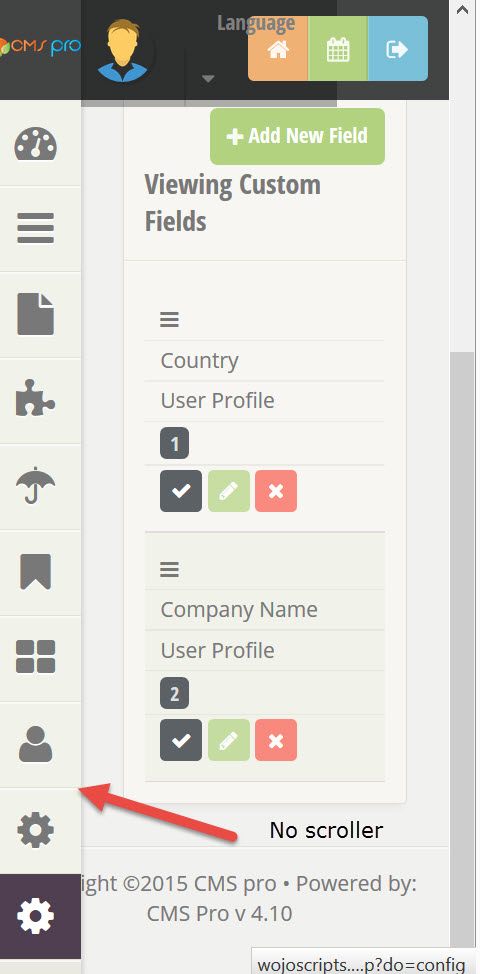
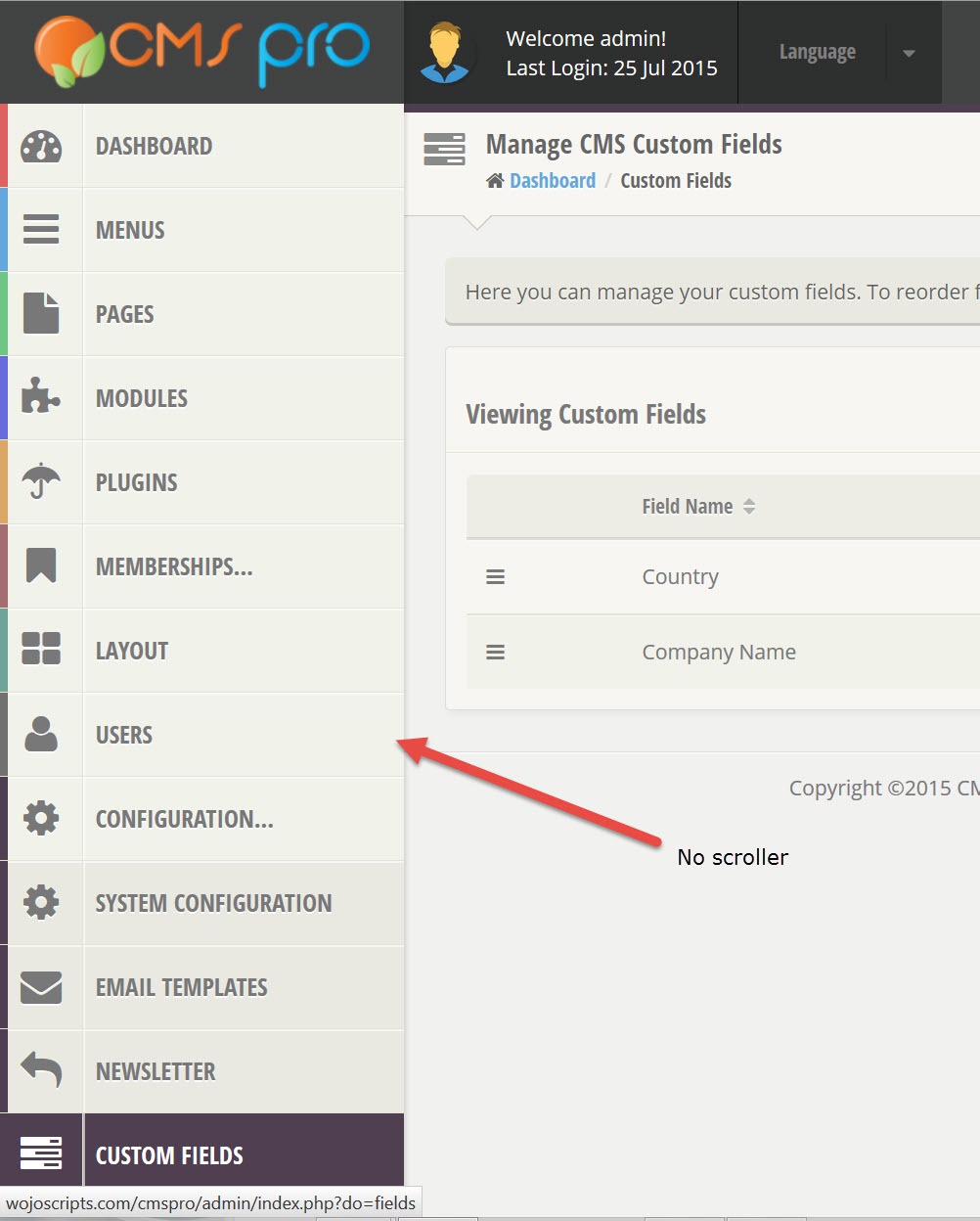
The problem is that in the admin menu when clicked on configuration a scroller should show on the right side of the menu allowing me to scroll down to backups and file manager but presently I am not able to do so as in the scroller just went missing.
Initially I thought that I am having the problem on my installation only, but when I view your demo, the problem seems to persist.
I have attached a couple of screenshots to show you what I mean. I have tried different browsers, (IE, FF, Chrome, Safari) but in vain.
Please advise.
Thanks.
Btw my system is MS Surface Pro 3 I7 on Win 8
Can you also please post the code changes here (if any) so that I can update them according? Thanks.
I don’t have MS surface to tested. I have tested with win8 tablet, and no issues there.even if scroller does not show, are you able to scroll at a all?
Nope. I wasn’t able to scroll down at all.
Let me do some investigation and I will let you know.
Thanks.
Btw, I searched the comments and found another user with what I believe may be the same problem. Probably what you did for that user might work for me too. Pls check this comment by user banditzero
http://codecanyon.net/item/cms-pro-content-management-system/140078/comments?utf8=%E2%9C%93&term=scroll&from_buyers_and_authors_only=0&order_by=relevanceThe user you’re referring to, had a problem with all of the browsers. I can definnatelly look into your configuration. Please email me from my profile with your FTP access as well as admin credentials.

This item was featured on CodeCanyon

Elite Author
Contact the Envato Market Help Team