29 comments found.

Is this still in active development. It’s been a long time since last update. Thanks.
Hello? Is this still in active development.?
is this compatible to idx and the elements version?
Hi, pre-sale questions. Is it compatible with wordpress 5.3.2 and Elementor page builder free version? Thanks
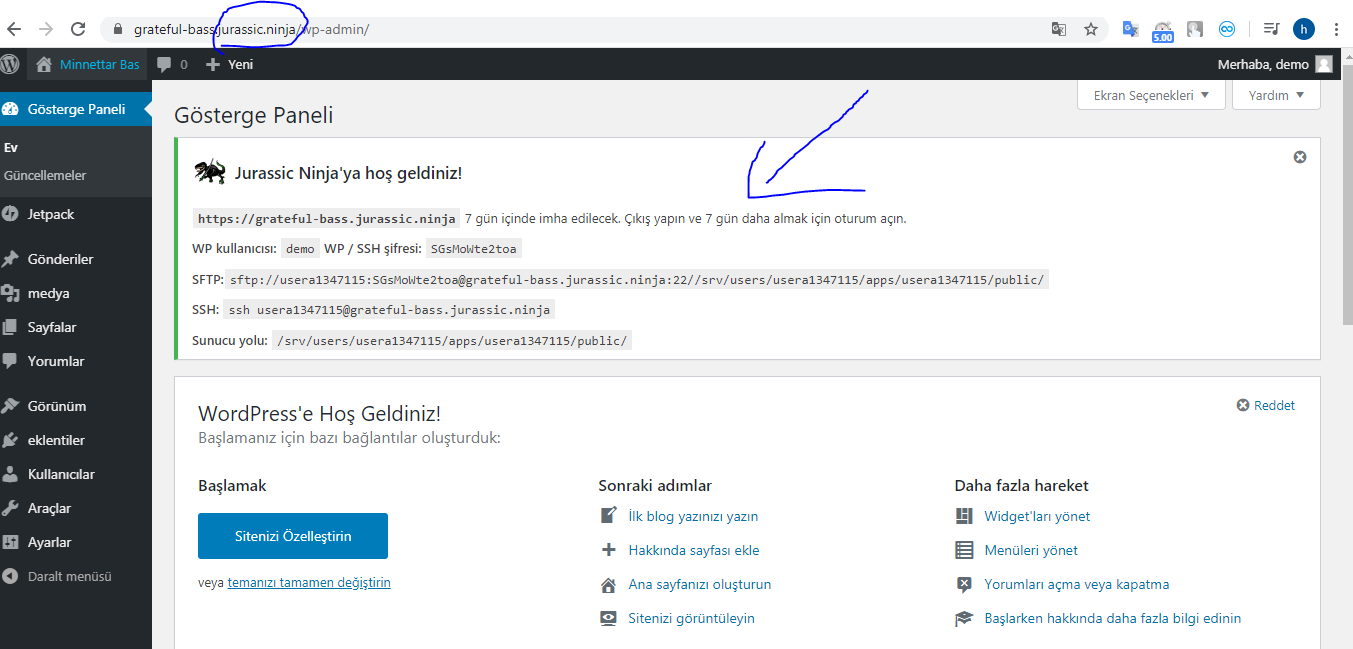
1- Can you answer my questions? 2- Can we close and open the areas on the left side of the Wordpress panel as required? (Themes, plugins, comments …) 3- Can the created demo site self-delete at a certain time? Can the user delete the created demo site?- 4- Can the user delete the created demo site? 5- Can we create more than one demo site? 6- Is the demo site loading like this? demosite.com/demo (Subdirectory) 7- Is the demo site loading like this? demo.demosite.com (Subdomain) 8- Is there a way to make such a notification screen? 9- Do you have a road map? 10- Will there be an update? 11- Can I make the wordpress language settings in Turkish? 12-Is reCAPTCHA being added
13- https://i.hizliresim.com/Z5r00G.png Can we do something like this?
13- https://pasteboard.co/IT13xlQ.png Can we do something like this? 14 Can users remove or add themes on demo sites? 15- Can users remove or add plugins on demo sites? 16- users must be able to delete demo sites. Can you add this to your roadmap? This is found in other plugins.
Thank you
- Yes
- You can restrict some functionality of the site depending on the role, but this relates to the site customization, not the demo manager
- No, the sites can not be self-delete. The end users can install/uninstall the prepared demo
- No, this can be done by the theme/site developer
- Yes
- The demo data is added to the current database and will be all the changes are displayed on the current site
- The demo data is added to the current database and will be all the changes are displayed on the current site
- All necessary notifications have already been added.
- No
- not planned yet.
- Yes
- No
- It is not provided
- After the demo installing, they can configure the site as they wish
- Once users have installed demo data on their site, they can change it, but they have not access to change the data which is imported
- The end users can install/uninstall the prepared demo
For the life of me I can’t figure out where the demos are located without setting up all the developer settings. I’m only interested in a few of the demos. Any advice?
Hello, we have mailed you.
Hello! Just a quick question. When a demo is installed. Can I deactivate the plugin ?
It’s quite heavy and slow down the loading of the website.
Hello! Yes, you will be able to deactivate the plugin.
Just notification due to frequent misunderstanding of the functionality of this plugin: the plugin is for developers. If your theme has several demo versions, you need to provide your customers(who will buy your theme) the opportunity to quickly import the required demo version. Best Regards!
Wow! This is a awesome product. Presale question: is the plugin compatible with WP 4.9.x ? Thanks
Hello! Yes, it is compatible with WordPress 4.9.x.
hi, some questions: does this work with AWS CloudFront? also, does this is for developers only? or maybe I can create a theme library to load remotely to my multisite installation? thanks
Hi, i wonder:
- can i create/setup wordpress system, and install all plugin needs, and set the SMTP mail settings or other settings in any WP theme, and page contents, post contents, footer etc areas for using at any time and any web site to run One Click import demo files work great?.
For example:
- i install all wp files
- install theme and setup settings
- install any plugin and setup settings
- make a footer design with theme
- make a any page design with Visual Composer
- add a users default for my users (username/password // demo/demo)
- use any image for any pages header or content
- LAST STEP > can i run to your plugin > Create a new demo > download it
When i need this demo (ftp setup files and databases) i can click to run and all everything come back for that new web site (new ftp and new domain) ?
Do come back all upload files? all themes, plugins, settings, databases?
Can you do that?
Hello! It seems you need a regular plugin for site backups, for example Akeeba Backup, which easily creates a full site backup (with all the content, plugins and database) and you can move it to another domain.
Demo Manager is something different. It imports the database and media files and to create a demo you need to follow the instructions https://goo.gl/jkZPZ1
this sys make a “zip” with params, theme and plugins to work a demo for x minutes, correct? just it. ok?
Hello! The plugin imports the database data and media files that you prepare.
Please note: the plugin is for developers. If your theme has several demo version, you need to provide your customers(who will buy your theme) the opportunity to quickly import the required demo version.
pre sale questions:
- I tried the test drive and liked the overall functionality of this plugin, though whenever i tried to install a demo i get an error.. is it because you have restricted the demo installation in the test drive site or some problem with the plugin?
- while exporting the demo, does it also export the plugins, custom posts, customizer settings etc.?
- if plugins are also included in the demo.. then does it also get installed while installing the demo?
- We have restricted the possibilities for the test drive
- It imports the database data and media files that you prepare
- Plugins are not included, they must be installed before installing the demo
Perhaps if you did a video tutorial or walk through to show what and how this plugin operates would help clear up alot of frustration on everyone including yourself. Documentation is great, but a 2-5mins video explainer would do it, along with any necessary tutorials/usage examples. You also never answered my previous post. I knew that there would be alot of unsatisfied or confused customers because you don’t exactly make it clear what your plugin does. That’s why I think it’s important that you have a walkthrough video. Heck, it might even boost your sales and reduce your returns.
Just giving critical feedback and constructive criticism. Hope for your success, but you need to help make things a bit more clear and dummy proof.
Hello! We did not expect that there will be such misunderstandings, since we tried to explain the purpose of this plugin as best as possible. In most cases, a video of course can help to better understand some things, but when it comes to using code, it’s better to describe in more detail in the documentation. In any way, for the moment, only the documentation is available. Maybe in the future, we will make a video.
Hi does support Elementor Pro?
Hello! We did not test it.
What exactly is this plugin? I still don’t really understand it after reading the description and the comments. Is it just a plugin to show the demos in your admin page? From my experience with Envato, the more convoluted and misleading a plugin is, the more likely the developers are trying to pull a fast one.
Your description is not clear whatsoever and as the customer above mentioned you shouldn’t include something like “test-drive” that is the focus point of your demo and not included.
Perhaps I am wrong, but can you clarify exactly the purpose of this plugin in simple terms? Every response is confusing thus far.
Thanks
Hello!
If you’re a WordPress theme developer and your theme has several demo version, you need to provide your customers(who will buy your theme) the opportunity to quickly import the required demo version. Many developers spend a lot of time developing own tool for demo import in their theme. We have already prepared such a tool – Demo Content Manager and can share it(for fee) to save your time. I hope, this clarified the situation slightly.
Best Regards,
Torbara
)
Does this support Elementor Page Builder?
Well its not what it does in demo
After hours of searching and trying to understand why its not like a demo, i go throw all comments here and saw that in demo you are using something called Test-Drive that you are not selling here and thats not what this plugin do.
Well this is HUGE mislead of what you are showing its doing vs what its actually is doing. Es many are thinking its a click and install wordpress demo site with all predefined plugins and content. Thats what it does in preview as it called WordPress Demo Content Manager Its NOT!
I would ask a full Refund! Its just so sad and i feel misslead
Really sorry that its not what you are actually are showing Please made a refund!
Hello, please carefully read the description of the item, the WordPress Demo Content Manager is a tool for developers of WordPress themes with many demos. With the test drive you can see how it looks.
If you need the WordPress theme with plugins and demo, here it is https://themeforest.net/item/team-multisport-esport-wordpress-theme/19713558?s_rank=7
Well what i understand is that it is working as it is in demo You click and it installs you a demo
I don’t need Themes. I searched for this functionality that you can get demo by only choosing a theme and it installs it for you. A “Test drive” itself as you call it.
and this plugin is not what it does. I have no use of it. I am sorry but its not clear that the “Test Drive” is not what this plugin does.
Please Refund
Hello, the test drive displays the plugin work after it’s integration into your theme. This tool is designed for developer. Before buying an item, please read its purpose and description. Please read the refund policy https://themeforest.net/page/customer_refund_policy
Before Selling an item please provide a working version exactly as its gonna work and not “Test Drive”. You didn’t mention that its not included. Reading is not an issue if you lack of describing what it includes and what its not!
I see demo, i buy products more then 9 years here. I am gonna raise this to Envato
PEOPLE !!! DONT BY THIS ITEM THIS IS SCAM
Hello! There was a misunderstanding. I’m not sure that this happened because of our fault, but we are ready to confirm the request for the refund. Just create it -https://themeforest.net/refund_requests/new
Can this switch themes on the fly as demos or just multiple demos of 1 theme
Greetings!
Well, your question is kind of unclear to us. Can you please specify it? Because there shouldn’t be a huge problem with switching between themes with usual WordPress methods.
Best regards.
Hello,
If I want to adapt a graphic frame around iframe is it possible by yourr plugin?
Hello!
Your question isn’t clear enough to us. Can you please specify it?
Kind regards, Torbara team.
how did you receive the documentation? Did the author email it to you?
Hello!
I’ve left it in the comments and later it will be available in the downloadable archive. You can find it here: https://goo.gl/B44tYx
Regards, Torbara team.
@mbx, no… no documentation included. Some help stuff in the plugin, but no real documentation
just recieved documentation 
wow very good job on this, fantastic work i wish you all the best for your sales