193 comments found.
Plugin works well for the past year. Finally updated it but the short desciption of my bundled products ignores all formatting.
Hi.
Thank you for reaching out.
We have tested it and it is properly formatting the HTML as you can see the short description above the product title here: https://box-product.progostech.com/product/cup-cakes-pack-vertical-left-layout/
If you are still having the formatting issue, please feel free to reach out to us at support@progos.org and we will assist you.
Regards,

There is also a annoying deprecated value that I think could be addressed in future versions
Deprecated: Creation of dynamic property WC_Product_Box_Product::$product_type is deprecated in /var/www/b23df76e-6810-4155-b49e-4983197d9fdf/public_html/wp-content/plugins/mix_match_box_product/includes/class-ubp-product-type.php on line 15
Hi.
Thank you for reporting this issue.
This will be fixed and new version will be released on CodeCanyon within this week.
Regards,
The new version is released.
This plugin seems to be crashing our website when we are using the new WooCommerce Checkout and Cart blocks.
IT DOES WORK fine on CLASSIC CHECKOUT + CLASSIC CART. But no good on the newer ones?
Hi.
As the issue is due to a third-party plugin, we need to check for compatibility. Please reach out to us at support@progos.org
Thanks & Regards,
This was resolved after discussions with progos support team fyi – was just a caching issue. (for everyone)
Your Plugin seems to be doing what a client of mine wants. My primary question is, is it possible to lock the number of products? So i want to have 12 positions for the products. More is not allowed and less is also not allowed. It’s basically a fixed price box where you can add your products. Also, how does it show up in the shopping cart? Basically the client only wants the name of the box and the items in the box (items without pricing). Is this possible?
Hi.
Thank you for showing interest in our plugin.
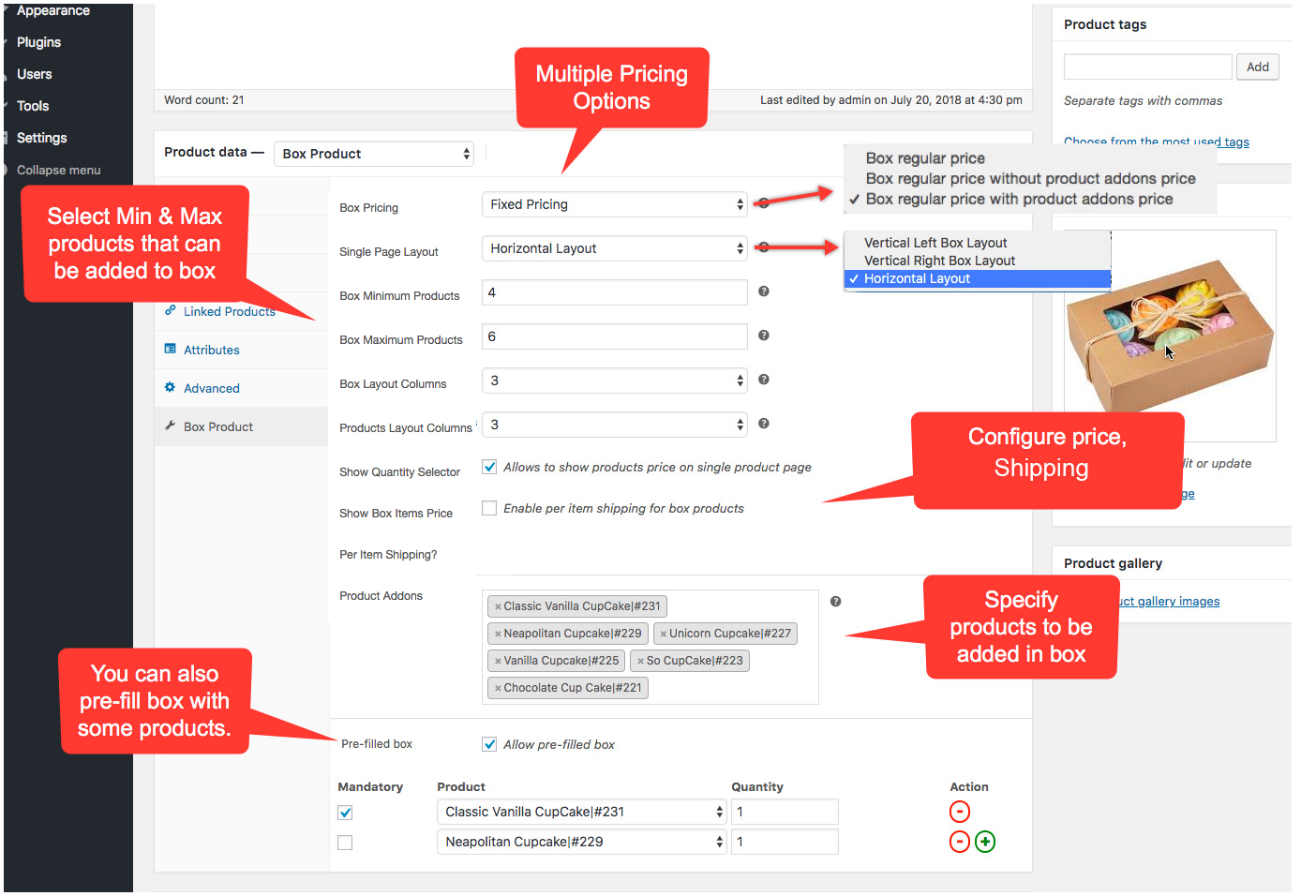
Our plugin have minimum and maximum limit option for the box as you can see here: https://s3.envato.com/files/253268958/06_WooCommerce%20Custom%20Product%20Boxes.png
Here is the view of the cart after the box is added: http://box-product.progostech.com/wp-content/uploads/2024/10/screenshot-box-product.progostech.com-2024.10.10-16_46_44.png
I hope this helps. Please feel free to reach out to us at support@progos.org for further discussion.
Regards,
That looks quite promising, thank you very much!
You are most welcome.
One more question to a problem i’ve just realised. The mix and match product will be on a shop lading page where all items (variable and single) will have an add to cart button. Because the Mix and Match product needs to be configured from the product detail, will it automatically redirect to the detail instead of adding it to the cart? Or does this work differently?
Hi.
The Mix and Match product will show a “View Products” button instead of the add to cart button as you can see here: http://box-product.progostech.com/wp-content/uploads/2024/10/screenshot-box-product.progostech.com-2024.10.12-13_50_58.png
This button will take the customer to the product detail page where the customer can add products into the box.
Hope this helps.
Thanks & Regards,
Ah that would be great. Currently we have a shop page where you can order directly, show variable or simple product with add to cart, but for this product that will not be possible, so this would solve the problem (as long as the add to cart plugin doens’t overrule some settings. But this gives me hope  Thanks
You are welcome.
If you encounter any issues with our plugin, feel free to reach out to us at support@progos.org
Regards,
Hi, I would like to ask is there any other design available for the layout? because the current layout design is very basic. or it will match with my theme’s design?
also, just to confirm, i have a coffee beans website. and i want people to add their choice of products on it up to a certain number. and then they can buy all at once. is that something i can achieve with this plugin? please let me know thank you.
Hi.
Thank you for your interest in our plugin.
There are 3 built-on layouts namely Horizontal :https://box-product.progostech.com/product/cup-cakes-pack-horizontal-layout/
Vertical Left: https://box-product.progostech.com/product/cup-cakes-pack-vertical-left-layout/
Vertical Right: https://box-product.progostech.com/product/cup-cakes-pack-vertical-right-layout/
Apart from that, there are other settings which allow you to change the appearance of the box product: http://box-product.progostech.com/wp-content/uploads/2022/08/mix-match-box-product-admin-settings.png
About your second question, you can define a size for the product box lets say 10. The customers will be able to add the 10 products of their choice (can add product more than once) and then add it to the cart and place the order.
I hope this answers your questions. If you think the default plugin does not offer your required design or functionality, we do offer paid customization services in which we add specific design and features for our customers.
If you have any other questions, feel free to reach out to us at support@progos.org
Regards,
Hi, thank you. yes i understand about the layout. it has some options. but will the styling also remain same as i can see on the demo? or it will adapt my theme’s styling?
Hi.
Can you please name you theme?
Thanks & Regards,
Hi, I’m using WOODMART theme.
Hi.
Here is a preview of the Box Product page while the WoodMart theme is active: http://box-product.progostech.com/wp-content/uploads/2024/09/box_product.png
Regards,
Hi Support Team,
Is it possible to set basic price in the product? so there will be basic price + addon product price.
Let me know.
Thanks.
Hi.
Thank you for showing interest in our plugin and reaching out to us.
Yes, it is possible to set basic price + addon product prices. The basic price in this case will be the regular price of the Box Product.
Please feel free to reach out to us at support@progos.org for further queries.
Regards.
I’m having an issue where when I add some products to my cart, they get added but I receive the following error:
The product Complicated Patterns – DDH Hazy Pale (4.7%) – Single Can x 440ml Can is not available and was removed from your cart
This is only happening for some products & not others, you can find our product we are having issues with here: https://truestorybrewing.com/craft-beer-shop/choose-your-own-12-pack/ Thanks.
Hi.
Thank you for reaching out to us.
The error message you mentioned is possibly due to the product not available in the stock or any changes made to the product setting by the admin.
If you are sure those are not the reasons, please reach out to us at support@progos.org
Regards.
Hi,
I’ve purchased extra support & emailed twice, and still haven’t heard back.
Thanks,
Ben
Hi Ben.
Please make sure you are using the correct email address: support@progos.org
Please send another email. We are looking forwards to solve your issues.
Thanks & Regards.
Thanks, I’ve just emailed
Hi Ben.
Thank you. We have replied to your email.
Regards.
Is it possible to display a progress bar so that at min/max the progress bar increases, primarily that at a certain number (min) it displays the . and at max 100 .
Hi.
Thank you for showing interest in our plugin.
The progress bar feature is not part of the plugin. However, we provide paid custom development services. We can do customization of the plugin to add this feature for you.
Feel free to reach out to us at support@progos.org for any further questions.
Regards.
hi there,
I write you an email couple of days ago and did get any answer.
I saw that you use a image hook from woo. can we change it to look something like this https://pasteboard.co/fLRtZBJHF11x.png Instead of cropping the image of the product that you show ? How can we make this look smaller to fit in the box image.
We really need this please!
thanks!
Hi.
We have replied to your support query by email. Please check.
Thank you.
I only had this:
Greetings from ProgosTech! We are here to help you. X from our development team will help you to resolve this issue.
Thank you.
But I did get anything from X. No solution was sent.
Please check and help us with this problem. We want to have full image not a crop version.
Thanks!
Please check our latest reply 2 days ago in which we asked for the product URL.
We have sent the email again now.
Thank you.
Hello there, I have a bug people cannot change their subscriptions. I have emailed you all the detailed. Hope you can help me.
Hi.
Thank you for the detailed email. We have replied to your email. Please review.
Thank you.
Thanks for the reply, I have seen the email and you said that you have done something to correct my 2 problems but nothing changed on the shop, the 2 bugs are still there :/
Hi.
Thank you for reporting the issues to us.
The reported issues have been fixed in the latest release.
Regards.
Hi thanks for you reply and correction, fast support that is great !
[presales] I need to set box of 6pcs cake, and i have 2 type of flavours (Premium and Classic), Premium have 10 choice, Classic have 10 choices as well. I would like to limit the box of 6, limited to 3 Premium flavour out of 10, and 3 classic flavour out of 10, able to set this?
Hi.
Thank you for showing interest in our plugin.
Unfortunately, this feature of limiting choices by flavors (categories) is not available in the plugin.
The good news is that we offer custom development services. We can add this feature for you on a paid request.
If you are interested or have any further questions, feel free to reach out to us at support@progos.org
Regards.
Hi Your plugin has has an error when you enable “Enable Category Filter Addon” and in de pdp backend the following options choosen “Display category from product addons” . We added the product manually and not the product categories. option “Enable Categories & AJAX Pagination?” set to true. error is: PHP Fatal error: Uncaught TypeError: in_array(): Argument #2 ($haystack) must be of type array, string given in /var/www/vhosts/staging.example.nl/httpdocs/wp-content/plugins/mix_match_box_product/templates/cat_filter_products.php:48. We are running on php 8.2
alo the option “Product Addons” does not work properly it shows all my products even when i added only 12 products manually.
PHP Fatal error: Uncaught TypeError: in_array(): Argument #2 ($haystack) must be of type array, string given in /var/www/vhosts/staging.plantje.nl/httpdocs/wp-content/plugins/mix_match_box_product/includes/class-ubp-controller.php:236
Hi.
Thank you for reporting these issues to us.
Please reach out to us at support@progos.org and we will fix all of the issues and upload a new release here as well.
Regards.
Hi.
We have released a new version today.
Please update the plugin and the issues will be fixed.
Regards.
your the best
Hi.
We kindly request that you take a moment to rate our service with a 5-star rating. You can do so by visiting the following link: https://codecanyon.net/item/woocommerce-mix-match-custom-product-boxes-plugin/reviews/22361393
We greatly appreciate your feedback, as it helps us improve our services and assists other customers in making informed decisions.
Thank you.
Hello,
Pre-sale question:
Here is the scenario: The main product is from the “Television” category and the bundle product is from the “HDMI cable” category. Is it possible to dynamically display the 3 cheapest products from the “HDMI cable” category as an option to choose from when a customer is buying a Television? The customer will select 1 television and 1 HDMI cable and checkout.
I need it to be dynamic, as a result, if I create 5 new products in the “HDMI cable” category, the 3 cheapest among all the products from that category will be displayed as a bundle/composite product when you buy a “Television”.
Is it possible?
Thanks in advance,
—GM
Hi.
Thank you for showing interest in our plugin.
We have reviewed you requirements and came to the decision that those will require customizing the plugin on a paid request.
Please reach out to us at support@progos.org and we will provide you a quotation for the customization.
Regards.
Are there any plans to allow pre-filled boxes using variable products? We want to pre-fill a box with single quantity variants of our products and at the moment we are unable to do this
Hi.
Yes, you can achieve this easily. The instructions are sent to you on mail.
Regards.
Presale question, this plugin seems what we are looking after. We need to create not a bundle but a customizable box: so people can choose from a list of product how to compose the box. Is it possible to add more than one product to fill in the box? so for example I want 3 of one item and 2 from another items – please let me know thanks
Hi.
Thank you for reaching out to us and showing interest in our plugin.
Using this plugin, you can create a WooCommerce Box Product which allows the customers to add variety of products as a box in to the cart.
You can select different products/categories which will be available to add to the box. The customers can add one or more products with any number of quantity to the box.
if you have any further questions, feel free to reach out to us at support@progos.org so that we can discuss your requirements in more details.
Regards.
Does it integrate well with Elementor?
Yes.
You can use the [box_product] shortcode to display product boxes on the single product page.
If you want to display a box product on other than single product page, you can use the shortcode as [box_product id=123] where 123 is the id of the product.
Hello! It seems that for me this plug-in doesn’t work at all. I’ve tried changing the options on a product and every time I update it just reverts to default and doesn’t work on front end. I would like to request a refund. Thank you
Hi.
Please reach out to us at support@progos.org and we will help you to make the plugin working on your site. If we are not able to do so, we will give you a full refund.
Regards.
bonjour avec votre plugin mix&match pro , est ce que l on peux avoir la fonction pas à pas de WooCommerce Create A Drawer – Composite Product Builder Plugin car j aime la fonction pas à pas de ce module et l affichage des produit associé àl a case , mais je ne sais pas si on peut modifier les quantités et avoir des case produits option comme dans le plugin mix&match
donc j aimerai avoir toute les fonction de mix &match.( changer les quantités , avoir des produits option donc pas obligatoire ) mais avec l affichage pas à pas de WooCommerce Create A Drawer – Composite Product Builder Plugin peux on donc avoir dans WooCommerce Create A Drawer – Composite Product Builder Plugin la fonction changer les quantités d un meme produits et avoir les produit option donc non obligatoire pour valider la box et en variante le plug abonnement pour WooCommerce Create A Drawer – Composite Product Builder Plugin
pouvez vous me donner un liens back end pour tester WooCommerce Create A Drawer – Composite Product Builder Plugin merci pour vos réponses
Hi.
Thank you for showing interest in our plugin.
We have replied to your queries on mail. Please check.
Thank you.
Hi, if we install this plugin to create personnalized boxes selled on a website, we can chose the regular license ?
Hi.
Thank you for showing interest in our product.
Yes, you can chose the regular license which includes 6 months of support.
If you have any further questions, feel free to reach out to us at support@progos.org
Regards.
Could this be added to a site like https://www.sayheygifting.com/
Hi.
This plugin works with any WooCommerce store.
If you have any issues with the plugin on your WooCommerce store, please reach out to the support team at support@progos.org.
Regards.
Is it possible to ad a second box in the same product page with the box (below the first box a optional second box)?
Hi.
Currently, only one product is supported on a single page. However, if you are interested in a paid request, please reach out to us at support@progos.org for a quote.
Thanks & Regards.