

ShortURL PHP – Lightweight PHP Short Link Platform with QR and Click Stats
Create branded short links and QR codes quickly, track clicks, and manage links from a minimal UI. Built with plain PHP and MySQL for easy deployment on common LNMP hosting.
Fast link creation QR per link Click stats CSV import/export Optional GeoIP Session UI + JSON APIOverview
ShortURL PHP is a lightweight, production-ready short link service for teams, marketers, and power users. Create a short code in one step, generate a QR code, and review click statistics with optional GeoIP insights. It is designed for simple deployment on standard PHP hosting with a small operational footprint.
Highlights
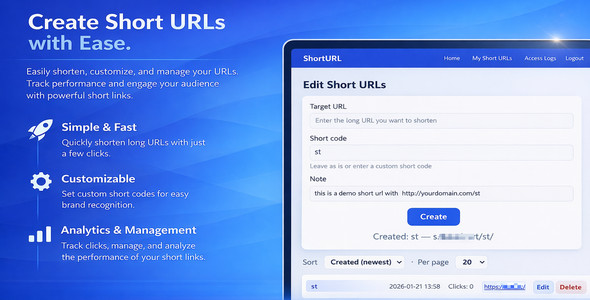
Customize, manage, and optimize your short URLs.Edit targets, manage short codes, and track performance from a clean dashboard. Detailed access logs and activity tracking.
Inspect redirect events with timestamps, IPs, countries, and devices. Track and analyze short URL visits.
Review access logs, quick stats, and traffic trends with minimal overhead. QR support integrated into the short link workflow.
Generate QR codes for your short links when needed, suitable for print, slides, and events.
Marketing images are for presentation. Real UI screenshots are included below.
Key Features
- One-step creation: paste a destination URL, optionally set a custom code and note, then create.
- Manage and edit: rename codes, change targets, add notes, soft-delete and restore links.
- Click logging and quick stats: daily counts, device detection, and optional GeoIP stats.
- Inline tools: copy link and QR actions available per link.
- Root-level short links: links appear at your domain as /CODE when clean URLs are enabled.
- Bulk import and export: CSV import for migration and export for reporting.
- Session UI and JSON API: UI for non-technical users and API endpoints for automation.
- Flexible routing: clean URLs for production, or PATH_INFO mode for fast setup without extra rewrite rules.
QR Codes
Generate a QR code for any short link instantly from the UI. The default setup uses an external QR service, and you can swap the endpoint if your deployment requires a different provider.
Friendly Error Page
Missing, expired, or soft-deleted codes return a branded error page instead of a raw 404. The template is easy to customize for your brand or promotions.
Real UI Screenshots
Real screenshots from the actual product UI
Tech Specs
- Backend: plain PHP 8 with server-rendered templates
- Database: MySQL 8.0+ recommended, MariaDB 10.4+ recommended
- Compatibility note: MySQL 5.7+ / MariaDB 10.3+ may also work, but this is not officially tested
- Web server: Nginx recommended, Apache also works with mod_rewrite
- Optional: GeoIP stats via MaxMind GeoLite2 and Composer package install
Installation (Quick Start)
- Upload the package to your PHP web root
- Copy .env.example to .env and fill in database credentials
- Create the database and database user
- Run php install.php or open /install.php in a browser
- Delete install.php after setup
- Configure Nginx for clean URLs or use PATH_INFO mode for quick deployment
Production notes: set APP_DEBUG=false , use a strong APP_SECRET , set SHORTURL_BASE_URL , and enable HTTPS.
Configuration
- SHORTURL_BASE_URL – canonical base URL used for generated links and QR codes.
- ALLOW_REGISTER – disable registration UI and API if needed.
- DEFAULT_CODE_LENGTH – default length for auto-generated short codes.
- PATH_INFO_MODE – switch between clean URLs and PATH_INFO mode.
- GEOIP_DB_PATH – path to GeoLite2-City.mmdb if GeoIP is enabled.





