21 comments found.

Don’t buy this product. I bought it and some of my pictures and videos disappeared on my page. I can’t modify the pages using Elementor anymore (error 500). Also my header buttons won’t work. After removing the plugin, everything works fine again. I will see another paywall option.
Hi.
We’re really sorry to hear about the issues you experienced, and we appreciate you bringing them to our attention.
We take problems like this very seriously. Our plugin is designed to work smoothly with Elementor and other popular themes and plugins, so the behavior you’re describing is certainly not expected. We would have loved the opportunity to help you resolve the conflict before it impacted your site.
Please reach out to us at support@progos.org and we’ll do our best to identify and fix the issue promptly.
We genuinely want every customer to have a great experience with our plugins, and we’re happy to work with you to make it right.
Thanks again for your feedback.
Best regards,
Thank you for your quick response. The issues were corrected by the Progos software developer very quickly! I hope that the product code is updated to avoid similar issues. Thank you!!
The plugin is update and new version is released. Thank you for reporting the issue and being cooperative.
can this block all content until user purchase a plan, and than they can see all content on website?
Hi.
Thank you for showing interest in our plugin.
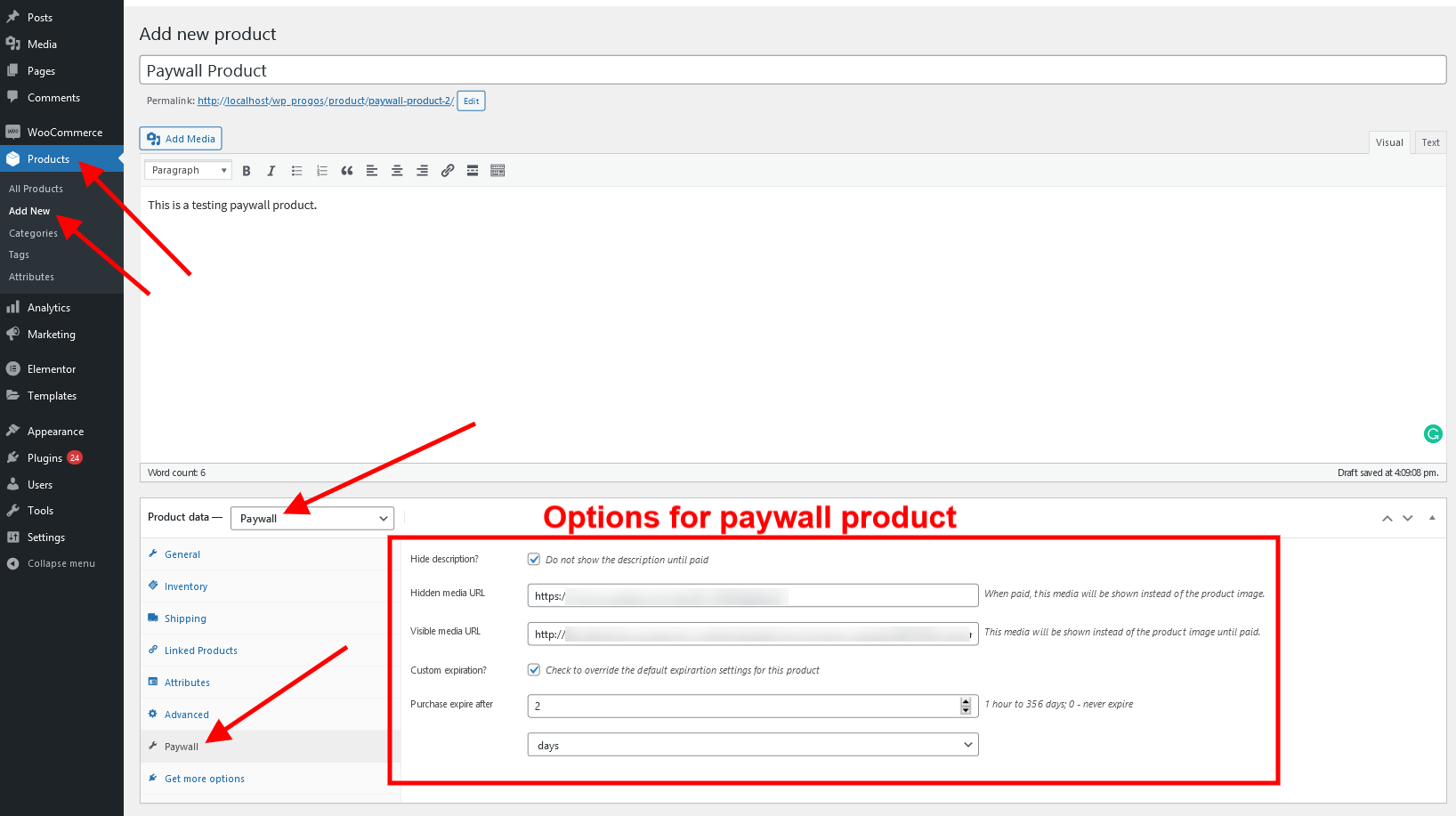
The Paywall for WooCommerce allows to specify a hidden media content URL and a visible media content URL for each WooCommerce Product (type Paywall).
The visible media content URL is the one shown before the purchase and the hidden media content URL is the one shown after the customer purchases that product.
Looking at your requirements, these seem to be achievable through customized work. Such work goes out of the CodeCanyon support policy and requires extra charges. Please reach out to us at support@progos.org and we will share a quote with you.
Regards,
so this is not a subscription paywall
Yes, it is not a subscription. The user can purchase the product and the purchase will expire based on the plugin’s settings: https://s3.envato.com/files/345450806/image_1.png
The user will need to purchase the product again through the regular WooCommerce checkout process if it the paywall product is expired.
is there a way to see all the completed purchased items all together? a page to view all the items with sorting by date, name, category, etc? thanks
Hi.
Thank you for showing interest in our plugin.
Unfortunately, the feature for a dedicated page to see all of the Paywall product purchases is currently not available in the plugin.
However, we can add it for you on a paid request. If you are interested, please reach out to us at support@progos.org
Regards,
how much it will cost? let’s say a page where all the purchased links or pages is listed.. thanks
Hi.
Please reach out to us at support@progos.org and we will share the cost and time estimation with you.
Regards,
ok will email soon  thanks
Hi.
We are looking forwards.
Regards,
Is this the same plugin “Paywall for WooCommerce” that woocommerce official website sells? Do you offer EXACTLY the same functionalities with this ? https://woocommerce.com/products/paywall-for-woocommerce/
Hi.
Thank you for showing interest in our plugin.
The idea of both plugins is same. You can review the full details here: https://codecanyon.net/item/paywall-for-woocommerce/32797108/comments
The features look to be exactly same as well.
If you have any issues or further questions, feel free to reach out to us at support@progos.org
Regards.
I want to be able to provide content with lifetime access and content with access for 5 days, is there a way to show it separately in the “my account” page of the user?
You can define the access to be lifetime for a Paywall product by leaving the “Purchase expire after” field empty. Please see here: https://s3.envato.com/files/345450806/image_1.png
Moreover, if you want to set it to 5 days, you can also define that.
About the “My Account” page view, we need some more specific information. Please reach out to us at support@progos.org so that we can communicate with you and provide the best solution.
Thank you.
Hope all is well. Question, how do I set Custom expiration to 30 minutes, I only see 1 hour as the lowest expiration time. Thank you
Hi.
Currently, the plugin does not have the option to set the expiration for minutes.
However, we provide paid customizations and can add it on your request.
If you are interested, please reach out to us at support@progos.org
Thanks you,
paywall fields are not getting saved please help me
Hi.
Thank you for the purchase.
Please reach out to us at support@progos.org and we will help you out of this issue.
Regards.
Hi Team,
I have already done that please check.
Regards, Apar
Hi.
Your issue has been addressed.
Thank you.
settings are saving on woocommerce page in the paywall section – contacted support
Hi.
Thank you for the purchase.
We have replied to your support ticket. Please review.
Regards.
Hello. After update woocommerce to 7.3-7.5 we can’t add or change and save input Hidden media URL and Visible media URL
Please – check it.
Hi.
Thank you for the purchase.
We have replied to your support email. Please check.
Regards.
i can not see any button or option to redirect to product page after buy complete.
Hi.
After the paywall order is placed, the customer is redirected to the default WooCommerce “Thank You” page.
The plugin currently does not have option to redirect the customer to the product page after checkout is completed.
Regards.
I am facing probleb to use the shortcode on page template. It does not work. Please can you help me?
[woopaywall_show_after_purchase]
<iframe width=”100%” height=”515” src=”https://www.youtube.com/embed/zKGhk6EWWMs” title=”YouTube video player” frameborder=”0” allow=”accelerometer; autoplay; clipboard-write; encrypted-media; gyroscope; picture-in-picture; web-share” allowfullscreen></iframe>
[/woopaywall_show_after_purchase]
Hi.
Thank you for reaching out to us.
We have replied to your support query on mail regarding this issue.
Regards.
Is there a version demo for a test before I purchase? Another question is, is compatible with the Theme “Divi elegant themes”?
Hi,
Greetings. You can check the demo at https://paywall-for-woocommerce.progostech.com/.
Thank you.
With this plugin, can I set that expiration time for watching my content? to limit in terms of the minutes. For example, after 10 minutes, you gotta pay again to watch that content.
Hi,
Greetings. You can set expiration hours/days. Once expired the product has to be purchased again to access. If you have any questions or concerns, feel free to forward your issue at support@progos.org.
Thank you.
Can I hide a product completely and show only the image . It can be available only after payment
Hi,
Greetings from ProgosTech! Yes you can hide the content as well and set to not hide the feature image.
Thank you
I have a custom field made with ACF. I want to hide that too before purchase. Can I do that ? If I purchased will u help me. Just in case I can’t do that ?
Sure, we are here to help. If you feel any trouble email us at support@progos.org we will guide you.
Cant get this plugin to work at all
Hi,
Greetings from ProgosTech! We are here to help you. Please share your problem at support@progos.org and our development team will fix this issue for you.
Thank you.
I have sent several emails no response basically the plugin does not work at all on our site
Please check your inbox or share the first few letter from your email username.
Thank you.
Does not work when you manually add a product to a customer
Can you please discuss your issue on our email, so we could fix this for you.
Thank You.
Hello, I bought the plugin, It does solve my goal of hiding description, but it gives me the error of 1. breaking the products list format inside shop page 2. my scheduled sale it no longer displays sale progress bars, in shop page and product page. 3 product photo dissapears in shop page. this error takes up almost the whole page for shop. error:
Fatal error: Uncaught ArgumentCountError: Too few arguments to function WCPFW_Paywall_For_Woocommerce_Frontend::paywall_loop_add_to_cart_link(), 2 passed in /home/regeshac/logotenders.co.ke/wp-includes/class-wp-hook.php on line 303 and exactly 3 expected in /home/regeshac/logotenders.co.ke/wp-content/plugins/paywall-for-woocommerce/includes/class-frontend.php:330 Stack trace: #0 /home/regeshac/logotenders.co.ke/wp-includes/class-wp-hook.php(303): WCPFW_Paywall_For_Woocommerce_Frontend->paywall_loop_add_to_cart_link(‘
Hi,
Greetings from ProgosTech! We are here to help you. Please share your website’s admin level access and FTP credentials with us at support@progos.org. Our development team will debug and resolve it for you by Monday evening.
Thank you.
Hi, I have forwarded access. please assist swiftly.
Our development is working on this issue and they will keep you posted on your email.
Thank you.
<quote>
Hello,
Pre-sale questions:
I am not sure if your plugin works this way, but this is what I am looking for:
When a user click a button on “page 1” > they have to pay before being redirected to “page 2”. Basically, I want certain URL to be only accessible after paying using Paywall.
Is it possible?
Thanks in advance,
— GM </quote>
This is a feature that would be useful. We use Wordpress and Woocommerce for payments, but have a separate non-Wordpress site with a relational database for private content due to the hoops of trying to build a membership site using Wordpress. Wordpress is ridiculous non-sense when building a true application. Updates are every week practically and the simple processes of CRUD operations is ridiculously convoluted with a basic database.
Woocommerce is the only reason we touch Wordpress and we use it with Stripe ONLY for the shopping cart side of things and send insert statements for usernames, roles and permissions to a separate database for the main membership application once a purchase is made.
Sending a query string or webhook from Woocommerce from your plugin could work, but most likely we would delve into your plugin and write the insert statements necessary to update our separate database. We would not ask you for help doing this and are capable of doing this.
But a simple redirection callback built into your script after all inserts are done would be useful for a lot of folks. In fact, it would seem like one of the most basic features you would implement. Please let us know if you decide to implement this.
Hi,
Greetings from ProgosTech! We have shared your requirements with the product team and they will surely evaluate your request. You can contact us at support@progos.org for further discussion.
Thank you.
Purchaesd licence: Hi, I have a custom single product page made in elementor wich does include the add to cart buttons but your button deos not appear. is there a shortcode that i can use? Thank you
Hi Alfadev,
Greetings from ProgosTech! Please email us your issue at support@progos.org and our development team will resolve your problem for sure.
Thank you.
Hi, i think there’s a problem with the plugin because even if i use the default product template there are problems: if i use the default product template i am able to complete the order but after the payment is complete i can’t see the product description wich should be visible then.
Please email us your problems and our development team will help you surely.
Hello,
Pre-sale questions:
I am not sure if your plugin works this way, but this is what I am looking for:
When a user click a button on “page 1” > they have to pay before being redirected to “page 2”. Basically, I want certain URL to be only accessible after paying using Paywall.
Is it possible?
Thanks in advance,
— GM
Hi,
Greetings from ProgosTech! Your requirements can be achieved with little customization in the plugin. Our development team is available to help you. Please share your requirements at support@progos.org.
Thank you.

This item was featured on CodeCanyon

Elite Author
Contact the Envato Market Help Team