Other Perfex Modules
NOTE: This is a module for Perfex CRM. It is not a standalone script.
ParsePilot — Scan invoices & receipts. Auto-fill Perfex. Done.
ParsePilot is a zero-setup OCR + Autofill module for Perfex CRM. Drag & drop a PDF or image (or use your phone camera) and ParsePilot instantly extracts fields and writes them into Perfex forms—Invoices, Expenses, and the AJAX “Record Payment” panel—without leaving the page.
- One-click Scan & Fill: A modern modal on Invoices, Expenses, and Payments.
- Images & PDFs: JPG, PNG, WEBP, HEIC, TIFF, and PDF (large files supported).
- Header + Line Items: Numbers, dates, currency, customer, and multi-line parsing.
- Smart Customer Match: Auto-search the Perfex AJAX customer picker and select the right client.
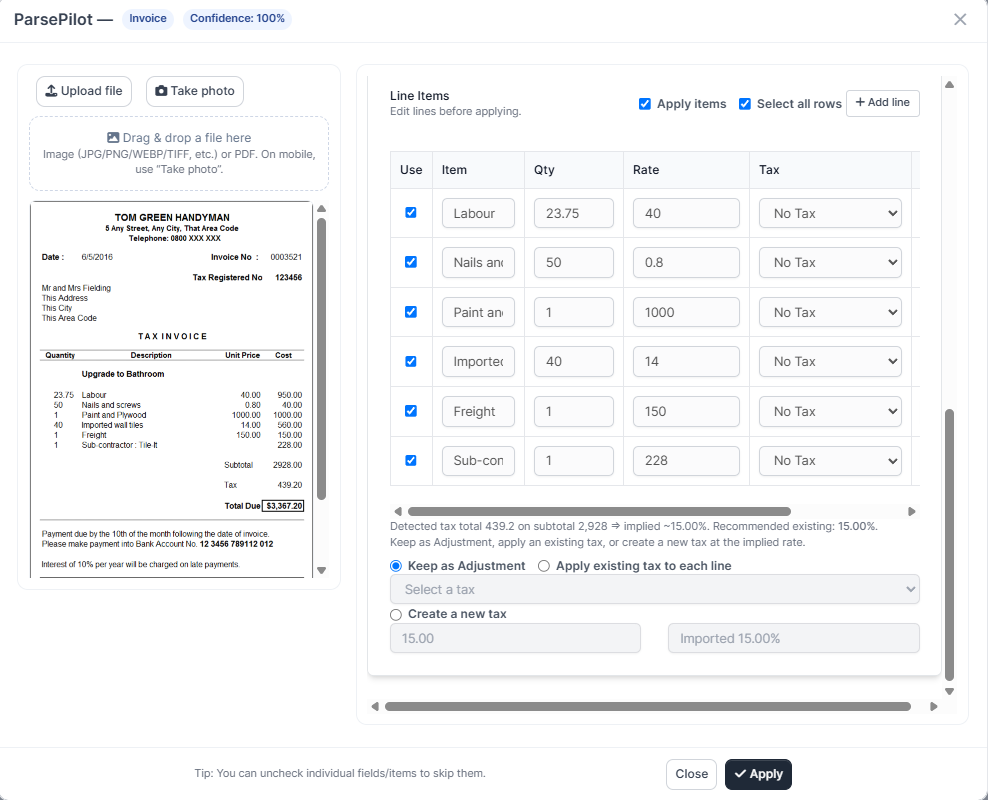
- Tax Resolver: Detects implied tax %, reuses existing taxes, or creates a new tax automatically.
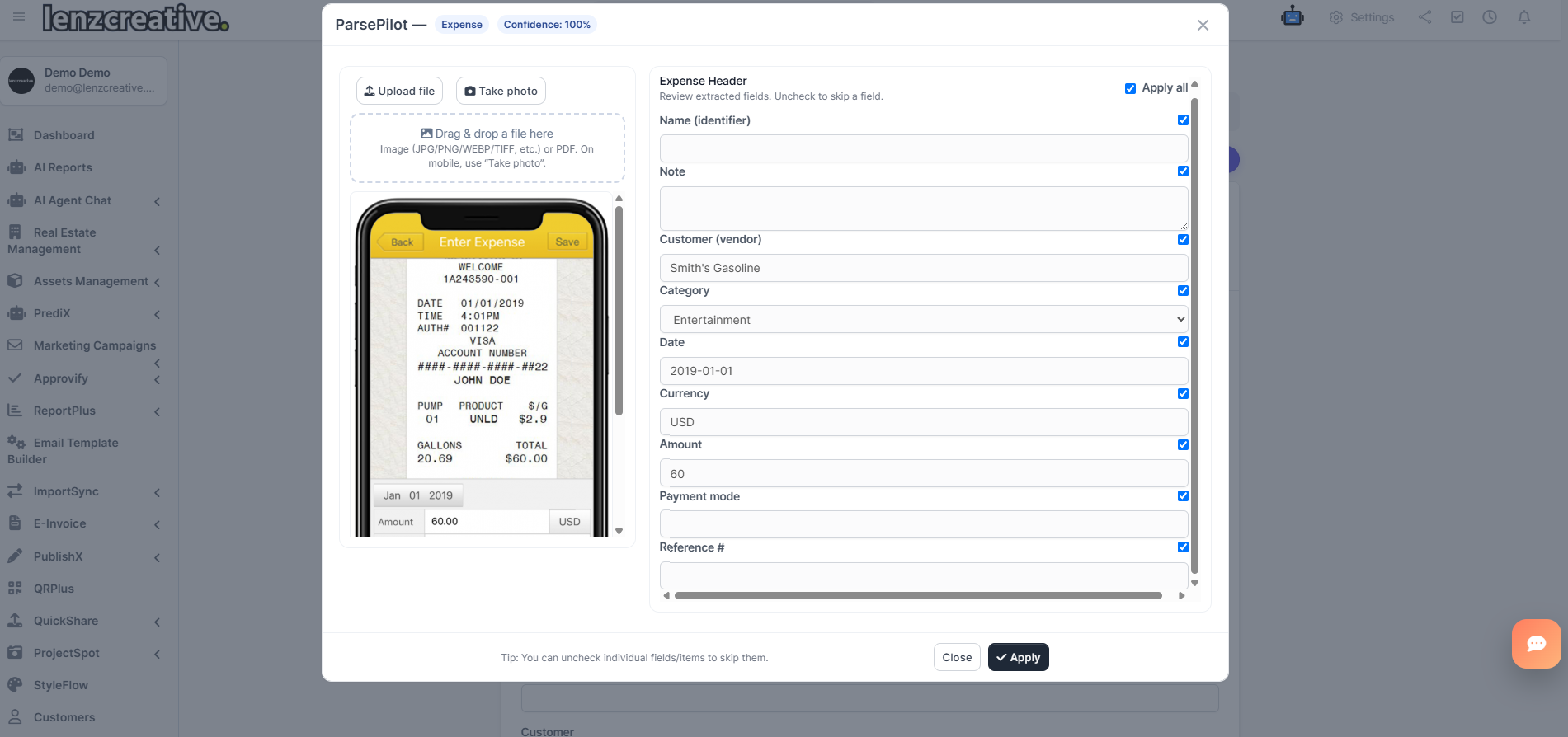
- Expenses aware: Sends vendor to Customer, suggests categories, fills payment mode & taxes.
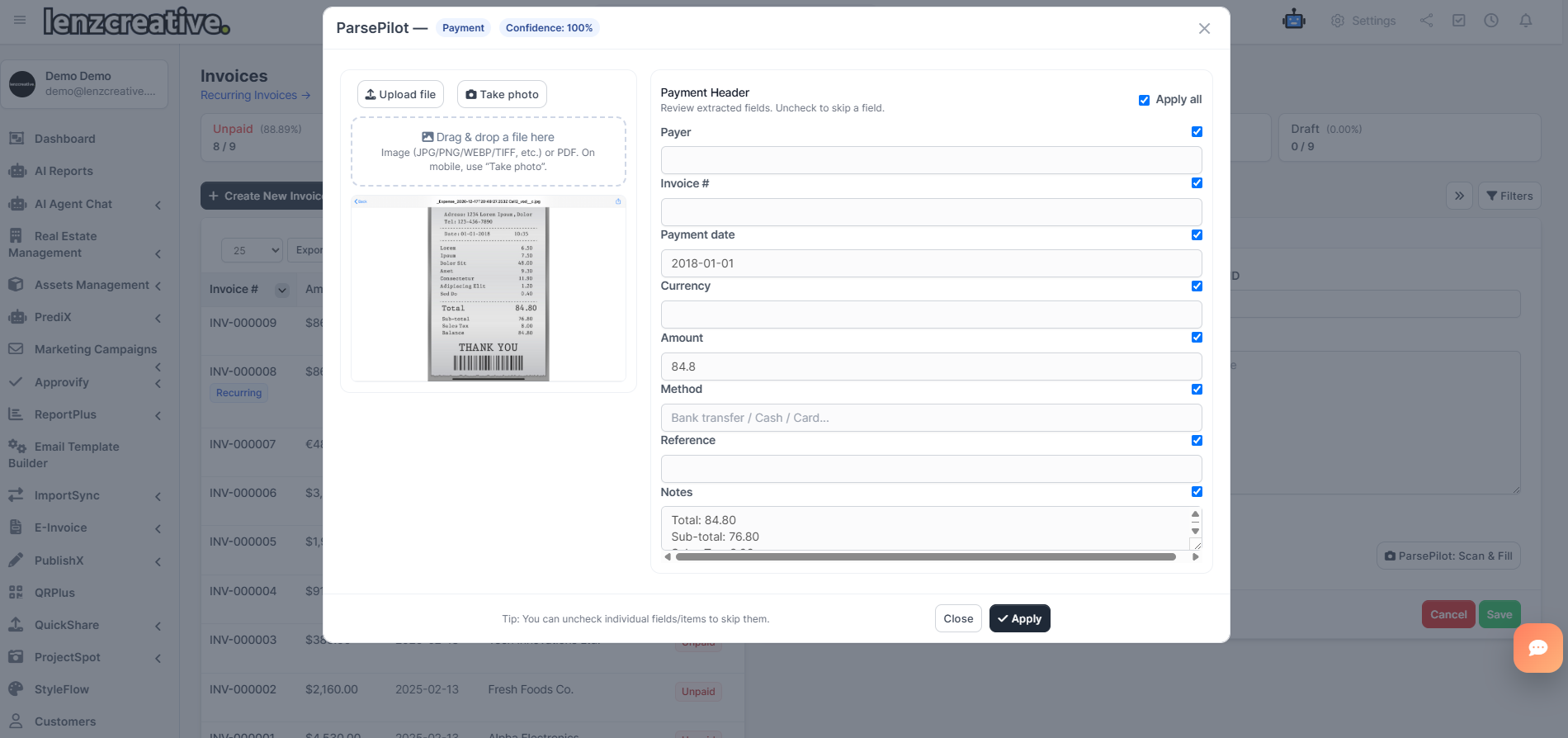
- Payments panel: Works inside the invoice’s Record Payment drawer (AJAX)—no page reloads.
- Confidence meter: Warns on low-confidence extractions so you can review before applying.
- Mobile-ready: “Take photo” capture, responsive UI, and large tap targets.
-
Multi-language OCR: Select your languages (e.g.,
en,de,it,fr) for better results.
Who is it for?
Teams that hate typing invoices. Accounting, operations, and field staff who receive lots of invoices/receipts and want them in Perfex fast—with fewer mistakes.
How it works (clear & simple)
- Open a form: Invoices → Create, Expenses → Create, or open an invoice and click Record Payment.
- Click “ParsePilot — Scan & Fill”: Use drag-and-drop, upload, or the camera button.
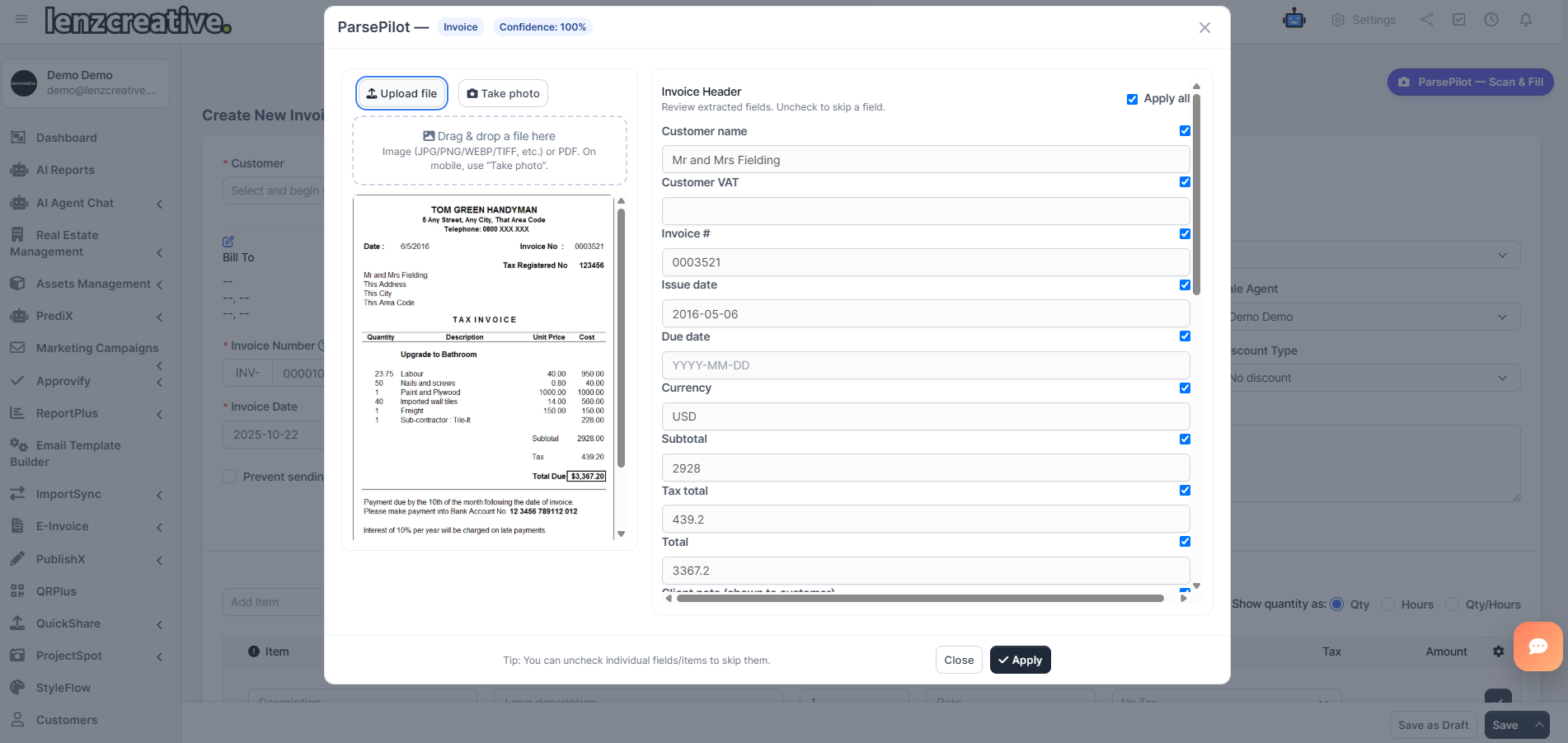
- Review & tweak: Header fields, optional line items, tax resolver, and confidence hint.
- Apply: ParsePilot writes values into the current Perfex form—without reloading your page.
Need help mapping edge-cases? We do custom parsers, languages, and tweaks (paid service). Contact lenzcreativee@hotmail.com.
Requirements- Perfex CRM (latest stable)
- OpenAI API key
- Server can reach
api.openai.com
Key Features
- Instant Capture: Drag & drop, upload, or phone camera. Works with PDFs and common image formats.
- Invoice Intelligence: Customer, VAT/Tax ID, invoice number, dates, currency, totals, notes, and line items.
- Expense-smart: Sends vendor to the Expense Customer field (AJAX), suggests categories, sets payment mode, reference #, date, amounts, and taxes (Tax 1 & Tax 2).
- Payments-smart: Inside the invoice’s payment drawer: fills amount, date, method, transaction ID, and note.
- Tax Resolver: Calculates implied tax from subtotal/tax totals; reuse an existing Perfex tax or auto-create one—then apply line-by-line or keep as an adjustment.
- Confidence & Controls: Low-confidence warning, “Apply all” toggles, per-field checkboxes, and per-row selection.
- Mobile UX: Touch-friendly layout, single-column fields on small screens, and responsive line-item editor.
-
Languages: Hint ParsePilot with your preferred OCR languages (e.g.,
en,de,it,fr,es). - Secure: Your OpenAI key stays in Perfex settings.
- Hooks & Extensibility: Built with Perfex hooks for easy future customizations.
Modern, guided import
Clean modal with preview, confidence badge, per-field switches, and a simple tax resolver.
Line items (optional)
Edit descriptions, quantities, rates, tax, and unit before applying to the invoice table.
Expense OCR
Payments OCR
Best Practices
- Use clear scans or exports for best OCR (300 DPI+ when possible).
- Set your expected OCR languages in ParsePilot settings for higher accuracy.
- Glance at the confidence badge—low scores just mean “take a quick look.”
Important Notes
- OpenAI account required. You manage your OpenAI usage/costs.
- Designed for the latest stable Perfex CRM.
- We’re available for custom parsing and mappings. Email lenzcreativee@hotmail.com.
| URL | Password | |
| https://lenzcreative.net/marketplace-pcrm-demo/admin | demo@lenzcreative.net | lenzcreative123321 |
- Login to Perfex CRM as admin
- Go to Modules → Installed Addons
- Upload the module zip
- Click “Install”
- Open ParsePilot → Settings, paste your OpenAI key, set OCR languages & confidence threshold
- Go to Invoices/Expenses (or open Record Payment) and click ParsePilot — Scan & Fill
Version 1.0.0 – 2025-10-24
• Initial release
• OCR for Invoices, Expenses, and the Record Payment panel
• Drag & drop, upload, and camera capture (mobile)
• Customer auto-match, category hints, payment mode/tax pickers
• Line items parsing with per-row controls
• Tax Resolver: reuse or auto-create Perfex taxes
• Confidence meter & Apply-all toggles