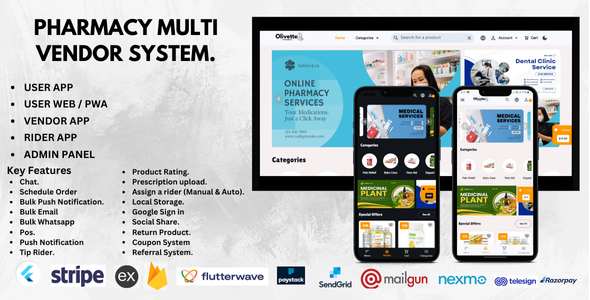
Pharmacy Multi-Vendor System
Revolutionize the way pharmacies operate with our Pharmacy Multi-Vendor System. Built with Flutter and Firebase, it connects vendors, customers, and delivery services, ensuring seamless order management, prescription handling, and delivery tracking.
Overall Features
- Vendor Order Management: Pharmacies can accept, process, and manage orders in real-time.
- Customer-Vendor Chat: Customers can chat with pharmacy vendors to clarify prescriptions or request specific products.
- Customer-Rider Chat: Customers can communicate directly with rider of his/her delivery.
- Scheduled Orders: Allow customers to schedule recurring medicine orders for convenience.
- Web App & PWA: Accessible via responsive web apps or progressive web apps (PWAs) for both vendors and customers.
- Delivery Management: Streamline the delivery process with optimized routing, order prioritization, and real-time tracking.
- Firebase Integration: Real-time synchronization, secure data handling, and scalable backend support ensure smooth platform operation.
- Delivery E-signature: Upon delivery arrival, users must sign electronically on the order page before the rider can mark the order as completed, ensuring confirmation and accountability.
Workflow Overview
This section outlines how the grocery delivery app functions from order placement to final delivery or pickup and payment:
- Order Placement: The user browses products, adds items to the cart, and checks out.
-
Delivery or Pickup Selection: During checkout, the user selects either delivery or
pickup.
- If Pickup is selected, the user chooses the nearest store or a desired store location for collection.
- If Delivery is selected, the order proceeds to vendor/admin review.
-
Order Acceptance:
- For delivery, the admin or vendor can accept the order and assign it manually or allow the system to assign it automatically to a rider.
- Rider Assignment: The assigned rider receives the order request and can choose to accept or reject it.
- Rider Acceptance: If accepted, the user is notified that their order is being processed.
- Order Processing: The vendor or admin updates the order status to processing once the rider arrives at the store to pick it up.
- On the Way: After collection, the order status is updated to on the way, and the user receives a live update.
- Communication: The rider can chat with or call the customer during transit for clarification or directions.
- E-signature on Arrival: Upon delivery arrival, the user must sign the order electronically in the app before the rider can mark the order as completed.
- Payment Distribution: After completion, payments are automatically processed and distributed to both the vendor (for products) and the rider (for delivery services).
Vendor-Specific Features
- Product Management: Vendors can add, edit, or remove medicines and healthcare products with detailed descriptions and images.
- Prescription Verification: Vendors can review uploaded prescriptions before approving orders.
- Inventory Management: Real-time stock updates to avoid out-of-stock orders.
- Sales Analytics: Track revenue, top-selling items, and customer preferences to optimize business operations.
Customer-Specific Features
- Prescription Upload Before Checkout: Customers must upload prescriptions for regulated medicine orders.
- Scheduled Orders: Set up recurring medicine deliveries based on doctor’s prescriptions.
- Real-Time Order Tracking: Customers can track their order status, including delivery updates.
- Search Functionality: Customers can search for medicines by name, category, or brand.
- Secure Payments: Multiple payment options for a seamless and secure checkout experience.
Delivery Service Features
- Category-Based Deliveries: Organize deliveries based on urgency or type (e.g., cold storage, over-the-counter medicines).
- Rider App: A dedicated app for delivery personnel to manage orders and track delivery locations.
- Live Tracking: Customers and vendors can track delivery progress in real-time.
- Optimized Routes: Ensure efficient delivery with optimized routes for riders.
Our Pharmacy Multi-Vendor System provides the tools and features needed to ensure timely medication delivery, secure prescription handling, and seamless communication between vendors, customers, and delivery personnel. Build a reliable and scalable platform that enhances user satisfaction.
App Login Details for Testing
Use the following login details to test the app:
Admin Login
Email: admin123@gmail.com
Password: 123456
Vendor Login
Email: vvendor666@gmail.com
Password: 123456
Email: preciousoliver3@gmail.com
Password: 123456
Rider Login
Email: olivetterider123@gmail.com
Password: 123456
Payment Test Cards
Below are test card details for Stripe, Paystack, and Flutterwave. Use these in test mode only.
Stripe Test Cards
| Card Type | Card Number | Expiry Date | CVC |
|---|---|---|---|
| Visa | 4242 4242 4242 4242 | 12/34 | 123 |
| Mastercard | 5555 5555 5555 4444 | 12/34 | 123 |
| Declined Card | 4000 0000 0000 9995 | 12/34 | 123 |
Paystack Test Cards
| Card Type | Card Number | Expiry Date | CVC |
|---|---|---|---|
| Visa | 4084 0840 8408 4081 | 12/34 | 408 |
| Mastercard | 5033 5611 1111 1118 | 12/34 | 408 |
| PIN Authentication | 5061 4601 2345 6789 | 12/34 | 123 |
Flutterwave Test Cards
| Card Type | Card Number | Expiry Date | CVC |
|---|---|---|---|
| Success | 5531 8866 5214 2950 | 09/32 | 564 |
| Insufficient Funds | 4187 4277 8010 0010 | 09/32 | 828 |
| Declined | 5061 4601 1111 1112 | 09/32 | 891 |
Changelog – February 15, 2025
We are excited to announce the latest updates to our app, including new features, enhancements, and improvements. Here is a detailed list of changes:
-
Nearby Stores:
- Users can see nearby stores that are 10km radius around them.
- NB: To test this feature, Create or update a vendor address to your preferred address. Select areas around the address to confirm this feature.
-
Bulk Upload:
- Added support for bulk products upload from excel sheet.
- A sample is available for download to guide with the upload.
-
Upload for Document Verification:
- Added support for upload of rider documents for faster verification.
- Enhanced validation checks to ensure data accuracy.
- Improved UI for easier file management.
-
Blog Post Feature:
- Introduced a new blog section for sharing updates, news, and insights.
- Admin panel now includes blog management tools (create, edit, delete posts).
- Users can read latest blog post from the user app
-
Multi-language Support:
- Added French, Arabic, Hindi, and Russian language options.
- Enhanced localization support across the platform.
- Users can change language preferences from settings.
-
Performance Improvements:
- Improved loading times and reduced latency across all pages.
- Optimized database queries for better response times.
- Enhanced caching mechanisms for frequently accessed data.
-
Bug Fixes:
- Fixed minor UI inconsistencies in the dashboard.
- Resolved occasional session time-out issues.
- Improved security checks for document uploads.
For any issues or feedback, please reach out to support.
Changelog – April 15, 2025
- UI Modifications: Updated user interface for a more seamless and modern experience.
- Admin License Rejection: Admins can now reject licenses with a detailed rejection message provided to users.
- Google Sign-In (User Web Version): Added Google sign-in support for the web version, enhancing user login convenience.
- Product Expiry Management: Added functionality to track and manage product expiry dates to improve inventory accuracy and reduce waste.
-
Bug Fixes:
- Resolved issues with UI rendering on smaller screens.
- Fixed errors in license rejection notification delivery.
- Corrected authentication glitches during Google sign-in on certain browsers.
Changelog – July 19, 2025
We are excited to announce the latest updates to our app, including new features, enhancements, and improvements. Here is a detailed list of changes:
-
Flutter Update:
- Upgraded apps to the latest Flutter version for improved performance and compatibility.
- Enhanced UI rendering and reduced app load times across Android and iOS platforms.
-
E-Signature Feature:
- Added e-signature functionality for delivery confirmation.
- Customers are now required to provide an e-signature on the order page upon delivery, allowing riders to update the order status to completed.
- Improved security and verification for delivery completion.
For any issues or feedback, please reach out to support.