18 comments found.

Hi! Great plugin.. I sent an email to contact@creamcode.org because I need support for a bug. Do you still answer emails there? It’s been 5 days. Let me know. Thanks for your time!
Hi,
Sorry for the delay.
Please update the plugin, we fixed the notice issues.
Thanks, Anuj
Hola mi GO CART , no carga el menú de personalización
Hello:
1. Can menu header be added?
2. Does it work with Ocean Wp theme?
3. Does it work with Elementor Free?
4. If it works with Elementor, is it 100% customizable?
5. It has shortcode
Hi @fsan2val,
1. I think this http://tinyurl.com/4rr9wd78 & http://tinyurl.com/4zxm56bb answers your question. 2. Yes, works with OceanWp theme. 3. Yes, works with Elementor free. 4. I am afraid I can’t say that it is 100% customizable. Yes, we have a lot of customization options but I still can’t agree on that 100% claim. Please have a look the features list here http://tinyurl.com/378xmrxs 5. Yes, just added in v1.0.20 http://tinyurl.com/4zxm56bb
The free shipping bar inherits the WooCommerce shipping settings or is it a value that can be set randomly
We can use WooCommerce shipping class but the value is random. Check doc here: https://docs-gocart.creamcode.com.np/cart/shopping-meter.html
Hey Looks like an impressive plugin. Can I use this plugin to build the shopping cart inside the home page?
like this: https://scontent.ftlv19-1.fna.fbcdn.net/v/t39.30808-6/363834392_10225562230751143_8128865519693942714_n.jpg?_nc_cat=107&ccb=1-7&_nc_sid=5cd70e&_nc_ohc=t26DedJIgtIAX9FpI7V&_nc_ht=scontent.ftlv19-1.fna&oh=00_AfCdugbMvlRgLzy_KEpbNVy9DGiey3uwam-gtVljosurXg&oe=64CD2F4FHi kfirSpo,
Yes, you can do it with few lines of CSS & HTML.
Cart canvas is visible when ”.gocart__woo-visible” class is added in body. You can remove the trigger button & add class ”.gocart__woo-visible” in body.
Hence, doing this cart will always be visible in the homepage.
Again, you might want to remove the overlay when cart is visible. This is simply possible with display none CSS.
That’s all mate. Hope you get the point.
Hello, regarding the “free shipping” meter, can it automatically detect the customer’s location and display the amount to have free shipping according to the customer’s shipping zone that i have set on the back end?
Hi @kiannaandbone
No, it doesn’t automatically detect the location.
But it can also be used in some different ways too. For example, You can display any message like free shipping or free gift if the cart amount total value is “x”.
I hope this helps.
Hi,
We have installed plugin, but its not working when we press add to cart. please support
Hi @thayyil,
Thank you for getting in touch.
Please let us know your website URL so we can test the problem.
Do you mean AJAX is not working when add to cart button is clicked? Do you mean page gets reload when product is added to cart from the WooCommerce product single page?
Hi @thayyil,
We are still we waiting for your response. Please let us know what problem are you facing exactly?
hi,
AJAX is not working when add to cart button is clicked. please support
Hi,
We need to make website live only this pending now. Can you update this.
Hello,
Any update. not working
Hi @thayyil,
The Go Cart works on the default behavior of WooCommerce plugin. In product single page, when add to cart form is submitted and after processing the product single page gets refreshed.
The cart modal opens when product is added to cart in the product catalog page via AJAX but not in the product single page. But still you can see the product in the cart when you open the cart modal.
I hope you understand the issue.
If you find a plugin that lets you add product into the cart via AJAX in the product single page, then let us know. We’ll try to make our plugin compatible with the plugin.
Let us know if you have any more questions.
Best regards.
Hello, It seems that the cart icon shows the number or product types, not total items. Can you add an option to show actual cart total item that are in the cart ? Or can you give me a code snippet to add myself ? Thank you!
Also, there is no cart string for when you delete a product from the cart “X product has been removed. Undo?”. Can you also add this so I can easily translate all strings. Aside from this is would be awesome to add option to disable floating cart on mobile and even more important to be able to change position(not just left/right, up/down. For me right now it’s set to right bottom, but it’s very close to the middle. I was surprised to see that I had to install Ajax Add to Cart myself. I think you should introduce this as an option. I’ve tested today probably 80% of all side cart addons on the market and I’m sticking with this one, but please fix the issues above. You are close to being the more usable side cart and after usability is finished, I would suggest working on better customization features. A lot of the plugins I’ve tested allowed the user to customize the appearance with wordpress in frontend.
And being able to choose on which pages the cart icon should appear also seems like a must have feature that most other plugins had
Hi @stefanl17
1. We will be adding the ’ total items’ count in the next update (Within this week)
2. We will check if there’s a translation issue & fix it too.
3. We have already planned the option to hide the cart on mobile devices & its placement option. We will introduce this option shortly.
4. Conditionally displaying the Go Cart would be a nice idea too. For now, we have disabled Go Cart from Cart & Checkout pages but if you think we need to provide more logical conditions we will consider planning for this option too.
I would like to thank you for everything. We appreciate your suggestions and feedback.
Also, another suggestion: For the quantity buttons in the cart, can you add a delay so if the customer wants to add 5 more products from the cart, it won’t load after every press ? This delay should be editable somewhere in the back end, maybe some people want it longer or shorter.
Hi, Thank you for the suggestion.
We are working to add two two new features and bug fix that you had reported earlier. We plan to release an update today. Once we release an update you can check the change log here https://docs-gocart.creamcode.com.np/support/changelog.html
We would love to have this feature in future. Hence, we will be adding this feature for future updates.
Thank you for making Go Cart better.
Hello! Thanks a lot for the update! I’ve found a new issue that is really severe for me. I use a plug-in for tiered prices. Basically, when a customer selects 5 products, the price is lowered by 5%. The problem is that in Go Cart, the price is still displayed as the normal price (not regular) but the total is correct. In the normal woocommerce cart, the price appears with the discount. It’s really bad for customers to see that they buy a product for 290 and when they check the cart it appears as 300. (even if the total is correct). P.S. – I’ve tried multiple tiered price plug-ins and for all of them the woocommerce cart & checkout page show the correct discounted price, only Go Cart shows the original price instead of discounted.
Hi,
Which plugin are you using for tiered prices? We need to test it. Can I please have a link to the plugin?
Since the plugin is not a free addon we need the plugin file. Can you please send that plugin file here creamcodetech@gmail.com?
I think that’s not required. We identified the cause of the problem. We are working to fix it immediately.
Awesome! Thank you very much!
Did you test the updated version 1.0.12?
Hello! this is the last version I can download Version 1.0.11.
It looks like again our update is pending. Can you email us from here https://codecanyon.net/user/creamcode
Dear sirs, we ask for refound since we do not find your product compatible with wp-rocket cache.
Our purchase code is 74fb9544-6bc9-4ffc-9b4b-0e678056fd78
Hello, allow us to look at the issue before you ask for the refund.
Did you read this https://docs-gocart.creamcode.com.np/support/fixing-cache-issue.html ?
What kind of problem are you having exactly?
Is it possible to disable the cart in mobile view? I prefer to use my theme’s mobile cart.
Hi, We will add functionality to disable the cart in the mobile version shortly.
For now, let me help with the CSS code, please paste the below CSS code at Customizer > Additional CSS box.
Link to CSS Code: https://gist.github.com/h1dd3nsn1p3r/ecd1750ab4511ac3cd0fbbc0e6b36d8e
Once you paste the above CSS code click update/save button at the customizer.
can the widget be hidden if the cart is empty? 
Hi @ikmsa,
No for now but if you think this feature might be helpful we’ll add this option in upcoming update.
Hi, added in version 1.0.7
Hello, I’m having trouble at the beggining to show the Discount part in the subtotal. Finally I could make it appear but now it’s not showing the acumulated disccount of the products. How can I make it to work? https://prnt.sc/1pwegFyNlvqa
Dear @ericsv
It looks like also the total amount is mismatched. 568 + 99 = $667 but I can see $688 is your final total price.
I checked your website https://imagentecnologica.com.mx/tienda/ but I can’t find the products that were shown on the screenshot.
We need to investigate this issue. We need to check your website & backend if possible. Do you mind sharing your access? Please feel to send the access from here https://codecanyon.net/user/creamcode
Looking forward to your response.
I have shared the details. With the new website, the imagentecnologica.com.mx is not longer working with shop as it was for testing purposes.
Thank you. We will continue the chat in the email.
Hi there, is this plugin compatible with Coupons+? https://couponspluspro.com/
Hi shela1,
We are not sure how Coupons+ works and we haven’t tested Go Cart with Coupons+ yet.
Please feel free to purchase Go Cart & test it with Coupons+. If you find any problem you may ask for a refund.
Thank you for your response.
- The cart button is appearing in landing page. How can I make so it doesn’t appear on certain pages or how to make it only appears in woocommerce pages.
- When adding to cart an item, the floating cart is not showing automatically
- When I click the cart icon in menu or in some button i’d like to show cart floating intead of taking to woocommerce’s cart.
This is the website so you have a better understanding.
Thanks in advance for the help!
Regards,
Eric.
Dear ericsv,
Thank you for purchasing Go Cart. Let me address your questions.
1. We don’t have this condition option yet, let me help you with this Custom CSS code https://gist.github.com/creamcodetech/1e40971cec963ac313bed0362612a6c8 Paste this CSS code at Dashboard > Customizer > Additional CSS box.
2. https://ibb.co/SspWFRc Enable Open the Cart on Add to Cart Button Click.
3. Having a custom trigger to open the Go Cart canvas panel is possible but you might need a bit of technical skill. Add class “gocart__show-woofc” to any HTML element in your website (Could be a menu item).
In your case, the cart icon in the header is a link, we need to prevent its default behaviour of opening the cart page & open the Go Cart panel using a few lines of JavaScript code. This is totally a customization task. Any customization tasks are not covered in this support scope.
However, let me help you to do it.
3.1 Install a plugin called WpCode https://wordpress.org/plugins/insert-headers-and-footers/
3.2 Once installed go to Dashboard > Code snippets > Header/Footer & paste the code this code https://gist.github.com/creamcodetech/a57bd5712ad03fd6481aa5ffdfd8c9d1
Reference: https://ibb.co/r7Q7Rrd
Hope this helps.
Thanks, CreamCode
Thank you very much, it worked perfectly point 3.
But when adding to cart an item, the floating cart is not showing automatically, even thoug the button “Enable Open the Cart on Add to Cart Button Click.” is on.
Also when on mobile the checkout button is not working, don’t know why.
Hi Eric,
Without looking at your dashboard all we can do is guess.
Can we have a look at your dashboard? You can create a temporary login for us using this plugin https://wordpress.org/plugins/temporary-login-without-password/ & send us the link from the contact form here https://codecanyon.net/user/creamcode
Looking forward.
Hi, I’ve managed to solve the last issue. But right now I want to show the discount for the items but it’s not appearing in the modal. I see it shows in Cart Strings but not in live.
I bought “Go Cart” wp plugin, but have 3 problems (see image: https://e1.pcloud.link/publink/show?code=XZzBEQZ2WRyojvGsSyCbh4E6YP6kjYO4qWV) :
1) On side cart, the products names are not translated; 2) The price whitout tax have many decimals; 3) How can I hide price whitout tax and ”=” icon ?
For test you can see this website page: https://ginmediterraneo.com/shop-gin-mediterraneo/
Hello @protesilao,
Thank you for purchasing Go Cart. Let me address your queries.
1. Please correct me if I am wrong. Product names will not be translated. It will be the actual product name that you have in WooCommerce > products.
2. We will be adding tax info shortly within a few days.
3. We do not have the option to hide ”=” & subtotal amount. We will be adding this option too.
We plan to release an update before 19th Nov 2022.
Thank you
Ok for point 2 and 3, I’m waiting for your plugin update.
About point 1, try you to go in this page (https://ginmediterraneo.com/en/prodotto/bottle-barreled/) and add to cart the product named “BOTTLE BARRELED”: on side cart the name is in italian language and not “Bottle Barreled”.
P.s. Also, on Side Cart ,if you click on “Have a promo code?” appar a “404” number instead of “Go back” word (see this image: https://e1.pcloud.link/publink/show?code=XZknOQZywMcNds847BcbMQKXjFqQbQBdDB7).
Also if I try to modify settings with “LiteSpeed cache” active, I get this red error “Ooops, error saving settings!!!” and I cannot change my settings.
Also, Button to Toggle Cart on notification box, doesn’t work.
Hi,
We need some time to figure out the product title issue. We are already working on points 2 & 3.
Regarding the 404 labels, can you check the Go Cart setting page > Cart Coupon section & change the label to “Coupon Modal Close Label” https://ibb.co/fHhMXnJ
Regarding LiteSpeed cache, it does quite aggressive caching. Which settings did you modify recently?
Please make sure to read the docs here https://docs-gocart.creamcode.com.np/support/fixing-cache-issue.html for fixing public-facing js issues.
Go Cart backend setting page is built using Vue 3 js & we have used Rest API too. Please make sure to exclude the below js files from being cached.
1. https://yourdomain.com/wp-content/plugins/go-cart/admin/assets/js/vendor.js 2. https://yourdomain.com/wp-content/plugins/go-cart/admin/assets/js/main.js
Note: Change https://yourdomain.com with your domain name.
If nothing helps. We are here to help. Please contact us from here https://docs-gocart.creamcode.com.np/support/contact.html
Have a great day.
Thank you
Ok, I’m whaiting for your plugin update, thank for your support. Last thing: on discount field, after comma I have many digits and not only 1 like I setted on woocommerce (see https://e1.pcloud.link/publink/show?code=XZzRNQZJVju8zMi5tQBc8lWqMjOiVBooQDk ).
Thank you for your response.
Can you check WooCommerce > General settings & scroll down till you find this option https://ibb.co/t2n4c8k
What’s the value of that setting there? 2 or more?
Now Problem: 4) discont applied are shoved without tax, insted Subtotal and Total are showed with tax (so when a discount is applied, on side cart the the calculations don’t add up). See this image: https://e1.pcloud.link/publink/show?code=XZmzXYZfcaj5A8tSWbbl9djcePww03uHkV7
I need urgent update to solve point 2, 3 and 4 above.
We just submitted the update to CodeCanyon review team. The update will be live once the CodeCanyon QA team approves.
This update will fix issues 2 & 3. It might also fix the 4th issue. Please make sure to check the updated Go Cart Docs site.
The update solve 2 and 3 point, but the problem with Discount remain (point 4): see https://e1.pcloud.link/publink/show?code=XZq50YZ322gTg9J0p4Q1nKqXIHCupB4argV
Please, fix this bug as soon as possible.
...also with this update we have a new problem (point 5): now translations with “Loco translate” doesn’t work.
Can you attach the screenshot please?
Go to https://ginmediterraneo.com/en/shop-gin-mediterraneo/ and insert a product on the cart: only “Cart” word is transalted, others words on Go Cart are not translated (before the update all words was translated).
... it seems that now all the words entered in the Go Cart settings fields, are not translated by Loco Translate.
Do you can solve in some days these problem with discount and translation?
Hello protesilao,
We added custom label thinking it will make translation even easier but in your case since your site is multilingual this feature was not helpful.
Can you please let us know which plugin are you using to make your site multilingual??
I use Transposh to translate my website (see https://transposh.org/)
Let me know if you solve in some days these problem with discount and translations.
We are currently working to find a solution when it comes to multilingual site. We will come with the solution with-in this week.
ok, but please, this week also solve the problem with the discount indicated without taxes on Go cart.
Sure. We are already working to fix all the problems that you are facing with-in this week.
With this plugin, can I set a cross selling products?
Sorry we do not have this feature now in Go Cart but we have a plan to add this feature in upcoming future.
When you are going to insert this feature?
I am sorry, we do not have the exact date but we expect to implement it before the end of December.
With new update 1.0.4 of Go Cart, problem with discount is fixed, but remain same problem with trasnslations: tarnsaltions with loco traslate doesn’t work (see https://ginmediterraneo.com/en/), it seams that only first website languege is translated, but not others website languages as it happened with first version of this plugin.
Let me know as soon as possible
Hi, Did you check this new setting https://docs-gocart.creamcode.com.np/cart/cart-strings.html? We have added “Cart string” setting in Go Cart setting page.
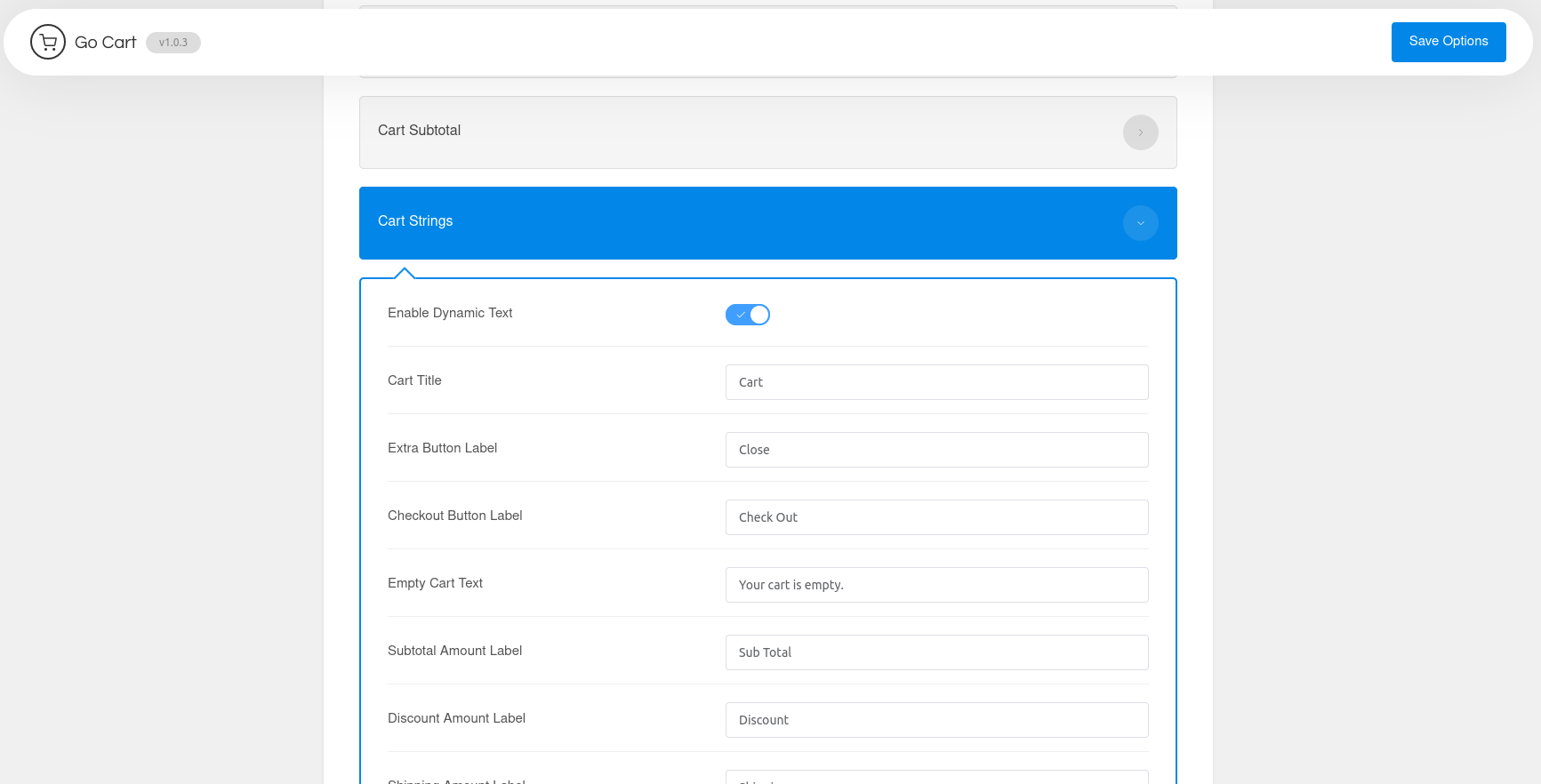
Can you enable the “Enable dynamic text” option & save. Then again, disable this setting & save. https://docs-gocart.creamcode.com.np/img/cart-strings.png
Also, please double check the Loco translate & make sure the strings are translated into different languages.
If nothing helps, can we have a look at your dashboard? You can create a temporary login for us using this plugin https://wordpress.org/plugins/temporary-login-without-password/ & send us the link from the contact form here https://codecanyon.net/user/creamcode
Looking forward to your response.
I’ve already tried everything you said, but doesn’t work:
with the new update, if I disable the “Cart string” option, Go Cart doesn’t take cart strings, but, to translate all cart strings, takes only the Italian language (the main website language) for all the website languages (as if it took the Italian .po file for all languages and not the specific en.po, or fr.po, or de.po file). So, for example, for the French language on Go cart some words are translated correctly (as they appear in the fr.po file created with Loco translate), but the cart strings seem to be taken from the it.po file (the main website language).
To be clear with translations problem see this image ( https://e1.pcloud.link/publink/show?code=XZJNSYZQgFCAt0WmB87IJi6QLM3Ib5gT8yX ).
This is a big problem for my business, so please solve this problem with translations in few days. Thanks
Hi protesilao,
Please allow us to borrow some time. We are studying how transposh works.
Do you have solve the problem with trasnlations?
I’m losing clients, I cannot wait more: let me know if you have solve the problem with translations if not I have to request a refund.
Dear protesilao,
I am sorry to keep you waiting.
It took a while to understand how Transposh works and what was causing the issue.
Since Go Cart version 1.0.3 we started checking the data consistency on Go Cart in each load. This process was required to fix the cache issue, maintain the data consistency & eradicate the changes of data being mismatched between the backend & the user interface.
Transposh will work on the initial load but once the cart is updated, the cart is reloaded then the strings will be overwritten immediately.
Hence to conclude, there’s no easy fix to this problem. There are other multilingual plugins like weglot which works fine with Go Cart but it has a paid plan. I am not sure if you are willing to replace Transposh as it is free.
We tried our best to resolve the problem but we couldn’t since we needed to reload the cart to check the cart consistency. Please feel free to ask for a refund with Envato.
Again, I apologize for all the inconvenience caused.
ok, but on the first version of Go Cart I doesn’t had this problem with translations and all translations on Go Cart was good. Are you sure you will doesn’t succed to solve this problem?
Yes, you are correct. Like I said, we started reloading the cart to check data consistency since version 1.0.3. I have also answered why we started doing so.
Unfortunately, we do not have an easy fix. We need to talk with Transposh Author and find the solution. This is definitely going to take some time. Since, this solution is only related to us, at this point I can’t confirm how long might it take.
In this case I have to request the refund and when you solve the problem, please let me know. Thanks
Dear protesilao,
Please be informed that your refund request has been approved.
Is possible to translate side cart text on multilanguage websites?
Yes. All the strings in Go Cart panel can be translated. Refer to the Docs here https://docs-gocart.creamcode.com.np/support/translate.html
This plugin is compatible with wordpress 5 ?
Can tell us exactly which 5.x version? We have tested & it works fine in WordPress version 6.1 (Latest) & WooCommerce version 7.0.1. What is your WordPress and WooCommerce versions?
Wordpress 5.7.2 and Woocomerce 5.9.1
There shouldn’t be any problem with WordpPress 5.7.2 but we need to test with WooComerce 5.9.1 as it is quite older version. We will get back to you once we are done with the testing.
Hi, we just tested & Go Cart works fine with WooCommerce version 5.7.2. Please feel free to purchase our product. If you get any problem, do kindly contact our support team from here https://docs-gocart.creamcode.com.np/support/contact.html
Hi. Nice plugin! I wanted to ask if perhaps you’re considering adding a feature where we could see shipping costs as well? Best regards
Thank you for getting in touch.
We would love to add this feature. When it comes to shipping, Go Cart won’t calculate the shipping cost. It will only display the cost calculated by WooCommerce or other extensions.
We would like to discuss this possibility, can you please email us from our profile?
Hi again. I’ve just sent an email. Thank you.
Hi,
I would like to let you know that we have added both the features that you have requested. Please check the change log here https://docs-gocart.creamcode.com.np/support/changelog.html.
Have a great week.
Hello. Great news! My congratulations! Please tell me. Apart from the shipping meter. Is there a demo where I could take a look at shipping fees being dispalyed? I can’t seem to find it in the demo. Thanks!
Demo now updated.
Thank you so much. I sent an email with one last question. If you could please check that would be great. Thanks!