24 comments found.

Hi, I’m really interested in checkout of this extension as the specs sound what I’m looking for. However, your preview is broken. Could you please upload it so I can see this in action? Thanks.
Hello Team,
We are looking for a plugin that supports the following requirements We are in urgent please answer ASAP
1. There will be a google map as the base. We’ll use our historic map as an overlay on Google Maps.
2. Now clients in the WordPress site backend could draw markers and polygons on our historic map through google maps API features.
3. On the front end all subareas + points would be displayed on a historic map + All the google map API features would work like zoom etc.
4. Also on hover marker and polygon custom data for that location should show in the info window
Hello, I bought the module “GMap Location! – Joomla Google Maps Module” Purchase code is “8126385e-f1fa-437b-8937-969d5c278fec” and I can’t make it work. Error message : “Oops! Something went wrong. This page didn’t load Google Maps correctly…..” I do not understand the problem I tried to find the solution on the Internet, but I do not manage thank you for helping me Virginie
Hello. Seem like google map api key is missing. You can paste your api key in module Map Options tab. And you can generate google maps api key from https://console.cloud.google.com/google/maps-apis/
Good module, I’m one of the first buyers, One feature should be added to be the best joomla gmap in the market … Adding search autocomplete/autofilter on the top of navigation list .
Hi, had a simular requests before, will look into it…
I had did it programmatically for my own use, I can send you for free  , drop your email here
hi kreativan, it is posible to add html on description so I can put a logo con each location? or maybe a link for get directions please
Hi. Sorry for the late reply, new update is on the way, you will be notified soon as it gets approved. With the new update, you will be able to add image to the location description, and also, all links (eg: www.something.com) are now automatically converted to clickable links. Ofc there is enabled/disable option to control this behavior.
Update is approved, you can download and install new version. Still cant add custom html in location description but hope new updates help you with your requirements.
Hi, if you add jquery search input for navigation locations, it will be fantastic & more professional work
Please send me update now as it, my client is beside me waiting map show
check your email for my reply please … problem still
The problem was with location titles and arabic chars. That is fixed in v2.3.2, everything should work fine now.
Thank you very much for your fast response, great module from great developer
Thank you! Glad we solve the problem
Hi, navigation displayed .. but map not appear!!! i got this error: “InvalidValueError: initMap is not a function” , help plz
Hello. Can you please check in module option if “Use custom api key” option is enabled and if your api key is correct.
There is a little update v2.3.1 on the way, it should fix initMap errors in some cases. You can update (reinstall) the module after update been approved.
Iused my api key, still not displayed!!! I need this fix urgently
Can you leave me you email address, i will send direct link to you new update, so you dont have to wait it to be approved here
check your email for my reply please … problem still
The problem was with location titles and arabic chars. That is fixed in v2.3.2, everything should work fine now.
HI There, I have a client who only has towns where jobs are available ie not the specific address. If I just put in the town like Fort Myers, Florida, will it default to the center of Fort Myers?
Let me know thanks.
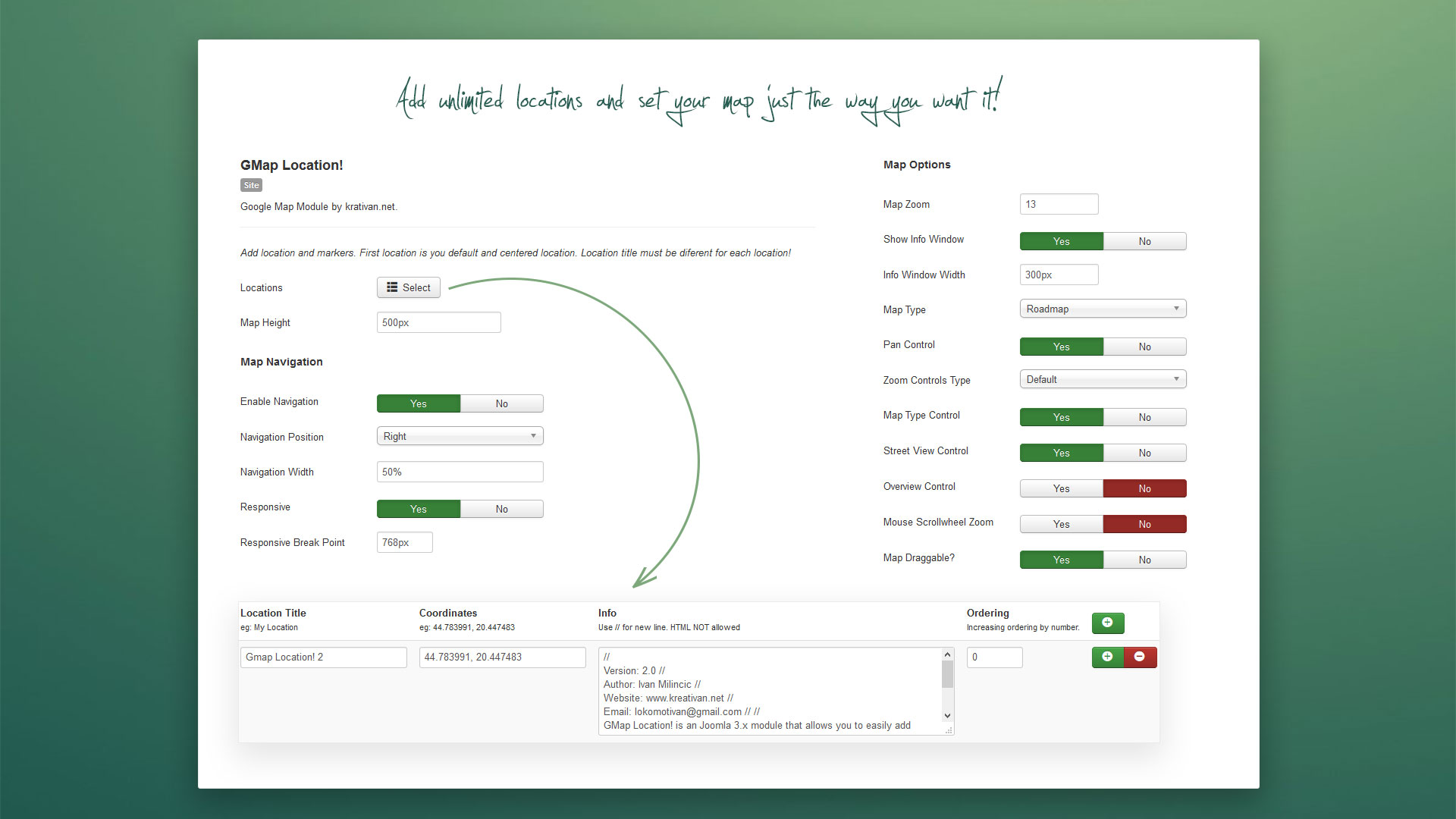
Hello. Locations and markers are set by latitude and longitude values (coordinates), so no specific address required. You can simply get the lat & lng of the Fort Myers, or any part of the town from google maps, and map will be centered on that point. Address is not displayed automatically, you can enter it manually in “info” textarea. Info will be displayed on the side navigation and inside marker info window. Here’s the screen shot https://s3.envato.com/files/188625408/4.jpg
Thanks for the reply – so there is no where you can add a link to click to an article or directory listing?
Unfortunately, no, links are not supported.
We update Your mod and now we have “crushed” map. Please help. Our site www.mostsopot.pl
it’s on bottom of page on “NASZE AKTUALNE BUDOWY” we dont see the map
Its all ok now,
Hi. Glad its solved
Hello, I just bought the license again… but v2.3 is not here to download… only v2.2??
Hi. Strange, v2.3 was ready for some time now, will be updated asap! Sorry for the inconvenience.
thanks
Hello Ivan, I did buy Gmap Location and I am very happy with it, really good Module everything is perfect except for one detail, It would be a plus if you can add to this module the possibility do set Center Latitude and Center Longitude, so the map can be centered differently from the Marker position and always centered even when the browser window is resized. Can you do that? Also… why don’t you update information on JED? Your work deserves to be much more popular!
Hello. Thank you very much for your kind words and your feedback.Glad you like the module and find it useful. Yes, it is possible to add features you mentioned and should be fairly easy task, just a custom center lat/lng field and event dom listener that will reset re-center the map when resizing the window. I agree with you, this sounds like useful options to add, so you can expect module update soon .
Back then when v1 of the module was realised, JED was a bit messy, reviews was taking to long (do to the lack of volunteers i assume), updates often refused for silly reasons that had nothing to do with functionality and code. That wouldn’t be the problem if there is no such a big delay on extension reviews. Im sure JED works much better now, but i just forgot about it and pushed all updates only here on envato. No matter lack of my presence on joomla JED, modules are always be supported, as long there are not obsolete.
I’ll be waiting for the next Gmap version, I’ll buy the license again! Thank you so much Ivan.
hello, Impossible to see the map in may website.
Can you please give me little more info, link to your website page where module is published maybe? And, please check your joomla version, joomla 3.3+ is required. Also you can try generate and use custom google map api-key in module options…
Nice work, GLWS
Hi Lokomotivan, We have just bought the plugin in order to create a map with several location markers, with 2 different types of marker. Could you please help us understand how to create multiple location markers on a map, and also to have more than one image/icon marker? We cannot see a second marker image/type option in the back panel.
Your help is much appreciated as we bought this plugin specifically to create different types of markers on a map! Many thanks.
Hello. To add multiple locations with markers just click on locations select button, and add your locations info (title, coordinates…) in a modal window. Unfortunately its not possible to have different marker styles (icons) on the same map. You can set custom market icon in “Map Style” tab, but it will be applied to each marker on the same map.
..
Hi, I just wondering why google map module it stop working the message is:
Oops! Something went wrong. This page didn’t load Google Maps correctly. See the JavaScript console for technical details.
Can you let me know how to fixing this issue.
Looking forward to hearing from you soon.
Hello. Reason can be that google maps api not loaded correctly, or its loaded multiple times on the same page. If you have you have any other google map related plugin/module published, it can be conflict issues. Can you give me a link so i can take a look?
Hello thanks for your reply back, my website is still under localhost. it’s weird because some pages it loaded correct and some it’s loaded error java script message.. so I am get lost with it.
Can you open google chrome dev tools (Ctrl+Shift+I), switch to console tab and read the error message. This might help, https://developers.google.com/maps/documentation/javascript/error-messages
Hello, great module. I am using Joomla 3.5.1. The map navigation does not work. If I switch off navigation – the map is OK. How to solve this?
Hi. Please make sure u don’t use any special chars for location title, that could cause the problems. Just finished version 2 of the module, it comes with improved navigation, its still beta but stable. You can leave me your email address to send you so you can test it, it will also probably solve your problem.
Or you can contact me on lokomotivan@gmail.com.
Thank you very much. I found the problem – I use Cyrillic characters in my location title. Please correct this in v2 if possible.
No problem. Unfortunately cyrillic is not supported for now, will try to implement it in v2.
Hi, Thanks for your great module. I have an issue about loading the google map module inside the Bootstrap tabs. I had try to find the solution but seem not work at all. Do you have any ideas how to solve this?
Thanks,
Dore
Hello, thanks. Unfortunately that is not possible with this module, due to the bit more complex code then simple map, map, markers, infowindows… are already instalized before you change the tab. You can maybe reinstalize the map, and get it to work, but you would probobly lose markers and have problems again when switching trogh the tabs.
Hello,
The map portion of the module does not display on my site in any browser.
http://www.alscott.ca/contact-alscottIs there an update? or a big fix?
Thanks for the help
Hello, Fix is on the way, waiting for approval. There is a small bug in default location (about info window width), looks like it occurs when image is set for the location, not sure how that got missed. You can send me an email lokomotivan@gmail.com ill sent the fix, if you dont wont to wait for approval.