110 comments found.

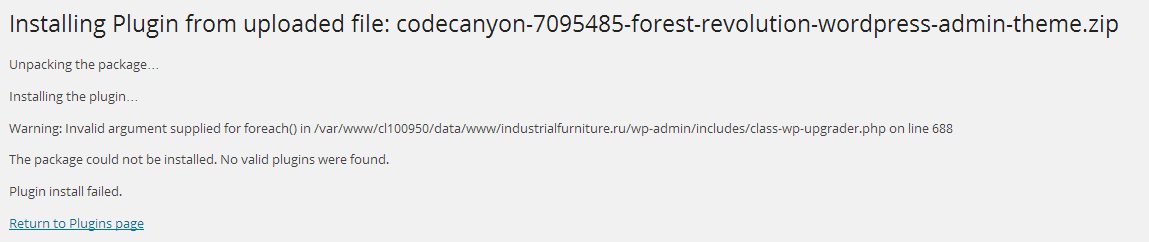
Warning: Invalid argument supplied for foreach() in /var/www/cl100950/data/www/industrialfurniture.ru/wp-admin/includes/class-wp-upgrader.php on line 688
You should unzip download package first, then you would find the right installation file in it. Thanks
sorry, i am dumb)
 just a small mistake, do not hesitate to contact us if you have any further questions, thanks
After about week working with Forest, I’m sure that this plugin is true art in dashboard. I love the design concept, it even makes me want to stay in admin dashboard more than front end
Thanks for kind words
Plugin disables Visual Composer. Images below. PLEASE need this to work asap.
with forest:
without forest:
Hi, I’ve checked Forest with VC many times and I can’t see same problem. Are you using a VC style addon or something related?
Hi, I need you help to install this theme, could you guys please?
Of couse yes, let send us an email via contact form, we will try our best to help you
Very thanks! you guys are the best of marketplace the admin theme is awesome too 
Unfortunate this is useless. I bought to be able to have a cool admin and not have to code it myself even though Im capable. Styles override the text within Yoast SEO Premium and Visual Composer enabling all the text to be white over white boxes. Thus can’t see even what you’re doing. I’ve changed the two options on color panel within this plug in and nither does the job. I would ask for my money back but I know I wont. I simply ask to dig further into the issue for future updates. Best of Luck.
This is in dark flat by the way.
haha wow wait its even worse in the other. I’m unsure how anyone can use this admin theme with the css I’m getting
Hi, could you give us admin login permission to see (via email)? We will fix bugs and update plugin ASAP. Thanks
I will as soon as I go live. But I work localhost until launch. So unfortunately you wont be able to help until than. BUT I customized some of the styling and changed it within your plug-in for myself. So for now your current version, plus the changes I made to your styling files I will be fine for some time. Other than some styling issues its actually a decent template. I like the google fonts built in.
I would highly suggest doing a menu editor add-on for this admin theme, or have it included. Where you can rearrange admin theme menu items, change their names. I believe if you did this you could get double the price you’re currently charging.
Thanks for suggestion, we will try our best to improve the plugin. Let tell us when you need help
OK. Been playing around now a few days and with CSS skill this pack is stinking awesome! I love my customizations (with certain plugins with crap styling) OTHER THAN ONE MAJOR LET DOWN lol which again leaves me unable to use it!...IT DISABLES VISUAL COMPOSER SELECTIONS!!! nooo haha
with forest:
without forest:
Hi, I’ve checked Forest with VC many times and I can’t see same problem. Are you using a VC style addon or something related?
No. That’s why I posted an image of my plugins also. You can see every plugin I use and no there is no visual composer add on. You can look again at the photos I posted yesterday. Come on.
And it’s completely obvious it’s your forest plugin. I tried disable all of the others desperately and none of them make visual composer work again when turned off other than yours. It’s very clear it’s a conflict with your plugin
Hi, I don’t get this problem after many times testing on my installation, I wish I could access your site to check, this might be a small CSS fix
So here is what I’m seeing with my CSS….This is coming from the “modal-backdrop fade” class that is some reason being applied when your plugin is activated….do you know which page or css file this is coming from within your plugin. I’ve done some research and it looks like that if I can simply take off the ‘fade’ class i will be fine. From my findings that fade class has bugs and in other platforms disables the page content from clearing that class ‘fade’....Any ideas where I can locate that in your files?
‘modal-backdrop fade in’ my fault is the correct class. by deleting it in live css editor on the page everything works PERFECTLY…You can’t just delete the ‘fade in’ must be the entire class length. But my css editor doesn’t show me which file this css class is being pulled from. So please let me know which file is doing this.
I tried to disable the quick panel within your setting tab thinking maybe it had something to do there, but that didn’t work.
FOUND IT!!! UGH what a mess, I found the css class and display:none on the “in” portion of the css class and walaaa, I’m in business!
Awesome guy “modal-backdrop fade” mighe be a UI element of WP admin, it made the problem because something’s made it’s z-index too high (I’m sure that Forest’s CSS does not have any line about “modal-backdrop fade” or “in”). Thanks
Is your theme compatible with wordpress network, I don’t want my users to access Forest Admin Setting page, Is it possible that only network admin can edit theme settings and users not?
Hi, our plugin works like normal on Multisite, and if you want only network admin can edit settings, you just need to modify a line of code, we will help. Thanks
“This admin theme is art” – our client said that
Thanks for great support & the greatest admin theme plugin ever
wow thanks
Could you send me some url to see our plugin’s working (via email)? Thanks
I’ve purchased a Forest license for my latest project, our customer loves it so much thank you guys for this great plugin
Great
I have just installed this, well tried to and I am getting the error:
Installing Theme from uploaded file: codecanyon-7095485-forest-revolution-wordpress-admin-theme-wordpress_plugin.zip
Unpacking the package…
Installing the theme…
The package could not be installed. The style.css stylesheet doesn’t contain a valid theme header.
Theme install failed.
I am using 3.9.1 does this not support the admin themes?
Hi, Forest – Admin theme is a plugin, not a theme. You should install it via plugin upload. Thanks
OMG I cannot believe I did that. So sorry! 
you’re welcome
i think the plugin has css errors
http://s28.postimg.org/l77im8hj1/demo.pngHi, this is weird. Coud you give us admin login permission via Contact form? We will try to find the reason. Thanks
Thanks again! This is best WP admin theme and supporting ever
Thanks Leaf
Thanks for kind words
Hey guys once again Great Admin theme! We love it!
Unfortunately we have tested it with one of our clients before scaling it to more and purchasing further licenses.
We have found way to many issues especially with specialized plugins of white ext on white or light backgrounds, making it really difficult to use
Any way though I would drop you a line surrounding it.
some of the plugins off the top of my head we have had issues with:
Membership ( WPMUDEV ) Visual Form Builder Most of WooCommerce is fixed but a few of the woo plugins are a problem.
After we have been patching at least ten CSS issues per day we have abandoned forest for the time being.
I will check back in in a while to see if and where you guys are up to. Would love to still use this theme.
Thanks for inform us, we will try to fix those issues soon
Beautiful theme! however after installation I uploade a 1920×1080 image for background, and the small version displays but it does not change the background?
Screenshot – after logging out and logging in
https://www.diigo.com/item/image/4u254/c1nbHi, thanks for using our plugin. There might be an error, could you give us admin login permission (via contact form)? We will try to check
Hi leafcolor, it seems to be working perfectly on Linux so it very well could be an issue with my testing setup (ampps on Windows) – on ampps the images/bg1.jpg in css stays constant, but it can be manually edited. On the production server it’s working great. Thank you for your hard work on this!!
I’ve replied your email
Hi I just purchased Forest, but It wont install.
“The style.css stylesheet doesn’t contain a valid theme header.”
Nevermind I seem to have gotten it to install… move along nothing to see here…
Hi guys,
Loving this theme so far but just have come across is that instead of displaying the login logo I uploaded, it only displays the name of the theme I am using for the wordpress frontend, which would make it embracing to show the person I am building this for.
Hi, thanks for using our plugin.
I think your theme has a function to replace login logo. You could remove it, or increase priority of your plugin logo function. You should send us your login info via profile contact form, we will try to help.
Thanks
is there any way change the white text colors in boxes or selects.. im getting some white font over white background
Could you send us a screenshot via email contact form?
hello, great theme, but when is active, non-logged in user can see the admin bar.
it has no items, but it is a trouble for the design.
how can i fix this?
Could you give us your admin login info (via profile contact form)? We will try to check and fix it for you. Thanks
hi, its actually on a local installation.. when i can upload it, i’ll contat you again, thanks
Hey great work on the CSS fixes.
Looks like a few more issues in WooCommerce. Variations tabs under the Dark setting, white text on white box.
Keep it up
Thanks for inform us, we will continue to improve dark style, if you have any problem, pls send us an email via envato contact form. Thanks
Can you support localization?
What are you meaning? Pls give us more detail. Thanks
Translation, multilingual
Got it, we will improve this issue in next update, pls wait. Thanks
thank you?
I can’t seem to get the background to change after updating to Wordpress 3.9.1. Do I need to follow any procedure to get this to update the admin background now?
Thanks in advance.
Could you send us admin login detail via envato contact form? We will try to check. Thanks
Thanks for the reply. Turns out it was a server config issue.