9 comments found.

Can I see the camera from anywhere in the world?
Yes because you configure a public MQTT Server, and the image goes directly on your Flutter App (all code included in this package)
All configuration needed is included on the user´s manual.
Can you make this project working on Arduino 2.0?
and Arduino 2.3.2
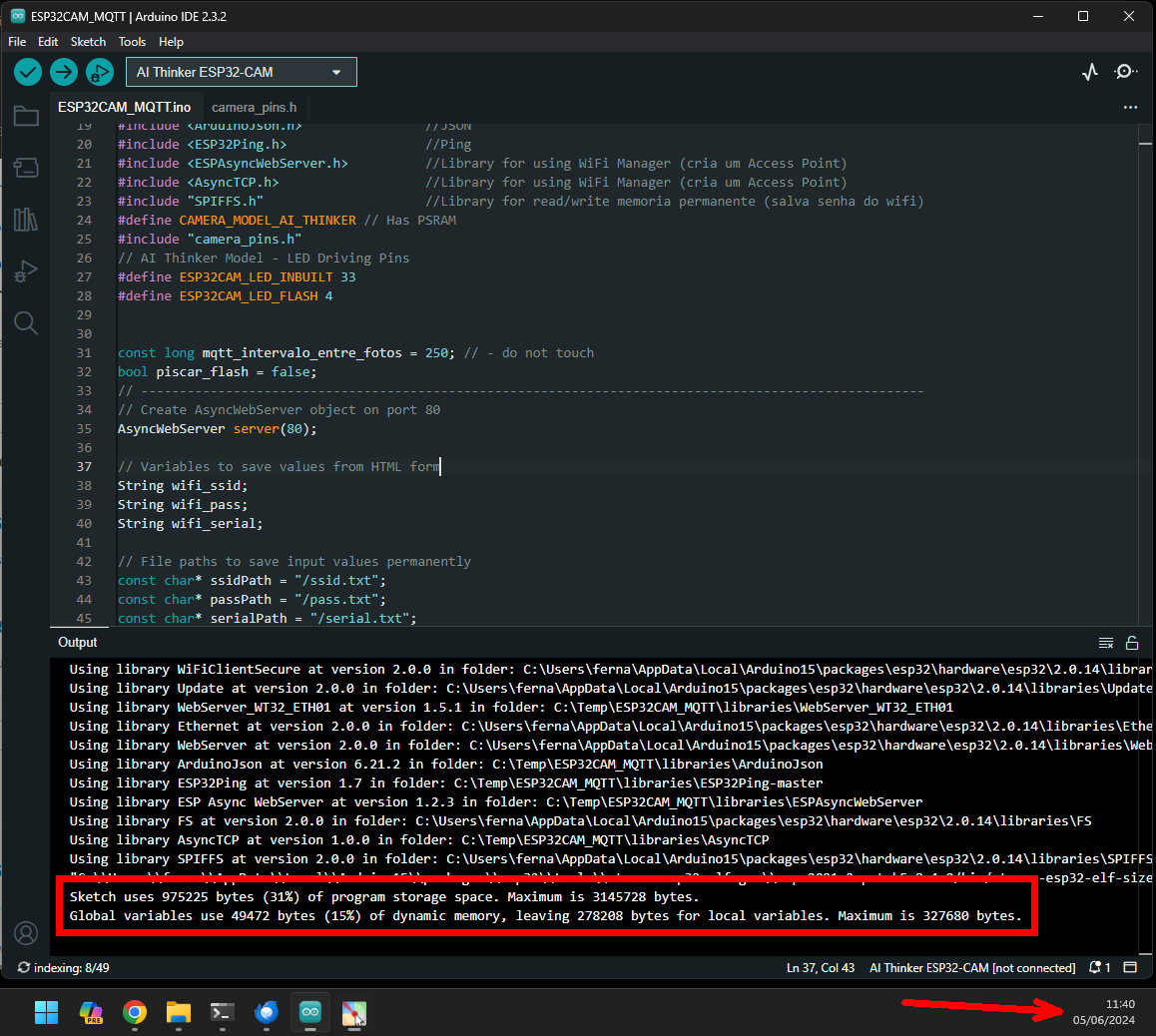
Hello. I just compiled on Arduino 2.0 and the project worked fine. Check: https://pastebin.com/skubmb5P
“Sketch uses 975225 bytes (31%) of program storage space. Maximum is 3145728 bytes. Global variables use 49472 bytes (15%) of dynamic memory, leaving 278208 bytes for local variables. Maximum is 327680 bytes.”
Did you select Partition: Regular 4MB with SPIFFS.
If you check tutorial, will find information about Tool for sending files from data partition to SPIFFS. This is a .jar file that works only on Arduino 1.8.9. Unfortunaly, there is no support for Arduino 2.0 (only for the SPIFFS data upload). You can check at: https://github.com/me-no-dev/arduino-esp32fs-plugin/releases/
For further help, use the item SUPPORT here on CodeCanyon Envato or e-mail me directly (check Tutorial). There we can talk with more details, not here on the comments, because involves details from the project that would be shared only with buyers. Thanks.
Hi. I got some errors C:\Users\A\Desktop\esp32cam\2024-02-09 – ESP32-CAM Live Streaming Flutter App\ESP32CAM_MQTT\libraries\ESPAsyncWebServer\src\WebAuthentication.cpp: In function ‘bool getMD5(uint8_t, uint16_t, char)’: C:\Users\A\Desktop\esp32cam\2024-02-09 – ESP32-CAM Live Streaming Flutter App\ESP32CAM_MQTT\libraries\ESPAsyncWebServer\src\WebAuthentication.cpp:74:3: error: ‘mbedtls_md5_starts_ret’ was not declared in this scope; did you mean ‘mbedtls_md5_starts’? 74 | mbedtls_md5_starts_ret(&_ctx); | ^~~~~~~~~~~~ | mbedtls_md5_starts
Also I would like to know how to compile this project in Arduino IDE 2.0, since Arduino IDE 1.8.19 a little outdated.
Hello. Yes it works on Arduino IDE 2.0. Did you realized the libraries folder is included on the package? You should go on Preferences of Arduino and set the folder of the project (where the .ino is located) This way the Arduino will use the libraries included in the project.
Remember also to select the AI Thinker ESP32-CAM board. Without setting the right board, the compilation will show error.
Yes, I set the folder of the project (where the .ino is located). Arduino uses the libraries included in the project. You can see the whole output here https://pastebin.com/2qGdj9A5
They are talking about an ArduinoIDE 2.2.1 problem. Please try to use a earlier version.
I will check this issue and update the code in the next release. Thanks for the information.
I use Arduino 1.8.19 to compile this project. Here is a screenshot of my IDE https://inter-i.pl/arduino1.png
Move all the project to c:\temp OR c:\src. Do not use spaces and long filenames and folders. Another idea may be because your language chars.
I moved all project to “c:\temp” and used only English chars for everything. The errors are the same https://pastebin.com/fKZ6SYR4
You are doing the wrong way.. C:\temp\libraries\ESPAsyncWebServer
You should keep all inside the folder of the project.
You are doing the wrong way.. C:\temp\libraries\ESPAsyncWebServer
You should keep all inside the folder of the project.
Delete everything and start again, without change files names or nothing. Read the instructions provided with attention.
Move THE FOLDER OF PROJECT in c:/Temp You moved the .ino in the temp.
The file .ino has a name, need to be the same name of the folder that is inside.
Example: C:\temp\ ESP32CAM_MQTT\ ESP32CAM_MQTT.ino Setup project folder on the Properties of Arduino to: C:\temp\ ESP32CAM_MQTT
Keep the library folder, example: C:\temp\ ESP32CAM_MQTT\libraries C:\temp\ ESP32CAM_MQTT\data
I trying to compile here right now and works regularly…
If you put files out of the folder or do something not informed in the tutorial it does not work.
I moved the whole project. Errors are the same, not working https://pastebin.com/st4ynwgd
In my computer I compiled normal. I did it today to check if there is something wrong, but there wasn´t. There is nothing more I can do for you right now.
I suggest format your computer or try in another computer, reinstalling all the platform, and ESP32 board.
The problem was solved. Everything works as in the description. Many thanks for support.
Thank you!
I downloaded the update, is there a changelog?
Hello. Will be included in the main file.
New update is coming soon.
Camera can be view over the internet or only the network ?
Hello. Over the internet using MQTT server to send the image. Works worldwide.
Hlo are this full functional app or just template?
Hello. This is a full working app. All you need to do is flash your ESP32-CAM, build your Flutter App and configure a MQTT server. Check the video and pictures explaining the flow.
Congratulations! Nice Work, GLWS 
Thank you! We will publish some updates soon!
may be add login accouting page and add more button ON/OFF and PRESS? i want make the app controler the CAR
Hello! We are preparing additional features in new versions that will be released soon. Thank you for your suggestion.
yes, waiting to you