11 comments found.
Navigation does not appear (Style 2)... Could you help me? Thanks in advance.
You can see it at: https://nouvell.afd-sitios.com/
Waiting for your answer…
Hi, Thanks for your question. Please allow us some time to check the issue and let you know as soon as possible.
Thanks
I am still waiting…
Hi, We already check the issue but it looks like everything is working fine here. Maybe you insert only 3 images and Carousel Item shows 3. Can you please add a few more images for test purposes?
Best Regards
You’re right… your plugin works PERFECTLY, sorry for my clumsiness.
No problem. Thanks for your reply. If you are happy to use our plugin and support Don’t hesitate to give us five-star feedback with some valuable comments.
Thanks
I just did it. Greetings 
Thanks a lot.

I have just purchased your Advanced Carousel Wordpress Plugin. I have installed it and before I active it shows me this error: Fatal error: Uncaught TypeError: Argument 1 passed to Elementor\Core\Utils\Collection::__construct() must be of the type array, null given, called in /usr/www/users/itlgrkmrtj/itl-group2022/wp-content/plugins/elementor/includes/managers/image.php on line 154 and defined in /usr/www/users/itlgrkmrtj/itl-group2022/wp-content/plugins/elementor/core/utils/collection.php:25 Stack trace: #0 /usr/www/users/itlgrkmrtj/itl-group2022/wp-content/plugins/elementor/includes/managers/image.php(154): Elementor\Core\Utils\Collection->__construct(NULL) #1 /usr/www/users/itlgrkmrtj/itl-group2022/wp-content/plugins/elementor/includes/managers/image.php(179): Elementor\Images_Manager->delete_custom_images(4549) #2 /usr/www/users/itlgrkmrtj/itl-group2022/wp-includes/class-wp-hook.php(309): Elementor\Images_Manager->Elementor\{closure}(4549) #3 /usr/www/users/itlgrkmrtj/itl-group2022/wp-includes/class-wp-hook.php(331): WP_Hook->apply_filters(NULL, Array) #4 /usr/www/users/itlgrkmrtj/itl-group2022/wp-includes/plugin.php(476): WP_Hook->do_action in /usr/www/users/itlgrkmrtj/itl-group2022/wp-content/plugins/elementor/core/utils/collection.php on line 25
Please let me know the solution to solve.
Hi, Thanks for your question. We are checking your issue and hopefully give you some update as soon as possible.
Best Regards
Hi, Sorry, for the late reply. We check and solve all the issues as well as release a new version of the plugin. Please download the latest version of the plugin and install it again. We hope it solves all the issues.
If you have more questions please contact us directly via our support email at johanspond@gmail.com
Best Regards
Hi Johan,
Thank you for your response. All is now working perfect!
You are Welcome. If you are happy to use our plugin and support please don’t hesitate to give us five-star feedback with some valuable comments. It inspired us a lot.
Best Regards
Are the links personalized by each of the images?
regards…!!!
No answer since all my questions ! This plugin don’t work on my website.
You say to Envato mediation that “I REFUSE TO GIVE YOU MY URL” !!!!! You have NEVER ask my URL !!!
“I” have tell you : how can you say you check my website when you never asked me once my URL.
It was I who told you about MY url and you say to the mediation that I refuse to give you my URL, why do you invent such words?
Hi, Thanks for your information. please try to understand that we already answer your question much time. When you ask us how can we check your website. we told you we check our plugin, not your website.
How can you say (No answer since all my questions! )
we check our plugin with many fresh installations & it working. that’s why we say please choose a default WordPress theme then check it. if it working fine in our installation why not it working on your installation.
It’s your right to ask thousand of time about the support we have no problem but if you don’t help us to figure out this issues. it so difficult for us to solve.
But are you crazy ? Liar it is sure : You NEVER ask me my URL ! ! ! !
Why we ask you for your URL. it’s nor our plugin issues that’s why we send you some instruction. you do not share your URL that’s why we ask you to provide some screenshots.
We don’t know what we lie with you. are you ok?
Hi, we understand your frustration. if he happy to use this type of words (liar) we have no problem.
Where we say we ask him about his UL & you refuse to provide that. it totally misunderstanding because of doesn’t mean that. we just want to say when you ask to support you do not share his URL that’s why we ask you to provide some screenshots but your thinking is totally wrong.
Can you please provide us your login details below email. we check this issues why it not working on your installation otherwise we refund you. johanspond@gmail.comRegards
I will send you my url now you ask it to me. But, before, can you show me “where” you have ask my url ? I see, I look, I see nowhere… Regards
please try to understand it’s totally misunderstanding we never write anywhere we ask your URL & you refuse to provide that.
Yes it is totaly misunderstanding. But where could have I give you my URL without your email? Email that you give me today… If you had tell me: send me your url to this email, I will have do it immediatly of course. I have to create a backup, and I contact you on your email to send you URL. Regards.
Ok, It is send. Regards
6 days after… no answer… I am with a plugin which don’t work…
Hi, Thanks for contact with us & we are really sorry for late replay. we check our plugin & release a new version to fix some issues also update the documentation file to create a carousel easily.
As you mention lots of function not working in your installation but we check it and everything is working fine. just figured out an image ratio issues. we fix the image issues and added new options to manage image size (default or custom).
Download the update file and install it again. we hope it working fine in your installation.
Regards
Hi, thank you for your message. I try to install again : Décompression de l’archive de l’extension…
Installation de l’extension…
Le dossier de destination existe déjà. /home/xxxxxxx/www/wp-content/plugins/carousel-ultimate-for-wordpress/
L’installation de l’extension a échoué.
Do I have to uninstall (or rename plugin in old) plugin? I will loose all my images and configuration?
Regards
Hi, Just delete your previous installation then install the latest one. don’t worry about losing your previous data. all data automatically back when you active the latest version.
Please inform us everything is working correctly or not. we are waiting for your response.
Regards
I am sorry, you tell me “we check it and everything is working fine” I don’t understand, I have never give you url of my website… how can you say “we check it”? how can you say everything is working fine?
If I tell you I have no slider but fixed images, I don’t imagine it.
I select 3 images visible, and I have my 5 images visible.
Only thing working: random and links.
So you tell me in your new version you only change documentation and ratio. This is not my most important problem. My problems are no slider, all images visible.
Regards.
Hi, We do not check your website URL. we check our plugins in a fresh installation & everything working fine in our site also we fix some issues and release a new version. we are not saying we check your Website.
Regards
Hi, ok for checking plugin in your workspace. I install new plugin and I will tell you if I have slider or not. Regards
Hi, if possible please check it in a new installation. it not possible for us to check the third party plugins conflict issues. we are here to solve your issues.
Regards
Hi, I have install new version. Same problem: I want to see only 3 pictures on 5, I see 5. I have 5 statics pictures, and no slider.
I know and see it is working on “your” website. It is the reason why I have order and buy your plugin.
On my pages, it doesn’t work (no slide, no good number of pictures).
Regards.
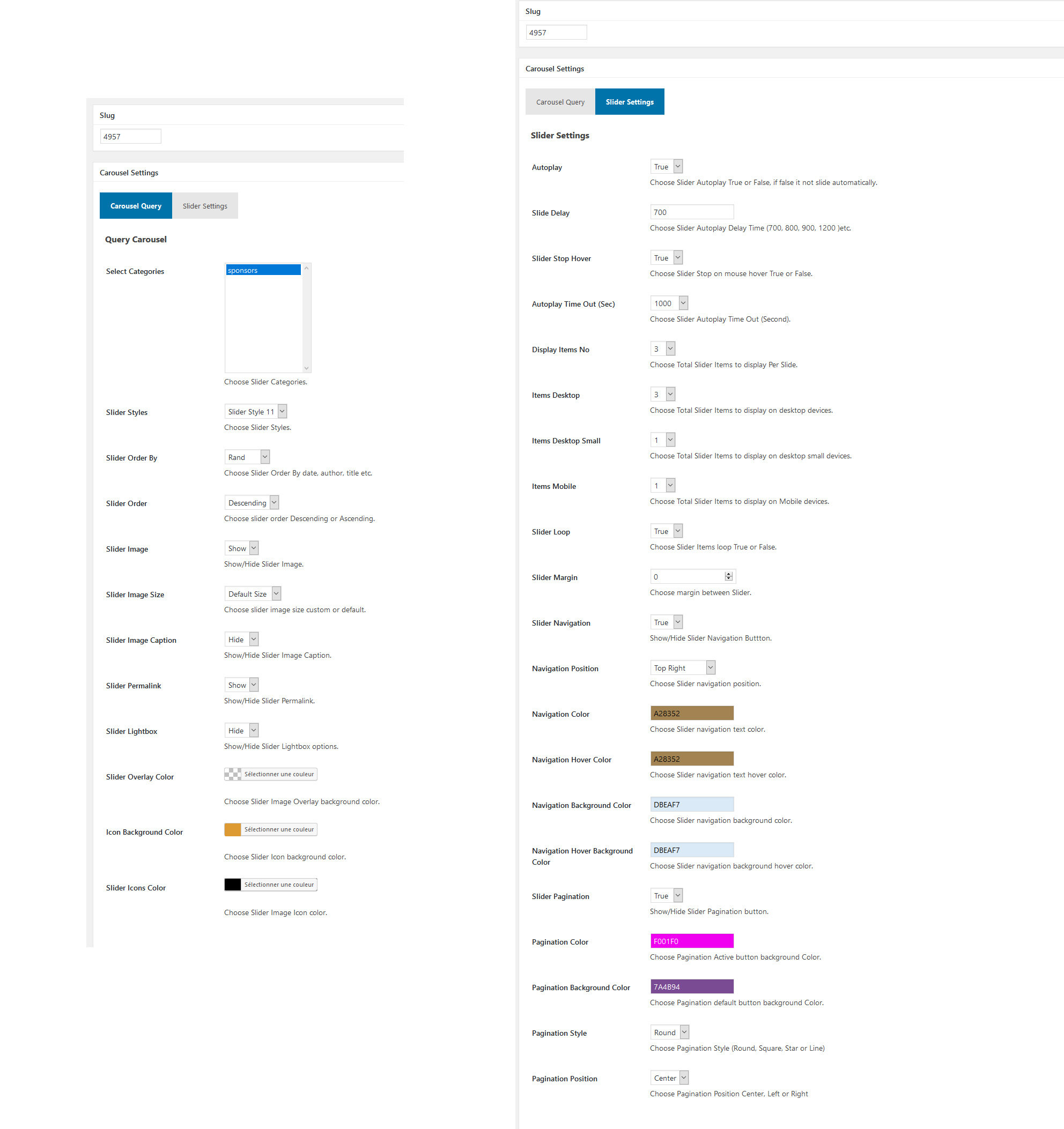
can you please send us few screenshots of our plugin options page. example screenshot attached
http://prntscr.com/kpy8d4We told you if possible install it in a new one not existing one because of how many plugins you install we don’t know. if slider js file conflict with another plugin it difficult for us to figure out.
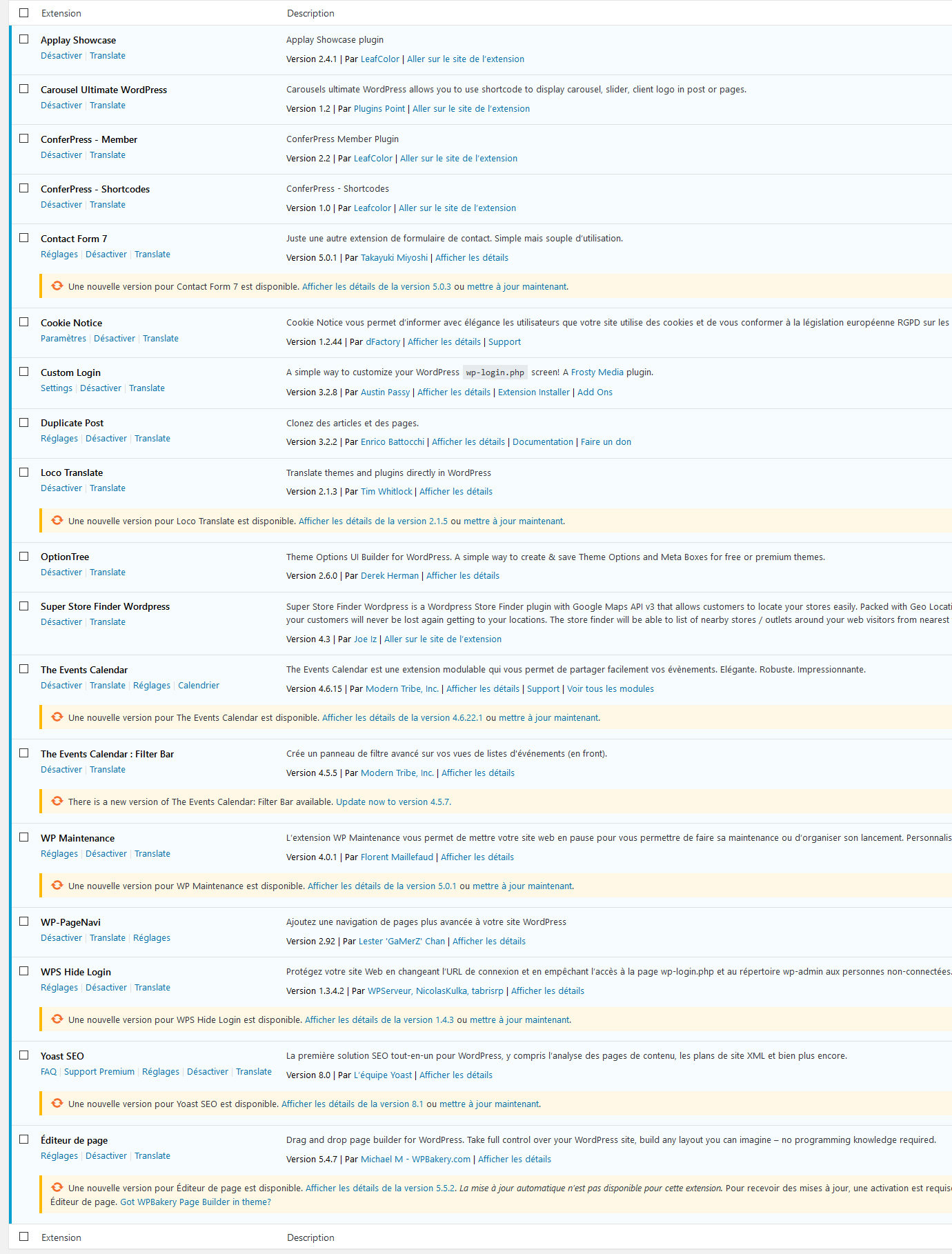
can you please send us a screenshot of your installed plugins page.
Hi, Thanks for your information. maybe you install (Applay – WordPress App Store Theme) theme. both theme & plugin comes owl carousel js file that’s why slider not working. it not our plugin issues. please try to change the theme for test purpose or contact with the theme owner to fix this issues.
We do not provide you support for third-party plugin or themes issues.
Regards
I stop with slider. I will have a slider without slider….
I have those problems :
I try with style 6 (because I prefer). I select : slider navigation = false I put : slider margin = 10 (I want a spacing between each photo)
I have yet slider navigation I have no space between each photo
What do I have to configure to have space between my pictures? (I have no space betwenn my pictures) What do I have to configure to don’t have little bullets under slider? (I have bullets under slider) What do I have to configure to have my slider centered? (my slider, not sliding, is on left)
Now I have: Style slider 6 Slider margin 10 Slider navigation false Navigation position center (in my page, carousel shortcode is center)
(and ever problem with number of pictures and slider not sliding…)
Regards
What do I do now? Slider no sliding, no space when I want one, not center when I want it center, unwanted bullets, all pictures visible, when I change color, nothing change….
To have spaces between my pictures, I have to create png images with transparent arround : it is not normal. I should be abble to use your plugin without having to do crafts
Autoplay on true : nothing move. Slide delay : no instruction in documentation (I put 700, I put 20 : nothing change : no slide) Autoplay Time Out (Sec) : no instruction in documentation Items No : no instruction in documentation Items dekstop: no instruction in documentation items dekstop small: no instruction in documentation items mobile: no instruction in documentation Pagination : true (no instruction in documentation – don’t work) Image height (px) : no instruction in documentation – if I put 160 my ratio is ok, but slide style 11 is cut – so I have to put 200, but my image ratio is bad I put 4 pictures in my slideshow, but I want to see only 3 in random, I put Items No (I imagine it is how much pictures I want to see? I don’t know because you explain nothing in your documentation, you just put a screencopy). I have “3” everywhere, and I see again 4 pictures.
To resume : I have no slide – bad ratio for pictures – 4 pictures and I want to see only 3 by 3 and absolutly no instruction in documentation only screencopy without fields description.
Hi, Thanks for contact with us & we are really sorry for late replay. we check our plugin & release a new version to fix some issues also update the documentation file to create a carousel easily.
As you mention lots of function not working in your installation but we check it and everything is working fine. just figured out an image ratio issues. we fix the image issues and added new options to manage image size (default or custom).
Download the update file and install it again. we hope it working fine in your installation.
Regards
Now I have order, you don’t answer ???? Nothing works. Can you answer me please ?
Already answer to your question. please download the latest version & install it again.
Regards
Hi, Doesn’t work. I add pictures, same size than yours (640×457) (for information you don’t speak about size in your documentation). I create category. my images are distorted because the ratio is not respected I modify Carousel settings. I select (for example Style 11) : nothing change. I select other Style, nothing change. I modify colors, nothing change. Carousel don’t move, it is not a carousel. No link (icon chain), no see (icon eye). Actually I have 2 images with link, no carousel, no style. Thank you to help me. Regards
Already answer to your question. please download the latest version & install it again.
Regards
Hi, In your examples, you show only 3 pictures. Is it a parameter editable?
Other point: I see a question from “Susie2014” writen about 2 months ago. Did you answer it or is there no support?
Regards
Hi, Thanks for contact with us. 3 pictures only use for demo purpose. you can manage everything via options page. support is available if it’s our plugins issues.
Thanks
Hi, Thank you very much, so we can show only 1 picture or 10 if we want? For Susie did you help here? Regards
Hi, You can show 1-6 items per slider.
Thanks
Perfect, thank you.
(I hope Susie is ok now  )
)
You are welcome
Hi, can you answer to ticket now I have order your plugin ??
Already answer to your question. please download the latest version & install it again.
Regards
Hello
I just bought this plugin but it didn’t work on my Wordpress website. I couldn’t select any category I created and any style availble. How come? Please help
Thank you
Awesome Work! Good Luck With Sale
Thanks