120 comments found.

hello, could it be integrated with woocommerce? something like add a player in product page that it could be preview in the shop page too?
Hello!
I’m sorry, it doesn’t have this option. You have to add the audio file in the player playlist
Regards
ok thanks anyway, great plugin 
Are you going to help me or not? I’ve emailed you 3 times now – no response. I need the JQuery version accidentally bought the WP version. Process the refund or give me the download for the JQ version or you leave me no choice but to back charge and use someone else.
Hello!
I’ve replied you yesterday the download link. Please check the email, maybe it entered in SPAM or maybe the email you’ve set for codecanyon is not in use anymore.
I’ve just replied you today to the last email the download link again.
Please let me know if you’ve received it.
Regards
you last email was in my inbox. there is nothing in my spam i don’t see the download link
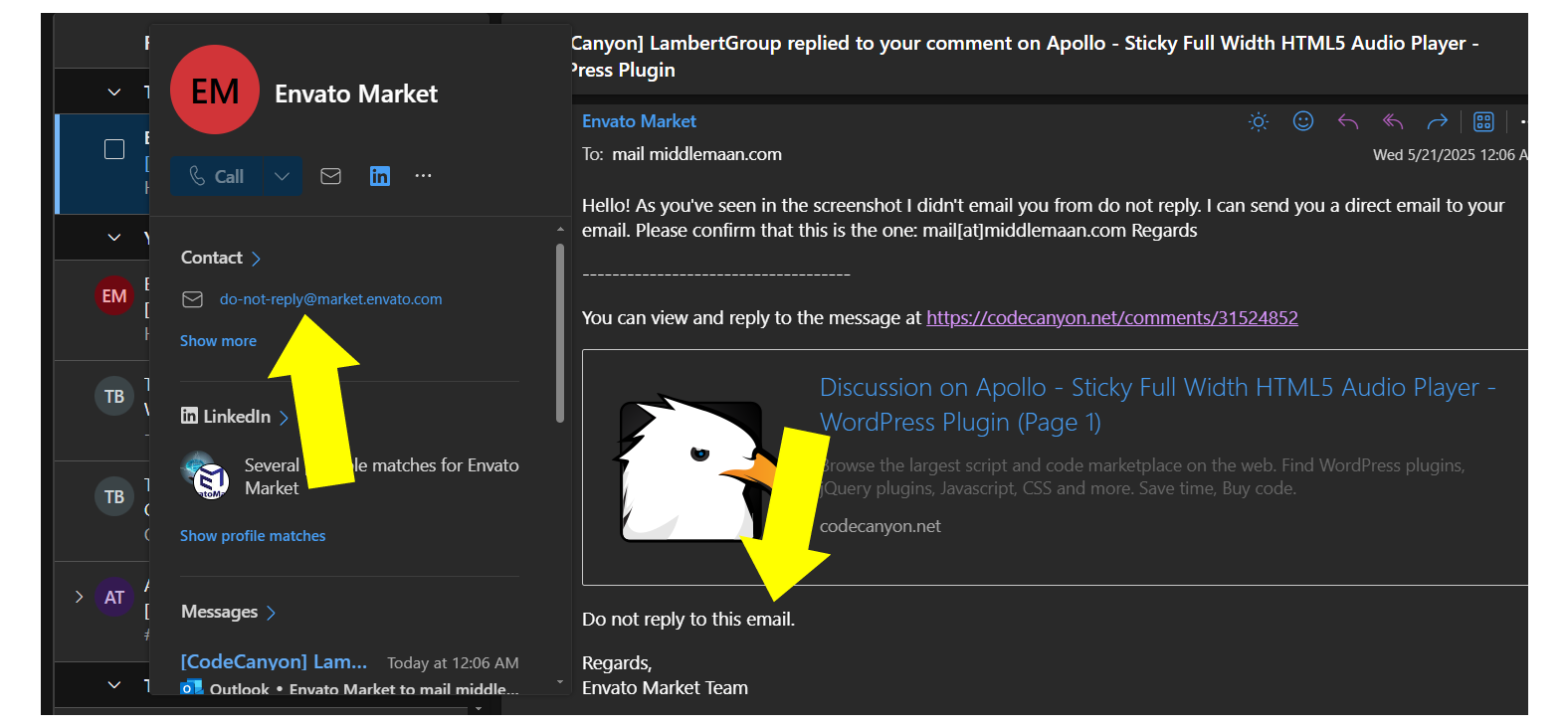
the email you sent from is a do not reply. there is not a download link in the email
do you see in the last email: Here’s the download link for the JQ version: https://...... ?
stop sending me emails from a DO NOT REPLY. That is retarded…
and NO, there is no download link!!!!
1. I’m not replying from a DO NOT REPLY. I’m replying from my email, the same way I do for all support requests.
2. The email contains a download link
3. Please write me a separate email on office@lambertgroup.ro and I’ll reply to it
1. YES you are emailing me from a DO NOT REPLY even your salutation says, “DO NOT REPLY TO THIS EMAIL” 2. THERE IS NO DOWNLOAD LINK AND THERE NEVER HAS BEEN 3. DON’T TELL ME YOU EMAILED ME YESTERDAY WHEN YOU DID NOT. 4. LAST CHANCE TO GIVE ME THE LINK – PRETTY SIMPLE TO COPY/PASTE A LINK INTO AN EMAIL
I JUST SENT YOU AN EMAIL TO YOUR: @lambertgroup.ro EMAIL.
Hello!
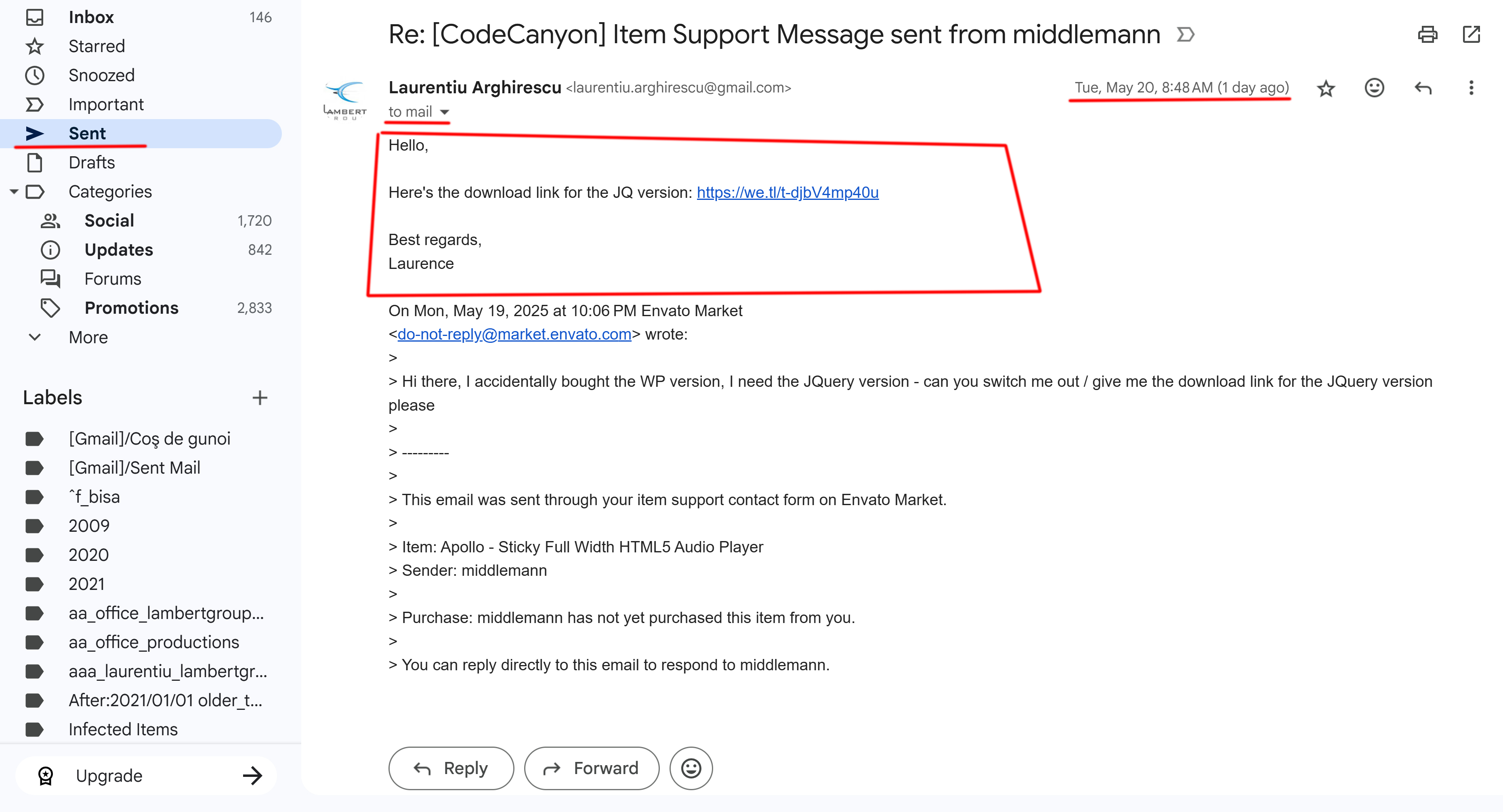
I did send the email yesterday on your email @middlemaan.com Here’s the screenshot: http://lambertgroup.ro/canyon/sent.jpg
I didn’t receive the new email.
If this email solution creates these problems, you can buy the JQ version https://codecanyon.net/item/apollo-sticky-full-width-html5-audio-player/20127983 and I’ll refund you the previously bought WP plugin.
Regards
YOU’RE NOT GETTING ANOTHER PAYMENT FROM ME, PERIOD. GIVE ME THE DOWNLOAD LINK OR I BACK CHARGE, END OF STORY.
STOP EMAILING ME FROM A DO NOT REPLY!!!!!!
IVE EMAILED YOU TWICE NOW @ office@lambertgroup.ro WITH SCREENSHOTS OF YOUR DO NOT REPLY EMAIL ADDRESS.
MAYBE YOU SHOULD CHECK YOUR SPAM!!!!!!
Hello!
As you’ve seen in the screenshot I didn’t email you from do not reply.
I can send you a direct email to your email address. Please confirm that this is the one: mail[at]middlemaan.com
Regards
YOU KNOW WHAT, FORGET IT. IF YOU WERE GOING TO GIVE ME THE LINK LIKE YOU SAY, THEN YOU COULD HAVE JUST PASTED IT INTO ANY ONE OF THE LAST 4 EMAILS YOUV’E SENT ME. IT’S CLEAR YOU DON’T WANT TO SOLVE THE MATTER SO I’LL HANDLE IT WITH MY BANK – THANKS FOR BEING SUCH A *
Hello!
I’ve replied your direct email.
Also, pasted here the download link for the JQ version: https://we.tl/t-djbV4mp40u
Regards
There are two types of emails:
1. the ones send on support which I can reply (and I did)
2. the ones from comments section which I don’t reply.
Anyway, please let me know if you have downloaded the product
Regards
Hello!
Please let me know if you have downloaded the player because the link has an expiration time. Thanks
Regards
YES I DOWNLOADED THE PLAYER AND I’VE EMAILED YOU 3 TIMES AT YOUR GMAIL THAT PLAYERT DOES NOT WORK!!
AND WHY ARE YOU STILL EMAILING ME FROM A DO NOT REPLY???? ARE YOU A RETARD OR DO YOU INTENTIONALLY TRY TO PISS PEOPLE OFF?!!?
CHECK YOUR SPAM IN YOUR GMAIL: laurentiu.arghirescu@gmail.com AND DISCONTINUE EMAILING ME FROM do-not-reply@market.envato.com
maybe you don’t know this but when there is a “do-not-reply” before the @ in an email address it means the email address is a DO NOT REPLY email
Hello!
I’m definitely not retarded and it would be nice if you would maintain a decent language.
What you see as ‘do not reply’ are the emails you are automatically receiving when I add a comment here. Most probably you’ll receive and email with this very comment from ‘do not reply’. These emails are not sent by me, but automatically by the Envato Market and they are just to inform you that a comment was posted to an opened discussion. In the screenshot you’ve sent me https://middlemaan.com/images/bullshit/bullshit.png if you check the title, it writes “Lambert Group replied to your comment….”
You have 2 types of emails:
1. Automatic emails from Envato Market that have ‘do not reply’ and they inform you about a new comment. These emails ARE NOT SENT BY ME. You can check the title to see that are sent by [CodeCanyon]. You can disable these emails from your CodeCanyon account-> Settings->Email Settings. Here’s a screenshot for your account settings: https://imgur.com/a/hsEqSpo
2. The emails I directly send from my email address.
I’ve found your last emails in the spam. In order to check why the player is not working please paste in the comment area the link to the page where you have inserted the player to check the errors.
Regards
this is the page where the player is not displaying: https://lightninglyrics.com/
Hello! The error on the page, is this one: Uncaught TypeError: jQuery(...).audio7_html5 is not a function at HTMLDocument. ((index):1120:33) at t (plugins.min.js:1:26655) at e (plugins.min.js:1:26985) This is due to the fact that your are loading jQuery multiple times on your page and this creates conflicts This is the first time from our player: This seems to be the second time: Try to comment one of the lines and make sure you are loading jQuery only one time to avoid conflicts. Regards
No more errors on page. Still no player!
Hello!
That’s because you’ve deleted the payer initialization script, which was at the bottom of your page, and the player doesn’t initialize:
<script>
jQuery(function() {
        jQuery("#lbg_audio7_html5_1").audio7_html5({
            skin:"whiteControllers",
            initialVolume:1,
......
No. It didn’t display when I had that there. All it did was throw errors. PLUS there is no mention of having that script in the in your documentation. I was just trying any/ all possibilities. Your player doesn’t work.
I just put that script back in. NO GO BRO! just errors, no player.
I fixed it. You had me put all the js links in the <head> they belong in the
not the <head>super glitchy, songs play/ don’t play. tapped on the popup icon and the player disappeared and won’t come back
The song you are trying to play is this one: https://lightninglyrics.com/audio/aint_that_something.mp3
As you can see it shows 404, so the path is incorrect or the file is not uploaded on the server
Regards
I like the audio player.
An urgent pre-sale query !! I will highly appreciate a quick response !!
Imagine a few WordPress posts with 2-3 songs each (not in a playlist, but individual tracks displayed in the post). Can the individual songs be clicked and played with this audio player in such a way that the audio player dynamically gets docked to the top / bottom (sticky feature) while playing the individual song, so that the audio player remains visible at top / bottom and visitors can scroll the post while the clicked song plays?
Thank you !!
Hi Author,
I installed your plugin though i set it to Auto Play but it is not working?
Please help
Hello!
The browsers have blocked autoplay feature for many years.
We have these notes on the product page:
Notes for IOS/Android (restrictions imposed by Apple/Google): 1. The autoplay will not work because IOS/Android disables autoplay feature and it can’t be controlled from JS 2. Volume controllers will not work on IOS/Android. You’ll have to adjust the volume with physical buttons of the mobile device.
Note for Safari & Chrome (restrictions imposed by Apple & Google): Starting with Safari 11 and Chrome 66 the autoplay will not work because Apple & Google disabled autoplay feature and it can’t be controlled from JS
hi, can player be loaded boomplay? And also albums and playlists from boomplay?
Hello!
I’m sorry, it doesn’t have this option
Regards
Hello, on my version of player, there is only Play, download, artist and title. So on mobile there is only play button and download button. Is it possible to show title and artist name? Thank you for your help.
Hello!
I’m sorry, on mobile (portrait mode) there’s not enough space to show all the info. To see more, you should hold the mobile in landscape mode.
Regards
Unfortunately, when I activate the download Option and when I press the download button, it downloads a file with a value of zero only!! Only Name with Zero Byte! Please Help me to Solve This Problem. Thank you
Hello!
It might be a problem with the filesize() function on your server.
Please send me the url to your page where you have the player, using the form present on the right sidebar of our profile page, where it writes ‘Email LambertGroup’: https://codecanyon.net/user/lambertgroup
Regards
why its not support with thrive achitecture ?
Hello!
If you are referring to “Thrive Architect WordPress Page Builder” you can try inserting it using the plugin shortcode
Regards
already i did, but looks like it works fine at the backend but its not show anything at the frontend, its jQuery is not define or something like that.
Hello,
Please send me the url to your page where you have the player, using the form present on the right sidebar of our profile page, where it writes ‘Email LambertGroup’: https://codecanyon.net/user/lambertgroup
Regards
here i added Apollo – Sticky Full Width HTML5 Audio Player shortcode, its works fine when i am at the backend, but front ends show nothing.
its fixed, thats was the theme issue. thanks
Hi, when are you going to add the feature to repeat 1 track from the playlist?
Hello!
I’m sorry, we don’t have this feature scheduled for the next update.
Regards
Can I create multiple playlists?
Hello!
Yes, you can create as many players as you want, each player with its own playlist. Only one player can be set as sticky
Regards
Hello how are you? Can you add an option to repeat 1 song or repeat the entire Playlist automatically?
Hello!
It has the option to repeat the entire playlist.
Regards
I can’t find where you repeat every Playlist, can you show me? I want to buy it!
Hello!
In Manage Players->Player Settings you set:
Loop: true
and it will loop the entire playlist. When it reaches the last song from the displayed playlist, it will move to the first one automatically.
Regards
But don’t have a button for the user to choose this?
Hello!
I’m sorry, it doesn’t have such a button. Only the shuffle button is available.
Regards
Do you plan to release this update? She’s very important!
Not in the near feature
in your video “How to use the plugin” it seems u dont have support external mp3 link or dynamic link?
Hello!
You can play MP3 files stored on your server or a third-party server.
All you need is to use the direct link to the MP3 file. Example:
https://domain_name.com/some_optional_path/file_name.mp3Regards
Hello, I already have your plugin and I’m happy with it. On the other hand, I would like to add a sticky player with a soundcloud playlist, could another player from your group come in addition without causing internal conflict? All the best
Hello!
I’m sorry, we don’t have a dedicated soundcloud player.
Regards
I was not talking about a dedicated SC player only, but another player who is also able to play a SC playlist.
Hello!
Please let me know which is the url you want to play
Regards
Hello, the idea is to add a sticky continuous player, with a SC playlist, at the bottom of this url https://houz-motik.fr/ ; without damaging the other player in articles all the best
Hello!
I’m sorry, we don’t have such a player.
Regards
Ciao come carico un link streaming di una radio?
Hello!
You can play only one radio stream and you add it in the player where you’ll add the MP3 file.
If you need a radio player, we have this dedicated radio player: https://codecanyon.net/item/shout-html5-radio-player-with-ads-shoutcast-and-icecast-support-wordpress-plugin/20667135
Regards
Forgive me but where do I insert the flow? I go to generate playlist on folder> The path to the folder which contains the .MP3 files *> and here I insert the stream? It gives me this error: No MP3 files in this folder! How should I enter the flow? If I put http: // it generates another error: Gone The requested resource is no longer available on this server and there is no forwarding address. Please remove all references to this resource. I only need to enter a single stream: 162.244.80.106:11620 Tell me what to do?
Non lo prende proprio…
Hello!
Please check this video tutorial: https://youtu.be/8qA3LlLxnPA?t=102
You’ll insert this radio stream http://162.244.80.106:11620/; in the player where it writes ‘MP3 file’
Regards
Hi Lambert, the plug doesn’t work. I send you to office@lambertgroup.ro user to enter as administrator. Will you fix the link for me? Please thank you
Hello!
I didn’t receive it.
Please note that your free 6 months support has expired for over 2 years. For additional support requests you need to buy additional 6 or 12 months support from here: https://codecanyon.net/item/apollo-sticky-full-width-html5-audio-player-wordpress-plugin/20158996
Regards
Hello Lambertgroup, yesterday I bought this product for my website but when I installed it I got the following message: The package could not be unzipped. No plugins found. The plugin installation has failed. what can i do, i hope your help
Hello,
The .zip file you’ve downloaded from CodeCanyon.net also contains help documentation, PSD files and license information. Please unzip it and install the ’.zip’ file you’ll find inside.
Don’t forget to check the video tutorials available on the product page https://codecanyon.net/item/apollo-sticky-full-width-html5-audio-player-wordpress-plugin/20158996 , under the ‘Video Tutorial’ section
Regards
How we can use this feature “Add To Queue”?
Hello!
I’m sorry, it doesn’t have this option.
Regards
Autoplay on several browsers, I used ~“Soundy Background Music” prior and autoplay worked.but this one isn’t working, However your plugin does resume as you jump pages which is a plus!! – I came from Envato elements
Hello!
Starting with Safari 11, Firefox 66 and Chrome 66 the autoplay will not work because Apple & Google disabled autoplay feature and it can’t be controlled from JS. Because of this it will not autoplay when you change the page.
You can click the last button from the right which will open the player in a pop-up window and the playback will never stop once it is started.
Regards
Good luck with your sales
maybe chill with the popups on the demo
Hello!
I’m sorry, that’s because Envato has removed the ‘close frame’ button and our live demo is loaded in an iframe now.
If you visit the live preview directly, the pop-up appears only once: http://stickyfullwidth.audioplayerhtml5.com/
Regards
Hello. Envato Elements buyer here. The version 2.1.3 of the plugin on a WP 5.7 new install seems to activate a health issue: “A PHP session was created by a session_start() function call. This interferes with REST API and loopback requests. The session should be closed by session_write_close() before making any HTTP requests.” Please assist. Thank you
Hello!
It’s not a PHP error, it’s a “Performance” recommendation. The sessions are ONLY used in wp-admin and since on wp-admin there are 1 or 2 persons logged in simultaneously there’s no real ‘Performance’ issue. The plugin doesn’t use sessions in the front-end so your website will have no performance issue from our plugin.
Regards