

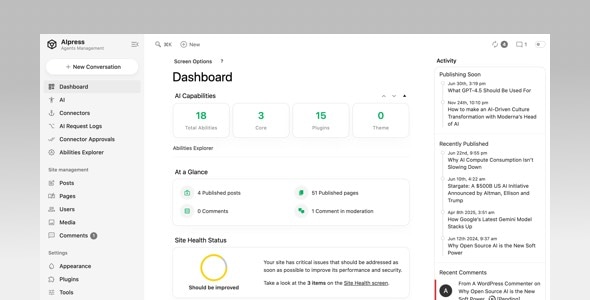
AIpress Admin Theme is a powerful plugin that lets you completely transform the look and feel of your WordPress admin dashboard and login page. It works out‑of‑the‑box with thousands of WordPress plugins. With its custom color feature, you can fine‑tune every shade – from background and text to menus and bars – making it easy to create a dark mode, light mode, or fully branded admin interface.
hether you’re building a personal workspace or a client‑friendly control panel, this plugin gives you full creative control without writing a single line of code.
Key Features
1. Colors
Easily adjust the color scheme of every major area.
Change admin color scheme – switch between preset palettes or start from scratch.
Global colors – set base background, text, and accent colors.
Menu colors – independently style the left sidebar menu, including background, text, hover, and active states.
Top bar colors – customize the admin bar at the top of the screen.
2. Admin Bar
Personalise the top admin bar to match your brand or declutter your workspace.
Custom admin logo – upload your own image to replace the default WordPress logo.
Custom admin name – change the displayed name in the admin bar.
Hide admin name – optionally remove the user name from the bar.
Hide quick links – disable shortcuts like “New Post” or “Comments” for a cleaner look.
3. Menu Management
Take full control over the left‑hand navigation menu.
Rename menu/submenu titles – change labels to more meaningful names.
Remove menu/submenu – hide unnecessary items to simplify the dashboard.
Custom menu icons – assign custom dashicons or image icons to any menu item.
Drag‑and‑drop sorting – reorder menus and submenus by simply dragging them.
4. Login Page
Brand the login screen (wp‑login.php) to reinforce your identity.
Custom login logo – upload your own logo image.
Login page background color – set a solid background colour.
Login page background image – add a custom background image for a unique entrance.
5. Footer
Modify the footer area of every admin page.
Change footer text – replace the default copyright notice with your own message.
Change footer version – show, hide, or replace the WordPress version number.
6. Extra Utilities
Handy tools for advanced users and multisite networks.
Import / Export – backup your settings or migrate them to another site with a single click.
Disable settings on sub‑sites – in a multisite installation, you can choose whether sub‑sites inherit or override the main settings.





