

27 comments found.
Hi, I’ve just installed the Mega Main Extensions plugin for VC, but it throws up php errors. Please see errors below:
Warning: filesize() [function.filesize]: stat failed for http://kelstonint.school.nz/wp-content/plugins/mega_main_extensions-iel/src/css/frontend.css in /home/kelstoni/public_html/wp-content/plugins/mega_main_extensions-iel/framework/common.php on line 106
Warning: fread() [function.fread]: Length parameter must be greater than 0 in /home/kelstoni/public_html/wp-content/plugins/mega_main_extensions-iel/framework/common.php on line 106
Please advise. Thanks!
Please could I have a response to this query, I have also sent a support ticket for it and have been waiting for two days for a response. I have clients who have given me a deadline for a website to be completed and I’m unable to meet their request until I am able to install this plugin and utilise it!!! NOTE: I have tested for plugin conflicts by deactivating all other plugins, but this hasn’t resolved the issue.
Hi,
I apologize for delay in reply, we had some technical problems. The new version of the plugin will be available on the CodeCanyon during the day. Also, we will send it to you by mail.
Thank you for patience.
Thanks! I’ll test it out now.
Works Fine! Nice features, thank you.
Hi, I purchase your plugin but I cant make it work correctly. I cant use the flip box without visual composer??
Hi,
You must to remember that “Visual Composer” is a way to visually adjust markup of page. But you can use this plugin without Visual Composer!
0) We recommend to do all following steps in the “Text” mode of WP editor.1) Select “Flip Box” as shown in the screenshot.
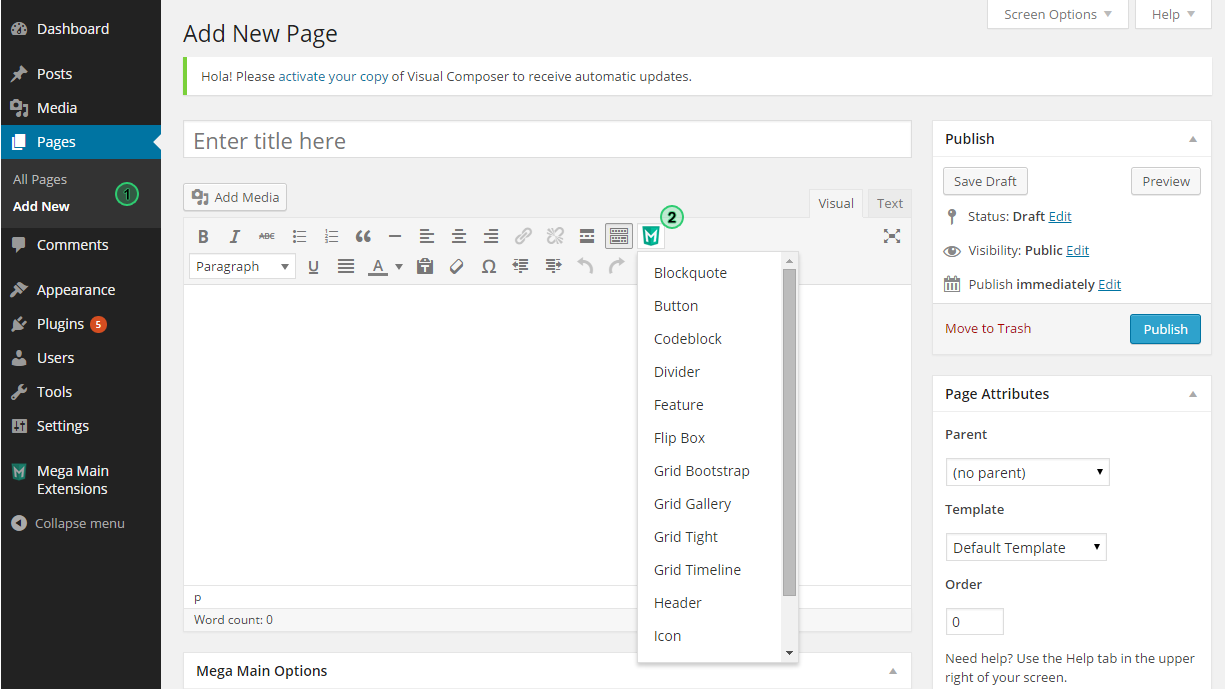 .
.2) Adjust settings in the modal window and save it.
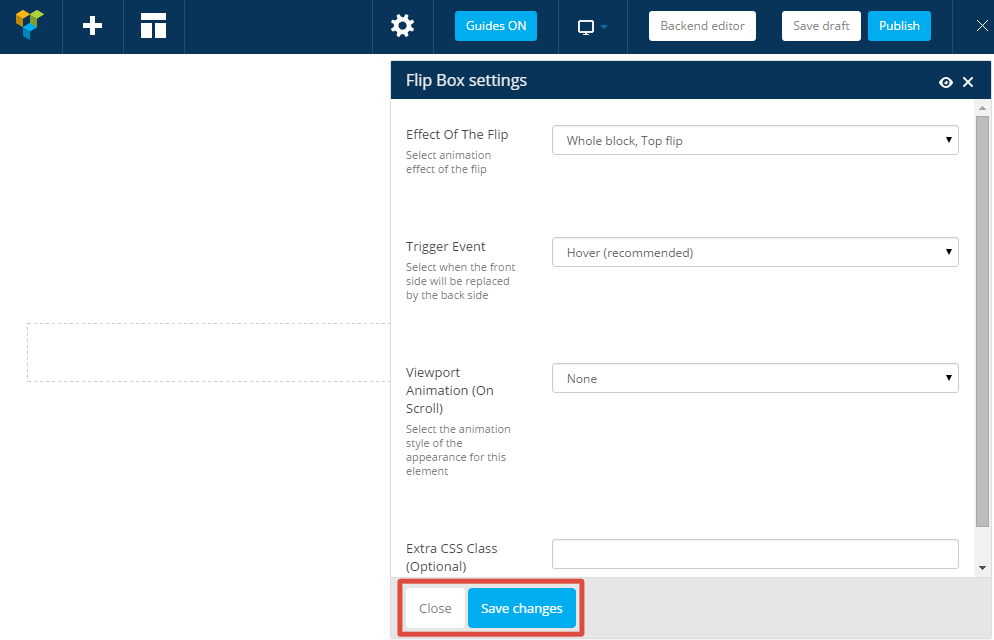 .
.3) You will get similar code in editor
[mme_flip_box flip_effect="whole_block_top" trigger="hover" animation="fadeInUp"] [/mme_flip_box]4) Then insert in the shortcode two any tags. The first tag it is your “side A”, second tag it is your “side B”. Example:
[mme_flip_box flip_effect="whole_block_top" trigger="hover" animation="fadeInUp"]
    <div class="front">
        Any content of A side
    </div>
    <div class="back">
        Any content of B side
    </div>
[/mme_flip_box]
Thank you.
Hi, thanks for the answer but I have a problem with that, when I select the “Flip Box”, the code appears like this: no display the close tag “[/mme_flip_box]”.
I try to copy all your code from the 4th point but nothing happens, in the frontend only appears a blank section.
The other extensions works great but not the flip box.
Hi,
Please contact us by mail and please provide a living example or temporary admin access in order to we could inspect this issue.
Thank you.
Hi Support; I bought Mega Main Extensions – Interactive VC Addons I read quick start guide but i can’t used plugin. I can’t add blockquote The blockquote not show admin panel i added screenshoot please help me
Hi,
Few minutes ago we have answered to your support request by mail. Please check your mailbox.
Thank you for patience.
You plan to add a “Menu” addon? Because the standard is too limited.
Hi,
What you mean? Please describe your question more detailed.
Thank you.

I am also trying very hard to figure out what this plugin does.
Hi,
With this plugin you can add in the content of your site:
- Animated Buttons (with icons inside).
- Features.
- Images with Fancy Hover Effects.
- Flip Boxes. Any content on side “A” and any content on side “B” (backside).
- Icons with different styles, sizes, colors.
This plugin is a first part of the shortcodes that we plan to release. Other parts will be released as other products (plugins). All parts of add-ons are compatible to each other and can be extended. You can to get an unlimited amount of combinations by mixing the addons. They all can be used standalone or extend the Visual Composer.
Examples from our documentation.
Without Visual Composer:
With Visual Composer:

Thank you.
Hi,
I’m a big fan and supporter of Mega Main Menu. Thank you for that.
But I’m still a bit lost as to what Mega Main Extensions does? Is it only an add on for Visual Composer? Meaning I have to purchase Visual Composer plugin to use this?
Also, in your Live Demo for this plugin. How do I get the dashed box around the “Coming Soon” ? Can I do that with Mega Main Menu right now?
Thank you Mega Main : )
Hi,
1) This plugin is a first part of the shortcodes that we plan to release. Other parts will be released as other products (plugins). All parts of add-ons are compatible to each other and can be extended. You can to get an unlimited amount of combinations by mixing the addons. They all can be used standalone or extend the Visual Composer.
Examples from our documentation.
Without Visual Composer:
With Visual Composer:
2) “Coming Soon” dashed box in the Mega Main Menu – just few lines of CSS.
#mega_main_menu .c_s
{
border-width: 2px;
border-style: dashed;
border-color: #f8f8f8;
padding: 5px 10px;
position: relative;
top: 1px;
}
Menus -> Your Menu Item -> Navigation Label -> <span class="c_s">Coming Soon</span>
Thank you 


