810 comments found.

We need a short code that will display all products belonging to a brand. Does yournplugin do this?
Hello
If you need a shortcode NO, but each brand is click-able and link to a page which display all products related to that brand.
Can the base page be changed so that woocommerce widgets are displayed instead of blog widgets?
Hello, what do you mean?
A user clicks on a brand and the brand page is displayed. This page seems built around a blog page where the blog sidebar is displayed. I would like to change the construction of the page so the woocommerce sidebar is displayed. Thanks.
Please give your url, FTP and wp-admin access , i will check it
You can contact me(send email from the form on right sidebar) from http://codecanyon.net/user/proword
Regards
Thanks. I fixed it by adding: case ‘product_brand’: to functions.php
Hello, 1. Can we click on the brand image to link instead of the text? 2. Can we get “Customize Brand” value in bold? Thank you.
How can i set up a page so customers can search by category then brand?
Hello,
Currently it is not possible to do that (filter brands by category),
Regards
Hi! Description and image is not showing in the list product, I attach image of my settings http://perifericedicions.com/wp-content/uploads/2014/09/Captura-de-pantalla-2014-09-24-a-las-11.30.48.png Thanks!
Hello
Please give your url, FTP and wp-admin access , i will check it
You can contact me(send email from the form on right sidebar) from http://codecanyon.net/user/proword
Regards
Hi! I just purchase the plugin, Is there any possibility to choose more than one brand for one product? Thanks lot!
Yes, In the product list, if you click on quick edit you can choose multiple brand.
Thanks!
Hi,
Useful plugin. Just one issue though – when I click on a brand, and then view the single brand page, the ‘Archive Intro Text’, or brand description, appears above the brand name (with associated products below this). So if I’m not using a graphic logo the brand category description is above the brand title.
This looks really odd.
To get around this I use an ‘Archive Headline’ as well – so this gives me a title that appears above the brand description. Great – except I now have two titles – one above, and one below the brand description.
How can I get this to work in a standard way? i.e.
Brand Title (text) Brand Description Products
So I need the brand name to appear above the Archive Intro Text. If I try and use the brand ‘Description’ field nothing appears on my page.
Thanks
Just to clarify – I think the issue is caused by your single Brand template (taxonomy-product_brand.php?). On the front end store the standard product category template displays any text content we’ve added to the Product Category Description, but when using your Brands template the Description text is not being displayed. If you could fix this so the description is shown, then I won’t have to use Archive Intro Text for the brand description, and therefore won’t have the title appearing below the description.
Thanks.
Hello,
Please give me your URL (which you see this issue), we didn’t have any feedback regarding this subject,
You can contact me(send email from the form on right sidebar) from http://codecanyon.net/user/proword
Regards
Hi,
Thank you for the reply – I’ve sent an email with links to some examples. Basically your Single Brand detail page isn’t picking up the Brand Description content, whereas categories are displaying this without any issue. If you can fix this everything will be great.
Please check your email.
Thanks, the description has lost it’s formatting though. Can you please fix this so it retains paragraph formatting (as per the category pages)?
Any chance of a fix for this?
Thanks, that’s all working now – 5 stars!
Just updated to latest version of Woocommerce and the descriptions have disappeared again, please fix, thanks.
I will check and email you the result
Fixed, thanks again.
Good, we will add these changes in our next updates.till then please be-careful about plugin’s update.
Hello! Its possible in future to see update of plugin with included options to add in brainds desctiption? Descriptions right now not showing up on pages like www.yoursite.com/brand/title
But you can see products. Can be its like with normaly category of woocommerce show up desctiption and maybe logo as well?
Many thanks.
Hello,
http://proword.net/Woocommerce_Brands/brand/111-skin/
then you can simply add description when you are creating a brand and then check
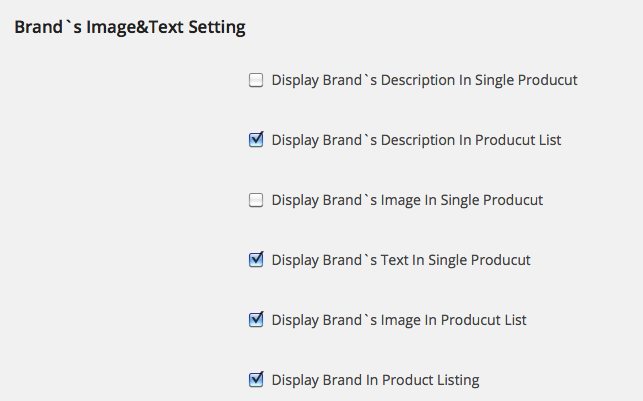
Display Brand`s Description In Producut List
in brand setting page(woocommerce setting—>brand) , also there are some other options such as
Display Brand`s Description In Single Product .
Regards
There only buttons SHOW IMAGE in PRODUCT LIST / SINGLE PRODUCT. Nothing else. Maybe i have wrong version of Brands?
Please make sure that you have our latest version (2.5),
yep. ive updated version. but dont know somehow only showing up text only at single product page. Wont to show up at product list texts of brand descriptions 
please give me your wp-admin, i will check ,
You can contact me(send email from the form on right sidebar) from http://codecanyon.net/user/proword
Regards
Sorry to ask 
Will the Brand showing on product listing option be in the next update and do have a rough time for that update ?
Hi,
If you mean display brand on product listing when you click on cayegory, please download the latest version (2.5)
let me know the result
Regrds
Shortcodes not displaying? I used this Shortcode:
[pw_brands type=”ver-carousel” carousel_count_items=”10” carousel_item_per_view=”3” featured=”yes” show_title=”yes” show_count=”yes” carousel_align=”left”]
Do I have to do something for it to display?
Hello,
I tested the shortcode and it works,
Please give your url, FTP and wp-admin access , i will check it
You can contact me(send email from the form on right sidebar) from http://codecanyon.net/user/proword
Regards
Inboxed you all the details.
Hi,
I’m running an affiliate store using WooCommerce and would be interested in using your WooCommerce Brands plugin for product brands but I would also be interested in using this plugin (or an adjusted copy) for the stores that we publish the products from (these are kind of brands as well but in another way) – possible?
Cheers Christian
Hello,
It depends an how you run your store, but if it is normal woocommerce products then yes you can use our plugin.
Regards
Hi again,
yes – I’m running WooCommerce using standard affiliate products. My questions was not really if I could use your plugin (I know I can use it in WooCommerce). My question was if I somehow can use your plugin for two different taxonomies, like brands e.g. Nike (which is the standard usage of this plugin) but also as a taxonomy for stores (like Walmart or similiar) linked to my products.
Regards, Christian
Hi Christian,
Well this trick may help you,
1- for normal usage as brand you can use plugin as normal
2- for using as stores you can define stores as featured in brand taxonomy and in shortcodes you can set to display just featured,also you can select multiple brand name for a product, (quick edit in product list)
In addition we can customize the plugin for your exact need too,
Regards
Hi there, can i get the brand of a product through a meta key with you plugin?
Cheers Nick
Hi,
Sorry for delay,
No, it is not possible, brand is a taxonomy , you can use get term.
Regards
Is there a short code to display the products of a single brand?
Hello
No there is not shortcode for displaying products of single brand.
Regards
Hi,
Thanks for the rapid response to my query! I have another question:
1. Currently, on a product listing, the information comes out in the following order: >>[Name of Product] >>[Price] >>Brands: [Name of Brand]
What file should I edit to change it to the following order: >>[Name of Product] >>[Name of Brand] (i.e. no need to have the prefix “Brands:”) >>[Price]
Any pointers?
One more question… the product listing under the category-archive page shows the brand names, but the product listing under my shop home page doesn’t (it gets called by woocommerce shopcodes). How do I get it to show up from woocommerce shortcodes, etc? What file should I edit?
thanks very much, Taroc
Hi,
You can ignore brands in CSS , add the following CSS code (in custom CSS or in plugin CSS file) if you can’t do it give me FTP access to plugin folder i will do it for you ,
.posted_in{display:none}
You can contact me(send email from the form on right sidebar) from http://codecanyon.net/user/proword
Second question :
The Brands can just display in default woocommerce category-archive, because we use default woocommerce functions, so if shortcode generate product listing the brands don’t display, this should be set for each theme
Regards
Hi,
How do I update the plugin from v2.0 to v2.5? Do i have to deactivate first? Or uninstall first? (If i do that, do i lose whatever brands I’ve added?)
Nice work on the plugin btw
thanks Taroc
Please do the following steps:
1-Deactive plugin
2-replace and overwrite the new files via FTP
3-Activate plugin
4-go to Permalink Settings page(Settings->Permalinks ) and click “save changes”
Regards
Hello,
http://proword.net/Woocommerce_Brands/ajax-loader.gif
Regards
i will soon purchase this plugin! but ahead of time i would like to ask how to do a layout similar to this site: http://petskingdom.ie/ | theme: http://themeforest.net/item/flat-responsive-woocommerce-theme/5484319
Hello
It needs custom works
whats the cost?
Please email your need in detail to info@proword.net, development team will answer you asap.
Hi
We added this featurs in new update
http://proword.net/Woocommerce_Brands_pro
Best Regards
Please can you help me: Warning: call_user_func_array() expects parameter 1 to be a valid callback, class ‘pw_woocommerc_brans_Wc_Brands’ does not have a method ‘my_add_cat_description’ in /............../wp-includes/plugin.php on line 470
We will send new update to codecanyon next hours,
But for now, please go to
woo-brands\calsses\class-wc-brands.php
Find and delete or comment line 16:
add_action( ‘woocommerce_after_subcategory_title’, array( $this,’my_add_cat_description’), 12);
Let me know the result
Regards
Works! Thanks
Good, Let me know if you need any help.
Warning: call_user_func_array() expects parameter 1 to be a valid callback, class 'pw_woocommerc_brans_Wc_Brands' does not have a method 'my_add_cat_description' in /home/columbia/public_html/wp-includes/plugin.php on line 470
I get the above message below my categories.
Version 2.0
Please give your url, FTP and wp-admin access , i will check it
You can contact me(send email from the form on right sidebar) from http://codecanyon.net/user/proword
Regards