1065 comments found.
hi can we control what to show on bottom menu bar on mobile? For default it is showing Store, Search, Wishlist, Account and Menu. But let say I want to show Categories Page as menu item instead wishlist, how do I do that? Is there any option inside admin panel, thanks.
Hi,
We don’t have option to config that buttons from the admin panel.
Each button has different logic and need to control from source code.
You need to customize it in platform/themes/shofy/partials/navigation-bar.blade.php

Hi,
Here https://codecanyon.net/comments/31883201
The Martfury Design is more expensive, what does it mean? Extra features or ?
Hi,
MartFury and Shofy have the same features, they just different in front theme UI.
MartFury design is high, so we need to sell it at a higher price.
Please elaborate, which parts of the design ? I cannot seeing the differences
Hi,
If you don’t see any different, please buy Shofy for better price.
Hi! Botble Team, could you please add the after-purchased product review invitation email template?
Hi,
We have it already https://prnt.sc/zG6ZvbDZm-br
Ah! I see. Thank you
I want to ask that I have already purchase Shopy script, so can I attach the mobile app script to it? And can I get a discount?
Hi,
You can buy and use this mobile app script https://codecanyon.net/item/botble-ecommerce-react-native-mobile-expo-app-for-botble-ecommerce-websites/61394620
This is an intro price, it’s discounted already.
Hi! Recently, I found that some users used Safari in Private Mode. This broke the checkout flow. You should have solutions to help that like Private Mode warning, or reducing JS dependence…
Hi,
Can you please give me more details about this issue?
I can’t see this issue in our demo site https://prnt.sc/EQ1NyQxSYEua
I have tested it many times in Safari private mode, it works fine without issues.
If you can provide some screenshots, it will be helpful.
Sorry, it’s ok. Just found a problem with third-party plugin
Thank you.
Been Honest, ¿what’s difference beetwen this product and MartFury ?
Hi,
It has the same features as MartFury.
The MartFury design is more expensive, so we have to sell it at a higher price. You should buy Shofy instead of MartFury for a better price.
In this version, does it include the same plugins as Martfury, or do we need to pay separately for some of them? Is it possible to emulate the Martfury theme design in Shofy and provide it that way?
Hi,
1. Yes, it is the same plugins. They are included in the download package, it will be the same as our demo site, you don’t need to pay any extra fees.
2. You can customize our script and make MartFury theme with Shofy script if you want to buy Shofy but like MartFury. You need to do it yourself, we don’t provide this in support.
Hi, I would like to report a bug UI issue when viewing on mobile
the widget banner slider full width it’s size change becomes smaller while resizing it is not fixed big as pc version not proportionnelle
Hi,
You can set a different image for the mobile screen for better display on mobile.
https://prnt.sc/qhDLqZE26VPc https://prnt.sc/A1MiFdp4fbYuIs there a way to increase the price of all my products in one go (say by 7%)? Of course, I can handle it by writing a script that updates the price and/or sale_price fields in the ec_products table in the database.
Hi,
For a 7% increase across the board, here’s the simplest way to think about it: one-time change → use a direct SQL update, recurring business operation → create an Artisan command, temporary or experimental → apply a price multiplier at runtime.
Your idea of updating ec_products.price / sale_price is absolutely correct. Just don’t forget about product variations.
Also worth mentioning: if you don’t want to modify the source code or the database at all, the only practical option is to add that 7% via taxes. You’d increase the tax percentage so the final price customers see goes up by around 7%.
Hi, please add new template for mono product- and plugin for cjdropshipping integration/ aliexpress or other free or paid api dropshipping… cjdropshipping is free and easier..,
Could you add the feature or plugin to increase the AOV.. bundle with gift include(optional). Buy 1 Get 1
Hi,
1. We don’t have a plan for a new template at this time.
2. We will consider making a new module for this in the future when we have more time.
Hello guys, I have two questions:
- Could you please add a “lock/unlock” option for widgets on the admin dashboard? On mobile devices, it’s quite frustrating when trying to scroll and accidentally moving widgets instead.
- Could you also implement an admin panel notification to alert when plugin updates are available?
Thanks in advance!
Hi,
We will consider those features in future versions when our dev team has more time.
Thanks for your suggestions.
Hi and Happy New Year to the team,
I was wondering if there is an option to set the price as “Price on request” or “Contact for price”. If not, are you planning to add an option like this in the future?
Thank you.
Hi,
You can install this free plugin https://marketplace.botble.com/products/FriendsOfBotble/fob-request-quote in Plugins -> Add new plugins to use.
Hi,
Yes, I installed this plugin, but the price is still displayed, and the notifications are not coming through in the seller panel.
Thanks
Hi,
Oh, I don’t know that. I was thinking that it will work.
So please remove that plugin if it doesn’t work or contact the author of that plugin if they can fix it.
I have a problem with price. I added a product with multiple price. The price I put is already TTC (4.9 €) and I checked the checkbox include TAX. The problem is in Product detail. The price in product detail is 5.17 €. When I added the product on cart, It showed 4.9 €. And when I changed the option on product detail for product EG: 500g to 1Kg, the problem always here. It mean the problem is on Product detail.
Hi,
This issue is in the old version. Please go to System Updater and upgrade your site to the latest version, then it should be fixed.
Thanks for your feedback!
Now , I am on version 1.4.3 but the issue always here.
Hi,
Please create a ticket on our support center https://botble.ticksy.com and give us access to your product URL to check it. Our dev team will check and fix it.
Hello, I have purchased this item, but when activating it, the purchase code did not work.
Hi,
Can you give me more details? You need to enter username chebli17 and your purchase code to activate your license.
Hi! I just noticed that you added “Abandoned cart” setting. I setup Cronjob and it’s working. Never received email, even if Cronjob showed that email was sent.
Hi,
We will check this again.
Thanks for your feedback!
Hi,
Thank you for reporting this issue. We’ve investigated and found that the cronjob may show “email sent” even when emails aren’t actually delivered due to configuration settings.
Please check the following in your admin panel:
Step 1: Enable Email Templates – Go to Settings → Email – Scroll to the Ecommerce section – Find “Abandoned Cart Reminder” templates (Email 1, 2, and 3) – Make sure each template toggle is turned ON
Step 2: Verify Abandoned Cart Settings – Go to Ecommerce → Settings → Abandoned Cart – Ensure “Enable abandoned cart tracking” is ON – Ensure “Send reminder emails” is ON
Step 3: Test Your Email Configuration – Go to Settings → Email – Use the “Send test email” button to confirm emails are working
Step 4: Check Spam Folder – Ask customers to check their spam/junk folders – Add your store email to their contacts
If all settings are correct and test emails work, but abandoned cart emails still don’t arrive, please let us know and we’ll investigate further.
Thank you. I checked all those steps. All are set. But Abandoned cart auto-mail is still not working. You may check again.
Hi,
Our dev team will check this issue again. Please wait.
Hi! I want to check this again. Just adding to cart, will it be notified? Or must be an incomplete order?
Hi,
Yes, adding items to the cart is enough for tracking. Customers do not need to start checkout.
However, the system can only send reminder emails if it has the customer’s email address.
How the email is captured:
- Logged-in customers: Email is captured automatically
- Guest visitors: Email is only captured if they enter it in a form (for example, during checkout)
If someone adds items to the cart and leaves without entering an email, the system cannot send them a reminder email.
How to test:
1. Log in to a customer account on your store
2. Add some items to the cart
3. Leave the site without completing the purchase
4. Wait 1 hour (or your configured delay)
5. Check your email, including the spam folder
If you receive the reminder email while logged in, the feature is working correctly. If not, most abandoned carts are likely from guest visitors who never entered their email address.
Here is the error log. You may check it. Call to undefined method Botble\Ecommerce\Models\Customer::getMeta() {exception] (BadMethodCallException(code: 0): Call to undefined method Botble\\Ecommerce\\Models\\Customer::getMeta() at
Hi,
Our dev team is working on it. We will release a new version in the next few days. Please wait.
Hi! Just want to ask a bit. I think this is fixed with the last update. However, should I keep using “Sync” or change to “database”? I found it’s not working well sometimes.
Hi,
It’s fixed. You can use “sync” or “database”, they are both working fine.
Ok, thank you
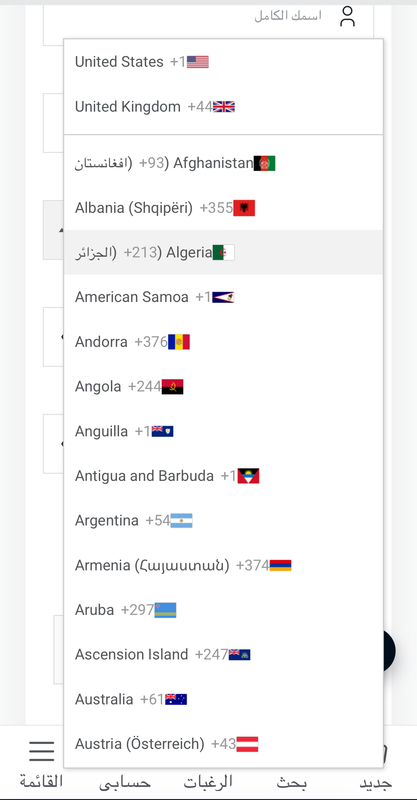
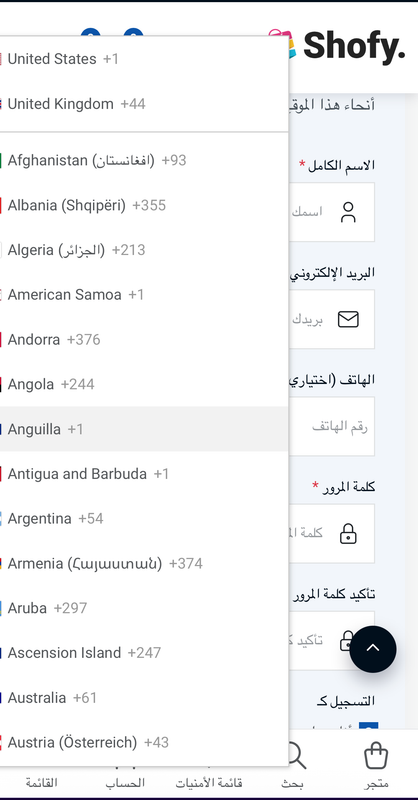
hello , 1.Regarding the phone number country code RTL issue its not fixed but it has more issues with mobile screens now when you switch to Arabic language , please check screenshot before:
https://i.postimg.cc/GmPNFnKh/Pphone-C-code-before.png
and after
https://i.postimg.cc/vT62DJDR/Pphone-C-code-after.png
2. Sellers are currently able to edit products and publish the changes immediately without any approval process, which creates a significant risk and opens the door to potential scams.
For existing published products, if a seller updates the product or adds new details, those modifications should not be published immediately. Instead, the changes should remain pending until reviewed and approved by an administrator. Additionally, a notification should be sent to the admin, and the update should be clearly displayed in the admin dashboard as “Pending Approval.”
Regards,
Hi,
1. We will check and make it fully support RTL in the next version. Please wait.
2. This is a big task, seller may change their product many times per day, so if it requires approval for each change, admin will need to approve it many times per day for 1 product. It is a lot of work. We will check this when we have more time in the future.
Thanks for your feedback!
Thank you for your reply,
and I know its a big task but its very Important for the stability and to maintain the the script un vulnerable (imagine that the sellers can control the home page or spam it )this feature is required , I know u guys are very busy and I really appreciate your excellent and hardwork, but please consider this as soon as possible ,
thanks and best regards
Hi,
We will check it when we have more time.
Thanks!
We’re facing a recurring error in the product inventory section:
“DataTables warning: table id=botble-ecommerce-tables-product-inventory-table – Ajax error.”
Because of this Ajax error, the inventory table doesn’t load properly, and product inventory data becomes inaccessible. This directly affects stock management and product updates. Please check the backend API response, permissions, or server-side errors related to this table and fix the issue as soon as possible.
https://prnt.sc/6SbdlWllPTTkPlease check the screenshot
Hi,
Are you using the latest version? If you are not in the latest version, please try to go to System Updater to upgrade your site to the latest version and check again.
Or check error logs in /storage/logs/laravel-...log to see what happens.
Or give me access to your hosting, I will check it for you.
Thank you for your response. After updating to the new version as suggested, we started facing several major issues. Many important features that we relied on were removed, which has made our daily workflow difficult.
Specifically, during product upload we were previously able to select color and size separately and manage products in a flexible way. After the update, this option is no longer available, which has made product management much harder for us.
Previous: https://prnt.sc/nhtcK_BfKQMC
After Update: https://prnt.sc/0fU3AEcQgeig
We also have an important request regarding updates. We often keep some custom modifications inside the CMS code, but these changes are lost after every update. Is there any way to ensure that custom modified code does not get overwritten during updates? A plugin-based or modular solution would allow us to keep our existing custom features while still receiving new updates.
Considering these points would greatly improve the experience for long-term users like us.
Hi,
We will check and bring that filter feature back in the next version.
If you want to keep your changes when upgrading to the new version, you need to make your changes using a plugin, the same as other customers do it on https://marketplace.botble.com/products instead of modifying our existing code.
Your new plugins won’t be overridden by our system updater.
Hi, After updating Shofy CMS, the product visit UI has completely changed and it’s no longer working according to the previous uploading strategy.
Before the update, product visits and related UI behavior were working correctly, but now the structure seems broken or mismatched.
Could you please clarify whether this UI change is intended in the latest version? If so, is there updated documentation for the new uploading strategy? Otherwise, please advise how to fix or revert this issue.
Screenshot: https://prnt.sc/4BjzS92Vgx_c
UI screenshot: https://prnt.sc/XlomtOCsf8aC
Thanks
Hi,
It was missing CSS code for new CKEditor version.
We have just released Shofy again to fix this issue. Please go to system updater and click on “Re-install the latest version” button, then it should be fixed. We will make an official release soon.
Thanks for your feedback!
1-can you please do something for gulf payment method specially like Tabby and tamara? its very hard to sell any product here in uae, saudi, qatar without tabby and tamara
2-how can i add in homepage like one image for fragrance any single brand then below that only show that brand product and so on sections -Like -versace image then all versace fragrance -dior image then all dior fragrance
Hi,
1. We don’t have those payment gateways for now. Hope that we will have those plugins by our community author on https://marketplace.botble.com/products in the near future.
2. You can customize our homepage in Admin → Pages → Home. Just insert image and link to your images on the homepage.
Hi,
We have added option to disable it in the latest version.
You can disable it in Settings → Ecommerce → Tax https://prnt.sc/CFgPNYnaGjgH
Thank you!
How to change math CAPTCHA to Letter ?
Hi,
We don’t have this kind of captcha for now. Currently, we just have reCaptcha by Google or Math captcha.
How to add attachment on Contact ?
Hi,
We don’t have this option in contact form, it has limited fields as it’s just used for contact form.
If you need more power form builder, you can use this plugin https://codecanyon.net/item/bb-form-builder-drag-drop-form-builder-plugin-for-botble-scripts/60961640 , then you can create a form with file attachment.

This item was featured on CodeCanyon

Elite Author
Contact the Envato Market Help Team