1065 comments found.

Hello. Just checking in again to see if any of the recent updates have included the option for multiple vendors to activate/deactivate shipping options yet? I don’t see this listed in the recent changelogs, but I can’t be the only one that will have various vendors that don’t allow certain shipping options for various reasons such as their geographic location (unavailable in that country) or their preference (they refuse to use a certain shipper and thus don’t want it as an option).
For example here in the U.S., I would primarily use either USPS, UPS, or Fedex. However vendors who signup on my website from Canada or Europe for example, will likely not want to show USPS as a shipping option for their customers.
I haven’t installed the script recently to see if this has been added or not, since without this functionality I will just need to uninstall and wait for this functionality.
Additionally, is there code that will split shipping if a visitor orders multiple items at the same time from various vendors from different countries for example? I will use United States Postal Service (USPS) to ship my goods to customers, but if they purchase from me and another vendor where USPS isn’t available, perhaps that will cause an issue?
Thanks
Hi,
We don’t have options to use USPS, UPS, or Fedex in our script by default.
Can you show me some screenshots for this?
Maybe you are integrating those services using our Shippo plugin.
We can’t control shipping services from Shippo API, please manage them in Shippo dashboard if they have option to enable/disable shipping options for specific countries.
Currently, only admin can config shipping options in the admin panel, vendor in can’t do this in vendor dashboard.
Do you have Delhivery.com shipping plugin
Hi,
We don’t have plan for this plugin at this time.
We will consider it when we have more time in the future.
how to remove or hide the category for example from the left sidebar and leave only display on top ? https://prnt.sc/n2czDF7FZgg1
since we’re already using a widget at the top it’s duplication https://shofy.botble.com/products
Hi,
Please purchase our script first, we just provide support for purchased customer.
No, we don’t.
We are just the author of Laravel version, which use that HTML template from https://themeforest.net/user/theme_pure
Hello,
I am receiving an unexpectedly large number of spam and useless emails on a site that is not advertised, and essentially no one knows that this domain exists. CAPTCHA is enabled, yet the emails keep coming.
What makes this more confusing is that this happens only with the SHOFY script. I have tested several other scripts under the same conditions, and none of them produce this behavior.
This raises a few questions. Where are these emails actually coming from? Is the contact or mail logic being triggered incorrectly? Could there be an issue in the SHOFY codebase itself, or possibly a misconfiguration that allows automated requests to bypass CAPTCHA?
I do not currently have time to deeply inspect the code, so I am looking for an explanation or insight from those familiar with SHOFY or similar setups. This seems like something that genuinely needs investigation.
Thanks
Hi,
It’s coming from email spam tools, they are scan websites from the internet and try to spam all forms, email on your site.
Some tools can bypass reCaptcha.
Try to install Math captcha in Admin → Settings → Captcha too.
Enter blacklist keywords for contact form in Admin → Settings → Contact too. Example:
If it still can spam your site, you can install this plugin https://marketplace.botble.com/products/FriendsOfBotble/fob-honeypot in Admin → Plugins → Add new plugin and enable it for contact form in Admin → Settings → Honeypot.
You can also integrate Cloudflare to protect your site better from spam tools.
Hi
1-kindly add holiday button for seller when seller will on this then the store of that seller will be offline completely he will not received any order and all his product will hide form homepage , once he will resume it will back to normal
this is good idea for seller when they need or holiday or vacation
2- please add multiple wrehouse for seller this is imp, if the seller will change his address then he can update warehouse or he can add multiple warehouse if he have in each cities
3- also please add in product detail page sold by seller name, if it is inhouse product then show store website name like in house – sold by codecaynon
Hi,
Our dev team will check if we can implement those features in the future when we have more time.
Thanks for your suggestions.
Do you have option to create our own contact form page widget using different fields ?
Hi,
No, we don’t have option to make other fields for contact form. It just can be used as contact form, can’t customize it to make other forms.
If you need a form builder, you can use this plugin https://codecanyon.net/item/bb-form-builder-drag-drop-form-builder-plugin-for-botble-scripts/60961640 , you can create any forms with it.
Hello, does this system support having multiple warehouses? I could not find it in the admin dashboard thanks
Hi,
Sorry, it doesn’t support multiple warehouses for now.
Thanks
Hi,
Sorry, I can’t see this issue on our demo site.
Where is that page in your screenshot? Please give me more details, so I can check it from my side.
Please create a ticket on our support center and give us a URL to that page on your site, we will check and fix it for you.
Thank you for your response, follow-up, and attention. I have indeed submitted a support request.
Please add Delivered boy on system. It will help us a lot of.
Hi,
We will consider it when our dev team has more time in the future.
Thanks for your suggestion.
why my contact form is showing this error ? when i am filling the form its not sending ?
https://prnt.sc/-4rAkuPUR6KCIssue resolved i have switched off “Honeypot” plugin
Thank you.
Hello,
I would like to highlight some very important security and privacy issues:
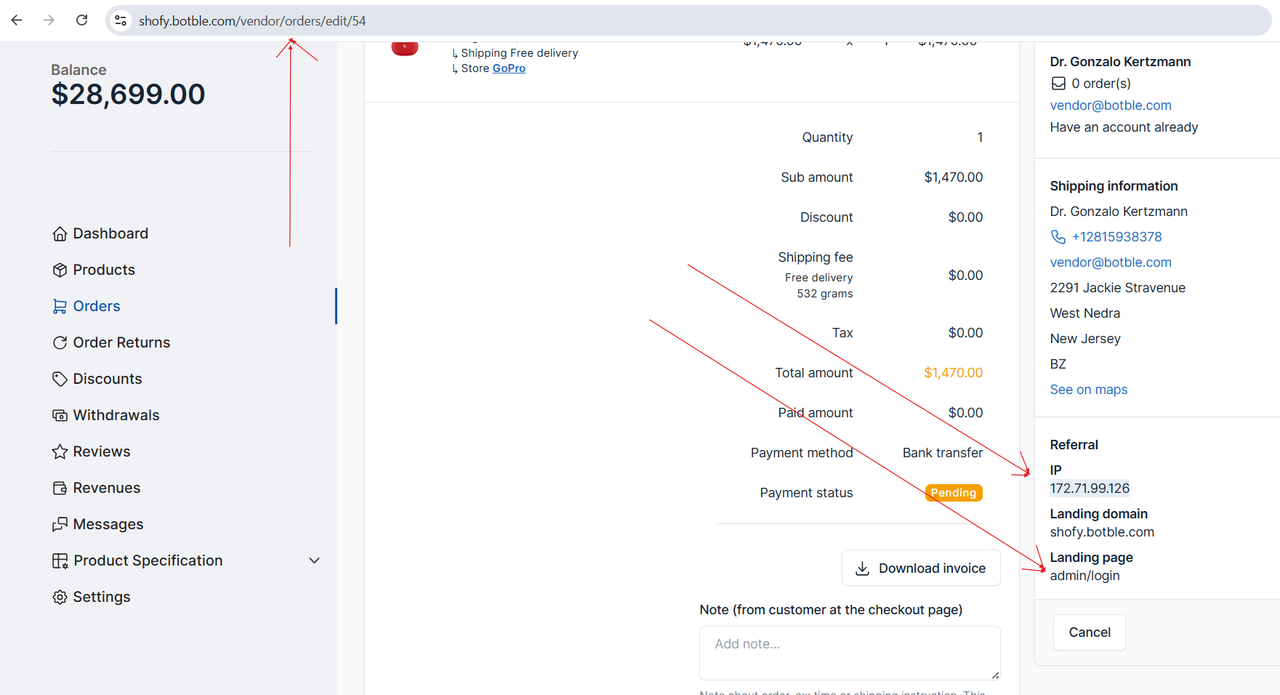
1.Exposure of sensitive customer and system information Within the seller dashboard, sellers are currently able to view sensitive information such as the customer’s IP address, landing page, and even internal admin URL paths (for example: go for orders , https://shofy.botble.com/vendor/orders/edit/54).and please check this screenshot for clarification
https://i.postimg.cc/6pVsrx2r/Vendor-access-customer-ip.png
This is a serious security concern, as sellers should not have access to customer IP addresses, landing pages, or any admin-related routes. Exposing this information creates both privacy risks for customers and security risks for the full website.
2.Barcode generator plugin is redirecting the vendors to the admin dashboard
When the barcode generator plugin is activated, actions initiated from the seller dashboard redirect the seller to the admin dashboard instead of generating or printing the barcode directly within the seller interface.
Currently, once the plugin is enabled, sellers see a “Generate Barcode” option on each product. However, clicking this option redirects them to the admin dashboard, which is unsafe and results in the exposure of admin paths. The barcode generation and printing process should be handled entirely within the seller dashboard without any redirection to admin pages.
Best Regards
Hi,
1. We will disable this section for vendor in the next version.
2. This is a free plugin by our community author, not us.
https://marketplace.botble.com/products/FriendsOfBotble/fob-barcode-generatorWe will leave your feedback in that plugin to let author to fix this issue.
Hi,
Plugin FOB Barcode Generator has been updated. Try to update it to the latest version in Plugins → Installed plugins, then check again.
Hello , thanks so much for your quick response from you and the plugin author, really appreciate it , the plugin has been updated and fixed now .
You’re welcome.
hi, regarding point number 1 ,its still not solved in this update , just a gentle reminder , Regards
Hi,
We have removed that ref feral section in vendor dashboard order page already, check this https://prnt.sc/gGOTDSfAu_do
Hello Support Team,
I’m using your Ecommerce system (version 1.4.2.1) and I’m unable to enable or access Product Variations at all.
I have already:
Created product attributes (e.g. Color)
Added multiple attribute values (Green, Blue, Red, etc.)
Published the attributes successfully
However, when editing a product:
I cannot find any option to switch the product type to Variable Product
There is no Variations section available
There is no option to generate variations from attributes
Prices cannot be set per attribute value
Kindly clarify:
How can I enable Product Variations using attributes?
Is there a specific plugin or module required to activate variations?
Is this feature supported in version 1.4.2.1, or does it require an upgrade?
If variations are not supported, what is the recommended way to set different prices based on attributes?
Please advise on the correct steps or configuration required to activate this feature.
Thank you for your support.
Hi,
I see that it’s still working fine on our demo site.
https://prnt.sc/pQOHa5vpnEMBAnd select attributes, then click on Continue button, it will have variations.
https://prnt.sc/qk0uoDP68cTDWe don’t have an option to enable or disable this feature, so it must work by default if you haven’t customized our code for this page.
When i create coupon with category then its not working in checkout Coupon code is not valid or does not apply to the products “Coupon is valid and starting time correct not working”
but when i create the same in your demo that is working . the issue is when you delete the old promocodes and create new then its not working but when you modify its working
Also when i create coupon for only product then its working but category not working
Hi,
Are you using the latest version?
Can you show me some screenshots for your coupon setup, then we can reproduce this from our side?
Or please create a ticket on our support center https://botble.ticksy.com and give us access to your site admin panel to check your coupon.
not able to create ticket -Sorry, support for this Envato Market purchase code has expired. You will need to extend support or purchase a new license.
1-Checkout coupon not working for category – https://prnt.sc/qfzKq0scHhGu
2-coupon info – https://prnt.sc/zOWLiBjT35Ts
3-coupon created for selected product working – https://prnt.sc/smDwyEtZeR8a
using lated version -Version 1.4.2.1
Hi,
Our dev team will check and fix it in the next version. Please wait about a week.
Please need this in next update 1-Choose by product while creating = Free delivery or fixed price mention or default
2-Choose by product while creating = Refundable or non refundable
3-uploading product through link external website= it will automatically feth image,heading,discription,price,stock,Category
Hi,
We will consider those features when our dev team has more time.
Thanks for your suggestions.
When sale
Next year.
Hello Team,
I noticed that there is currently no shortcode to display the payment processing fees as a separate line item on the invoice. While the processing fee is correctly included in the total amount, it is not shown as a detailed breakdown(in the invoice template itself).
For example, if the item amount is $100, VAT is 5% ($5), and the processing fee is $6, the total of $111 is calculated correctly. However, since the $6 processing fee is not explicitly listed, customers may complaint claiming wrong extra charges.
Best Regards
Hi,
Our dev team will add payment processing fee in invoice and release it next week. Please wait.
hello , any update for this? has it been added? as i dont see option to activate it Regards
Hi,
You can use this code https://prnt.sc/WT0eFWSM8YhX to display payment processing fee in invoice.
Check our latest invoice template on https://shofy.botble.com/admin/ecommerce/settings/invoice-template and compare with your version.
Thanks for your reply , and yes now its working But, you have recently added tax on shipping fee and also its not reflecting in the invoice and causses the same hidden calculations , so is it added or how to add it ?
Thanks and regards
Hi,
Our dev team will check and add an option to display that tax on shipping fee in invoice in the next version. Please wait.
i see there are alot of addons and alot of free addons. (1)are the free addons already added? i see things that i would think the base would already have. i just want to know if everything needed to run a complete website is already in the purchase base? (2)Also,do this have QR code? (3)will this website track sales in shipping? (4)when a user setup a store do all his sales go threw the merchant service he setup? (5)and do it have nothing to do with the website owner? meaning website owner do not make any fees from each store sales?
Hi,
1. All plugins on our demo site are included in the download packages. You won’t need to pay any extra fees.
You can also install more free plugins by our community authors https://marketplace.botble.com/products in Plugins → Add new plugins to use.
2. I don’t understand your question. We have QR code in shipping label. Do you need QR code in other places?
3. Yes, it has this feature.
4. No, it will be shown in vendor dashboard. Check it on our demo site https://shofy.botble.com/vendor/orders
5. You can set sale commissions and withdrawal fee in Settings → Ecommerce → Marketplace if you want to charge your sellers.
Qr code for stores would be nice. that is the store address or store link or for product link
Hi,
We will consider it.
lets say i wanted to use 1 payment system like stripe for all sales is that possible?
Hi,
Yes, you can setup Stripe in Payments → Payment methods and disable other payment options.
thanks for replies
can this be set so every store, has to have its own domain? if a person go to a domain they wont be on the shofy? but all changes the user make will auto change on shofy? but the user can se all domain stores on shofy?
Hi,
No, our script doesn’t support multiple domains, just can work on 1 domain and access store page on an URL like this: https://shofy.botble.com/stores/gopro
1-what if i want to any product not refundable ? for example product A listed with refundble Product B non refundable how can i set
Resolved
Thank you.
We are planning to move the code in a new server, any recommended server that the site load faster and works smoothly?
Hi,
We’re currently using Vultr to host our sites. It’s a VPS plan that costs $24/month, and it’s been running smoothly for us.
If your website has visitors from multiple countries, you can consider using Vultr as well. If your traffic is mainly local, it may be better to check with a hosting provider in your country.
hi, this is what i get : Illuminate\Database\QueryException : i need to stop updating my website as am always having issues with it
SQLSTATE[42S22]: Column not found: 1054 Unknown column ‘sessions_invalidated_at’ in ‘field list’ (Connection: mysql, SQL: update `users` set `last_login` = 2025-12-12 12:13:49, `sessions_invalidated_at` = ?, `users`.`updated_at` = 2025-12-12 12:13:49 where `id` = 1)
Hi,
I think that your site is not updated correctly, so it is missing database columns.
Please try to go to System Updater and click on “Re-install the latest version” button then it should be fixed.

This item was featured on CodeCanyon

Elite Author
Contact the Envato Market Help Team