57 comments found.
anyways this can be easily added only the connection will be change in the code
i already added this on my update notes
—->
Please don’t just say that adding a USB printer is easy like you mentioned—please make sure this feature is actually included in the next update.
I’m not sure what exactly you’re focusing on in your updates, but adding USB printer support is more important than anything else.
Because in a restaurant, printing customer orders—whether they come from online or the POS—is a basic, essential function.
Because more than 90% of all restaurants are already using USB printers.
mate this will be added am just focus on the features am adding now if you cannot wait your welcome to hire your own dev to add this one
I used to rely on external programmers whenever I needed a new feature.
But I eventually realized that this approach was pointless. Every time the software is updated, the custom features have to be updated as well, and since I wasn’t developing just one thing, it only created more confusion. I’ve come to understand that the best approach is simply to wait for updates based on the questions and feedback we give you.
What I really hope is that your team listens more closely to the voices of people like us who are working in the real world.
The most important feature is that food orders are automatically printed in the kitchen and at the bar. This should work without buying new printing equipment, because USB printers can already do the job. When an order is received, it should print. This is the top priority, and everything else is secondary.
But even though we, the customers, have been requesting this essential feature for years, it still hasn’t been implemented. So I sincerely ask that this be done first.
If this feature doesn’t work, restaurant staff have to write down every order by hand and deliver it to the kitchen and the bar.
This is the number one reason restaurant owners choose not to use our system.
mate  like i said if you cannot wait you can hire your own dev to add this one
remember i added the wifi printer support cause you asked for it
Hi, we want to sent invoices to warehouse from store through internet to be printed over there. is this product for us? Thanks
hi mate
thank you for your interest
this will work using internet but you need to make sure that thermal printer has a static i.p address so you can call it anywhere or you can create a vpn connected to each other so you can use this thermal printer
cheers

baasti, is there any option to add a USB printer to Merchant?
Also, I want to change the bill layout a bit. Which file to edit?
hi mate
unfortunately at the moment USB printer is not supported i haven’t added this one the reason i don’t have a USB printer on my end anyways this can be easily added only the connection will be change in the code
i already added this on my update notes
cheers
Hi mate i buy the plugin i unzip in merchant windows computer and i open print.bat i get the message that the websocket is working , i added the printer in the backend but when i tried to print in backoffice pos history i tried to print in green button i m gettting error : Records per page WebSocket error occurred, but no detailed ErrorEvent is available. or websocket error : 0
can you share a screenshot ?
Is it possible to use a Bluetooth printer or WiFi printer with the Merchant PWA app? However, Fei printers should be excluded since they are not available for purchase.
for pwa short answer is no, it cannot work cause PWA is a browser and browser cannot access device you need to use build android
https://www.youtube.com/watch?v=8CG1nrrsY2w
https://www.youtube.com/watch?v=9WNpL7v_Wg4
https://www.youtube.com/watch?v=kZnXgb79_5M
And you can search on Amazon for Raspberry Pi.
If we build a printer server using Raspberry Pi OS and allow an Android tablet running a PWA to communicate with a Raspberry Pi on the same network, printing to a POS printer becomes fully achievable. This approach would significantly reduce the financial burden on restaurants by eliminating the need for expensive traditional POS systems. At the same time, it would enable us to deliver a complete and advanced POS solution—one that supports order intake via a PWA or Android app and automatically prints orders in both the kitchen and the bar. We are confident that this architecture can provide a reliable, cost-effective, and fully functional POS system.
am sorry i don’t have plans for this at the moment
If there is a better plan than the one suggested above, please proceed with that. Otherwise, please consider the method described above.
After reviewing feedback from many users, printer servers built in this way have been shown to operate reliably with no issues, even when left on 24/7. The monthly electricity cost is less than $1, and the overall cost can be reduced significantly. However, a separate script is required for the printer server.
am sorry i don’t have plans for it
in merchant app i already added different printer to use also in next update it will also support wifi/ip printer
It’s a relief to hear that it’s already being developed using a different approach. I’m looking forward to the new update—I can’t wait to see it.
cheers
I’m asking out of curiosity: does the Wi-Fi/IP printer you are developing work without a computer?
In other words, if only an Ethernet connection is available, can a tablet (Android or iPad) send print commands directly to the printer without a computer in between?
Yes it does not need pc it will print directly using your device
I hope that a new and improved printing solution can be developed and made available soon. I sincerely appreciate all of your hard work and efforts.
thanks
When will you update new version?
ah i cannot promise the exact date yet
HI Basti,
Does this mean the merchant should start this file before working What if someone is using POS machine where he don’t how things work
is there a way where the system automatically start the bat file and minimizes so the user will need to open things manually
hi mate
the printer server need to run in order to print
now to make it start automatically you need to add the bat file in your windows start up
so it will always run once your pc is open
Basti, quick question/ What is this addon for? I noticed a printing icon on merchant app. Is this addon linked to that? or what is this addon for? Do i need this if im only going to be using merchant app?
hi mate
thank you for your interest
no merchant app is using bluetooth thermal printer while this addon is for wifi printer and this can be use in your website to print incoming orders
you can take a look at this video how it works
https://youtu.be/KOzbIeCZkC8?si=fJiYcU6ZjslrBMujSo what is the printer icon for? when i open it, it shows Printers and says “No available printers”. So if i buy this addon i will be able to see them there?
no this will work only in website admin panel in printer sections
in the future updates i might make it work also in merchant app
Hi everyone we have had a lot of problems with our Bluetooth printer, and I understand that Basti does not always have time to sort things out. We have found a guy in Pakistan and he is on Fiverr, called Zeeappsolutions he fixed our problem within 30 minutes. He knows the system very well he can even make changes to apps or add something. Hopefully this helps
as far i know thermal printer has no issue?
Hey Basti, I’m getting this error even though antivirus is turned off; “WebSocket is not open. Ready state is:0”
you need to run the print.bat first in your pc
watch this video https://youtu.be/KOzbIeCZkC8?si=fJiYcU6ZjslrBMuj
Print.bat is running” WebSocket server started on port 49160” Added the printer just like in the video too. Still no luck. “WebSocket is not open. Ready state is:0”
And this error too: “Couldn’t print to this printer: Cannot initialise NetworkPrintConnector: No connection could be made because the target machine actively refused it”
Deprecated: Creation of dynamic property React\Socket\Connection::$decor is deprecated in C:\MyMenus Ripo\thermal printer\print-server\project\vendor\cboden\ratchet\src\Ratchet\Server\IoServer.php on line 83
Deprecated: Creation of dynamic property Ratchet\Server\IoConnection::$resourceId is deprecated in C:\MyMenus Ripo\thermal printer\print-server\project\vendor\cboden\ratchet\src\Ratchet\Server\IoServer.php on line 84
Deprecated: Creation of dynamic property Ratchet\Server\IoConnection::$remoteAddress is deprecated in C:\MyMenus Ripo\thermal printer\print-server\project\vendor\cboden\ratchet\src\Ratchet\Server\IoServer.php on line 87
Deprecated: Creation of dynamic property Ratchet\Server\IoConnection::$httpHeadersReceived is deprecated in C:\MyMenus Ripo\thermal printer\print-server\project\vendor\cboden\ratchet\src\Ratchet\Http\HttpServer.php on line 33
Deprecated: Creation of dynamic property Ratchet\Server\IoConnection::$httpBuffer is deprecated in C:\MyMenus Ripo\thermal printer\print-server\project\vendor\cboden\ratchet\src\Ratchet\Http\HttpRequestParser.php on line 30
Deprecated: Creation of dynamic property Ratchet\Server\IoConnection::$httpRequest is deprecated in C:\MyMenus Ripo\thermal printer\print-server\project\vendor\cboden\ratchet\src\Ratchet\WebSocket\WsServer.php on line 112
Deprecated: Creation of dynamic property Ratchet\Server\IoConnection::$WebSocket is deprecated in C:\MyMenus Ripo\thermal printer\print-server\project\vendor\cboden\ratchet\src\Ratchet\WebSocket\WsServer.php on line 114 New connection! (68)
I got the error “Could not open input file: server.php WebSocket server crashed or exited with an error. Restarting in 5 seconds..”, I redownloaded and extracted it on my computer, and I also same problem.
I fixed the problem because this is Norton Quarantine, I restored the files.
glad to hear
yes sometimes anti virus consider bat file or php file as threat
You mentioned that USB printer support will be included in the next update. I wondered whether this would require an update to the printer module or the main program. I would also appreciate it if you let me know when you expect to complete the update.
hi mate
only in the printer module
cause this is the print server that handles the printing
cheers
When do we have an option for a USB printer?
still working in single app updates so i don’t have news about the USB support
Hello, It doesn’t make sense that you can’t print to a thermal printer via USB, where 99% of stores use USB printers. Could you include the QZ print server API https://qz.io/ Today I’m discouraged with the system for this reason, it’s a big barrier to resale here in Brazil
hi mate
next update this will also support USB printer
i don’t want to use that cause its not free you need to pay
cheers
A customer needs to add a USB printer for order printing (Epson TM T20x printer), but cannot add it. What can I do? (I bought the thermal printer)
hi mate
right now USB printer is not supported only wifi
i haven’t add this yet and even i add USB your printer should work with esc/pos command
Hi, orderdy
I have faced an issue with the printer!
1. Should I upload a print-server file to my website server like Hostinger?—>No, you must upload it POS computer.
2. if I upload on the server which directory is uploaded?—> You can make any name of a directory on your PC.
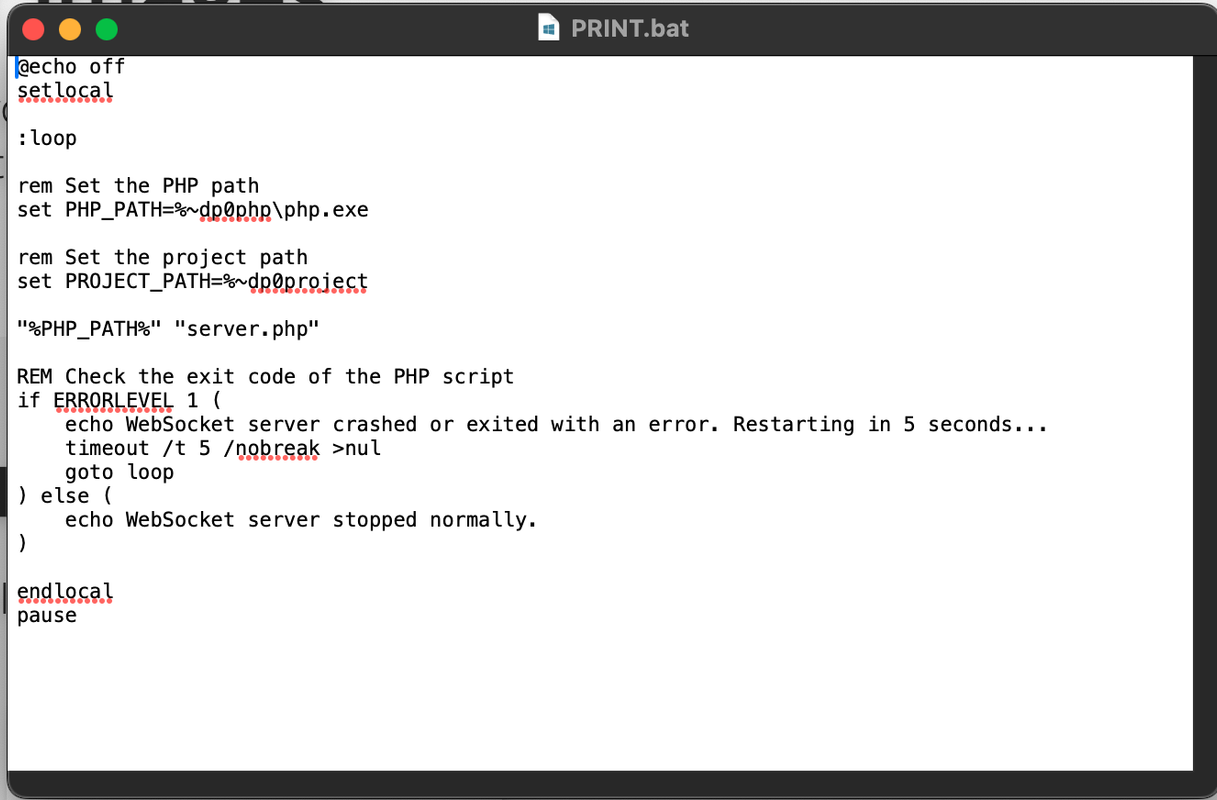
3. PRINT.bat file how can I run? because I am using a Mac, when I press it, it opens the text editor—>This program can use only a PC, not a Mac.
if your using mac pc
contact me here for a guide
https://codecanyon.net/item/karenderia-multiple-restaurant-system/9118694/supportOh! mac also can use printer..
Yes mac can also use this thermal printer add
Your documents are not clear why?????
your video work on localhost
I have faced an issue with the printer!
1. Should I upload a print-server file to my website server like Hostinger?
2. if I upload on the server which directory is uploaded?
3. PRINT.bat file how can I run? because I am using a Mac, when I press it, it opens the text editor
https://i.postimg.cc/zGSThSK6/image.png
could you please configure my PC remotely?
if your using mac pc
You can reach support here: https://codecanyon.net/item/karenderia-multiple-restaurant-system/9118694/supportWhen the merchant is logged in on the restaurant’s computer and the printer server is running, order receipts print automatically for online orders. However, if a POS order is placed using a tablet instead of the restaurant computer, the POS printer does not print the receipt. It would be great if POS orders could also print automatically, just like online orders. If this is possible, multiple servers will be able to take orders at different tables and enter them using a tablet. It will also be possible to automatically print out orders from the tableside orders. Already our competitors are doing so.
hi mate
you need pc to print the printer not table as the printer server can only run in pc
hope that make sense so you you need 1 pc to mainly receive the orders
if your using table then you can print using bluetooth printer
1) The table order tablet is too far from the printer, making it difficult to use Bluetooth.
2) My question is: In the restaurant, the computer is connected to the printer, the printer server is installed on the POS computer, and the merchant is logged in. In the case of online orders, whether the customer places an order using a tablet or a computer, the order details are printed. If table orders were processed the same way as online orders, wouldn’t it be possible for the order details to be printed as well?
3) If a customer places an online order using a tablet from the same table, the order details are printed. However, if they place a table order using the same tablet from the same table, the order is not printed. This is what I find difficult to understand.
If online orders, table orders, and POS orders all follow the same process as online orders, wouldn’t they all be printed immediately after being placed?
Do you understand what I mean?
mate its easy to understand thermal printer only works in pc cause you need to run the print.bat and this will only works in windows this will serve as printer server
and open the merchant panel so that it will do the auto print
it does not matter if order is coming from any device
OK
When can I print the Kitchen and Bar separately?
i cannot promise yet am still working in customer app update
POS systems have become increasingly important for securing online restaurant order partnerships. This is because most POS providers are now expanding into the online ordering market. To stay competitive, a POS system must have the capability to print orders separately for the kitchen and bar. This is a crucial factor that should not be overlooked. After updating the relevant app, it is essential to include the functionality for separate printing. While POS companies have integrated online ordering features, KMRS still lacks sufficient POS printing capabilities
like i mention at the moment this is not my priority maybe after all addons is updated
I will wait until you have updated all the add-ons. After that, please make sure to resolve this issue. If we cannot create the same environment as our competitors, it will be difficult to attract new customers and may become a reason for existing customers to leave.
Hi Mate,
Thank you sincerely for the update that has made it more convenient to use the printer. However, it would be even better if the following improvements could be made:
1) Allow Font Size Selection in the Printer Server Program:
The main reason for automatically printing online orders is to notify the restaurant of new orders and to pass the printed ticket to the kitchen. In this case, only the ticket information is necessary; many have requested larger font sizes. Please add the following options, and if there are other available options, include them. A simple management program would make it even easier to use.
- 2x enlargement (both width and height)
- 2x height enlargement
- Standard print
2) Receipt Type Selection in backoffice/merchant/All Printer:
Allow the option to select the type of receipt for automatic printing as follows:
- Standard Receipt: Same as the current format
- Ticket: Should display information such as order number, pickup, and delivery details. The content should be the same as the current tickets used in the POS system.
3) Enable Ticket Printing in New Online Orders:
It should be possible to print tickets from the New Order section of online orders. Allow the option to select either a standard receipt or a ticket.
hi mate
1. i will do take note but i cannot promise cause printing using esc/pos is not like html that you can simply change size and font its via command of esc/pos
2. same as 1
3. same as 1
Many online ordering providers already use this method, and I think it’s possible. It will be very convenient for restaurants. By the way, can you let the restaurant choose the receipt print or ticket print? This is for online orders.
i know but right now i cannot promise cause am working in customer app update this is not priority at the moment
After completing all the Addon app updates, I would like this to be the next goal.
will do take note
Hi, i can see videos for terminal printer
but i have ipad and macbook how should i do?
Cheers
Hi Adam Na,
Did you find a way to increase the font size?