638 comments found.

Is this supports multiple time options per tour?
Hi,
I’m not sure the feature mentioned, but you can create time slots with a variable product like this: https://exthemes.net/wootour/product/tour-with-different-times/
Is this theme compatible with either Elementor or Bricks Builder?
Hi,
You can use this plugin with the Elementor page builder, but you will need to add the shortcode into Elementor’s text editor. You can check this example site using WooTour with Elementor:https://tripsoon.co/tours/ or this site:https://holidayintenerife.eu/termekkategoria/programok/hajokazas/
Thank you. What about Bricks Builder?
We have not yet tested this plugin with Bricks Builder, but I think it should work fine. You will need to add the shortcode into the Bricks Builder text editor, similar to how it works in the Elementor page builder and if You have any problem with Bricks Builder, you just need to send your request via support tab, we will check it
Is there a way to select the dates tours are available globally, and not just individually?
Hi,
Unfortunately, that feature is not available.
Does this support timeslots?
Hi,
You can create time slots with variable product like this: https://exthemes.net/wootour/product/tour-with-different-times/
I would like to upload multiple products where I can set different prices for each time period. For example: from May 15 to June 16 €300, from June 17 to August 19 €350, and so on. Like in this screenshot: https://ibb.co/9kRqczgb
Is it possible to do it like this in the photo?
Hi,
Unfortunately, there is no feature like the one in your screenshot available in this plugin. If you want to use the calendar feature, you can check out this plugin: https://codecanyon.net/item/wooevents-calendar-and-event-booking/15598178
Hello, I have a question. Can I use other payment methods or only paypal and stripe?
Hi,
This is a WooCommerce add-on, so you can use any of WooCommerce’s supported payment gateways instead of just PayPal and Stripe
How do you disable children and infants from appearing as an option?
Found it. I want to remove the price next to the # of adults dropdown, so that just the price of the tour is shown. How can this be done?
Basically I want the price set no matter how many adults are chosen
Hi,
1. Please add this custom css code:
.wt-user-info span._adult_select .p-price { display: none; }
To WooTour Settings page > Custom Code > Paste your CSS code
2. To set tour with fixed price, please go to edit tour > Fixed price > Yes
3. This is not support thread so If you have other questions, please send us via support tab
Hello, I have 2 questions. First, is this plugin compatible with Elementor? Second, why you don´t support this plugin anymore? Thank you 
Hi,
1. This plugin works normally with the Elementor plugin. You can check this example site using WooTour with Elementor (theme hello elementor):https://holidayintenerife.eu/termekkategoria/programok/hajokazas/ or Astra with WooTour and Elementor:https://www.instinctvertical.com/
2. We still provide support for this plugin, but please note all features of this plugin can only work like the demo + description page and please check the support policy:https://codecanyon.net/page/item_support_policy#whats-included-item-support
Item support does not include services to modify or extend the item beyond the original features, style and functionality described on the item pageBest regards, ExThemes.
Hello! I am considering purchasing WooTour. But I have questions.
1. How to enable the option to enter passenger data when ordering?
2. How to create a list of passengers (not buyers) with their data for a specific tour and/or date?
3. Can the administrator upload additional documents (voucher, tickets, contract) so that the buyer can download from his personal account?
4. If these functions are not available, can they be implemented using third-party plugins or modifications on your part?
Hi,
1. You can enable it from settings page
2. Iam not sure about this question, but you can create order via admin dashboard, please check this doc:https://woocommerce.com/document/managing-orders/
3. You can use the “Download” feature of WooCommerce, You can check this doc:https://woocommerce.com/document/digital-downloadable-product-handling/
4. All features of this plugin only available from demo + description page so you should check the demo + description page to make sure everything will work for you or not
Hi
I have a cruise business that sells upper and lower decks. We give seats on upper and lower decks. Each deck has a different price and customer chooses deck by drop down option. The problem is that it only applies to adults selected in order and not on the number of kids. As each deck has different price for both adults and kids. It is not working. Can you help? Also if we add option for transfers to our cruises from hotel, we charge by each person. We charge for each adult and kid. We donot charge for infants. Problem is that this plugin only applies payments to adults and not calculates the kids
Hi,
The price of the option will increase for adults only, so if you want to increase it for children as well, you will need to custom some code in this case.
Because this is not support thread so if you have other questions, please send it via email :exthemes.net@gmail.com
Hello Ex-Themes,
Your WooEvents plugin has ability to sync with a Google calendar.
I would like to know if WooTour has similar feature?
If not, is there any way to use WooEvents for managing tour bookings?
In the absence of Google Calendar integration, where does one easily view all the up-coming bookings? I have looked at your admin demo and I see no where for viewing the bookings. There’s just orders, but these are not a convenient way to assess what tours are booked, etc.
Is there more to the WooTours interface than simply a new product type in Woocommerce? It looks like there’s nothing else. No WooTours settings, no list or calendar or tours, no bookings list, etc.
Am I overlooking something?
Thank you.
Hi,
I think this plugin cannot fit your requirement so you should check other plugins
Hi,
WooCommerce discount coupons do not apply based on the number of adults. By default, if we need to account for the number of adults, the order quantity must be set to 1 for the product. However, when a coupon is applied, it always considers a single product and does not account for the number of adults or children.
In such cases, fixed discounts per quantity cannot be used. Only percentage-based discounts work, as they are applied to the total order amount.
Hi,
This plugin does not use the default quantity field, because it is not possible to manage different number of tickets for each date with the default quantity feature of WooCommerce so the settings from your “discount coupons” extra plugin will not apply for the number of adults or child, You need to custom code or hire custom work to change it in this case
Hi, When I use the “Price Rule” option and set a start and end date, the product page displays “View Price” instead of showing the default price or the lowest price among the variable options. Is there a way to display the actual price instead of the “View Price” text?
Hi,
1. That is not possible by default, you will need to custom code
2. Your support has expired so if you have other questions, you need to renew/buy another license to receive support.
Is it possible for this application to work with QR code check-in
Hi,
Unfortunately, that is not possible.
Hi this is presale question. I’m creating a tour website and this website the requirements of each tour is to get minimum of 4 booking to start , and some of them 2 bookings. So i want to show book now button if the dates have 1 or 2 bookings already and show the available slots on that date . And if the dates don’t have bookings i want to show a button that let the customer inquire and send us a message. Is that possible with this plugin? And how does it work with bricks and woocommerce
Hi,
That is not possible with this plugin so please check other plugins
Is it possible to set the number of tickets for each variant separately? For example, I have a tour organized daily at 10 AM and 4 PM, with 10 tickets available for 10 AM and 20 tickets for 4 PM. I noticed that in the demo at https://exthemes.net/wootour/product/london/ the available quantity changes depending on the selected “Package” option, but I don’t see such an option for setting variants when creating a tour, for example at https://exthemes.net/wootour/wp-admin/post.php?post=15216&action=edit.
Hi,
That is possible, but you will need to change it via Custom Fields (metadata) of Wordpress
If you have other questions, please send it via this emails:exthemes[dot]net@gmail[dot]com
The plugin seems to be working well, but I’m having trouble finding the option and any documentation for setting up flexible rates for group tours. I need to know whether the price should be per person or per group.
Hi,
There is no option/feature to set price for the group tours so you need to custom code or hire custom work to create it
1- Can the tours be uploaded collectively as csv or xls? Does your plugin give a sample excel template? 2- We use woocommerce iyzico payment system does woocommerce support payment systems?
Hi,
1. This is an addon for WooCommerce, that uses products as tours so you can import products/tours via default CSV import feature of WooComemrce, you should check this doc:https://woocommerce.com/document/product-csv-importer-exporter/
2. This is an addon of WooCommerce so you can use any payment gateway of WooComemrce
3. All features of this plugin will only work like the demo page so you should check the demo + document to make sure everything will work for you or not.
Demo Account: demo Password: demo
Admin Dashboard demo: http://exthemes.net/wootour/wp-admin/
Frontend user login and register: http://exthemes.net/wootour/my-account/
And document: https://exthemes.net/docs/all/wootours/
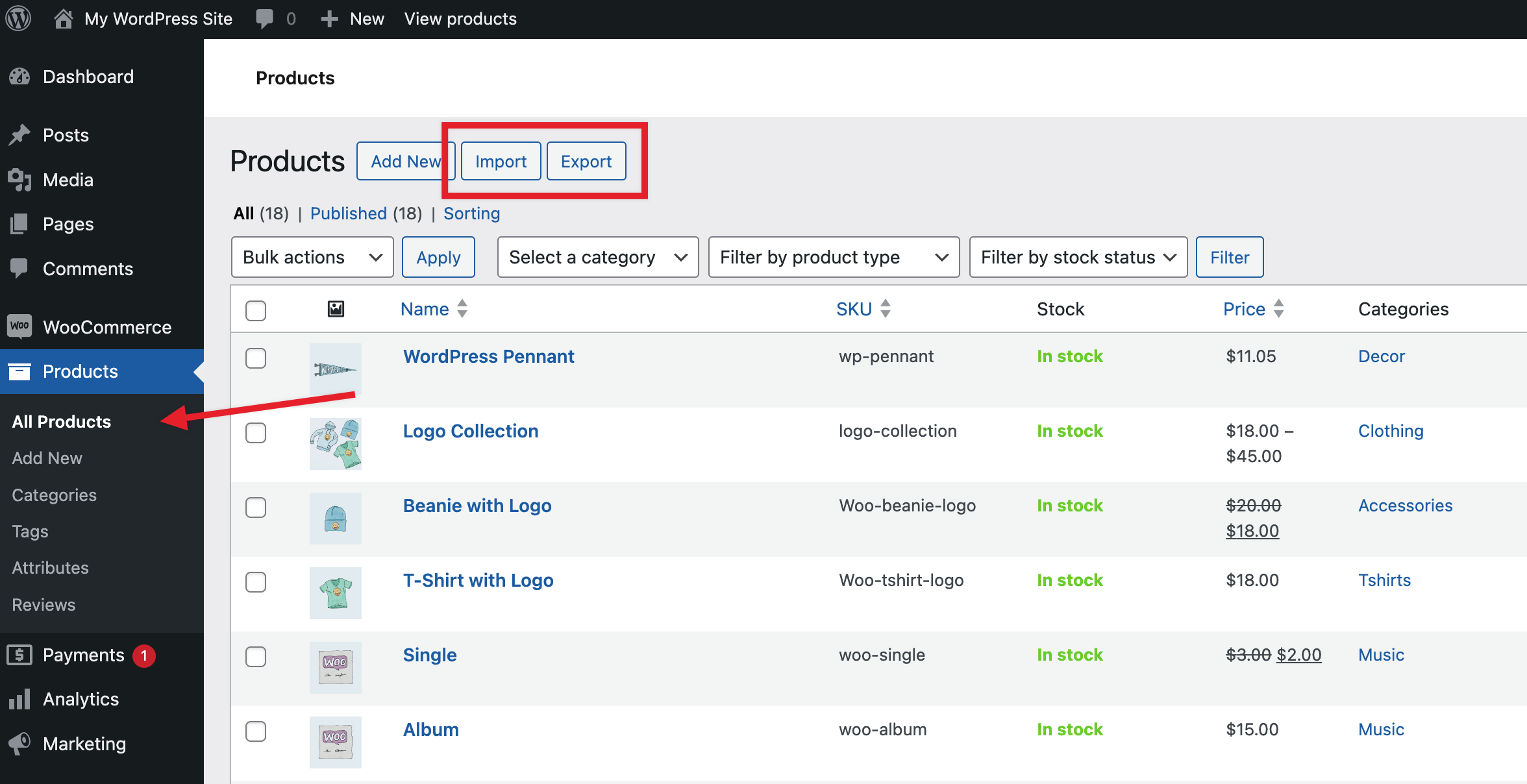
In the demo you sent, the import export option does not appear next to the Products and all products tab (Add New).
https://woocommerce.com/wp-content/uploads/2024/01/image_67287f.pngI have looked at this demo before and I wanted to ask you because I could not see these two options.
Some options has been disabled for the demo purpose and you will see the full options with the admin access:https://exthemes.net/docs/all/wootours/install-sample-data/
thank you
Can custom fields be added to the checkout fields? e.g. dietary restrictions etc
Hi,
You can customise the default checkout fields of WooCommerce with this addon:https://wordpress.org/plugins/woo-checkout-field-editor-pro/ but You will need to use custom hook code to add more fields for Attendees info part from checkout page
many thanks. and is there a way to display a trip with just a fixed single date without a calendar picker option or a list?
In this case, you should check this plugin: https://codecanyon.net/item/wooevents-calendar-and-event-booking/15598178
for a travel booking? does this have extra options like the travel one does?
Yes, If you have only one date for each tour then you should use WooEvent plugin, you should check the demo + login to demo account and check it, you can change all static texts using Loco Translate plugin.
Compared both plugins, and I see that Woo Event doesn’t have the customer’s birthday and sex like the woo tour does. Does that also require editing the plugin for it to work the same? And is there an add-on I can use instead to do it without manually editing anything because I don’t know how to code? I was hoping for an easy plug-and-play process
Unfortunately there is no addon to do that, if you buy WooTour, we can provide some custom code to auto select date for you: https://exthemes.net/wootour/product/pellentesque-habitant-morbi/ and if you buy WooEvent, we can provide some custom code to show birthday and gender fields for you
Hi there, I have bought the plugin which is working great!
I have a question as I couldn’t find anything related to your demos.
Is it possible to have a conditional field before selecting the dates?
For example, I have a tour available in English (every day), German (every Tuesday), and Italian (every Sunday). Is it possible to select the language first and then unlock/display the dates?
If it’s not possible do I have to make a different tour (when it is the same) for every language in order to achieve my goal?
Hi,
There is no feature as you mentioned available so you need to create each tour for each language in this case